

浅谈angular表单提交中ng-submit的默认使用方法
更新时间:2018年09月30日 16:10:11 作者:狗子life
今天小编就为大家分享一篇浅谈angular表单提交中ng-submit的默认使用方法。具有很好的参考价值,希望对大家有所帮助。一起跟随小编过来看看吧
在表单提交的时候,我使用了一个button,但ng-submit写在form标签中,然而button中我未使用任何方法访问submit()函数
<div ng-app="dkr">
	 <div ng-controller="logincontrol">
	 <form ng-submit="submit(user)">
	 	<div>账号名 <input type="text" ng-model="user.username"/></div>
	 	<div>密码 <input type="text" ng-model="user.password"></div>
	 	<button type="submit">提交</button>
	 	<div ng-show="success.length>0">{{success}}</div>
	 	<div ng-show="error.length>0">{{error}}</div>
	 </form>
	 </div>
<code class="language-html"></div></code>
	angular.module("dkr",[])
	.controller("logincontrol",function($scope){
 		$scope.user={username:'',password:''};
 		$scope.success="";
 		$scope.error="";
 		$scope.submit=function(u){
 			if($scope.user.username=="admin"&&$scope.user.password=="123"){
 				$scope.success="success";
 				$scope.error="";
 			}
 			else{
 				$scope.success="";
 				$scope.error="error";
 			}
 			console.log(u);
 		};
 	})
点击提交后的结果:
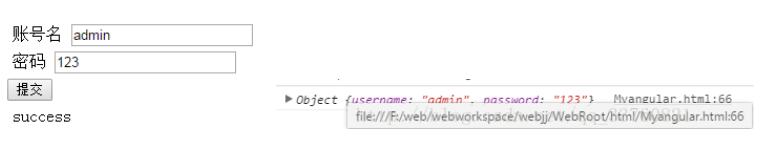
如上所示,返回结果以及控制台打印完全正确。
然而我对提交这个button未做任何处理
然后经过测试,我发现button的默认type为submit。
因为只要将
<button>提交</button>
改成
<button type="button">提交</button>
之后
点击按钮没有任何反应。
因此在form表单提交的时候一定要注意button标签的默认使用。
以上这篇浅谈angular表单提交中ng-submit的默认使用方法就是小编分享给大家的全部内容了,希望能给大家一个参考,也希望大家多多支持脚本之家。
相关文章
 这篇文章主要介绍了AngularJS用户选择器指令,结合实例形式分析了angular指令实现选择器功能的具体操作步骤与相关实现技巧,需要的朋友可以参考下2016-11-11
 本篇文章主要介绍了详解AngularJS脏检查机制及$timeout的妙用,“脏检查”是Angular中的核心机制之一,它是实现双向绑定、MVVM模式的重要基础,有兴趣的可以了解一下2017-06-06
 本文主要介绍AngularJS Scope(作用域),这里对Score知识做了详细介绍,并提供实例代码,有需要的小伙伴可以参考下2016-07-07
AngularJS基础 ng-mouseleave 指令详解
本文主要介绍AngularJS ng-mouseleave 指令,这里帮大家整理了ng-mouseleave指令的详细资料,并附有代码示例,有需要的小伙伴可以参考下2016-08-08 这篇文章主要介绍了AngularJS在IE下取数据总是缓存问题的解决方法,分析了问题的原因及AngularJS设置禁止IE对ajax缓存的实现方法,需要的朋友可以参考下2016-08-08
 AngularJS是如今最受欢迎的JS框架之一,简化开发过程是它的目标之一,这使得它非常适合于元型较小的apps的开发,但也扩展到具有全部特征的客户端应用的开发。下面给大家总结了AngularJS开发者最常犯的十个错误,有需要的可以参考学习下。2016-08-08
 本文给大家介绍angularjs中module模块的导入导出,涉及到angularjs module相关知识,对angularjs module感兴趣的朋友一起看看吧2015-12-12
 本文主要介绍AngularJS XHR和依赖注入,这里整理了详细资料和示例代码,有兴趣的小伙伴可以参考下2016-08-08
 这篇文章主要介绍了Angular实现form自动布局的相关资料,以代码片段的形式分析了Angular实现form自动布局的实现方法,感兴趣的小伙伴们可以参考一下2016-01-01
 这篇文章主要为大家详细介绍了angular和BootStrap3实现购物车功能的相关资料,具有一定的参考价值,感兴趣的小伙伴们可以参考一下2017-01-01
最新评论