

Android实现自定义dialog的代码
更新时间:2018年11月11日 13:12:19 作者:给你留灯
这篇文章主要介绍了Android实现自定义dialog的实例代码,代码简单易懂,非常不错,具有一定的参考借鉴价值,需要的朋友可以参考下
Android自定Dialog
先上效果图:
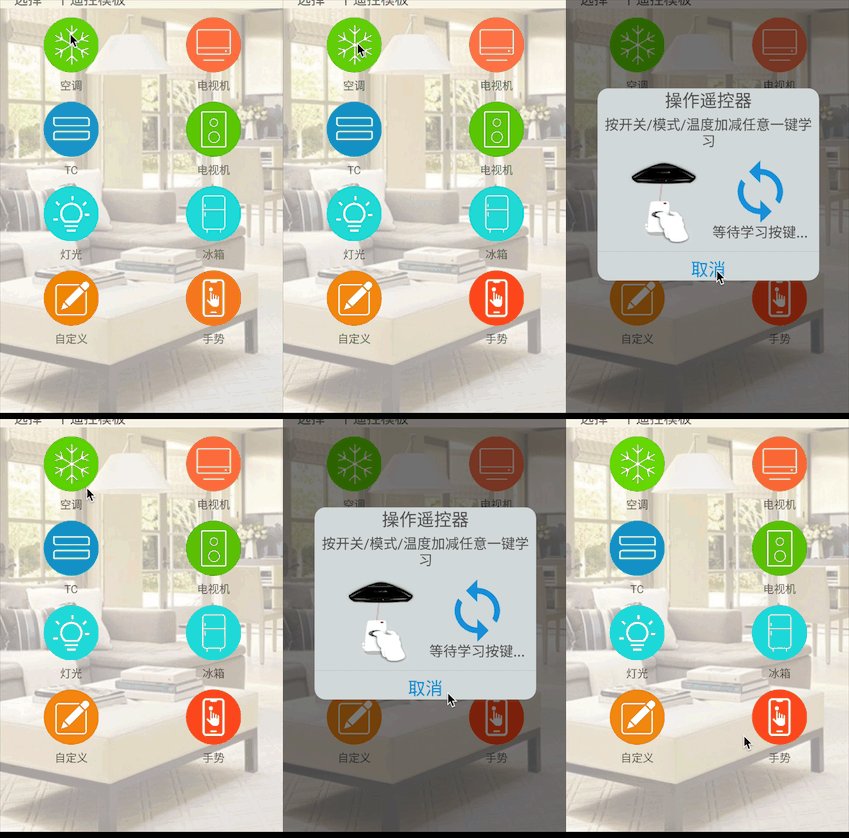
1.先在drawable下新建一个drawble resource file,这个文件用于dialog的圆角背景
<?xml version="1.0" encoding="utf-8"?> 2.在layout下新建一个xml文件,这个布局的背景使用刚刚定义的drawable文件,android:background="@drawable/建的drawable文件" <?xml version="1.0" encoding="utf-8"?>
<TextView
  android:layout_width="match_parent"
  android:layout_height="wrap_content"
  android:text="操作遥控器"
  android:textColor="#585858"
  android:textSize="25dp"
  android:gravity="center"
  />
<TextView
  android:layout_width="match_parent"
  android:layout_height="wrap_content"
  android:layout_margin="5dp"
  android:textColor="#585858"
  android:text="按开关/模式/温度加减任意一键学习"
  android:textSize="20dp"
  android:gravity="center"
  />
<LinearLayout
  android:layout_width="match_parent"
  android:layout_height="140dp"
  android:orientation="horizontal"
  android:padding="10dp"
  >
  <Button
    android:layout_width="100dp"
    android:layout_height="wrap_content"
    android:background="@mipmap/yaokong"
    android:layout_marginLeft="35dp"
    />
  <!--<ImageView-->
    <!--android:layout_width="100dp"-->
    <!--android:layout_height="wrap_content"-->
    <!--android:src="@mipmap/yaokong"-->
    <!--android:layout_marginLeft="35dp"-->
    <!--/>-->
  <LinearLayout
    android:layout_width="150dp"
    android:layout_height="wrap_content"
    android:orientation="vertical"
    android:layout_marginLeft="15dp"
    android:layout_marginBottom="5dp"
    >
    <ImageView
      android:layout_width="wrap_content"
      android:layout_height="90dp"
      android:src="@mipmap/xuanhuang" />
    <TextView
      android:layout_width="wrap_content"
      android:layout_height="wrap_content"
      android:layout_gravity="center"
      android:text="等待学习按键..."
      android:textColor="#585858"
      android:textSize="20dp"
      />
  </LinearLayout>

</LinearLayout>
<LinearLayout
  android:id="@+id/yaokongCancel"
  android:layout_width="match_parent"
  android:layout_height="match_parent"
  android:orientation="vertical"
  >
<View
android:layout_width="match_parent"
android:layout_height="1px"
android:layout_marginTop="1dp"
android:background="#8d8d8f"
/>
<TextView
  android:layout_width="match_parent"
  android:layout_height="wrap_content"
  android:gravity="center"
  android:layout_marginTop="8dp"
  android:textColor="#1196db"
  android:textSize="25dp"
  android:text="取消"
  />
</LinearLayout>
3.在values的styles设置dialog样式
4.之后去显示
package com.example.atry.test;
import android.app.Dialog;
import android.content.Context;
import android.os.Bundle;
import android.support.v7.app.ActionBar;
import android.support.v7.app.AppCompatActivity;
import android.view.LayoutInflater;
import android.view.View;
import android.widget.LinearLayout;
public class tianjiayaokong extends AppCompatActivity {
// 这个为点击显示dialog的布局
private LinearLayout kongtiaol;
// dialog中的取消
private LinearLayout yaokongCancel;
@Override
protected void onCreate(Bundle savedInstanceState) {
  super.onCreate(savedInstanceState);
  setContentView(R.layout.activity_tianjiayaokong);
  ActionBar actionBar = getSupportActionBar();
  if(actionBar != null) {
    actionBar.hide();
  }
  kongtiaol = findViewById(R.id.kongtiaol);
  kongtiaol.setOnClickListener(new View.OnClickListener() {
    @Override
    public void onClick(View view) {
      showDialog();
    }
  });
}
/**
 * 显示dialog
 */
private void showDialog()
{
  LayoutInflater inflater = getLayoutInflater();
  //通过inflate加载出自定义布局
  View view = inflater.inflate(R.layout.activity_dialog_componet,null);
  final Dialog dialog = new Dialog(this,R.style.custom_dialog);
  dialog.setContentView(view);
  yaokongCancel = view.findViewById(R.id.yaokongCancel);
  yaokongCancel.setOnClickListener(new View.OnClickListener() {
    @Override
    public void onClick(View view) {
      dialog.dismiss();
    }
  });
  dialog.show();
}
}
总结
以上所述是小编给大家介绍的Android实现自定义dialog的代码,希望对大家有所帮助,如果大家有任何疑问欢迎给我留言,小编会及时回复大家的!
您可能感兴趣的文章:
- Android 自定义AlertDialog对话框样式
- Android自定义对话框Dialog的简单实现
- Android中DialogFragment自定义背景与宽高的方法
- android自定义ProgressDialog加载效果
- Android自定义弹出框dialog效果
- Android通过自定义Activity实现悬浮的Dialog详解
- Android仿IOS自定义AlertDialog提示框
- Android实现自定义圆角对话框Dialog的示例代码
- android自定义AlertDialog对话框
- ANDROID中自定义对话框AlertDialog使用示例
- Android AlertDialog自定义样式实现代码
- Android自定义Dialog实现文字动态加载效果
相关文章
 抖音的点赞效果在第一次看到的时候,总有一种眼前一亮的感觉。一边看视频,还能在视频上点赞,而且整个屏幕都能够点赞,并伴随动画,还是很炫酷的。今天我们用Flutter来实现一下这个效果2021-05-05
Android系统进程间通信(IPC)机制Binder中的Server启动过程源代码分析
本文主要介绍Android IPC机制Binder中的Server启动过程源代码,这里对Binder 中Server 启动过程中的源码做了详细的介绍,有研究Android源码 Binder 通信的小伙伴可以参考下2016-08-08 这篇文章给大家介绍android实现图片自动轮播并且支持手势左右无限滑动,代码简单易懂,非常不错,具有参考借鉴价值,感兴趣的朋友一起看看吧2016-10-10
 这篇文章主要介绍了Android自定义View制作仪表盘界面的相关资料,首先需要自定义仪表盘的属性,在构造方法种获取自定义属性,本文介绍的非常详细,具有参考借鉴价值,需要的朋友可以参考下2016-11-11
 这篇文章主要为大家详细介绍了Android实现手写签名的具体实现方法,文中示例代码介绍的非常详细,具有一定的参考价值,感兴趣的小伙伴们可以参考一下2016-04-04
 这篇文章主要介绍了Android开发自学笔记(四):APP布局下,本文是上一篇的补充,需要的朋友可以参考下2015-04-04
Android获取手机屏幕宽高、状态栏高度以及字符串宽高信息的方法
这篇文章主要介绍了Android获取手机屏幕宽高、状态栏高度以及字符串宽高信息的方法,涉及Android获取文字宽高、状态栏高度、textView宽度及屏幕尺寸的相关技巧,需要的朋友可以参考下2015-04-04
Android HorizontalScrollView内子控件横向拖拽实例代码
本文主要介绍Android HorizontalScrollView的使用,这里给大家一个实例来展示HorizontalScrollView内子控件横向拖拽的效果实现,有需要的小伙伴可以参考下2016-07-07
Android 组件Gallery和GridView示例讲解
本文主要讲解Android 组件Gallery和GridView,这里详细介绍组件Gallery和GridView的知识要点,并附示例代码和实现效果图,有兴趣的小伙伴可以参考下2016-08-08 这篇文章主要介绍了Android webView如何输出自定义网页,文中通过示例代码介绍的非常详细,对大家的学习或者工作具有一定的参考学习价值,需要的朋友可以参考下2020-09-09
最新评论