

vue中组件的3种使用方式详解
更新时间:2019年03月23日 11:45:37 作者:贵飞
这篇文章主要给大家介绍了关于vue中组件的3种使用方式,文中通过示例代码介绍的非常详细,对大家学习或者使用vue具有一定的参考学习价值,需要的朋友们下面来一起学习学习吧
前言
组件是Vue.js最强大的功能之一。组件可以扩展HTML元素,封装可重用的代码。
在vue angular react三大前端框架的大前端时代。许多人选择了vue,在 github 上的star,vue已经超过react的数量了。虽然star并不能代表vue更强,不过在发展速度上看来,vue确实很快。

在模块化的前端时代,万物皆组件,vue学习组件是必不可少的。

可是在大多数人熟悉了纯html、jq之后,在初次接触vue的组件时候,却是满脸蒙蔽。
今天咱们以最简单的方式,带vue小白童鞋们,步入组件的世界~
咱们今天讲三种组件使用方式
- 基本组件
- 全局组件
- 构造组件
1. 基本组件四步骤
- 写好组件(废话~)
- 在页面种引用组件
- 在components中声明组件
- 在页面上使用
咱们以一个button子组件为例
项目src结构:

组件一般都放在components文件夹下:
1.写好子组件:
<template>
 <button class="btn" :style="{color:color}">
 <slot/> <!-- 插槽 -->
 </button>
</template>

<script>
export default {
 // 传入子组件的参数写到props
 props: {
 color: {
 type: String, // 颜色参数类型
 default: "#000" // 默认黑色
 }
 }
}
</script>

<style scoped>
 .btn {
 width: 110px;
 height: 60px;
 border-radius: 10px;
 border: none;
 font-size: 15px;
 }
</style>
2.3.4.父组件:
<template>
 <div id="app">
 <!-- 4. 在页面上使用 -->
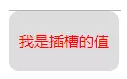
 <Button color="red">我是插槽的值</Button>
 </div>
</template>

<script>
// 2. 在页面种引用组件
import Button from '@/components/Button.vue'
export default {
 name: "app",
 // 3. 在components中声明组件
 components: {
 Button
 }
};
</script>
效果:
2. 全局组件五步骤
- 写好组件(还是废话~)
- 子组件添加install方法
- 在 main.js 中引用
- 使用 Vue.use 方法
- 在页面上使用
1.子组件还是那样~~:
2. 子组件添加install方法
Button.js :
import ButtonComponent from './Button.vue'

// 添加install方法 (插件方法)
const Button = {
 install: function (Vue) {
 Vue.component("Button", ButtonComponent);
 }
}

// 导出Button
export default Button
当然 你可以处理多个全局组件:
import ButtonComponent1 from './Button1.vue'
import ButtonComponent2 from './Button2.vue'
import ButtonComponent3 from './Button3.vue'

const buttonList = [
 ButtonComponent1,
 ButtonComponent2,
 ButtonComponent3
];
// 添加install方法 (插件方法)
const Button = {
 install: function (Vue) {
 buttonList.forEach(button=>{
 // 这里 使用每个组件的 name 属性作为组件名
 Vue.component(button.name, button);
 })
 }
}

// 导出Button
export default Button
3.4. main.js
import Vue from 'vue'
import App from './App.vue'
// 3
import Button from '@/components/Button.js'
// 4
Vue.use(Button);
new Vue({
 render: h => h(App),
}).$mount('#app')
5. 在页面上使用
app.vue:
<template>
 <div id="app">
 <!-- 5. 在页面上使用 -->
 <Button color="blue">我是全局按钮</Button>
 </div>
</template>
效果如下:

2. 构造组件四步骤
- 写好组件(还**是废话~)
- vue.extend构建组件
- 挂载 Vue.prototype
- 在js中使用
1.写好子组件:
<template>
 <p class="Message">{{value}}</p>
</template>

<script>
export default {
 data() {
 return {
  value: "我是一个弹框"
 };
 }
};
</script>

<style>
.Message {
 position: fixed;
 bottom: 30px;
 width: 200px;
 background-color: rgba(0, 0, 0, 0.5);
 color: #fff;
 border-radius: 10px;
 left: 50%;
 transform: translateX(-50%);
 line-height: 30px;
 text-align: center;
 font-size: 15px;
 animation: messageFade 3s 1;
}
/* 加个简单动画 */
@keyframes messageFade {
 0% {
 opacity: 0;
 -webkit-transform: translate3d(-50%, 80%, 0);
 transform: translate3d(-50%, 80%, 0);
 }
 16% {
 opacity: 1;
 -webkit-transform: translate3d(-50%, 0, 0);
 transform: translate3d(-50%, 0, 0);
 }
 84% {
 opacity: 1;
 -webkit-transform: translate3d(-50%, 0, 0);
 transform: translate3d(-50%, 0, 0);
 }
 100% {
 opacity: 0;
 -webkit-transform: translate3d(-50%, 80%, 0);
 transform: translate3d(-50%, 80%, 0);
 }
}
</style>
2. vue.extend构建组件
Message.js :
import Vue from 'vue';
import Message from './Message.vue';
// 构造组件
const MessageConstructor = Vue.extend(Message);
// 设置删除组件
const removeDom = (target) => {
 target.parentNode.removeChild(target);
};
// 构造组件添加关闭方法
MessageConstructor.prototype.close = function() {
 this.visible = false;
 removeDom(this.$el);
};

const MessageDiv = (options) => {
 // 实例化组件
 const instance = new MessageConstructor({
  el: document.createElement('div'),
  // 组件参数,运用到组件内的data
  data: options,
 });
 // 在body添加组件
 document.body.appendChild(instance.$el);
 Vue.nextTick(() => {
  instance.timer = setTimeout(() => {
   // 定时关闭组件
   instance.close();
  }, 3000);
 });
 return instance;
};

export default MessageDiv;
3. 挂载 Vue.prototype
main.js :
import Message from '@/components/Message.js'
Vue.prototype.$message = Message;
4. 使用:
<template>
 <div id="app">
 <Button color="blue" @click.native="msg">我是全局按钮</Button>
 </div>
</template>

<script>
import Button from "@/components/Button.vue";
export default {
 name: "app",
 components: {
 Button
 },
 methods: {
 msg() {
  // 4. 使用构造组件
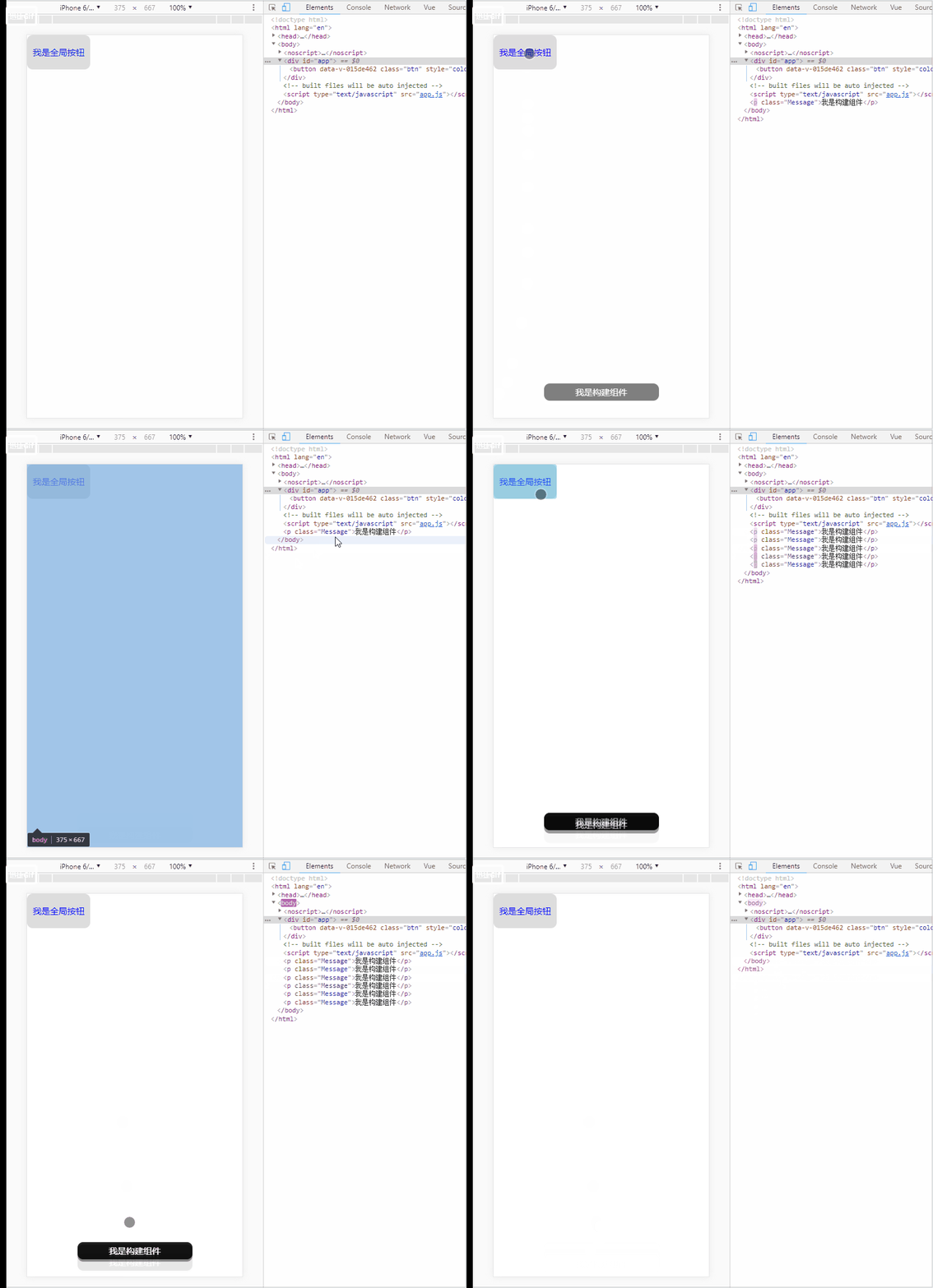
  this.$message({value:'我是构造组件'});
 }
 }
};
</script>
效果:
以上就是三种组件的基本使用啦~~
总结
以上就是这篇文章的全部内容了,希望本文的内容对大家的学习或者工作具有一定的参考学习价值,谢谢大家对脚本之家的支持。
相关文章

一步步从Vue3.x源码上理解ref和reactive的区别
vue3的数据双向绑定,大家都明白是proxy数据代理,但是在定义响应式数据的时候,有ref和reactive两种方式,如果判断该使用什么方式,是大家一直不很清楚地问题,下面这篇文章主要给大家介绍了关于从Vue3.x源码上理解ref和reactive的区别的相关资料,需要的朋友可以参考下2023-02-02
vue router总结 $router和$route及router与 router与route区别
这篇文章主要介绍了vue router总结 $router和$route及router与 router与route区别,本文给大家介绍的非常详细,具有一定的参考借鉴价值 ,需要的朋友可以参考下2019-07-07 CLI是一个全局安装的npm包,提供了终端里的vue命令。它可以通过vue create快速搭建一个新项目,或者直接通过vue serve构建新想法的原型。你也可以通过vue ui通过一套图形化界面管理你的所有项目2022-11-11
 本文主要介绍了element table跨分页多选及回显的实现示例,文中通过示例代码介绍的非常详细,具有一定的参考价值,感兴趣的小伙伴们可以参考一下2022-02-02
 这篇文章主要介绍了vue $set 实现给数组集合对象赋值方式,具有很好的参考价值,希望对大家有所帮助。如有错误或未考虑完全的地方,望不吝赐教2021-07-07
 移动端页面,有时候会出现一些固定定位在底部图标,比如购物车等。这篇文章主要介绍了Vue制作固定定位图标滑动隐藏效果,需要的朋友可以参考下2019-05-05
 这篇文章主要介绍了vue props type设置多个类型,具有很好的参考价值,希望对大家有所帮助。如有错误或未考虑完全的地方,望不吝赐教2022-04-04
 这篇文章主要介绍了浅谈vue获得后台数据无法显示到table上面的坑,具有很好的参考价值,希望对大家有所帮助。一起跟随小编过来看看吧2020-08-08
 在vue3.x中vuex调取值在html代码里可以直接使用vue2.x的方法,但是在js里与vue2.x就有了那么一丢丢的不同,下面这篇文章主要给大家介绍了关于Vue3中Vuex详细使用的相关资料,需要的朋友可以参考下2022-07-07
关于vue3 解决getCurrentInstance 打包后线上环境报错问题
这篇文章主要介绍了vue3 解决getCurrentInstance 打包后线上环境报错问题,本文给大家介绍的非常详细,对大家的学习或工作具有一定的参考借鉴价值,需要的朋友可以参考下2022-05-05
最新评论