

jQuery实现弹幕特效
更新时间:2019年11月29日 08:27:34 作者:有一个进大厂的梦
这篇文章主要为大家详细介绍了jQuery实现弹幕特效,文中示例代码介绍的非常详细,具有一定的参考价值,感兴趣的小伙伴们可以参考一下
案例简介
jQuery实现弹幕效果,代码如下。
案例目录
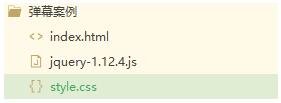
HTML部分
<!DOCTYPE html>


<html>
 <head>
 <meta charset="utf-8">
 <title>jQuery弹幕案例</title>
 <link rel="stylesheet" type="text/css" href="style.css" rel="external nofollow" />
 </head>
 <body>
 <div class="box">
 <div class="top"></div>
 <div class="bot">
 <input type="text" id="txt" placeholder="我来说两句。。。" />
 <button type="button" id="btn">发送</button>
 </div>
 </div>
 <script src="jquery-1.12.4.js"></script>
 <script>
 $(function() {
 var colors = ["red", "green", "hotpink", "pink", "cyan", "yellowgreen", "purple", "deepskyblue"];
 $("#btn").on("click", function() {
  var randomColor = parseInt(Math.random() * colors.length);
  var randomY = parseInt(Math.random() * 400);
  $("<span></span>") //创建span
  .text($("#txt").val()) //设置内容
  .css("color", colors[randomColor]) //设置字体颜色
  .css("left", "1400px") //设置left值
  .css("top", randomY) //设置top值
  .animate({
  left: -500
  }, 10000, "linear", function() {
  //到了终点,需要删除
  $(this).remove();
  }) //添加动画
  .appendTo(".top");

  $("#txt").val("");
 });
 });
 </script>
 </body>
</html>
CSS部分
* {
 margin: 0;
 padding: 0;
}

.box {
 width: 1600px;
 height: 757px;
}

.top {
 width: 100%;
 height: 660px;
 position: relative;
}

.bot {
 width: 100%;
 height: 97px;
 background-color: #666666;
 position: relative;
}

#txt {
 width: 300px;
 height: 30px;
 border-radius: 5px;
 position: absolute;
 left: 50%;
 margin-left: -150px;
 top: 50%;
 margin-top: -15px;
 border: none;
}

#btn {
 width: 60px;
 height: 30px;
 color: white;
 background-color: red;
 position: absolute;
 left: 955px;
 top: 34px;
 border: none;
}

span {
 position: absolute;
 color: #000;
 font-size: 50px;
 line-height: 1.5em;
 cursor: pointer;
 white-space: nowrap;
}
效果展示

以上就是jQuery实现弹幕效果的代码,希望对您有帮助!
源码下载:jQuery弹幕
以上就是本文的全部内容,希望对大家的学习有所帮助,也希望大家多多支持脚本之家。
相关文章
 这篇文章主要介绍了jquery默认校验规则有哪些,需要的朋友可以参考下2014-03-03
 这篇文章主要介绍了深入了解query和params的使用区别,路由传参的时候,有俩兄弟,一个叫query,一个叫parmas,你说他们俩长得也不像吧,可这用法实在是太类似了,下面就让我们分别从vue路由和Node接收两个角度讲他们的区别,需要的朋友可以参考下2019-06-06
 这篇文章主要介绍了jQuery实现Flash效果上下翻动的中英文导航菜单代码,实例分析了jQuery基于鼠标hover事件控制页面元素动画效果的相关技巧,具有一定参考借鉴价值,需要的朋友可以参考下2015-09-09
EasyUI Datebox 日期验证之开始日期小于结束时间
这篇文章主要介绍了EasyUI Datebox 日期验证之开始日期小于结束时间,需要的朋友可以参考下2017-05-05 本文重点给大家介绍jquery中的事件机制,涉及到onload和ready两者的区别介绍,非常不错,具有参考借鉴价值,感兴趣的朋友一起看下吧2016-08-08
 下面小编就为大家带来一篇jQuery基础_入门必看知识点。小编觉得挺不错的,现在就分享给大家,也给大家做个参考。一起跟随小编过来看看吧2016-07-07
 自己写的一个菜单(因为是初学 不知道能不能算无限级)2010-05-05
 本文分享了jQuery实现限制文本框的输入长度的示例代码,具有一定的参考价值,下面跟着小编一起来看下吧2017-01-01
通过JQuery将DIV的滚动条滚动到指定的位置方便自动定位
本文为大家介绍下将DIV的滚动条滚动到其子元素所在的位置,方便自动定位,需要的朋友可以参考下2014-05-05 原作者是在body中不停的插入多个小div雪花来向下慢慢飘,一直飘到body的底部后,将雪花移除,于是,将原来的代码稍加修改,让他只是从屏幕的顶部飘落到屏幕底部(不是body的底部)后,就将雪花移除,另外将雪花改为fixed定位2013-01-01
最新评论