

Spring Cloud @RefreshScope 原理及使用
@RefreshScope那些事
要说清楚RefreshScope,先要了解Scope
- Scope(org.springframework.beans.factory.config.Scope)是Spring 2.0开始就有的核心的概念
- RefreshScope(org.springframework.cloud.context.scope.refresh)是spring cloud提供的一种特殊的scope实现,用来实现配置、实例热加载。
- Scope -> GenericScope -> RefreshScope
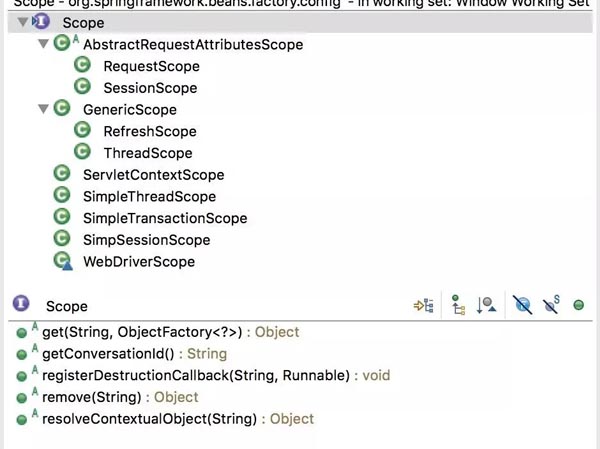
Scope与ApplicationContext生命周期
AbstractBeanFactory#doGetBean创建Bean实例
 protected <T> T doGetBean(...){
  final RootBeanDefinition mbd = ...
  if (mbd.isSingleton()) {
    ...
  } else if (mbd.isPrototype())
    ...
  } else {
     String scopeName = mbd.getScope();
     final Scope scope = this.scopes.get(scopeName);
     Object scopedInstance = scope.get(beanName, new ObjectFactory<Object>() {...});
     ...
  }
  ...
 }
Singleton和Prototype是硬编码的,并不是Scope子类。 Scope实际上是自定义扩展的接口
Scope Bean实例交由Scope自己创建,例如SessionScope是从Session中获取实例的,ThreadScope是从ThreadLocal中获取的,而RefreshScope是在内建缓存中获取的。
@Scope 对象的实例化
@RefreshScope 是scopeName="refresh"的 @Scope
 ...
 @Scope("refresh")
 public @interface RefreshScope {
   ...
 }
@Scope 的注册 AnnotatedBeanDefinitionReader#registerBean
 public void registerBean(...){
  ...
  ScopeMetadata scopeMetadata = this.scopeMetadataResolver.resolveScopeMetadata(abd);
   abd.setScope(scopeMetadata.getScopeName());
  ...
   definitionHolder = AnnotationConfigUtils.applyScopedProxyMode(scopeMetadata, definitionHolder, this.registry);
 }
读取@Scope元数据, AnnotationScopeMetadataResolver#resolveScopeMetadata
public ScopeMetadata resolveScopeMetadata(BeanDefinition definition) {
     AnnotationAttributes attributes = AnnotationConfigUtils.attributesFor(
         annDef.getMetadata(), Scope.class);
     if (attributes != null) {
       metadata.setScopeName(attributes.getString("value"));
       ScopedProxyMode proxyMode = attributes.getEnum("proxyMode");
       if (proxyMode == null || proxyMode == ScopedProxyMode.DEFAULT) {
         proxyMode = this.defaultProxyMode;
       }
       metadata.setScopedProxyMode(proxyMode);
     }
}
Scope实例对象通过ScopedProxyFactoryBean创建,其中通过AOP使其实现ScopedObject接口,这里不再展开
现在来说说RefreshScope是如何实现配置和实例刷新的
RefreshScope注册
RefreshAutoConfiguration#RefreshScopeConfiguration
 @Component
 @ConditionalOnMissingBean(RefreshScope.class)
 protected static class RefreshScopeConfiguration implements BeanDefinitionRegistryPostProcessor{
 ...
   registry.registerBeanDefinition("refreshScope",
   BeanDefinitionBuilder.genericBeanDefinition(RefreshScope.class)
             .setRole(BeanDefinition.ROLE_INFRASTRUCTURE)
             .getBeanDefinition());
 ...
 }
RefreshScope extends GenericScope, 大部分逻辑在 GenericScope 中
GenericScope#postProcessBeanFactory 中向AbstractBeanFactory注册自己
public class GenericScope implements Scope, BeanFactoryPostProcessor...{
   @Override
   public void postProcessBeanFactory(ConfigurableListableBeanFactory beanFactory)
     throws BeansException {
     beanFactory.registerScope(this.name/*refresh*/, this/*RefreshScope*/);
     ...
   }
}
RefreshScope 刷新过程
入口在ContextRefresher#refresh
 refresh() {
   Map<String, Object> before = ①extract(
       this.context.getEnvironment().getPropertySources());
   ②addConfigFilesToEnvironment();
   Set<String> keys = ④changes(before,
       ③extract(this.context.getEnvironment().getPropertySources())).keySet();
   this.context.⑤publishEvent(new EnvironmentChangeEvent(keys));
   this.scope.⑥refreshAll();
 }
①提取标准参数(SYSTEM,JNDI,SERVLET)之外所有参数变量
②把原来的Environment里的参数放到一个新建的Spring Context容器下重新加载,完事之后关闭新容器
③提起更新过的参数(排除标准参数)
④比较出变更项
⑤发布环境变更事件,接收:EnvironmentChangeListener/LoggingRebinder
⑥RefreshScope用新的环境参数重新生成Bean
重新生成的过程很简单,清除refreshscope缓存幷销毁Bean,下次就会重新从BeanFactory获取一个新的实例(该实例使用新的配置)
RefreshScope#refreshAll
 public void refreshAll() {
     <b>super.destroy();</b>
     this.context.publishEvent(new RefreshScopeRefreshedEvent());
 }
GenericScope#destroy
 public void destroy() {
   ...
   Collection<BeanLifecycleWrapper> wrappers = <b>this.cache.clear()</b>;
   for (BeanLifecycleWrapper wrapper : wrappers) {
     <b>wrapper.destroy();</b>
   }
 }
Spring Cloud Bus 如何触发 Refresh
BusAutoConfiguration#BusRefreshConfiguration 发布一个RefreshBusEndpoint
@Configuration
 @ConditionalOnClass({ Endpoint.class, RefreshScope.class })
 protected static class BusRefreshConfiguration {

   @Configuration
   @ConditionalOnBean(ContextRefresher.class)
   @ConditionalOnProperty(value = "endpoints.spring.cloud.bus.refresh.enabled", matchIfMissing = true)
   protected static class BusRefreshEndpointConfiguration {
     @Bean
     public RefreshBusEndpoint refreshBusEndpoint(ApplicationContext context,
         BusProperties bus) {
       return new RefreshBusEndpoint(context, bus.getId());
     }
   }
 }
RefreshBusEndpoint 会从http端口触发广播RefreshRemoteApplicationEvent事件
 @Endpoint(id = "bus-refresh")
 public class RefreshBusEndpoint extends AbstractBusEndpoint {
    public void busRefresh() {
     publish(new RefreshRemoteApplicationEvent(this, getInstanceId(), null));
   }
 }
BusAutoConfiguration#refreshListener 负责接收事件(所有配置bus的节点)
 @Bean
 @ConditionalOnProperty(value = "spring.cloud.bus.refresh.enabled", matchIfMissing = true)
 @ConditionalOnBean(ContextRefresher.class)
 public RefreshListener refreshListener(ContextRefresher contextRefresher) {
   return new RefreshListener(contextRefresher);
 }
RefreshListener#onApplicationEvent 触发 ContextRefresher
public void onApplicationEvent(RefreshRemoteApplicationEvent event) {
   Set<String> keys = contextRefresher.refresh();
 }
大部分需要更新的服务需要打上@RefreshScope, EurekaClient是如何配置更新的
EurekaClientAutoConfiguration#RefreshableEurekaClientConfiguration
 @Configuration
 @ConditionalOnRefreshScope
 protected static class RefreshableEurekaClientConfiguration{
   @Bean
   @RefreshScope
   public EurekaClient eurekaClient(...) {
     return new CloudEurekaClient(manager, config, this.optionalArgs,
         this.context);
   }

   @Bean
   @RefreshScope
   public ApplicationInfoManager eurekaApplicationInfoManager(...) {
     ...
     return new ApplicationInfoManager(config, instanceInfo);
   }
 }
以上就是本文的全部内容,希望对大家的学习有所帮助,也希望大家多多支持脚本之家。
相关文章
 这篇文章主要介绍了简单了解Spring Bean常用注解的装配,文中通过示例代码介绍的非常详细,对大家的学习或者工作具有一定的参考学习价值,需要的朋友可以参考下2019-11-11
 这篇文章主要介绍了Java静态内部类实现单例过程,文中通过示例代码介绍的非常详细,对大家的学习或者工作具有一定的参考学习价值,需要的朋友可以参考下2019-10-10
Spring Cloud Gateway全局通用异常处理的实现
这篇文章主要介绍了Spring Cloud Gateway全局通用异常处理的实现,文中通过示例代码介绍的非常详细,对大家的学习或者工作具有一定的参考学习价值,需要的朋友们下面随着小编来一起学习学习吧2020-05-05 RESTful是一种web软件风格,它不是标准也不是协议,它不一定要采用,只是一种风格,它倡导的是一个资源定位(url)及资源操作的风格,这篇文章主要介绍了SpringBoot使用RESTful接口2022-12-12
Docker环境下Spring Boot应用内存飙升分析与解决场景分析
当运行一个Spring Boot项目时,如果未设置JVM内存参数,Spring Boot默认会采用JVM自身默认的配置策略,接下来通过本文给大家介绍Docker环境下Spring Boot应用内存飙升分析与解决方法,需要的朋友参考下吧2021-08-08
关于JAVA中stream流的基础处理(获取对象字段和对象批量处理等)
这篇文章主要介绍了关于JAVA中stream流的基础处理,包含获取对象字段、按字段排序、按字段去重、对象批量处理、指定字段转数组等内容,需要的朋友可以参考下2023-03-03
MybatisPlus使用@TableId主键id自增长无效的解决
本文主要介绍了MybatisPlus使用@TableId主键id自增长无效的解决,文中通过示例代码介绍的非常详细,对大家的学习或者工作具有一定的参考学习价值,需要的朋友们下面随着小编来一起学习学习吧2023-04-04 泛型机制在项目中一直都在使用,甚至很多源码中都用到了泛型机制。但是里面很多的机制和特性一直没有明白,尤其通配符这块,经常忘记。本文对此做了一些总结,具有一定借鉴价值,希望有所帮助2022-09-09
在jmeter的beanshell中用java获取系统当前时间的简单实例
这篇文章介绍了在jmeter的beanshell中用java获取系统当前时间的简单实例,有需要的朋友可以参考一下2013-09-09 这篇文章主要为大家详细介绍了SpringBoot如何实现识别图片中的身份证号与营业执照信息,文中的示例代码讲解详细,感兴趣的小伙伴可以了解一下2024-01-01
最新评论