

Android 8.1隐藏状态栏图标的实例代码
更新时间:2020年04月03日 10:54:45 作者:祥子Gyx
这篇文章主要介绍了Android 8.1隐藏状态栏图标,本文通过实例代码给大家介绍的非常详细,对大家的学习或工作具有一定的参考借鉴价值,需要的朋友可以参考下
近期客户需求,状态栏只显示时间和电池图标,如图
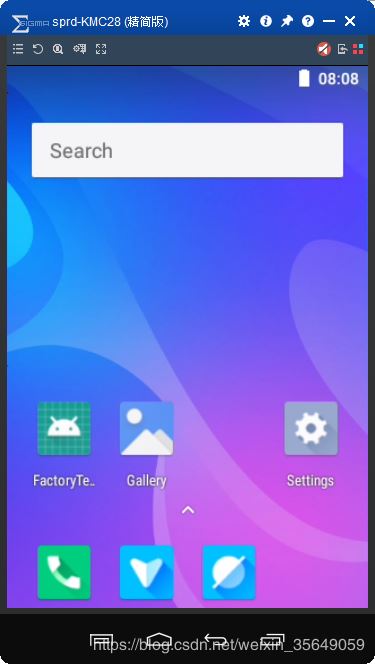
状态栏图标的布局文件在frameworks\base\packages\SystemUI\res\layout\status_bar.xml,主要包括通知,定位,蓝牙,信号,时间,电池等图标,只要在相应的布局文件中加入属性android:visibility="invisible" 或者“gone”即可
<?xml version="1.0" encoding="utf-8"?>
<!--
**
** Copyright 2006, The Android Open Source Project
**
** Licensed under the Apache License, Version 2.0 (the "License");
** you may not use this file except in compliance with the License.
** You may obtain a copy of the License at
**
**   http://www.apache.org/licenses/LICENSE-2.0
**
** Unless required by applicable law or agreed to in writing, software
** distributed under the License is distributed on an "AS IS" BASIS,
** WITHOUT WARRANTIES OR CONDITIONS OF ANY KIND, either express or implied.
** See the License for the specific language governing permissions and
** limitations under the License.
*/
-->
<!--  android:background="@drawable/status_bar_closed_default_background" -->
<com.android.systemui.statusbar.phone.PhoneStatusBarView
  xmlns:android="http://schemas.android.com/apk/res/android"
  xmlns:systemui="http://schemas.android.com/apk/res/com.android.systemui"
  android:layout_width="match_parent"
  android:layout_height="@dimen/status_bar_height"
  android:id="@+id/status_bar"
  android:background="@drawable/system_bar_background"
  android:orientation="vertical"
  android:focusable="false"
  android:descendantFocusability="afterDescendants"
  >
  <ImageView
    android:id="@+id/notification_lights_out"
    android:layout_width="0dp"
    android:layout_height="match_parent"
    android:paddingStart="6dip"
    android:paddingBottom="2dip"
    android:src="@drawable/ic_sysbar_lights_out_dot_small"
    android:scaleType="center"
    android:visibility="gone"
    />
  <LinearLayout android:id="@+id/status_bar_contents"
    android:layout_width="match_parent"
    android:layout_height="match_parent"
    android:paddingStart="6dp"
    android:paddingEnd="8dp"
    android:orientation="horizontal"
    >
    <!-- The alpha of this area is controlled from both PhoneStatusBarTransitions and
       PhoneStatusBar (DISABLE_NOTIFICATION_ICONS). -->
    <com.android.systemui.statusbar.AlphaOptimizedFrameLayout
      android:id="@+id/notification_icon_area"
      android:layout_width="0dip"
      android:layout_height="match_parent"
      android:layout_weight="1"
      android:visibility="invisible"
      android:orientation="horizontal" />
    <com.android.keyguard.AlphaOptimizedLinearLayout android:id="@+id/system_icon_area"
      android:layout_width="wrap_content"
      android:layout_height="match_parent"
      android:orientation="horizontal"
      >
      <include layout="@layout/system_icons" />
      <com.android.systemui.statusbar.policy.Clock
        android:id="@+id/clock"
        android:textAppearance="@style/TextAppearance.StatusBar.Clock"
        android:layout_width="wrap_content"
        android:layout_height="match_parent"
        android:singleLine="true"
        android:paddingStart="@dimen/status_bar_clock_starting_padding"
        android:paddingEnd="@dimen/status_bar_clock_end_padding"
        android:gravity="center_vertical|start"
        />
    </com.android.keyguard.AlphaOptimizedLinearLayout>
  </LinearLayout>
  <ViewStub
    android:id="@+id/emergency_cryptkeeper_text"
    android:layout_width="wrap_content"
    android:layout_height="match_parent"
    android:layout="@layout/emergency_cryptkeeper_text"
  />
</com.android.systemui.statusbar.phone.PhoneStatusBarView>
<?xml version="1.0" encoding="utf-8"?><!--
 ~ Copyright (C) 2014 The Android Open Source Project
 ~
 ~ Licensed under the Apache License, Version 2.0 (the "License");
 ~ you may not use this file except in compliance with the License.
 ~ You may obtain a copy of the License at
 ~
 ~   http://www.apache.org/licenses/LICENSE-2.0
 ~
 ~ Unless required by applicable law or agreed to in writing, software
 ~ distributed under the License is distributed on an "AS IS" BASIS,
 ~ WITHOUT WARRANTIES OR CONDITIONS OF ANY KIND, either express or implied.
 ~ See the License for the specific language governing permissions and
 ~ limitations under the License
 -->
<LinearLayout xmlns:android="http://schemas.android.com/apk/res/android"
  android:id="@+id/system_icons"
  android:layout_width="wrap_content"
  android:layout_height="match_parent"
  android:gravity="center_vertical">
  <com.android.keyguard.AlphaOptimizedLinearLayout android:id="@+id/statusIcons"
    android:layout_width="wrap_content"
    android:layout_height="match_parent"
    android:gravity="center_vertical"
    android:visibility="invisible"
    android:orientation="horizontal"/>
  <include layout="@layout/signal_cluster_view"
    android:visibility="invisible"
    android:layout_width="wrap_content"
    android:layout_height="wrap_content"
    android:layout_marginStart="@dimen/signal_cluster_margin_start"/>
  <com.android.systemui.BatteryMeterView android:id="@+id/battery"
    android:layout_height="match_parent"
    android:layout_width="wrap_content"
    />
</LinearLayout>
总结
到此这篇关于Android 8.1隐藏状态栏图标的实例代码的文章就介绍到这了,更多相关android 隐藏状态栏图标内容请搜索脚本之家以前的文章或继续浏览下面的相关文章希望大家以后多多支持脚本之家!
相关文章
 这篇文章主要介绍了Android编程防止进程被第三方软件杀死的方法,涉及Android进程操作的相关技巧,具有一定参考借鉴价值,需要的朋友可以参考下2015-10-10
 这篇文章主要介绍了Android开发之图片压缩实现方法,结合实例形式分析了Android图片压缩的原理、实现方法及相关操作注意事项,需要的朋友可以参考下2019-03-03
 本篇文章主要介绍了Android中PopupMenu组件的使用实例,详细的介绍了PopupMenu组件的使用,具体一定的参考价值,有兴趣的可以了解一下2017-07-07
 在 Kotlin 中 , :: 双冒号操作符 的作用是获取类,对象,函数,属性的 类型对象引用,这篇文章主要介绍了详解kotlin中::双冒号的使用,需要的朋友可以参考下2023-04-04
 当用户选择"确定",就退出当前的对话框。其中,有个很重要的函数,Activity.finish(),通过调用这个函数,退出当前运行的整个Android程序2013-06-06
 这篇文章主要为大家详细介绍了Android使用vitamio实现视频播放器,具有一定的参考价值,感兴趣的小伙伴们可以参考一下2019-04-04
 这篇文章主要介绍了 Android onKeyDown监听返回键无效的解决办法的相关资料,需要的朋友可以参考下2017-06-06
 众所周知相比Java, Kotlin提供了不少高级语法特性。对于一个Kotlin的初学者来说经常会写出一些不够优雅的代码。下面这篇文章主要给大家介绍了关于Kotlin中内置函数的用法和区别的相关资料,需要的朋友可以参考下2018-06-06
Android 提交或者上传数据时的dialog弹框动画效果
我们在使用支付宝支付的时候会看到类似这种弹框动画效果,下面通过实例代码给大家分享android 提交或者上传数据时的弹框动画效果,感兴趣的的朋友参考下2017-07-07 下面小编就为大家带来一篇浅谈Viewpager和轮播图的冲突解决方法。小编觉得挺不错的,现在就分享给大家,也给大家做个参考。一起跟随小编过来看看吧2017-04-04
最新评论