

Spring Boot 实现配置文件加解密原理
背景
接上文《失踪人口回归,mybatis-plus 3.3.2 发布》[1] ,提供了一个非常实用的功能 「数据安全保护」 功能,不仅支持数据源的配置加密,对于 spring boot 全局的 yml /properties 文件均可实现敏感信息加密功能,在一定的程度上控制开发人员流动导致敏感信息泄露。
// 数据源敏感信息加密
spring:
 datasource:
  url: mpw:qRhvCwF4GOqjessEB3G+a5okP+uXXr96wcucn2Pev6BfaoEMZ1gVpPPhdDmjQqoM
  password: mpw:Hzy5iliJbwDHhjLs1L0j6w==
  username: mpw:Xb+EgsyuYRXw7U7sBJjBpA==
// 数据源敏感信息加密
spring:
 redis:
  password: mpw:Hzy5iliJbwDHhjLs1L0j6w==
实现原理
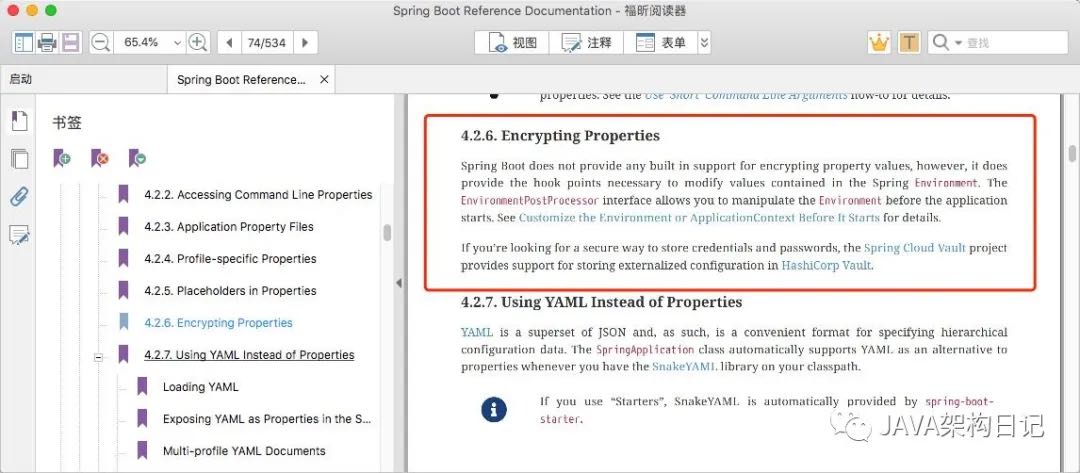
我们翻开 spring boot 官方文档,翻到 4.2.6 章节 Spring Boot 不提供对加密属性值的任何内置支持,但是提供修改 Spring 环境中包含的值所必需的扩展点 EnvironmentPostProcessor 允许在应用程序之前操作环境属性值
mybatis-plus 的实现
public class SafetyEncryptProcessor implements EnvironmentPostProcessor {

 @Override
 public void postProcessEnvironment(ConfigurableEnvironment environment, SpringApplication application) {
 //命令行中获取密钥
 String mpwKey = null;

 // 返回全部形式的配置源(环境变量、命令行参数、配置文件 ...)
 for (PropertySource<?> ps : environment.getPropertySources()) {
  // 判断是否需要含有加密密码,没有就直接跳过
  if (ps instanceof SimpleCommandLinePropertySource) {
  SimpleCommandLinePropertySource source = (SimpleCommandLinePropertySource) ps;
  mpwKey = source.getProperty("mpw.key");
  break;
  }
 }

 //处理加密内容(获取到原有配置,然后解密放到新的map 里面(key是原有key))
 HashMap<String, Object> map = new HashMap<>();
 for (PropertySource<?> ps : environment.getPropertySources()) {
  if (ps instanceof OriginTrackedMapPropertySource) {
  OriginTrackedMapPropertySource source = (OriginTrackedMapPropertySource) ps;
  for (String name : source.getPropertyNames()) {
   Object value = source.getProperty(name);
   if (value instanceof String) {
   String str = (String) value;
   if (str.startsWith("mpw:")) {
    map.put(name, AES.decrypt(str.substring(4), mpwKey));
   }
   }
  }
  }
 }
 // 将解密的数据放入环境变量,并处于第一优先级上 (这里一定要注意,覆盖其他配置)
 if (!map.isEmpty()) {
  environment.getPropertySources().addFirst(new MapPropertySource("custom-encrypt", map));
 }
 }
}
如何加载生效
resources/META-INF/spring.factories 配置 SPI
org.springframework.boot.env.EnvironmentPostProcessor=\
 com.baomidou.mybatisplus.autoconfigure.SafetyEncryptProcessor
扩展
mybatis-plus 默认是读取启动参数,可以在此处可以根据自己需求修改为更安全的根密钥存储。
读取环境变量
System.getProperty("mpw.key")
远程加载密码服务
// 此处思路,参考 druid ConfigFilter
public Properties loadConfig(String filePath) {
   Properties properties = new Properties();

   InputStream inStream = null;
   try {
     boolean xml = false;
     if (filePath.startsWith("file://")) {
       filePath = filePath.substring("file://".length());
       inStream = getFileAsStream(filePath);
       xml = filePath.endsWith(".xml");
     } else if (filePath.startsWith("http://") || filePath.startsWith("https://")) {
       URL url = new URL(filePath);
       inStream = url.openStream();
       xml = url.getPath().endsWith(".xml");
     } else if (filePath.startsWith("classpath:")) {
       String resourcePath = filePath.substring("classpath:".length());
       inStream = Thread.currentThread().getContextClassLoader().getResourceAsStream(resourcePath);
       // 在classpath下应该也可以配置xml文件吧?
       xml = resourcePath.endsWith(".xml");
     } else {
       inStream = getFileAsStream(filePath);
       xml = filePath.endsWith(".xml");
     }

     if (inStream == null) {
       LOG.error("load config file error, file : " + filePath);
       return null;
     }

     if (xml) {
       properties.loadFromXML(inStream);
     } else {
       properties.load(inStream);
     }

     return properties;
   } catch (Exception ex) {
     LOG.error("load config file error, file : " + filePath, ex);
     return null;
   } finally {
     JdbcUtils.close(inStream);
   }
 }
总结
配置文件加解密,是通过自定义扩展 EnvironmentPostProcessor 实现
若项目中没有使用最新版本 mybatis-plus ,可以参考如上自己实现,不过我推荐 jasypt-spring-boot-starter[2] ,原理类似实现了一个 EnableEncryptablePropertySourcesPostProcessor ,但是支持的加密方式更多更成熟
关于 jasypt 使用可以参考源码: https://gitee.com/log4j/pig
到此这篇关于Spring Boot 实现配置文件加解密原理的文章就介绍到这了,更多相关SpringBoot文件加解密内容请搜索脚本之家以前的文章或继续浏览下面的相关文章希望大家以后多多支持脚本之家!
相关文章

SpringBoot四大神器之Auto onfiguration的使用
本文主要介绍了SpringBoot四大神器之Auto Configuration,springboot auto configuration的本质就是自动配置spring的各种bean。感兴趣的可以了解一下2021-10-10 本文介绍了一个java解析sina视频地址的例子,从这个例子中可以学习到java使用sax解析xml的方法,大家可以参考修改成其它功能2014-01-01
详解Spring Boot对 Apache Pulsar的支持
Spring Boot通过提供spring-pulsar和spring-pulsar-reactive自动配置支持Apache Pulsar,类路径中这些依赖存在时,Spring Boot自动配置命令式和反应式Pulsar组件,PulsarClient自动注册,默认连接本地Pulsar实例,感兴趣的朋友一起看看吧2024-11-11 这篇文章主要介绍了java 指定某个jdk版本方法的相关资料,需要的朋友可以参考下2017-05-05
 这篇文章主要介绍了Spring整合Junit的使用详解,文中通过示例代码介绍的非常详细,对大家的学习或者工作具有一定的参考学习价值,需要的朋友们下面随着小编来一起学习学习吧2020-02-02
使用@Autowired注解引入server服务层方法时报错的解决
这篇文章主要介绍了使用@Autowired注解引入server服务层方法时报错的解决,具有很好的参考价值,希望对大家有所帮助。如有错误或未考虑完全的地方,望不吝赐教2021-11-11 在Java应用程序中,为了确保安全性和保护用户数据,一种常见的做法是使用Token进行身份验证和授权,Token是由服务器生成的具有一定时效的令牌,用于识别和验证用户身份,当Token失效后,用户将无法再进行相关操作,从而提高系统的安全性2023-10-10
 本文主要介绍了浅谈Java包装类型Long的==操作引发的低级bug,文中通过示例代码介绍的非常详细,具有一定的参考价值,感兴趣的小伙伴们可以参考一下2021-08-08
 这篇文章主要介绍了java 实现当前时间加减30分钟的时间代码,具有很好的参考价值,希望对大家有所帮助。一起跟随小编过来看看吧2020-08-08
Java如何优雅地关闭资源try-with-resource及其异常抑制
这篇文章主要介绍了Java如何优雅地关闭资源try-with-resource及其异常抑制,小编觉得挺不错的,现在分享给大家,也给大家做个参考。一起跟随小编过来看看吧2019-02-02
最新评论