

Vue 封装防刷新考试倒计时组件的实现
更新时间:2020年06月05日 09:22:43 作者:Vam的金豆之路
这篇文章主要介绍了Vue 封装防刷新考试倒计时组件的实现,文中通过示例代码介绍的非常详细,对大家的学习或者工作具有一定的参考学习价值,需要的朋友们下面随着小编来一起学习学习吧
本文详细的介绍了防刷新考试倒计时组件 ,分享给大家,也给自己留个笔记,感兴趣的可以了解下
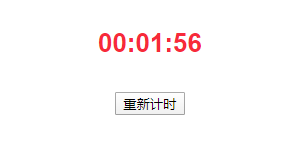
<!-- 考试倒计时组件 -->
<template>
 <div class="time">
  <p>00:{{timerCount2}}:{{timerCount1}}</p>
  <button @click="reset">重新计时</button>
 </div>
</template>


<script>
export default {
 name: "Time",
 data() {
  return {
   timeSeconds: 0,
   timeMinutes: 0,
   seconds: 59, // 秒
   minutes: 1, // 分
   timer: null
  };
 },
 methods: {
  num(n) {
   return n < 10 ? "0" + n : "" + n;
  },
  // 重新计时
  reset() {
   sessionStorage.removeItem("answered");
   window.location.reload();
   localStorage.removeItem("startTime1");
   localStorage.removeItem("startTime2");
   clearInterval(this.timer);
  },
  // 清除
  clear() {
   localStorage.removeItem("startTime1");
   localStorage.removeItem("startTime2");
   sessionStorage.setItem("answered", 1);
   clearInterval(this.timer);
  },
  // 倒计时
  timing() {
   let [startTime1, startTime2] = [ localStorage.getItem("startTime1"), localStorage.getItem("startTime2") ];
   let nowTime = new Date().getTime();
   if (startTime1) {
    let surplus = this.seconds - parseInt((nowTime - startTime1) / 1000);
    this.timeSeconds = surplus <= 0 ? 0 : surplus;
   } else {
    this.timeSeconds = this.seconds;
    localStorage.setItem("startTime1", nowTime); //存储秒
   }
   if (startTime2) {
    this.timeMinutes = startTime2;
   } else {
    this.timeMinutes = this.minutes;
    localStorage.setItem("startTime2", this.minutes); //存储分
   }
   this.timer = setInterval(() => {
    if ( this.timeSeconds == 0 && this.timeMinutes != 0 && this.timeMinutes > 0 ) {
     let nowTime = new Date().getTime();
     this.timeSeconds = this.seconds;
     localStorage.setItem("startTime1", nowTime);
     this.timeMinutes--;
     localStorage.setItem("startTime2", this.timeMinutes);
    } else if (this.timeMinutes == 0 && this.timeSeconds == 0) {
     this.timeSeconds = 0;
     this.clear();
     alert("考试时间到");
    } else {
     this.timeSeconds--;
    }
   }, 1000);
  }
 },
 mounted() {
  if (sessionStorage.getItem("answered") != 1) {
   this.timing();
  }
 },
 computed: {
  timerCount1() {
   return this.timeSeconds < 10 ? "0" + this.timeSeconds : "" + this.timeSeconds;
  },
  timerCount2() {
   return this.timeMinutes < 10 ? "0" + this.timeMinutes : "" + this.timeMinutes;
  }
 },
 destroyed() {
  // 退出后清除计时器
  if (this.timer) {
   clearInterval(this.timer);
  }
 }
};
</script>
<style scoped>
.time {
 color: #f72a3a;
 font-weight: bold;
 font-size: 26px;
}
</style>
到此这篇关于Vue 封装防刷新考试倒计时组件的实现的文章就介绍到这了,更多相关Vue 防刷新考试倒计时组件内容请搜索脚本之家以前的文章或继续浏览下面的相关文章希望大家以后多多支持脚本之家!
相关文章
 下面小编就为大家带来一篇vueJS简单的点击显示与隐藏的效果【实现代码】。小编觉得挺不错的,现在分享给大家,一起跟随小编过来看看吧2016-05-05
 这篇文章主要介绍了vue.js实现点击图标放大离开时缩小,本文通过实例代码给大家介绍的非常详细,对大家的学习或工作具有一定的参考借鉴价值,需要的朋友可以参考下2021-01-01
 Vue3中的ref是一种创建响应式引用的方式,它在Vue生态系统中扮演着重要角色,下面这篇文章主要给大家介绍了关于Vue中动态绑定Ref的两种方式,需要的朋友可以参考下2024-09-09
 这篇文章主要介绍了vue.js数据绑定操作,结合实例形式详细分析了vue.js数据绑定的各种常见操作技巧与相关注意事项,需要的朋友可以参考下2018-04-04
 放大镜效果在很多购物网站都可以看到,本文主要介绍了vue3实现淘宝放大镜效果的示例代码,文中通过示例代码介绍的非常详细,对大家的学习或者工作具有一定的参考学习价值,需要的朋友们下面随着小编来一起学习学习吧2022-06-06
vue项目打包后提交到git上为什么没有dist这个文件的解决方法
这篇文章主要介绍了vue项目打包后提交到git上为什么没有dist这个文件的解决方法,本文给大家介绍的非常详细,对大家的学习或工作具有一定的参考借鉴价值,需要的朋友可以参考下2020-09-09
在移动端使用vue-router和keep-alive的方法示例
这篇文章主要介绍了在移动端使用vue-router和keep-alive的方法示例,vue-router与keep-alive提供的路由体验与移动端是有一定差别的,感兴趣的小伙伴们可以参考一下2018-12-12
vue项目使用高德地图时报错:AMap is not defined解决办法
这篇文章主要给大家介绍了关于vue项目使用高德地图时报错:AMap is not defined的解决办法,"AMap is not defined"是一个错误提示,意思是在代码中没有找到定义的AMap,需要的朋友可以参考下2023-12-12
ElementUI中el-dropdown-item点击事件无效问题
这篇文章主要介绍了ElementUI中el-dropdown-item点击事件无效问题及解决方案,具有很好的参考价值,希望对大家有所帮助。如有错误或未考虑完全的地方,望不吝赐教2023-04-04 这篇文章主要介绍了vue2.0制作多级嵌套菜单栏,主要使用v-for循环生成一个多级嵌套菜单栏,这个方法应用非常广泛,需要的朋友可以参考下2018-06-06
最新评论