

android实现密码框右侧显示小眼睛
更新时间:2020年09月29日 11:19:14 作者:键盘侠007
这篇文章主要为大家详细介绍了android实现密码框右侧显示小眼睛,文中示例代码介绍的非常详细,具有一定的参考价值,感兴趣的小伙伴们可以参考一下
本文实例为大家分享了android实现密码框右侧显示小眼睛的具体代码,供大家参考,具体内容如下


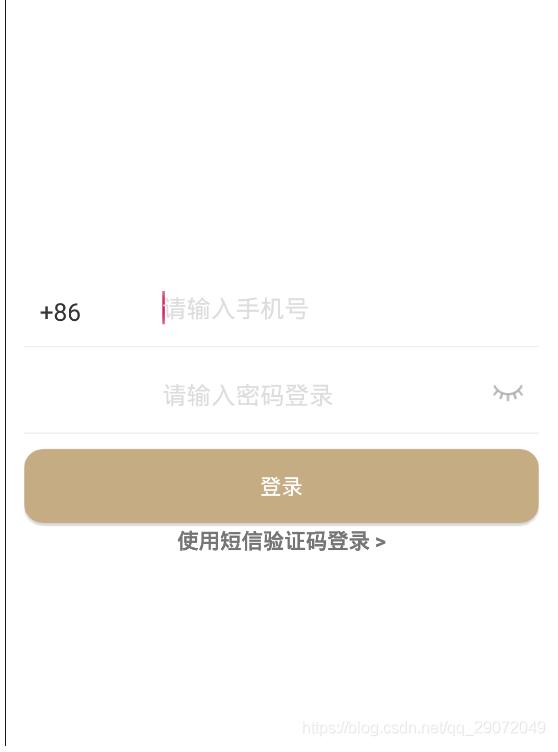
实现效果
<?xml version="1.0" encoding="utf-8"?>
<LinearLayout xmlns:android="http://schemas.android.com/apk/res/android"
  android:layout_width="match_parent"
  android:layout_height="match_parent"
  android:background="#ffffff"
  android:orientation="vertical" >

  <LinearLayout

    android:layout_width="match_parent"
    android:layout_height="wrap_content"
    android:orientation="vertical"
    android:padding="12dp" >

    <RelativeLayout
      android:layout_width="match_parent"
      android:layout_height="wrap_content" >

      <EditText
        android:paddingTop="10dp"
        android:background="@drawable/selector_sign"
        android:id="@+id/et_usertel"
        android:layout_width="match_parent"
        android:layout_height="wrap_content"
        android:layout_centerInParent="true"
        android:hint="@string/editText_phont"
        android:inputType="phone"
        android:paddingLeft="90dp"
        android:singleLine="true"
        android:textColorHint="#DDDDDD"
        android:textSize="16sp" />

      <EditText
        android:id="@+id/edt_chosed_country_num"
        android:layout_width="60dp"
        android:layout_height="wrap_content"
        android:layout_alignLeft="@id/et_usertel"
        android:layout_centerVertical="true"
        android:layout_marginLeft="10dp"
        android:background="@color/white"
        android:inputType="number"
        android:maxLength="5"
        android:text="+86"
        android:textColor="#353535"
        android:textSize="16sp" />
    </RelativeLayout>

    <LinearLayout
      android:id="@+id/linear_password_code"
      android:visibility="visible"
      android:layout_marginTop="10dp"
      android:orientation="horizontal"
      android:layout_width="match_parent"
      android:layout_height="wrap_content">
      <RelativeLayout
        android:layout_width="match_parent"
        android:layout_height="wrap_content" >

        <EditText
          android:background="@drawable/selector_sign"
          android:id="@+id/et_password"
          android:layout_width="match_parent"
          android:layout_height="wrap_content"
          android:layout_centerInParent="true"
          android:paddingTop="10dp"
          android:hint="@string/editText_code"
          android:paddingLeft="90dp"
          android:singleLine="true"
          android:textColorHint="#DDDDDD"
          android:textSize="16sp" />

        <Button
          android:id="@+id/bu_register_code"
          android:layout_width="wrap_content"
          android:layout_height="40dp"
          android:layout_alignRight="@+id/et_password"
          android:layout_marginRight="2dp"
          android:background="@drawable/shape_border_color_primary_sign"
          android:text="@string/verification_code"
          android:textColor="@drawable/selector_text_color_primary"
          android:textSize="16sp" />
        <!-- <View
           android:layout_marginTop="1dp"
           android:layout_alignBottom="@+id/bu_code"
           android:layout_width="290dp"
           android:layout_height="1dp"
           android:background="@color/light_grey"/>-->

      </RelativeLayout>


    </LinearLayout>

    <LinearLayout
      android:id="@+id/password_liner"
      android:visibility="gone"
      android:layout_marginTop="10dp"
      android:orientation="horizontal"
      android:layout_width="match_parent"
      android:layout_height="wrap_content">
      <RelativeLayout
        android:layout_width="match_parent"
        android:layout_height="wrap_content" >

        <EditText
          android:background="@drawable/selector_sign"
          android:id="@+id/et_password_code"
          android:layout_width="match_parent"
          android:layout_height="wrap_content"
          android:layout_centerInParent="true"
          android:paddingTop="10dp"
          android:hint="请输入密码登录"
          android:paddingLeft="90dp"
          android:singleLine="true"
          android:textColorHint="#DDDDDD"
          android:inputType="textPassword"
          android:textSize="16sp" />

        <ImageView
          android:id="@+id/imageView"
          android:layout_width="20dp"
          android:layout_height="20dp"
          android:layout_alignParentRight="true"
          android:layout_margin="10dp" />
      </RelativeLayout>


    </LinearLayout>


    <Button
      android:textColor="@color/background"
      android:layout_marginTop="10dp"
      android:background="@drawable/shape_color_primary"
      android:layout_width="match_parent"
      android:layout_height="wrap_content"
      android:text="登录"/>


    <LinearLayout
      android:layout_marginTop="2dp"
      android:layout_width="match_parent"
      android:layout_height="wrap_content">
      <TextView
        android:textStyle="bold"
        android:gravity="center"
        android:text="使用密码登录 >"
        android:id="@+id/tv_register_login_password"
        android:layout_width="match_parent"
        android:layout_height="wrap_content" />
    </LinearLayout>

  </LinearLayout>


</LinearLayout>
//主要代码如下
<LinearLayout
      android:id="@+id/password_liner"
      android:visibility="gone"
      android:layout_marginTop="10dp"
      android:orientation="horizontal"
      android:layout_width="match_parent"
      android:layout_height="wrap_content">
      <RelativeLayout
        android:layout_width="match_parent"
        android:layout_height="wrap_content" >

        <EditText
          android:background="@drawable/selector_sign"
          android:id="@+id/et_password_code"
          android:layout_width="match_parent"
          android:layout_height="wrap_content"
          android:layout_centerInParent="true"
          android:paddingTop="10dp"
          android:hint="请输入密码登录"
          android:paddingLeft="90dp"
          android:singleLine="true"
          android:textColorHint="#DDDDDD"
          android:inputType="textPassword"
          android:textSize="16sp" />

        <ImageView
          android:id="@+id/imageView"
          android:layout_width="20dp"
          android:layout_height="20dp"
          android:layout_alignParentRight="true"
          android:layout_margin="10dp" />
      </RelativeLayout>

</LinearLayout>
重要代码
private boolean isHideFirst = true;// 输入框密码是否是隐藏的,默认为true

  if (isHideFirst == true) {
            imageView.setImageResource(R.drawable.open);
            //密文
            HideReturnsTransformationMethod method1 = HideReturnsTransformationMethod.getInstance();
            et_password_code.setTransformationMethod(method1);
            isHideFirst = false;
          } else {
            imageView.setImageResource(R.drawable.close);
            //密文
            TransformationMethod method = PasswordTransformationMethod.getInstance();
            et_password_code.setTransformationMethod(method);
            isHideFirst = true;

          }
     // 光标的位置
    int index = et_password_code.getText().toString().length();
    et_password_code.setSelection(index);
package com.ynrd.entrepreneur.activity;

import androidx.appcompat.app.AppCompatActivity;

import android.os.Bundle;
import android.text.method.HideReturnsTransformationMethod;
import android.text.method.PasswordTransformationMethod;
import android.text.method.TransformationMethod;
import android.view.View;
import android.widget.Button;
import android.widget.EditText;
import android.widget.ImageView;
import android.widget.LinearLayout;
import android.widget.TextView;

import com.ynrd.entrepreneur.R;
import com.ynrd.entrepreneur.utils.CountDownTimerUtils;

public class RegisterActivity extends BaseCommonActivity implements View.OnClickListener {

  private Button bu_register_code;
  private TextView tv_register_login_password;
  private boolean isHideFirst = true;// 输入框密码是否是隐藏的,默认为true
  private boolean isFirst = true;// 是否密码登录,默认是验证码登录

  private ImageView imageView;
  private EditText et_password_code;
  private LinearLayout linear_password_code,password_liner;

  @Override
  protected void onCreate(Bundle savedInstanceState) {
    super.onCreate(savedInstanceState);
    setContentView(R.layout.activity_register);
  }

  @Override
  protected void initViews() {
    super.initViews();
    //获取验证码
    bu_register_code = findViewById(R.id.bu_register_code);
    tv_register_login_password = findViewById(R.id.tv_register_login_password);
    imageView = findViewById(R.id.imageView);
    et_password_code = findViewById(R.id.et_password_code);
    linear_password_code = findViewById(R.id.linear_password_code);
    password_liner = findViewById(R.id.password_liner);
  }

  @Override
  protected void initListeners() {
    super.initListeners();
    bu_register_code.setOnClickListener(this);
    tv_register_login_password.setOnClickListener(this);
    imageView.setOnClickListener(this);
    imageView.setImageResource(R.drawable.close);
  }

  @Override
  public void onClick(View v) {
    switch (v.getId()){
      case R.id.bu_register_code:
        //验证码方法 后期调用服务器
        CountDownTimerUtils mCountDownTimerUtils = new CountDownTimerUtils(bu_register_code, 30000, 1000);
        mCountDownTimerUtils.start();
        break;
      case R.id.tv_register_login_password:
        if (isFirst == true){
          //切换成密码登录
          linear_password_code.setVisibility(View.GONE);
          password_liner.setVisibility(View.VISIBLE);
          tv_register_login_password.setText("使用短信验证码登录 >");
          isFirst = false;
        }else{
          //切换成验证码登录
          linear_password_code.setVisibility(View.VISIBLE);
          password_liner.setVisibility(View.GONE);
          tv_register_login_password.setText("使用密码登录 >");
          isFirst = true;
        }
        break;
      case R.id.imageView:
          if (isHideFirst == true) {
            imageView.setImageResource(R.drawable.open);
            //密文
            HideReturnsTransformationMethod method1 = HideReturnsTransformationMethod.getInstance();
            et_password_code.setTransformationMethod(method1);
            isHideFirst = false;
          } else {
            imageView.setImageResource(R.drawable.close);
            //密文
            TransformationMethod method = PasswordTransformationMethod.getInstance();
            et_password_code.setTransformationMethod(method);
            isHideFirst = true;

          }
          // 光标的位置
          int index = et_password_code.getText().toString().length();
          et_password_code.setSelection(index);
        break;
    }
  }
}
以上就是本文的全部内容,希望对大家的学习有所帮助,也希望大家多多支持脚本之家。
您可能感兴趣的文章:
相关文章
 这篇文章主要为大家详细介绍了Android自定义View实现圆形加载进度条,文中示例代码介绍的非常详细,具有一定的参考价值,感兴趣的小伙伴们可以参考一下2022-06-06
 这篇文章主要介绍了Android 侧滑关闭Activity的实例的相关资料,好的手机现在没有物理返回键,或者说统一Android 与IOS 软件功能的时候,需要侧滑关闭,需要的朋友可以参考下2017-07-07
Android ListView的item中嵌套ScrollView的解决办法
有时候,listview 的item要显示的字段比较多,考虑到显示问题,item外面不得不嵌套ScrollView来实现,纠结怎么解决此问题呢?下面小编给大家分享下Android ListView的item中嵌套ScrollView的解决办法,感兴趣的朋友一起看看吧2016-10-10 这篇文章主要介绍了Android实现固定屏幕显示的方法,实例分析了Android屏幕固定显示所涉及的相关技巧,具有一定参考借鉴价值,需要的朋友可以参考下2015-07-07
 这篇文章主要介绍了Cocos2d-x的内存管理总结,详解探讨了手工对象内存管理、自动对象内存管理、自动释放的时机等问题,需要的朋友可以参考下2014-04-04
Android Studio 中aidl的自定义类的使用详解
这篇文章主要介绍了Android Studio 中aidl的自定义类的使用详解,具有很好的参考价值,希望对大家有所帮助。一起跟随小编过来看看吧2020-03-03 这篇文章主要介绍了Android常用三方库混淆规则整理(小结),小编觉得挺不错的,现在分享给大家,也给大家做个参考。一起跟随小编过来看看吧2018-07-07
 这篇文章主要介绍了详解Android Studio正式签名进行调试的实现步骤的相关资料,需要的朋友可以参考下2017-07-07
 Android HTTP请求和接收响应实例完整的Manifest文件如下,感兴趣的朋友可以参考下哈,希望对大家有所帮助2013-06-06
 今天给大家讲解的是Scroller类的滚动实现原理,可能很多朋友不太了解该类是用来干嘛的,但是研究Launcher的朋友应该对他很熟悉,Scroller类是滚动的一个封装类,可以实现View的平滑滚动效果,而我们今天就来探究一下为什么Scroller能够实现平滑滚动。2016-08-08
最新评论