

React实现评论的添加和删除
更新时间:2020年10月20日 16:51:01 作者:qqz_2016
这篇文章主要为大家详细介绍了React实现评论的添加和删除,文中示例代码介绍的非常详细,具有一定的参考价值,感兴趣的小伙伴们可以参考一下
本文实例为大家分享了React实现评论添加和删除的具体代码,供大家参考,具体内容如下
一、效果图
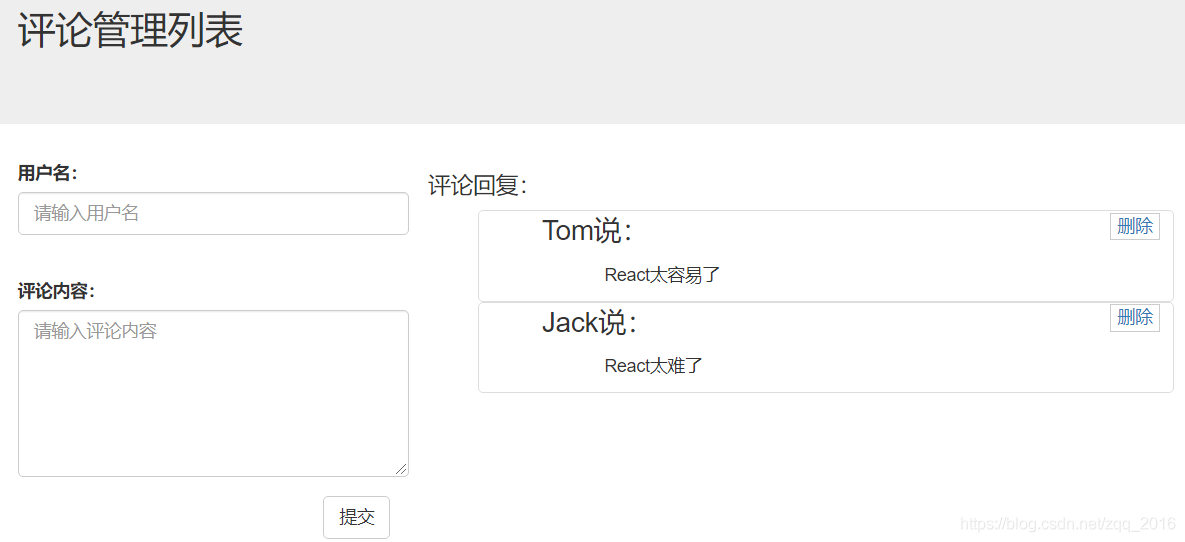


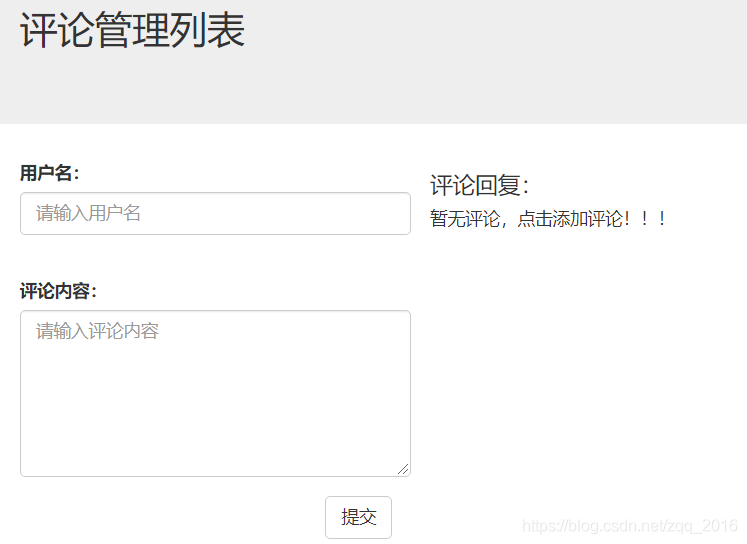
二、需求描述
1. 手动输入用户名和评论内容,点击提交;输入内容被追加到右侧评论列表;
2. 点击评论列表的“删除”按钮,弹框提示确定删除用户“xx”;
3. 点击“确定”,“xx”用户发表的评论被删除;
4. 所有评论均被删除时,显示“暂无评论,点击添加评论!!!”
三、代码实现
App.js
import React from 'react';
import './App.css';
import CommentAdd from '../src/components/CommentAdd'
import CommentList from '../src/components/CommentList'
import PropTypes from 'prop-types'
import "../src/assets/css/bootstrap.css"

class App extends React.Component {
 // 给组件对象指定state属性
 // 初始化状态
 state = {
 comments: [
  {username: "Tom", content: "React太容易了"},
  {username: "Jack", content: "React太难了"}
 ]
 }

 static propTypes = {
 comments: PropTypes.array.isRequired,
 addComment: PropTypes.func.isRequired,
 deleteComment: PropTypes.func.isRequired
 }

 addComment = (comment) => {
 // 将添加的评论追加到评论list上
 const {comments} = this.state
 comments.unshift(comment)
 // 更新状态
 this.setState({comments})
 }
 deleteComment = (index) => {
 const {comments} = this.state
 comments.splice(index, 1)
 this.setState({comments})
 }

 render() {
 const {comments} = this.state
 return (
  <div>
  <header className="site-header jumbotron">
   <div className="container">
   <div className="row">
    <div className="col-xs-12">
    <h2>评论管理列表</h2>
    </div>
   </div>
   </div>
  </header>
  <div className="container">
   <CommentAdd addComment={this.addComment}/>
   <CommentList comments={comments} deleteComment={this.deleteComment}/>
  </div>
  </div>
 );
 }
}

export default App;
CommentAdd.js
import React, {Component} from 'react';
import PropTypes from 'prop-types'
import "../assets/css/bootstrap.css"

class CommentAdd extends Component {

 state = {
 username: "",
 content: ""
 }

 static propTypes = {
 addComment: PropTypes.func.isRequired
 }
 handleNameChange = (event) => {
 const username = event.target.value
 this.setState({username});
 }
 handleContentChange = (event) => {
 const content = event.target.value
 this.setState({content});
 }
 handleSubmit = () => {
 const comment = this.state
 this.props.addComment(comment)
 // 清楚输入数据
 this.setState({
  username: "",
  content: ""
 });
 }

 render() {
 const {username, content} = this.props
 return (
  <div className="col-md-4">
  <form className="form-horizontal">
   <div className="form-group">
   <label>用户名:</label>
   <input type="text" className="form-control" placeholder="请输入用户名" value={username}
    onChange={this.handleNameChange}/><br/>
   </div>
   <div className="form-group">
   <label>评论内容:</label>
   <textarea className="form-control" rows="6" placeholder="请输入评论内容"
     value={content} onChange={this.handleContentChange}>
   </textarea>
   </div>
   <div className="form-group">
   <div className="col-sm-offset-2 col-sm-10">
    <button type="button" className="btn btn-default pull-right"
     onClick={this.handleSubmit}>提交
    </button>
   </div>
   </div>
  </form>
  </div>
 );
 }
}

export default CommentAdd;
CommentList.js
import React, {Component} from 'react';
import CommentItem from "./CommentItem";
import PropTypes from 'prop-types'
import "../assets/css/comment_list.css"

class CommentList extends Component {

 static propTypes = {
 comments: PropTypes.array.isRequired,
 deleteComment: PropTypes.func.isRequired
 }

 render() {
 const {comments, deleteComment} = this.props
 const display = comments.length === 0 ? "block" : "none"
 return (

  <div className="col-md-8">
  <h4>评论回复:</h4>
  <h5 style={{display}}>暂无评论,点击添加评论!!!</h5>
  <ul>
   {
   comments.map((comment, index) => <li key={index}><CommentItem comments={comment} index={index}
           deleteComment={deleteComment}/>
   </li>)
   }
  </ul>
  </div>
 );
 }
}

export default CommentList;
CommentItem.js
import React, {Component} from 'react';
import PropTypes from 'prop-types'
import "../assets/css/comment_item.css"

class CommentItem extends Component {
 static propTypes = {
 comments: PropTypes.array.isRequired,
 deleteComment: PropTypes.func.isRequired,
 index: PropTypes.number.isRequired
 }

 handleDeleteComment = () => {
 const {comments, deleteComment, index} = this.props
 if (window.confirm(`确定删除${comments.username}嘛?`)) {
  deleteComment(index)
 }
 }

 render() {
 const {comments} = this.props
 return (
  <div className="list-group-item">
  <div className="handle">
   <a href="javascript:;" rel="external nofollow" onClick={this.handleDeleteComment}>删除</a>
  </div>
  <p className="user"><span>{comments.username}</span><span>说:</span></p>
  <p className="centence">{comments.content}</p>
  </div>
 );
 }
}

export default CommentItem;
以上就是本文的全部内容,希望对大家的学习有所帮助,也希望大家多多支持脚本之家。
您可能感兴趣的文章:
相关文章

React Native实现Toast轻提示和loading效果
这篇文章主要介绍了React Native实现Toast轻提示和loading效果,本文通过实例代码给大家介绍的非常详细,对大家的学习或工作具有一定的参考借鉴价值,需要的朋友可以参考下2023-09-09 这篇文章主要介绍了React中的生命周期和子组件,文章围绕主题展开详细的内容介绍,具有一定的参考价值,感兴趣的小伙伴可以参考一下2022-08-08
react-router v4如何使用history控制路由跳转详解
这篇文章主要给大家介绍了关于react-router v4如何使用history控制路由跳转的相关资料,文中通过示例代码介绍的的非常详细,对大家的学习或者工作具有一定的参考学习价值,需要的朋友们下面随着小编来一起学习学习吧。2018-01-01 这篇文章主要介绍了深入浅析react native es6语法的相关资料,需要的朋友可以参考下2015-12-12
 这篇文章主要介绍了react中监听props的改变方式,具有很好的参考价值,希望对大家有所帮助,如有错误或未考虑完全的地方,望不吝赐教2024-01-01
 在现代开发中的弹窗样式,经常会是底部一个叉号样式的弹窗,但是目前组件库中并无类似弹窗组件,本文小编给大家介绍了React使用api的方式封装弹窗的示例,感兴趣的小伙伴跟着小编一起来看看吧2024-09-09
 在React中,通过自定义Hook useTimeHook实现定时器的启动与清除,在App组件中使用Clock组件展示当前时间,利用useEffect钩子在组件挂载时启动定时器,同时确保组件卸载时清除定时器,避免内存泄露,这种方式简化了状态管理和副作用的处理2024-10-10
React Native系列之Recyclerlistview使用详解
这篇文章主要为大家介绍了React Native系列之Recyclerlistview使用详解,有需要的朋友可以借鉴参考下,希望能够有所帮助,祝大家多多进步,早日升职加薪2022-10-10
Remix后台开发之remix-antd-admin配置过程
这篇文章主要为大家介绍了Remix后台开发之remix-antd-admin配置过程详解,有需要的朋友可以借鉴参考下,希望能够有所帮助,祝大家多多进步,早日升职加薪2023-04-04 这篇文章主要介绍了详解React 16 中的异常处理的相关资料,React 16.x 版本中,引入了所谓 Error Boundary 的概念,从而保证了发生在 UI 层的错误不会连锁导致整个应用程序崩溃;未被任何异常边界捕获的异常可能会导致整个 React 组件树被卸载,需要的朋友可以参考下2017-07-07
最新评论