

实现vuex原理的示例
更新时间:2020年10月21日 09:46:35 作者:舜岳
这篇文章主要介绍了实现vuex原理的示例,帮助大家更好的理解和学习vue,感兴趣的朋友可以了解下
效果图如下:

1. 准备好环境
使用 vue/cil 初始化项目配置:
npm install -g @vue/cli //全局安装@vue/cli vue create demo-vue //创建项目
yarn add vuex安装vuex创建一个store文件夹并使用:
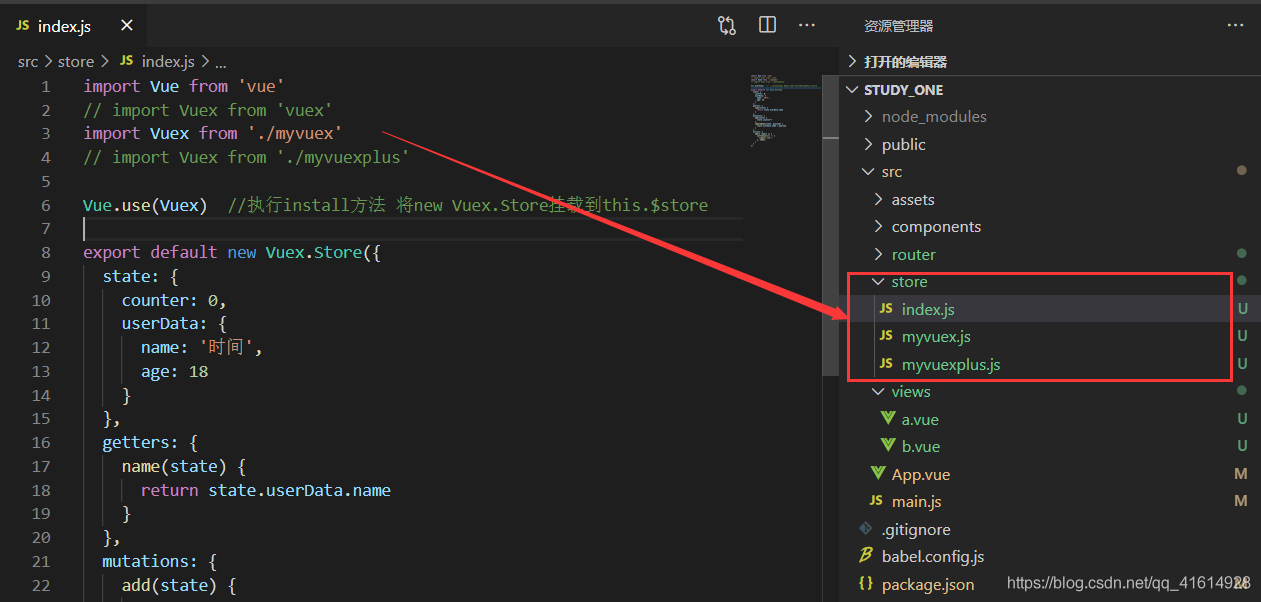
2. 实现目的
stroe/index.js内容如下:(我们的目的将引入自写的vuex实现vuex基础功能)
import Vue from 'vue'
import Vuex from 'vuex'
// import Vuex from './myvuex'   //我们实现的 青铜版vuex
// import Vuex from './myvuexplus' //我们实现的 白银版vuex

Vue.use(Vuex) //执行install方法 将new Vuex.Store挂载到this.$store

export default new Vuex.Store({
 state: {
  counter: 0,
  userData: {
   name: '时间',
   age: 18
  }
 },
 getters: {
  name(state) {
   return state.userData.name
  }
 },
 mutations: {
  add(state) {
   state.counter++
  },
  updateName(state, payload) {
   state.userData.name = payload
  }
 },
 actions: {
  add({ commit }) {
   setTimeout(() => {
    commit('add')
   }, 1000);
  }
 }
})
- 青铜版vuexmyvuex.js代码如下:
let Vue
class Store {
 constructor(options) {
  this._vm = new Vue({
   data: {
    state: options.state
   }
  })

  let getters = options.getters
  this.getters = {}
  Object.keys(getters).forEach((val) => {
   Object.defineProperty(this.getters, val, { //getters响应式
    get: () => {
     return getters[val](this.state)
    }
   })
  })

  this._actions = Object.assign({}, options.actions)
  this._mutations = Object.assign({}, options.mutations)
 }

 // get/set state目的:防止外部直接修改state
 get state() {
  return this._vm.state
 }
 set state(value) {
  console.error('please use replaceState to reset state')
 }

 commit = (funName, params) => { //this执行问题
  // 在mutations中找到funName中对应的函数并且执行
  this._mutations[funName](this.state, params)
 }

 dispatch(funName, params) {
  this._actions[funName](this, params)
 }
}

function install(vue) {
 Vue = vue
 vue.mixin({
  beforeCreate () {
   // 将 new Store() 实例挂载到唯一的根组件 this 上
   if (this.$options?.store) {
    this.$store = this.$options.store
   } else {
    this.$store = this.$parent && this.$parent.$store
   }
  }
 })
}

export default {
 Store,
 install
}
青铜版vuex this.$stroe:

- 白银版vuexmyvuexplus.js代码如下:
let _Vue
const install = function(Vue, opts) {
 _Vue = Vue
 _Vue.mixin({ // 因为我们每个组件都有 this.$store这个东西,所以我们使用混入模式
  beforeCreate () { // 从根组件向子组件遍历赋值,这边的 this 就是每个 Vue 实例
   if (this.$options && this.$options.store) { // 这是根节点
    this.$store = this.$options.store
   } else {
    this.$store = this.$parent && this.$parent.$store
   }
  }
 })
}

class ModuleCollection {
 constructor(opts) {
  this.root = this.register(opts)
 }

 register(module) {
  let newModule = {
   _raw: module,
   _state: module.state || {},
   _children: {}
  }
  Object.keys(module.modules || {}).forEach(moduleName => {
   newModule._children[moduleName] = this.register(module.modules[moduleName])
  })
  return newModule
 }
}

class Store {
 constructor(opts) {
  this.vm = new _Vue({
   data () {
    return {
     state: opts.state // 把对象变成响应式的,这样才能更新视图
    }
   }
  })

  this.getters = {}
  this.mutations = {}
  this.actions = {}

  // 先格式化传进来的 modules 数据
  // 嵌套模块的 mutation 和 getters 都需要放到 this 中
  this.modules = new ModuleCollection(opts)
  console.log(this.modules)

  Store.installModules(this, [], this.modules.root)
 }

 commit = (mutationName, value) => { // 这个地方 this 指向会有问题,这其实是挂载在实例上
  this.mutations[mutationName].forEach(f => f(value))
 }

 dispatch(actionName, value) {
  this.actions[actionName].forEach(f => f(value))
 }

 get state() {
  return this.vm.state
 }
}
Store.installModules = function(store, path, curModule) {
 let getters = curModule._raw.getters || {}
 let mutations = curModule._raw.mutations || {}
 let actions = curModule._raw.actions || {}
 let state = curModule._state || {}

 // 把子模块的状态挂载到父模块上,其他直接挂载到根 store 上即可
 if (path.length) {
  let parent = path.slice(0, -1).reduce((pre, cur) => {
   return pre[cur]
  }, store.state)
  _Vue.set(parent, path[path.length - 1], state)
 }

 Object.keys(getters).forEach(getterName => {
  Object.defineProperty(store.getters, getterName, {
   get: () => {
    return getters[getterName](state)
   }
  })
 })

 Object.keys(mutations).forEach(mutationName => {
  if (!(store.mutations && store.mutations[mutationName])) store.mutations[mutationName] = []
  store.mutations[mutationName].push(value => {
   mutations[mutationName].call(store, state, value)
  })
 })

 Object.keys(actions).forEach(actionName => {
  if (!(store.actions && store.actions[actionName])) store.actions[actionName] = []
  store.actions[actionName].push(value => {
   actions[actionName].call(store, store, value)
  })
 })

 Object.keys(curModule._children || {}).forEach(module => {
  Store.installModules(store, path.concat(module), curModule._children[module])
 })


}

// computed: mapState(['name'])
// 相当于 name(){ return this.$store.state.name }
const mapState = list => { // 因为最后要在 computed 中调用
 let obj = {}
 list.forEach(stateName => {
  obj[stateName] = () => this.$store.state[stateName]
 })
 return obj
}

const mapGetters = list => { // 因为最后要在 computed 中调用
 let obj = {}
 list.forEach(getterName => {
  obj[getterName] = () => this.$store.getters[getterName]
 })
 return obj
}

const mapMutations = list => {
 let obj = {}
 list.forEach(mutationName => {
  obj[mutationName] = (value) => {
   this.$store.commit(mutationName, value)
  }
 })
 return obj
}

const mapActions = list => {
 let obj = {}
 list.forEach(actionName => {
  obj[actionName] = (value) => {
   this.$store.dispatch(actionName, value)
  }
 })
 return obj
}

export default {
 install,
 Store,
 mapState,
 mapGetters,
 mapMutations,
 mapActions
}
白银版vuex this.$stroe:

3. App.vue 内使用自写的vuex:
<template>
 <div id="app">
  <button @click="$store.commit('add')">$store.commit('add'): {{$store.state.counter}}</button>
  <br>
  <button @click="$store.commit('updateName', new Date().toLocaleString())">$store.commit('updateName', Date): {{$store.getters.name}}</button>
  <br>
  <button @click="$store.dispatch('add')">async $store.dispatch('add'): {{$store.state.counter}}</button>
 </div>
</template>
<script>
...
以上就是实现vuex原理的示例的详细内容,更多关于实现vuex原理的资料请关注脚本之家其它相关文章!
相关文章
 本文介绍了Pinia的使用方法及如何实现状态持久化存储,首先,介绍了Pinia的安装和在main.ts中的挂载,介绍了getters和actions的使用方法,最后,详细说明了如何通过Pinia-plugin-persistedstate插件实现Pinia状态的持久化处理,包括插件的安装、配置和在main.ts文件中的注册2024-10-10
 这篇文章主要介绍了Vue+element-ui 实现表格的分页功能示例,小编觉得挺不错的,现在分享给大家,也给大家做个参考。一起跟随小编过来看看吧2018-08-08
 这篇文章主要介绍了Vue实现Header渐隐渐现效果,本文通过实例代码给大家介绍的非常详细,对大家的学习或工作具有一定的参考借鉴价值,需要的朋友可以参考下2020-11-11
 这篇文章主要给大家介绍了关于Vue如何在CSS中使用data定义的数据的相关资料,文中通过实例代码介绍的非常详细,对大家学习或者使用vue具有一定的参考学习价值,需要的朋友可以参考下2022-05-05
vue+ElementUI 关闭对话框清空验证,清除form表单的操作
这篇文章主要介绍了vue+ElementUI 关闭对话框清空验证,清除form表单的操作,具有很好的参考价值,希望对大家有所帮助。一起跟随小编过来看看吧2020-08-08 这篇文章主要介绍了利用Vue通过自定义指令实现内容替换的方法,通过Vue.directive指令定义函数来实现内容自定义,通过指令定义函数的三个钩子函数(inserted、componentUpdated、unbind)来实现自定义内容的挂载、更新和销毁,需要的朋友可以参考下2025-03-03
 这篇文章主要介绍了vue-cli webpack配置文件分析,小编觉得挺不错的,现在分享给大家,也给大家做个参考。一起跟随小编过来看看吧2019-05-05
Element通过v-for循环渲染的form表单校验的实现
日常业务开发中,form表单校验是一个很常见的问题,本文主要介绍了Element通过v-for循环渲染的form表单校验的实现,文中通过示例代码介绍的非常详细,对大家的学习或者工作具有一定的参考学习价值,需要的朋友们下面随着小编来一起学习学习吧2022-04-04 这篇文章主要给大家介绍了vue实现发送短信倒计时和重发短信功能的相关知识,文中通过代码示例给大家介绍的非常详细,需要的朋友可以参考下2023-12-12
 这篇文章主要为大家介绍了c++游戏教程使用easyx实现大飞机示例详解,有需要的朋友可以借鉴参考下,希望能够有所帮助,祝大家多多进步,早日升职加薪2022-08-08
最新评论