

vue中可编辑树状表格的实现代码
更新时间:2020年10月31日 14:52:17 作者:等樱花的龙猫
这篇文章主要介绍了vue中可编辑树状表格的实现代码,本文通过实例代码给大家介绍的非常详细,对大家的学习或工作具有一定的参考借鉴价值,需要的朋友可以参考下
vue中可编辑树状表格的代码如下所示:
html代码
 <template>
	<el-table
    :data="datatree"
    row-key="id"
    :tree-props="{children: 'children'}"
   >
    <el-table-column label="姓名" border>
        <template slot-scope="scope">
          <el-input placeholder="请输入内容" v-show="scope.row.show" v-model="scope.row.label"></el-input>
          <span v-show="!scope.row.show">{{scope.row.label}}</span>
        </template>
      </el-table-column>
      <el-table-column label="操作">
        <template slot-scope="scope">
          <el-button @click="scope.row.show =true" >编辑</el-button>
          <el-button @click="scope.row.show =false">保存</el-button>
        </template>
      </el-table-column>
   </el-table>
 </template>
js代码
<script>
export default {
	data(){
  	return {
  	datatree: [{
     id: 1,
     label: '水果',
     show:false,
     children: [{
      id: 4,
      label: '苹果',
      show:false,
      children: [{
       id: 9,
       label: '苹果皮',
       show:false
      }, {
       id: 10,
       label: '苹果仔',
       show:false
      }]
     }]
    }, {
     id: 2,
     label: '蔬菜',
     show:false,
     children: [{
      id: 5,
      label: '青菜',
      show:false
     }, {
      id: 6,
      label: '土豆',
      show:false
     }]
    }, {
     id: 3,
     label: '饮料',
     show:false,
     children: [{
      id: 7,
      label: '冰红茶',
      show:false
     }, {
      id: 8,
      label: '酷儿',
      show:false
     }]
    }],
    defaultProps: {
     children: 'children',
     label: 'label',
     show:'show'
    }
  }
 }
}
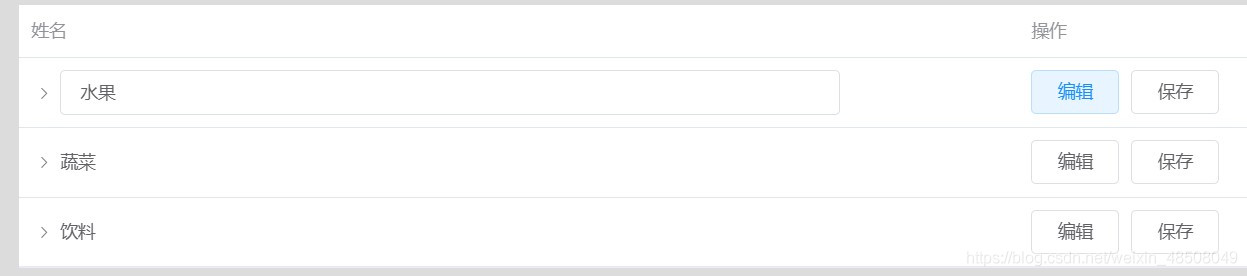
效果图

一个简单的可编辑树状表格就出现了
嫌input框太大自己设置一下

到此这篇关于vue中可编辑树状表格的实现代码的文章就介绍到这了,更多相关vue树状表格内容请搜索脚本之家以前的文章或继续浏览下面的相关文章希望大家以后多多支持脚本之家!
相关文章
 本文详细介绍了如何在使用Vite构建的Vue项目中实现ElementPlus暗黑模式及模式切换,文中通过示例代码介绍的非常详细,对大家的学习或者工作具有一定的参考学习价值,需要的朋友们下面随着小编来一起学习学习吧2024-11-11
 本文给大家分享了vue实现登录后页面跳转到之前页面的一个功能,有这方便需要的朋友学习参考下吧。2018-01-01
 在Vue3中,推荐使用::deep作为深度选择器,它比Vue2中的::v-deep语法更简洁,::v-deep、::deep、:deep()、>>>和/deep/都是用于穿透组件作用域的选择器,但Vue3更倾向于使用::deep或:deep(),感兴趣的朋友跟随小编一起看看吧2024-10-10
Vuex处理用户Token过期及优化设置封装本地存储操作模块
这篇文章主要为大家介绍了Vuex处理用户Token优化设置封装本地存储操作模块及Token 过期问题详解,有需要的朋友可以借鉴参考下,希望能够有所帮助,祝大家多多进步,早日升职加薪2022-09-09 这篇文章主要介绍了Vue 页面权限控制和登陆验证功能的实例代码,非常不错,具有一定的参考借鉴价值,需要的朋友可以参考下2019-06-06
 这篇文章主要为大家介绍了vue源码解析computed多次访问会有死循环原理,有需要的朋友可以借鉴参考下,希望能够有所帮助,祝大家多多进步,早日升职加薪2023-04-04
 这篇文章主要为大家详细介绍了Vue表单双绑和组件,文中示例代码介绍的非常详细,具有一定的参考价值,感兴趣的小伙伴们可以参考一下,希望能够给你带来帮助2022-03-03
 这篇文章主要为大家介绍了vue使用微软的开发接口Office Web,实现线上文件预览,预览word,excel,pptx,pdf文件,有需要的朋友可以借鉴参考下,希望能够有所帮助,祝大家多多进步,早日升职加薪2022-07-07
 这篇文章主要为大家详细介绍了vue实现echarts中的仪表盘,文中示例代码介绍的非常详细,具有一定的参考价值,感兴趣的小伙伴们可以参考一下2022-03-03
详解vue-cli快速构建vue应用并实现webpack打包
这篇文章主要介绍了详解vue-cli快速构建vue应用并实现webpack打包,小编觉得挺不错的,现在分享给大家,也给大家做个参考。一起跟随小编过来看看吧2017-12-12
最新评论