

使用Vant完成通知栏Notify的提示操作
更新时间:2020年11月11日 08:41:43 作者:柠檬不萌只是酸i
这篇文章主要介绍了使用Vant完成通知栏Notify的提示操作,具有很好的参考价值,希望对大家有所帮助。一起跟随小编过来看看吧
效果:
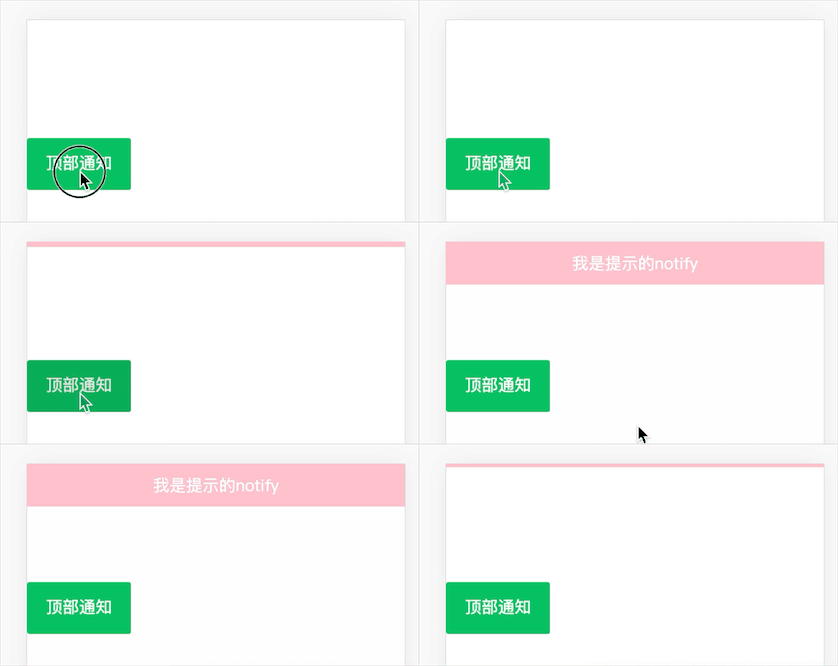
代码展示:
<template>
 <!-- 通知消息提示 -->
 <div id="notify">
  <van-button type="primary" @click="toNotify" class="btn">顶部通知</van-button>
 </div>
</template>
<script>
 export default{
 data(){
  return{
  msg:''
  }
 },
 methods:{
  toNotify(){
  this.$notify({
   message:'我是提示的notify',
   background:'pink',
   duration: 1000
  })
  }
 },
 mounted() {

 }
 }
</script>
<style scoped="scoped">
 .btn{
 margin-top: 100px;
 }
</style>
补充知识:vantweapp引入notify消息提示组件解决importpath/to/@vant/weapp/dist/notify/notify和‘selectComponent‘ of undefined
**
微信小程序搭配vantweapp引入notify消息提示组件
/path/to/@vant/weapp/dist/notify/notify未找到
‘selectComponent‘ of undefined报错
解决办法:
** import引入相对路径
Notify({ type: ‘success', message: ‘通知内容' });//放入事件中
对应js文件代码:
import Notify from '../../miniprogram_npm/@vant/weapp/notify/notify';
Page({
 data: {},
 //btnSub是事件名
 btnSub() {
 Notify({ type: 'success', message: '通知'});
 }
})
wxml文件代码
<van-notify id="van-notify" />
app.json文件代码
"usingComponents": {
 "van-notify": "@vant/weapp/notify/index"
}
以上这篇使用Vant完成通知栏Notify的提示操作就是小编分享给大家的全部内容了,希望能给大家一个参考,也希望大家多多支持脚本之家。
相关文章

基于Vue sessionStorage实现保留搜索框搜索内容
这篇文章主要介绍了基于Vue sessionStorage实现保留搜索框搜索内容,文中通过示例代码介绍的非常详细,对大家的学习或者工作具有一定的参考学习价值,需要的朋友可以参考下2020-06-06 这篇文章主要给大家介绍了关于vue3父子组件传值中props使用细节的相关资料,文中通过实例代码介绍的非常详细,对大家的学习或者工作具有一定的参考学习价值,需要的朋友可以参考下2022-03-03
 这篇文章主要介绍了vue-quill-editor如何设置字体大小,具有很好的参考价值,希望对大家有所帮助。如有错误或未考虑完全的地方,望不吝赐教2022-04-04
 这篇文章主要给大家介绍了关于Vue3在router中使用pinia报错的简单解决办法,什么是pinia,可以理解为状态管理工具,文中通过图文介绍的非常详细,需要的朋友可以参考下2023-08-08
 本篇文章主要介绍了在基于vue-cli的项目自定义打包环境,小编觉得挺不错的,现在分享给大家,也给大家做个参考。一起跟随小编过来看看吧2018-11-11
 这篇文章主要为大家详细介绍了vue-dialog的弹出层组件,可以通过npm引用的组件,具有一定的参考价值,感兴趣的小伙伴们可以参考一下2017-03-03
 本篇文章主要介绍了用vuex写了一个购物车H5页面的示例代码,文中通过示例代码介绍的非常详细,对大家的学习或者工作具有一定的参考学习价值,需要的朋友们下面随着小编来一起学习学习吧2018-12-12
 这篇文章主要介绍了Vue.extend 编程式插入组件的实现,文中通过示例代码介绍的非常详细,对大家的学习或者工作具有一定的参考学习价值,需要的朋友们下面随着小编来一起学习学习吧2019-11-11
 这篇文章主要介绍了vue.js body的css不生效问题及解决方案,具有很好的参考价值,希望对大家有所帮助。如有错误或未考虑完全的地方,望不吝赐教2023-06-06
Vue中@change、@input和@blur的区别及@keyup介绍
这篇文章主要给大家介绍了关于Vue中@change、@input和@blur的区别及@keyup介绍的相关资料,文中通过实例代码介绍的非常详细,对大家的学习或者工作具有一定的参考学习价值,需要的朋友可以参考下2023-02-02
最新评论