

JavaFX实现简易时钟效果(一)
更新时间:2020年11月15日 11:20:41 作者:酸甜梅子
这篇文章主要为大家详细介绍了JavaFX实现简易时钟效果的第一篇,文中示例代码介绍的非常详细,具有一定的参考价值,感兴趣的小伙伴们可以参考一下
本文实例为大家分享了JavaFX实现简易时钟效果的具体代码,供大家参考,具体内容如下
效果图
用当前时间创建时钟,绘制表盘。
钟表是静止的。让指针动起来,请参照:绘制简易时钟(二)
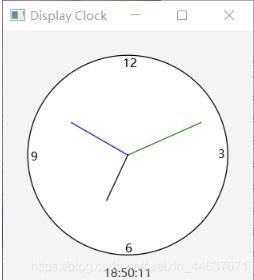
主函数文件 ShowClock:
package primier;

import javafx.application.Application;
import javafx.geometry.Insets;
import javafx.geometry.Pos;
import javafx.scene.Scene;
import javafx.stage.Stage;
import javafx.scene.paint.Color;
import javafx.scene.layout.*;
import javafx.scene.control.*;
import javafx.scene.image.Image;
import javafx.scene.image.ImageView;
import javafx.scene.shape.Line;

public class ShowClock extends Application {
 @Override //Override the start method in the Application class
 public void start(Stage primaryStage) {
  // 创建时钟面板
  ClockPane clock = new ClockPane();
  // 当前时间整理为字符串
  String timeString = clock.getHour() + ":" + clock.getMinute()
    + ":" + clock.getSecond();
  Label lbCurrentTime = new Label(timeString);

  BorderPane pane = new BorderPane();
  pane.setCenter(clock);
  pane.setBottom(lbCurrentTime);
  // 将时钟字符串设为靠上居中
  BorderPane.setAlignment(lbCurrentTime, Pos.TOP_CENTER);

  Scene scene = new Scene(pane, 250,250);
  primaryStage.setTitle("Display Clock");
  primaryStage.setScene(scene);
  primaryStage.show();
 }
 public static void main (String[] args) {
  Application.launch(args);
 }
}
ClockPane 类
package primier;

import java.util.Calendar;
import java.util.GregorianCalendar;
import javafx.scene.layout.Pane;
import javafx.scene.paint.Color;
import javafx.scene.shape.Circle;
import javafx.scene.shape.Line;
import javafx.scene.text.Text;

public class ClockPane extends Pane {
 private int hour;
 private int minute;
 private int second;

 // 时钟面板的宽度和高度
 private double w = 250, h = 250;

 /** 用当前时间创建时钟 */
 public ClockPane() {
  setCurrentTime();
 }

 /** Return hour */
 public int getHour() { return hour; }

 /** Return minute */
 public int getMinute() { return minute; }

 /** Return second */
 public int getSecond() { return second; }

 /** Set the current time for the clock */
 public void setCurrentTime() {
  // 用当前时间创建Calendar类
  Calendar calendar = new GregorianCalendar();
  this.hour = calendar.get(Calendar.HOUR_OF_DAY);
  this.minute = calendar.get(Calendar.MINUTE);
  this.second = calendar.get(Calendar.SECOND);
  paintClock();
 }

 /** 绘制时钟 */
 protected void paintClock() {
  double clockRadius = Math.min(w,h)*0.4; // 时钟半径
  // 时钟中心x, y坐标
  double centerX = w/2;
  double centerY = h/2;

 // 绘制钟表
  Circle circle = new Circle(centerX, centerY, clockRadius);
  circle.setFill(Color.WHITE); // 填充颜色
  circle.setStroke(Color.BLACK); // 笔画颜色
  Text t1 = new Text(centerX-5, centerY-clockRadius+12,"12");
  Text t2 = new Text(centerX-clockRadius+3, centerY +5, "9");
  Text t3 = new Text(centerX+clockRadius-10, centerY+3, "3");
  Text t4 = new Text(centerX-3, centerY+clockRadius-3,"6");

  // 秒针
  double sLength = clockRadius * 0.8;
  double secondX = centerX + sLength * Math.sin(second * (2 * Math.PI / 60));
  double secondY = centerY - sLength * Math.cos(second * (2 * Math.PI / 60));
  Line sLine = new Line(centerX, centerY, secondX, secondY);
  sLine.setStroke(Color.GRAY);

  // 分针
  double mLength = clockRadius * 0.65;
  double minuteX = centerX + mLength * Math.sin(minute * (2 * Math.PI / 60));
  double minuteY = centerY - mLength * Math.cos(minute * (2 * Math.PI / 60));
  Line mLine = new Line(centerX, centerY, minuteX, minuteY);
  mLine.setStroke(Color.BLUE);

  // 时针
  double hLength = clockRadius * 0.5;
  double hourX = centerX + hLength *
    Math.sin((hour % 12 + minute / 60.0) * (2 * Math.PI / 12));
  double hourY = centerY - hLength *
    Math.cos((hour % 12 + minute / 60.0) * (2 * Math.PI / 12));
  Line hLine = new Line(centerX, centerY, hourX, hourY);
  sLine.setStroke(Color.GREEN);

 // 将之前的结点清空,绘制新创建的结点
  getChildren().clear();
  getChildren().addAll(circle, t1, t2, t3, t4, sLine, mLine, hLine);
 }
}
以上就是本文的全部内容,希望对大家的学习有所帮助,也希望大家多多支持脚本之家。
相关文章
 文章介绍了Spring Security在分布式环境下的使用,包括单点登录(SSO)的概念、流程图以及JWT(JSON Web Token)的生成和校验,通过使用JWT和RSA非对称加密,可以实现安全的分布式认证,感兴趣的朋友一起看看吧2025-02-02
 这篇文章主要为大家介绍了zookeeper的Leader选举源码解析,有需要的朋友可以借鉴参考下,希望能够有所帮助,祝大家多多进步,早日升职加薪2023-03-03
 HashMap 作为 Java 中最常用的数据结构之一,用于存储和管理键值对,HashMap 基于哈希函数实现,能通过将 key 映射到特定的位置来实现快速存储、查找和删除数据,接下来将从源码角度分析以通俗易懂的方式向大家讲解一下 HashMap 如何确定 key 的存储位置的2023-07-07
 这篇文章主要介绍了JVM的类加载机制的相关资料,帮助大家更好的理解和学习Java,感兴趣的朋友可以了解下2020-09-09
 本篇文章主要介绍了java实现微信H5支付方法详解,非常具有实用价值,需要的朋友可以参考下2017-04-04
 下面小编就为大家分享一篇JFinal极速开发框架使用笔记,具有很好的参考价值,希望对大家有所帮助。一起跟随小编过来看看吧2018-01-01
 在本篇文章里小编给大家整理的是关于springboot 切面添加日志功能的相关知识点内容,有需要的朋友们可以参考下。2019-09-09
使用Spring AntPathMatcher的doMatch方法
这篇文章主要介绍了使用Spring AntPathMatcher的doMatch方法,具有很好的参考价值,希望对大家有所帮助。如有错误或未考虑完全的地方,望不吝赐教2021-09-09
Mybatis selectKey 如何返回新增用户的id值
这篇文章主要介绍了Mybatis selectKey 如何返回新增用户的id值,具有很好的参考价值,希望对大家有所帮助。如有错误或未考虑完全的地方,望不吝赐教2022-01-01 Spring,SpringBoot框架凭借多种高效机制,显著增强了代码的功能性,并实现了切面编程(AOP)的精髓,其核心亮点之一,是运用动态代理技术,无需触动源代码即可在Bean的运行时为其动态织入额外功能,本文给大家介绍了SpringBoot通过3种方式实现AOP切面,需要的朋友可以参考下2024-08-08
最新评论