

Android窗口小部件基础编写代码实例
更新时间:2020年11月17日 10:48:29 投稿:yaominghui
这篇文章主要介绍了Android窗口小部件基础编写代码实例,文中通过示例代码介绍的非常详细,对大家的学习或者工作具有一定的参考学习价值,需要的朋友可以参考下
实现窗口小部件,访问手机储存卡指定目录中的图片文件,然后随机选择一张在窗口的小部件中显示。图片路径使用List存储,适合初级Android学习者参考。本系统无服务,不能保证进程长存。
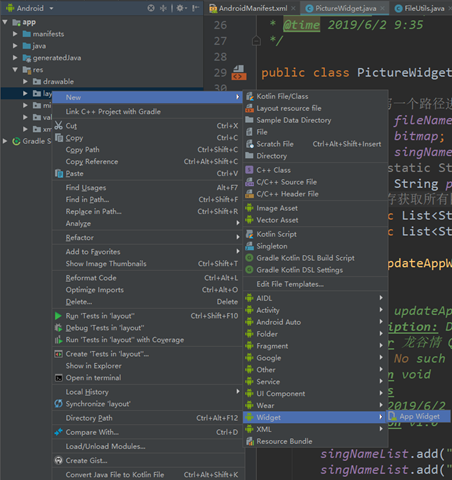
新建一个空的布局项目,然后新建一个Widget,如图所示:
在新建的xml和java实现类中进行编写即可。
picture_widget.xml文件如下:
<RelativeLayout xmlns:android="http://schemas.android.com/apk/res/android"
  android:layout_width="match_parent"
  android:layout_height="match_parent"
  android:padding="@dimen/widget_margin">

  <ImageView
    android:id="@+id/picture_widget"
    android:layout_width="match_parent"
    android:layout_height="match_parent"
    android:src="@drawable/zhizhuxia" />
  <TextView
    android:id="@+id/change_picture"
    android:layout_width="wrap_content"
    android:layout_height="wrap_content"
    android:text=""
    android:textSize="10dp"
    android:gravity="right|bottom"
    android:layout_marginRight="2dp"
    android:layout_marginBottom="2dp"/>
</RelativeLayout>
以上就是本文的全部内容,希望对大家的学习有所帮助,也希望大家多多支持脚本之家。
相关文章
 这篇文章主要介绍了Android 操作excel功能实例代码 ,需要的朋友可以参考下2017-01-01
Android 1.5 1.6 2.0 2.1 2.2 的区别详解
本篇文章是对Android 1.5 1.6 2.0 2.1 2.2 版本之间的区别进行了详细的分析介绍,需要的朋友参考下2013-06-06 这篇文章主要为大家详细介绍了一个简单的toolabar结合drawlayout的使用方法,具有一定的参考价值,感兴趣的小伙伴们可以参考一下2017-10-10
 在本文里我们给大家分享了关于TableLayout(表格布局)的相关基础知识点内容,需要的朋友们学习下。2019-02-02
Android CameraX结合LibYUV和GPUImage自定义相机滤镜
之前使用Camera实现了一个自定义相机滤镜(Android自定义相机滤镜 ),但是运行起来有点卡顿,这次用Camerax来实现一样的效果发现很流畅,在此记录一下,也希望能帮到有需要的同学2021-12-12 这篇文章主要为大家详细介绍了Android实现微信的图片选择器,具有一定的参考价值,感兴趣的小伙伴们可以参考一下2017-12-12
 这篇文章主要为大家详细介绍了如何简单实现Android文件上传的相关资料,具有一定的参考价值,感兴趣的小伙伴们可以参考一下2016-12-12
 这篇文章主要为大家介绍了如何利用Flutter实现笑嘻嘻的动态表情,文中的示例代码讲解详细,对我们学习Flutter有一定帮助,感兴趣的可以了解一下2022-04-04
 这篇文章主要介绍了flutter封装单选点击菜单工具栏组件,有需要的朋友可以借鉴参考下,希望能够有所帮助,祝大家多多进步,早日升职加薪2022-05-05
Android AndBase框架内部封装实现进度框、Toast框、弹出框、确认框(二)
这篇文章主要介绍了Android AndBase框架使用AbActivity内部封装实现进度框、Toast框、弹出框、确认框,感兴趣的小伙伴们可以参考一下2016-03-03
最新评论