

Vue $attrs & inheritAttr实现button禁用效果案例
更新时间:2020年12月07日 09:13:27 作者:书院二层楼
这篇文章主要介绍了Vue $attrs & inheritAttr实现button禁用效果案例,具有很好的参考价值,希望对大家有所帮助。一起跟随小编过来看看吧
components/Button.vue
<template>
 <div>
  <button :disabled="$attrs.disabled">点击</button>
 </div>
</template>

<script>
 export default {
   inheritAttrs: false,
 }
</script>

<style scoped>
</style>
App.vue
<template>
 <div id="app">
 <Parent></Parent>
 <Button disabled></Button>
 </div>
</template>
<script>
import Parent from './components/Parent'
import Button from './components/Button';

export default {
 name: 'App',
 components: {
 Parent,
 Button
 }
}
</script>
<style>
#app {
 font-family: Avenir, Helvetica, Arial, sans-serif;
 -webkit-font-smoothing: antialiased;
 -moz-osx-font-smoothing: grayscale;
 text-align: center;
 color: #2c3e50;
 margin-top: 60px;
}
</style>
效果截图1-inheritAttrs默认true:
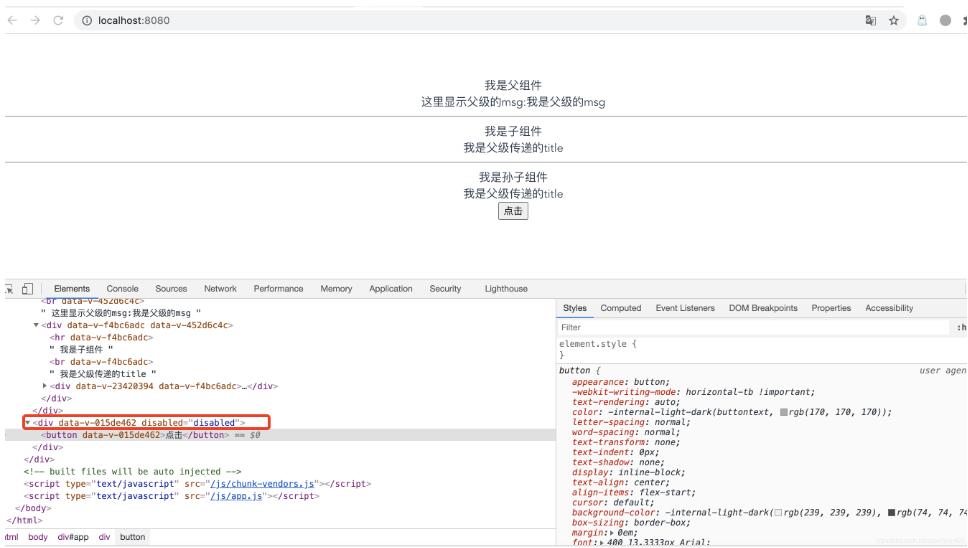
效果截图2-inheritAttrs=false:

补充知识:vue中使用inheritAttrs实现组件的扩展性
1、首先我们创建一个input组件
<template>
  <div class="inputCom-wrap">
    <input v-bind="$attrs" />
  </div>
</template>

<script lang="ts">
import { defineComponent } from 'vue'

export default defineComponent({
  inheritAttrs:false,//不希望根直接继承特性,而是使用$attrs自定义继承,当前组件的根就是inputCom-wrap
  setup () {
    return {}
  }
})
</script>

<style scoped>
</style>
2、使用组件的时候,随便增加一些属性,如
<inputCom type="text" class="input-a"></inputCom>
<inputCom type="password" class="input-b"></inputCom>
3、查看最终的渲染结果为(与props不会冲突)

以上这篇Vue $attrs & inheritAttr实现button禁用效果案例就是小编分享给大家的全部内容了,希望能给大家一个参考,也希望大家多多支持脚本之家。
相关文章

VUE的history模式下除了index外其他路由404报错解决办法
在本篇文章里小编给大家分享的是关于VUE的history模式下除了index外其他路由404报错解决办法,对此有需要的朋友们可以学习下。2019-08-08
Vue export default中的name属性有哪些作用
这篇文章主要介绍了Vue export default中的name属性有哪些作用,具有很好的参考价值,希望对大家有所帮助。如有错误或未考虑完全的地方,望不吝赐教2022-03-03 本篇文章主要介绍了Vue 获取数组键名的方法,小编觉得挺不错的,现在分享给大家,也给大家做个参考。一起跟随小编过来看看吧2018-06-06
 这篇文章主要介绍了关于表单组件el-form中的prop的作用,具有很好的参考价值,希望对大家有所帮助。如有错误或未考虑完全的地方,望不吝赐教2022-05-05
Vue中使用vue-plugin-hiprint插件进行打印的功能实现
hiprint 是一个web 打印的js组件,无需安装软件,支持windows,macOS,linux 系统,支持移动端,PC端浏览器,angular,vue,react 等 分页预览,打印,操作简单,运行快速,本文介绍了Vue中使用vue-plugin-hiprint插件进行打印,需要的朋友可以参考下2025-04-04 这篇文章主要介绍了如何利用Vue+ElementUi实现评论功能,结合实例代码给大家介绍的非常详细,对大家的学习或工作具有一定的参考借鉴价值,需要的朋友可以参考下2024-04-04
 这篇文章主要介绍了Vue中import与@import的区别及使用场景说明,具有很好的参考价值,希望对大家有所帮助。如有错误或未考虑完全的地方,望不吝赐教2023-06-06
 这篇文章主要介绍了vue 单页应用和多页应用的优劣,帮助大家更好的理解和使用vue,感兴趣的朋友可以了解下2020-10-10
 在Vue中,修饰符处理了许多DOM事件的细节,让我们不再需要花大量的时间去处理这些烦恼的事情,而能有更多的精力专注于程序的逻辑处理,需要的朋友可以参考下2023-04-04
 这篇文章主要介绍了Vue前端实现导出页面为word的两种方法,文中通过代码示例和图文介绍的非常详细,对大家的学习或工作有一定的帮助,需要的朋友可以参考下2024-12-12
最新评论