

如何在vue中使用kindeditor富文本编辑器
更新时间:2020年12月19日 09:36:24 作者:火星黑洞
这篇文章主要介绍了vue中使用kindeditor富文本编辑器的方法,帮助大家更好的理解和使用vue框架,感兴趣的朋友可以了解下
第一步,下载依赖
yarn add kindeditor
第二步,建立kindeditor.vue组件
<template>
 <div class="kindeditor">
 <textarea :id="id" name="content" v-model="outContent"></textarea>
 </div>
</template>

<script>
import '../../node_modules/kindeditor/kindeditor-all.js'
import '../../node_modules/kindeditor/lang/zh-CN.js'
import '../../node_modules/kindeditor/themes/default/default.css'

export default {
 name: 'kindeditor',
 data () {
 return {
  editor: null,
  outContent: this.content
 }
 },
 props: {
 content: {
  type: String,
  default: ''
 },
 id: {
  type: String,
  required: true
 },
 width: {
  type: String
 },
 height: {
  type: String
 },
 minWidth: {
  type: Number,
  default: 650
 },
 minHeight: {
  type: Number,
  default: 100
 },
 items: {
  type: Array,
  default: function () {
  return [
   'source', '|', 'undo', 'redo', '|', 'preview', 'print', 'template', 'code', 'cut', 'copy', 'paste',
   'plainpaste', 'wordpaste', '|', 'justifyleft', 'justifycenter', 'justifyright',
   'justifyfull', 'insertorderedlist', 'insertunorderedlist', 'indent', 'outdent', 'subscript',
   'superscript', 'clearhtml', 'quickformat', 'selectall', '|', 'fullscreen', '/',
   'formatblock', 'fontname', 'fontsize', '|', 'forecolor', 'hilitecolor', 'bold',
   'italic', 'underline', 'strikethrough', 'lineheight', 'removeformat', '|', 'image', 'multiimage',
   'flash', 'media', 'insertfile', 'table', 'hr', 'emoticons', 'baidumap', 'pagebreak',
   'anchor', 'link', 'unlink', '|', 'about'
  ]
  }
 },
 noDisableItems: {
  type: Array,
  default: function () {
  return ['source', 'fullscreen']
  }
 },
 filterMode: {
  type: Boolean,
  default: true
 },
 htmlTags: {
  type: Object,
  default: function () {
  return {
   font: ['color', 'size', 'face', '.background-color'],
   span: ['style'],
   div: ['class', 'align', 'style'],
   table: ['class', 'border', 'cellspacing', 'cellpadding', 'width', 'height', 'align', 'style'],
   'td,th': ['class', 'align', 'valign', 'width', 'height', 'colspan', 'rowspan', 'bgcolor', 'style'],
   a: ['class', 'href', 'target', 'name', 'style'],
   embed: ['src', 'width', 'height', 'type', 'loop', 'autostart', 'quality',
   'style', 'align', 'allowscriptaccess', '/'],
   img: ['src', 'width', 'height', 'border', 'alt', 'title', 'align', 'style', '/'],
   hr: ['class', '/'],
   br: ['/'],
   'p,ol,ul,li,blockquote,h1,h2,h3,h4,h5,h6': ['align', 'style'],
   'tbody,tr,strong,b,sub,sup,em,i,u,strike': []
  }
  }
 },
 wellFormatMode: {
  type: Boolean,
  default: true
 },
 resizeType: {
  type: Number,
  default: 2
 },
 themeType: {
  type: String,
  default: 'default'
 },
 langType: {
  type: String,
  default: 'zh-CN'
 },
 designMode: {
  type: Boolean,
  default: true
 },
 fullscreenMode: {
  type: Boolean,
  default: false
 },
 basePath: {
  type: String
 },
 themesPath: {
  type: String
 },
 pluginsPath: {
  type: String,
  default: ''
 },
 langPath: {
  type: String
 },
 minChangeSize: {
  type: Number,
  default: 5
 },
 loadStyleMode: {
  type: Boolean,
  default: true
 },
 urlType: {
  type: String,
  default: ''
 },
 newlineTag: {
  type: String,
  default: 'p'
 },
 pasteType: {
  type: Number,
  default: 2
 },
 dialogAlignType: {
  type: String,
  default: 'page'
 },
 shadowMode: {
  type: Boolean,
  default: true
 },
 zIndex: {
  type: Number,
  default: 811213
 },
 useContextmenu: {
  type: Boolean,
  default: true
 },
 syncType: {
  type: String,
  default: 'form'
 },
 indentChar: {
  type: String,
  default: '\t'
 },
 cssPath: {
  type: [ String, Array ]
 },
 cssData: {
  type: String
 },
 bodyClass: {
  type: String,
  default: 'ke-content'
 },
 colorTable: {
  type: Array
 },
 afterCreate: {
  type: Function
 },
 afterChange: {
  type: Function
 },
 afterTab: {
  type: Function
 },
 afterFocus: {
  type: Function
 },
 afterBlur: {
  type: Function
 },
 afterUpload: {
  type: Function
 },
 uploadJson: {
  type: String
 },
 fileManagerJson: {
  type: Function
 },
 allowPreviewEmoticons: {
  type: Boolean,
  default: true
 },
 allowImageUpload: {
  type: Boolean,
  default: true
 },
 allowFlashUpload: {
  type: Boolean,
  default: true
 },
 allowMediaUpload: {
  type: Boolean,
  default: true
 },
 allowFileUpload: {
  type: Boolean,
  default: true
 },
 allowFileManager: {
  type: Boolean,
  default: false
 },
 fontSizeTable: {
  type: Array,
  default: function () {
  return ['9px', '10px', '12px', '14px', '16px', '18px', '24px', '32px']
  }
 },
 imageTabIndex: {
  type: Number,
  default: 0
 },
 formatUploadUrl: {
  type: Boolean,
  default: true
 },
 fullscreenShortcut: {
  type: Boolean,
  default: false
 },
 extraFileUploadParams: {
  type: Array,
  default: function () {
  return []
  }
 },
 filePostName: {
  type: String,
  default: 'imgFile'
 },
 fillDescAfterUploadImage: {
  type: Boolean,
  default: false
 },
 afterSelectFile: {
  type: Function
 },
 pagebreakHtml: {
  type: String,
  default: '<hr style=”page-break-after: always;” class=”ke-pagebreak” />'
 },
 allowImageRemote: {
  type: Boolean,
  default: true
 },
 autoHeightMode: {
  type: Boolean,
  default: false
 },
 fixToolBar: {
  type: Boolean,
  default: false
 },
 tabIndex: {
  type: Number
 }
 },
 watch: {
 content (val) {
  this.editor && val !== this.outContent && this.editor.html(val)
 },
 outContent (val) {
  this.$emit('update:content', val)
  this.$emit('on-content-change', val)
 }
 },
 mounted () {
 var _this = this
 _this.editor = window.KindEditor.create('#' + this.id, {
  width: _this.width,
  height: _this.height,
  minWidth: _this.minWidth,
  minHeight: _this.minHeight,
  items: _this.items,
  noDisableItems: _this.noDisableItems,
  filterMode: _this.filterMode,
  htmlTags: _this.htmlTags,
  wellFormatMode: _this.wellFormatMode,
  resizeType: _this.resizeType,
  themeType: _this.themeType,
  langType: _this.langType,
  designMode: _this.designMode,
  fullscreenMode: _this.fullscreenMode,
  basePath: _this.basePath,
  themesPath: _this.cssPath,
  pluginsPath: _this.pluginsPath,
  langPath: _this.langPath,
  minChangeSize: _this.minChangeSize,
  loadStyleMode: _this.loadStyleMode,
  urlType: _this.urlType,
  newlineTag: _this.newlineTag,
  pasteType: _this.pasteType,
  dialogAlignType: _this.dialogAlignType,
  shadowMode: _this.shadowMode,
  zIndex: _this.zIndex,
  useContextmenu: _this.useContextmenu,
  syncType: _this.syncType,
  indentChar: _this.indentChar,
  cssPath: _this.cssPath,
  cssData: _this.cssData,
  bodyClass: _this.bodyClass,
  colorTable: _this.colorTable,
  afterCreate: _this.afterCreate,
  afterChange: function () {
  _this.afterChange
  _this.outContent = this.html()
  },
  afterTab: _this.afterTab,
  afterFocus: _this.afterFocus,
  afterBlur: _this.afterBlur,
  afterUpload: _this.afterUpload,
  uploadJson: _this.uploadJson,
  fileManagerJson: _this.fileManagerJson,
  allowPreviewEmoticons: _this.allowPreviewEmoticons,
  allowImageUpload: _this.allowImageUpload,
  allowFlashUpload: _this.allowFlashUpload,
  allowMediaUpload: _this.allowMediaUpload,
  allowFileUpload: _this.allowFileUpload,
  allowFileManager: _this.allowFileManager,
  fontSizeTable: _this.fontSizeTable,
  imageTabIndex: _this.imageTabIndex,
  formatUploadUrl: _this.formatUploadUrl,
  fullscreenShortcut: _this.fullscreenShortcut,
  extraFileUploadParams: _this.extraFileUploadParams,
  filePostName: _this.filePostName,
  fillDescAfterUploadImage: _this.fillDescAfterUploadImage,
  afterSelectFile: _this.afterSelectFile,
  pagebreakHtml: _this.pagebreakHtml,
  allowImageRemote: _this.allowImageRemote,
  autoHeightMode: _this.autoHeightMode,
  fixToolBar: _this.fixToolBar,
  tabIndex: _this.tabIndex
 })
 }
}
</script>

<style>

</style>
第三步,引入使用
<template>
 <div id="app">
  <editor id="editor_id" height="500px" width="700px" :content.sync="editorText"
   :afterChange="afterChange()"
   :loadStyleMode="false"
   @on-content-change="onContentChange"></editor>
 <div> editorTextCopy: {{ editorTextCopy }} </div>

 </div>
</template>

<script>
import editor from './components/kindeditor.vue'

export default {
 name: 'app',
 components: {
 editor
 },
 data () {
 return {
  editorText: '直接初始化值', // 双向同步的变量
  editorTextCopy: '' // content-change 事件回掉改变的对象
 }
 },
 methods: {
 onContentChange (val) {
  this.editorTextCopy = val;
  window.console.log(this.editorTextCopy)
 },
 afterChange () {
 }
 }
}
</script>
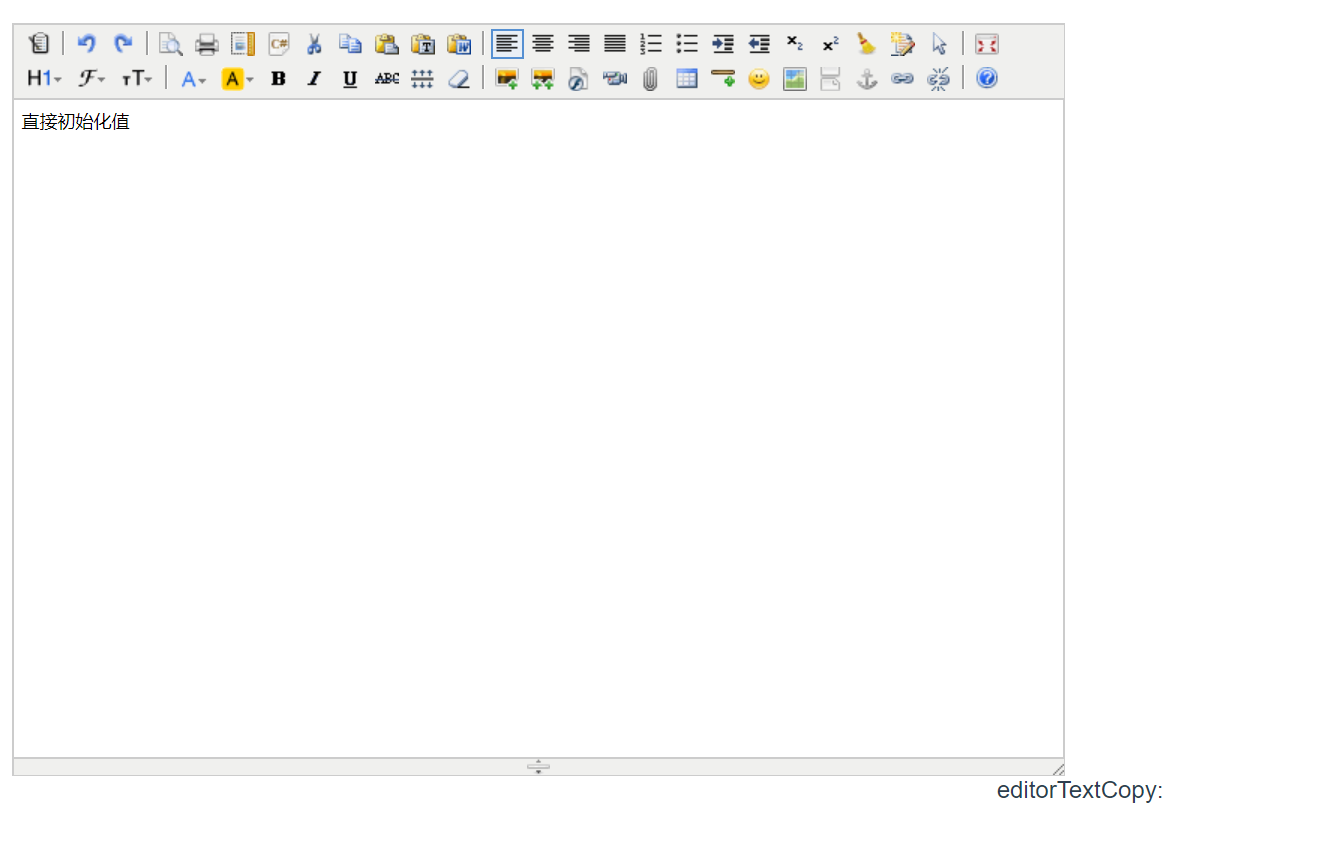
效果如下:
以上就是vue中使用kindeditor富文本编辑器的详细内容,更多关于vue kindeditor富文本编辑器的资料请关注脚本之家其它相关文章!
相关文章
 这篇文章主要介绍了vue动态添加store、路由和国际化配置方式,具有很好的参考价值,希望对大家有所帮助。如有错误或未考虑完全的地方,望不吝赐教2022-03-03
 当页面刷新时,Vuex 的 state 数据会丢失,这是因为 Vuex 的状态存储在内存中,刷新浏览器会重置 JavaScript 的运行环境,下面我将详细介绍几种解决方案,从简单到复杂,帮助你根据项目需求选择最适合的方法,需要的朋友可以参考下2025-04-04
 这篇文章主要为大家详细介绍了vue使用nprogress实现进度条,文中示例代码介绍的非常详细,具有一定的参考价值,感兴趣的小伙伴们可以参考一下2019-12-12
Vue之beforeEach非登录不能访问的实现(代码亲测)
这篇文章主要介绍了Vue之beforeEach非登录不能访问的实现,文中通过示例代码介绍的非常详细,对大家的学习或者工作具有一定的参考学习价值,需要的朋友们下面随着小编来一起学习学习吧2019-07-07 Vue3官方提供了 script setup 语法糖,只需在script标签中添加setup,组件只需引入不用注册,属性和方法也不用返回,今天通过本文给大家分享vue3的setup语法糖简单封装ckediter的过程,感兴趣的朋友一起看看吧2023-10-10
 这篇文章主要介绍了vue如何实时往数组里追加数据,具有很好的参考价值,希望对大家有所帮助。如有错误或未考虑完全的地方,望不吝赐教2022-04-04
element-ui 限制日期选择的方法(datepicker)
本篇文章主要介绍了element-ui 限制日期选择的方法(datepicker),小编觉得挺不错的,现在分享给大家,也给大家做个参考。一起跟随小编过来看看吧2018-05-05 这篇文章主要介绍了vue3编写挂载DOM的插件的问题,本文通过实例代码给大家介绍的非常详细,对大家的学习或工作具有一定的参考借鉴价值,需要的朋友可以参考下2021-07-07
 这篇文章主要介绍了解决vue中less的使用问题,本文给大家介绍的非常详细,对大家的学习或工作具有一定的参考借鉴价值,需要的朋友可以参考下2021-11-11
 这篇文章主要介绍了vue如何动态修改$router参数,具有很好的参考价值,希望对大家有所帮助。如有错误或未考虑完全的地方,望不吝赐教2022-09-09
最新评论