

深入了解Vue动态组件和异步组件
更新时间:2021年01月26日 12:03:07 作者:gzhjj
这篇文章主要介绍了深入了解Vue动态组件和异步组件的相关资料,帮助大家更好的理解和学习vue组件的相关知识,感兴趣的朋友可以了解下
1.动态组件
<!DOCTYPE html>
<html>
<head>
 <meta charset="utf-8">
 <style>
		#app {
			font-size: 0
		}
		.dynamic-component-demo-tab-button {
			padding: 6px 10px;
			border-top-left-radius: 3px;
			border-top-right-radius: 3px;
			border: 1px solid #ccc;
			cursor: pointer;
			margin-bottom: -1px;
			margin-right: -1px;
			background: #f0f0f0;
		}
		.dynamic-component-demo-tab-button.dynamic-component-demo-active {
			background: #e0e0e0;
		}
		.dynamic-component-demo-tab-button:hover {
			background: #e0e0e0;
		}
		.dynamic-component-demo-posts-tab {
			display: flex;
		}
		.dynamic-component-demo-tab {
			font-size: 1rem;
			border: 1px solid #ccc;
			padding: 10px;
		}
		.dynamic-component-demo-posts-sidebar {
			max-width: 40vw;
			margin: 0 !important;
			padding: 0 10px 0 0 !important;
			list-style-type: none;
			border-right: 1px solid #ccc;
			line-height: 1.6em;
		}
		.dynamic-component-demo-posts-sidebar li {
			white-space: nowrap;
			text-overflow: ellipsis;
			overflow: hidden;
			cursor: pointer;
		}
		.dynamic-component-demo-active {
			background: lightblue;
		}
		.dynamic-component-demo-post-container {
			padding-left: 10px;
		}
		.dynamic-component-demo-post > :first-child {
			margin-top: 0 !important;
			padding-top: 0 !important;
		}
 </style>
 <script src="https://cdn.jsdelivr.net/npm/vue/dist/vue.js"></script>
</head>
<body>
<div id="app">
	<button v-for="tab in tabs" class="dynamic-component-demo-tab-button"
		v-bind:class="{'dynamic-component-demo-active': tab === currentTab}"
		@click="currentTab = tab">{{ tab }}</button>
	<keep-alive>
		<component v-bind:is="currentTabComponent"></component>
	</keep-alive>
</div>
<script>
 Vue.component('tab-posts', {
		data: function(){
			return {
				posts: [
					{id: 1, title: 'Cat Ipsum', content: 'Cont wait for the storm to pass, ...'},
					{id: 2, title: 'Hipster Ipsum', content: 'Bushwick blue bottle scenester ...'},
					{id: 3, title: 'Cupcake Ipsum', content: 'Icing dessert souffle ...'},
				],
				selectedPost: null
			}
		},
 template: `<div class="dynamic-component-demo-posts-tab dynamic-component-demo-tab">
						<ul class="dynamic-component-demo-posts-sidebar">
							<li v-for="post in posts"
								v-bind:key="post.id"
								v-on:click="selectedPost = post"
								v-bind:class="{'dynamic-component-demo-active': post===selectedPost}">
								{{ post.title }}
							</li>
						</ul>
						<div class="dynamic-component-demo-post-container">
							<div v-if="selectedPost" class="dynamic-component-demo-post">
								<h3>{{ selectedPost.title }}</h3>
								<div v-html="selectedPost.content"></div>
							</div>
							<strong v-else>
								Click on a blog title to the left to view it.
							</strong>
						</div>
					</div>`
 });

	Vue.component('tab-archive', {
		template: '<div class="dynamic-component-demo-tab">Archive component</div>'
	});

 new Vue({
 el: '#app',
		data: {
			currentTab: 'Posts',
			tabs: ['Posts', 'Archive']
		},
		computed: {
			currentTabComponent: function(){
				return 'tab-' + this.currentTab.toLowerCase()
			}
		}
 });
</script>
</body>
</html>
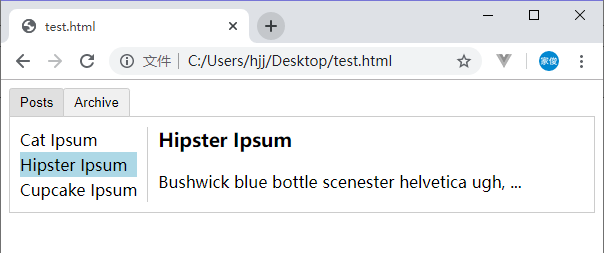
在动态组件上使用keep-alive,可以在组件切换时保持组件的状态,避免了重复渲染的性能问题。
2.异步组件
Vue 允许你以一个工厂函数的方式定义你的组件,这个工厂函数会异步解析你的组件定义。
Vue.component('async-example', function (resolve, reject) {})
这里可以回顾一下 Vue.js — 组件基础。
我们使用通过webpack打包的Vue项目来介绍异步组件。
<!-- HelloWorld.vue -->
<template>
 <div>
 <h2 class="title">{{msg}}</h2>
 </div>
</template>

<script>
export default {
 data () {
 return {
 msg: 'Hello Vue!'
 }
 }
}
</script>

<!-- Add "scoped" attribute to limit CSS to this component only -->
<style scoped>
 .title {
 padding: 5px;
 color: white;
 background: gray;
 }
</style>
<!-- App.vue -->
<template>
 <div id="app">
 <HelloWorld/>
 </div>
</template>

<script>
import HelloWorld from './components/HelloWorld'

export default {
 name: 'App',
 components: {
 HelloWorld
 }
}
</script>

<style>
</style>
我们把App.vue的<script>标签里面的内容改为:
export default {
 name: 'App',
 components: {
 HelloWorld: () => import('./components/HelloWorld')
 }
}
这样就实现了App组件异步加载HelloWorld组件的功能。
我们可以实现按需加载。
<!-- App.vue -->
<template>
 <div id="app">
 <button @click="show = true">Load Tooltip</button>
 <div v-if="show">
 <HelloWorld/>
 </div>
 </div>
</template>

<script>
export default {
 data: () => ({
 show: false
 }),
 components: {
 HelloWorld: () => import('./components/HelloWorld')
 }
}
</script>

<style>
</style>
这里的异步组件工厂函数也可以返回一个如下格式的对象:
const AsyncComponent = () => ({
 // 需要加载的组件 (应该是一个 `Promise` 对象)
 component: import('./MyComponent.vue'),
 // 异步组件加载时使用的组件
 loading: LoadingComponent,
 // 加载失败时使用的组件
 error: ErrorComponent,
 // 展示加载时组件的延时时间。默认值是 200 (毫秒)
 delay: 200,
 // 如果提供了超时时间且组件加载也超时了,
 // 则使用加载失败时使用的组件。默认值是:`Infinity`
 timeout: 3000
})
参考:
以上就是深入了解Vue动态组件和异步组件的详细内容,更多关于Vue动态组件和异步组件的资料请关注脚本之家其它相关文章!
相关文章
 这篇文章主要给大家介绍了关于Vue基础学习之项目整合及优化的相关资料,文中通过示例代码介绍的非常详细,对大家学习或者使用Vue具有一定的参考学习价值,需要的朋友们下面来一起学习学习吧2019-06-06
 Vue.js(读音 /vjuː/, 类似于 view) 是一套构建用户界面的渐进式框架。这篇文章给大家介绍Vue仿手机qq的实例代码,需要的的朋友参考下吧2017-09-09
 这篇文章主要介绍了Vue3内置组件Teleport使用方法,Teleport是Vue 3.0 新增的一个内置组件,主要是为了解决一些特殊场景下模态对话框组件、组件的渲染,带着些许的了解一起走进下面文章的详细内容吧2021-10-10
 <keep-alive> 是一个抽象组件,它自身不会渲染一个DOM元素,也不会出现在组件的父组件链中,下面这篇文章主要给大家介绍了关于vue3利用keepAlive缓存页面的相关资料,需要的朋友可以参考下2022-11-11
 在现代前端开发中,Vue.js 结合 Webpack 的动态路由加载能显著提升应用性能,本文将通过一个实际案例,详细分析动态路由加载的常见错误,希望对大家有所帮助2025-04-04
vue开发chrome插件,实现获取界面数据和保存到数据库功能
这篇文章主要介绍了vue开发chrome插件,实现获取界面数据和保存到数据库功能的示例,帮助大家更好的理解和使用vue,感兴趣的朋友可以了解下2020-12-12 我们最近的项目中需要使用谷歌机器人验证,所以就动手实现一下,本文就来详细的介绍一下vue Google Recaptcha验证,感兴趣的可以了解一下2021-08-08
 这篇文章主要介绍了关于vant的时间选择器使用方式,具有很好的参考价值,希望对大家有所帮助,如有错误或未考虑完全的地方,望不吝赐教2024-03-03
 这篇文章主要介绍了Vue滚动页面到指定位置的实现及避坑,具有很好的参考价值,希望对大家有所帮助。如有错误或未考虑完全的地方,望不吝赐教2022-09-09
vue.extend,mixins和vue.component的区别及说明
Vue.extend 创建Vue的子类,可视为组件构造函数,Vue.mixin 允许全局添加方法或属性,方便所有组件使用,Vue.component 是插件注册方法,通过Vue.extend创建的组件实例可以注册到Vue全局,使其在任何组件中可用2024-09-09
最新评论