

jQuery实现动态粒子效果
更新时间:2021年03月18日 08:36:13 作者:云杰8了
这篇文章主要为大家详细介绍了jQuery实现动态粒子效果,文中示例代码介绍的非常详细,具有一定的参考价值,感兴趣的小伙伴们可以参考一下
本文实例为大家分享了jQuery实现动态粒子效果的具体代码,供大家参考,具体内容如下
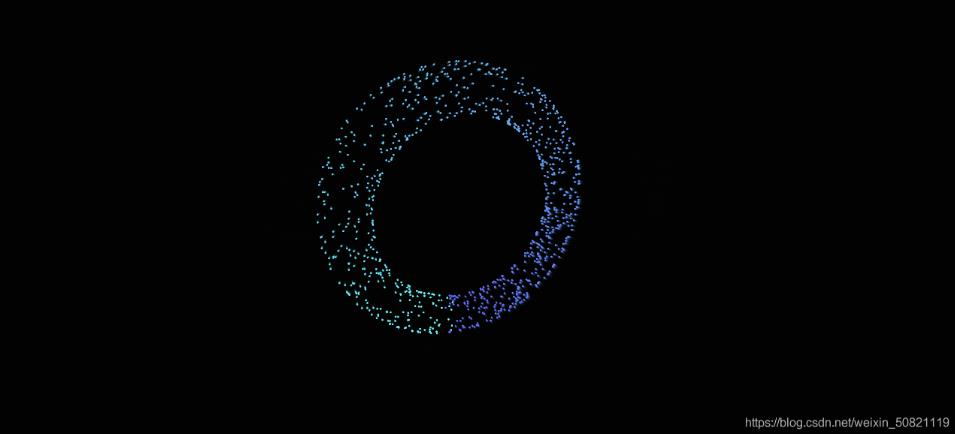
效果图

代码
<!DOCTYPE html>
<html lang="en">

<head>
  <meta charset="UTF-8">
  <meta http-equiv="X-UA-Compatible" content="IE=edge">
  <meta name="viewport" content="width=device-width, initial-scale=1.0">
  <title>Document</title>
  <script src="https://cdn.staticfile.org/jquery/1.10.2/jquery.min.js"></script>
  <div id="jsi-particle-container" class="container"></div>
  <style>
    html,
    body {
      width: 100%;
      height: 100%;
      margin: 0;
      padding: 0;
      overflow: hidden;
    }

    .container {
      width: 100%;
      height: 100%;
      margin: 0;
      padding: 0;
      background-color: #000000;
    }
  </style>
</head>

<body>
  <script>
    var RENDERER = {
      PARTICLE_COUNT: 1000,
      PARTICLE_RADIUS: 1,
      MAX_ROTATION_ANGLE: Math.PI / 60,
      TRANSLATION_COUNT: 500,

      init: function(strategy) {
        this.setParameters(strategy);
        this.createParticles();
        this.setupFigure();
        this.reconstructMethod();
        this.bindEvent();
        this.drawFigure();
      },
      setParameters: function(strategy) {
        this.$window = $(window);

        this.$container = $('#jsi-particle-container');
        this.width = this.$container.width();
        this.height = this.$container.height();

        this.$canvas = $('<canvas />').attr({
          width: this.width,
          height: this.height
        }).appendTo(this.$container);
        this.context = this.$canvas.get(0).getContext('2d');

        this.center = {
          x: this.width / 2,
          y: this.height / 2
        };

        this.rotationX = this.MAX_ROTATION_ANGLE;
        this.rotationY = this.MAX_ROTATION_ANGLE;
        this.strategyIndex = 0;
        this.translationCount = 0;
        this.theta = 0;

        this.strategies = strategy.getStrategies();
        this.particles = [];
      },
      createParticles: function() {
        for (var i = 0; i < this.PARTICLE_COUNT; i++) {
          this.particles.push(new PARTICLE(this.center));
        }
      },
      reconstructMethod: function() {
        this.setupFigure = this.setupFigure.bind(this);
        this.drawFigure = this.drawFigure.bind(this);
        this.changeAngle = this.changeAngle.bind(this);
      },
      bindEvent: function() {
        this.$container.on('click', this.setupFigure);
        this.$container.on('mousemove', this.changeAngle);
      },
      changeAngle: function(event) {
        var offset = this.$container.offset(),
          x = event.clientX - offset.left + this.$window.scrollLeft(),
          y = event.clientY - offset.top + this.$window.scrollTop();

        this.rotationX = (this.center.y - y) / this.center.y * this.MAX_ROTATION_ANGLE;
        this.rotationY = (this.center.x - x) / this.center.x * this.MAX_ROTATION_ANGLE;
      },
      setupFigure: function() {
        for (var i = 0, length = this.particles.length; i < length; i++) {
          this.particles[i].setAxis(this.strategies[this.strategyIndex]());
        }
        if (++this.strategyIndex == this.strategies.length) {
          this.strategyIndex = 0;
        }
        this.translationCount = 0;
      },
      drawFigure: function() {
        requestAnimationFrame(this.drawFigure);

        this.context.fillStyle = 'rgba(0, 0, 0, 0.2)';
        this.context.fillRect(0, 0, this.width, this.height);

        for (var i = 0, length = this.particles.length; i < length; i++) {
          var axis = this.particles[i].getAxis2D(this.theta);

          this.context.beginPath();
          this.context.fillStyle = axis.color;
          this.context.arc(axis.x, axis.y, this.PARTICLE_RADIUS, 0, Math.PI * 2, false);
          this.context.fill();
        }
        this.theta++;
        this.theta %= 360;

        for (var i = 0, length = this.particles.length; i < length; i++) {
          this.particles[i].rotateX(this.rotationX);
          this.particles[i].rotateY(this.rotationY);
        }
        this.translationCount++;
        this.translationCount %= this.TRANSLATION_COUNT;

        if (this.translationCount == 0) {
          this.setupFigure();
        }
      }
    };
    var STRATEGY = {
      SCATTER_RADIUS: 150,
      CONE_ASPECT_RATIO: 1.5,
      RING_COUNT: 5,

      getStrategies: function() {
        var strategies = [];

        for (var i in this) {
          if (this[i] == arguments.callee || typeof this[i] != 'function') {
            continue;
          }
          strategies.push(this[i].bind(this));
        }
        return strategies;
      },
      createSphere: function() {
        var cosTheta = Math.random() * 2 - 1,
          sinTheta = Math.sqrt(1 - cosTheta * cosTheta),
          phi = Math.random() * 2 * Math.PI;

        return {
          x: this.SCATTER_RADIUS * sinTheta * Math.cos(phi),
          y: this.SCATTER_RADIUS * sinTheta * Math.sin(phi),
          z: this.SCATTER_RADIUS * cosTheta,
          hue: Math.round(phi / Math.PI * 30)
        };
      },
      createTorus: function() {
        var theta = Math.random() * Math.PI * 2,
          x = this.SCATTER_RADIUS + this.SCATTER_RADIUS / 6 * Math.cos(theta),
          y = this.SCATTER_RADIUS / 6 * Math.sin(theta),
          phi = Math.random() * Math.PI * 2;

        return {
          x: x * Math.cos(phi),
          y: y,
          z: x * Math.sin(phi),
          hue: Math.round(phi / Math.PI * 30)
        };
      },
      createCone: function() {
        var status = Math.random() > 1 / 3,
          x,
          y,
          phi = Math.random() * Math.PI * 2,
          rate = Math.tan(30 / 180 * Math.PI) / this.CONE_ASPECT_RATIO;

        if (status) {
          y = this.SCATTER_RADIUS * (1 - Math.random() * 2);
          x = (this.SCATTER_RADIUS - y) * rate;
        } else {
          y = -this.SCATTER_RADIUS;
          x = this.SCATTER_RADIUS * 2 * rate * Math.random();
        }
        return {
          x: x * Math.cos(phi),
          y: y,
          z: x * Math.sin(phi),
          hue: Math.round(phi / Math.PI * 30)
        };
      },
      createVase: function() {
        var theta = Math.random() * Math.PI,
          x = Math.abs(this.SCATTER_RADIUS * Math.cos(theta) / 2) + this.SCATTER_RADIUS / 8,
          y = this.SCATTER_RADIUS * Math.cos(theta) * 1.2,
          phi = Math.random() * Math.PI * 2;

        return {
          x: x * Math.cos(phi),
          y: y,
          z: x * Math.sin(phi),
          hue: Math.round(phi / Math.PI * 30)
        };
      }
    };
    var PARTICLE = function(center) {
      this.center = center;
      this.init();
    };
    PARTICLE.prototype = {
      SPRING: 0.01,
      FRICTION: 0.9,
      FOCUS_POSITION: 300,
      COLOR: 'hsl(%hue, 100%, 70%)',

      init: function() {
        this.x = 0;
        this.y = 0;
        this.z = 0;
        this.vx = 0;
        this.vy = 0;
        this.vz = 0;
        this.color;
      },
      setAxis: function(axis) {
        this.translating = true;
        this.nextX = axis.x;
        this.nextY = axis.y;
        this.nextZ = axis.z;
        this.hue = axis.hue;
      },
      rotateX: function(angle) {
        var sin = Math.sin(angle),
          cos = Math.cos(angle),
          nextY = this.nextY * cos - this.nextZ * sin,
          nextZ = this.nextZ * cos + this.nextY * sin,
          y = this.y * cos - this.z * sin,
          z = this.z * cos + this.y * sin;

        this.nextY = nextY;
        this.nextZ = nextZ;
        this.y = y;
        this.z = z;
      },
      rotateY: function(angle) {
        var sin = Math.sin(angle),
          cos = Math.cos(angle),
          nextX = this.nextX * cos - this.nextZ * sin,
          nextZ = this.nextZ * cos + this.nextX * sin,
          x = this.x * cos - this.z * sin,
          z = this.z * cos + this.x * sin;

        this.nextX = nextX;
        this.nextZ = nextZ;
        this.x = x;
        this.z = z;
      },
      rotateZ: function(angle) {
        var sin = Math.sin(angle),
          cos = Math.cos(angle),
          nextX = this.nextX * cos - this.nextY * sin,
          nextY = this.nextY * cos + this.nextX * sin,
          x = this.x * cos - this.y * sin,
          y = this.y * cos + this.x * sin;

        this.nextX = nextX;
        this.nextY = nextY;
        this.x = x;
        this.y = y;
      },
      getAxis3D: function() {
        this.vx += (this.nextX - this.x) * this.SPRING;
        this.vy += (this.nextY - this.y) * this.SPRING;
        this.vz += (this.nextZ - this.z) * this.SPRING;

        this.vx *= this.FRICTION;
        this.vy *= this.FRICTION;
        this.vz *= this.FRICTION;

        this.x += this.vx;
        this.y += this.vy;
        this.z += this.vz;

        return {
          x: this.x,
          y: this.y,
          z: this.z
        };
      },
      getAxis2D: function(theta) {
        var axis = this.getAxis3D(),
          scale = this.FOCUS_POSITION / (this.FOCUS_POSITION + axis.z);

        return {
          x: this.center.x + axis.x * scale,
          y: this.center.y - axis.y * scale,
          color: this.COLOR.replace('%hue', this.hue + theta)
        };
      }
    };
    $(function() {
      RENDERER.init(STRATEGY);
    });
  </script>
</body>

</html>
以上就是本文的全部内容,希望对大家的学习有所帮助,也希望大家多多支持脚本之家。
您可能感兴趣的文章:
相关文章
 本章我们将创建一个自增长的输入框插件,jquery.aotogrow.js2012-08-08
 本文给大家介绍jquery ui tabs的理解,包括属性、事件、方法和技巧等相关知识,对jquery ui tabs感兴趣的朋友一起学习吧2015-11-11
 这篇文章主要介绍了jQuery插件扩展操作,结合简单实例形式分析了jQuery扩展方法的定义与使用技巧,非常简单易懂,需要的朋友可以参考下2017-01-01
 相信大家应该都会看到在各大网站上都有一个轮播器的效果,于是自己不禁也想做一个,查了资料,看了轮播器的原理,慢慢的试着做了做,最终效果勉勉强强,但还是想总结出来,或许对有需要的朋友们带来一定的帮助,下面来一起看看吧。2016-12-12
 这篇文章主要介绍了jQuery实现的超酷苹果风格图标滑出菜单效果代码,涉及jQuery基于鼠标hover事件动态操作页面元素属性的相关技巧,非常美观实用,需要的朋友可以参考下2015-09-09
 这篇文章主要介绍了jQuery分组选择器用法,以实例形式分析了分组选择器的功能与具体用法技巧,具有一定的参考借鉴价值,需要的朋友可以参考下2014-12-12
为jquery的ajaxfileupload增加附加参数的方法
这篇文章主要介绍了为jquery的ajaxfileupload增加附加参数的方法,需要的朋友可以参考下2014-03-03 现在jquery应用的越来越多, 有些同学在享受爽快淋漓coding时就将性能问题忽略了, 比如我. jquery虽在诸多的js类库中性能表现还算优秀, 但毕竟不是在用原生的javascript开发, 性能问题还是需要引起重视的.2010-02-02
html、css和jquery相结合实现简单的进度条效果实例代码
这篇文章主要介绍了html、css和jquery相结合实现简单的进度条效果的实例代码,这个进度条特别简单,首先html里面的话就是一个div里面嵌套一个div,然后写好想要的样式就行了,具有一定的参考借鉴价值,感兴趣的朋友一起看看吧2016-10-10 这篇文章主要介绍了jQuery实现监听下拉框选中内容发生改变操作,结合实例形式分析了jQuery针对select选中触发change事件相关操作技巧,需要的朋友可以参考下2018-07-07
最新评论