

vue 实现无规则截图
更新时间:2021年04月15日 10:35:52 作者:渺小尘埃
这篇文章主要介绍了vue 实现无规则截图的方法,帮助大家更好的理解和学习使用vue框架,感兴趣的朋友可以了解下
大家所见到的大多数都是有规则截图,可以应付大部分的应用场景,但是对于图片处理,想要将规则交给用户,普通的截图已经满足不了用户了,那我们能不能前端实现图片的任意规则截取,接下来让我一起探讨一下吧!
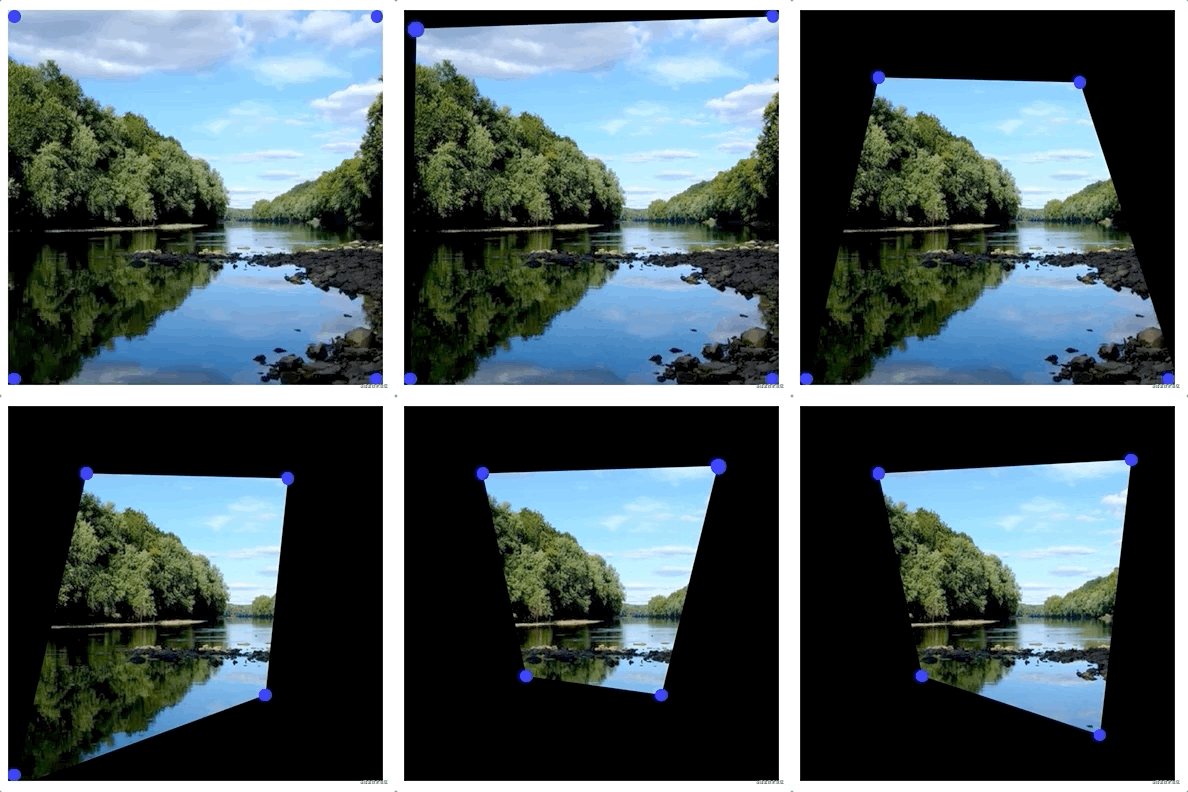
通过 svg 实现 图片截取
使用svg中clipPath image标签 通过id 映射, 动态位置polygon的坐标,实现图片的截取
    <div>
        <div class="content" @mousemove="mousemove" @mouseup="(e) => {mouseup(e);}">
          <!-- 画布展示 -->
          <svg
            ref="blackSvg"
            class="blackSvg"
            xmlns="http://www.w3.org/2000/svg"
            width="300"
            height="300"
          >
            <defs>
              <clipPath id="clippath">
                <polygon :points="points"></polygon>
              </clipPath>
            </defs>
            <image
              xmlns:link="http://www.w3.org/1999/xlink"
              href="https://ss2.bdstatic.com/70cFvnSh_Q1YnxGkpoWK1HF6hhy/it/u=3228549874,2173006364&fm=26&gp=0.jpg" rel="external nofollow"
              width="300"
              height="300"
              preserveAspectRatio="none"
              style="clip-path: url(#clippath)"
            ></image>
          </svg>
          <!-- 拖拽点 -->
          <ul class="interception">
            <li
              v-for="item in 4"
              :ref="`li${item}`"
              :key="item"
              @mousedown="(e) => {mousedown(e, item);}"
            ></li>
          </ul>
          <!-- 底图展示 -->
          <img
            class="blackImge"
            src="https://ss2.bdstatic.com/70cFvnSh_Q1YnxGkpoWK1HF6hhy/it/u=3228549874,2173006364&fm=26&gp=0.jpg"
            alt=""
          />
          <!-- 遮罩层 -->
          <div class="blackDiv"></div>
    </div>
  </div>
css部分
<style lang="sass">
.blackDiv
    width: 100%
    height: 100%
    position: absolute
    top: 0
    z-index: 2
    background: rgba(0,0,0, 1)
.content
    width:300px
    height:300px
    text-align: left
    position: relative
    .blackSvg
        position: absolute
        top: 0
        z-index: 3
    .blackImge
        position: absolute
        top: 0
        left: 0
        width: 300px
        height: 300px
    .interception
        list-style: none
        position: absolute
        top: 0
        margin: 0
        padding: 0
        z-index: 3
        >li
            position: absolute
            width: 10px
            height: 10px
            background: blue
            border-radius: 50%
            cursor: pointer
            &:hover
                transform: scale(1.2)
                transition-duration: .2
        >li:nth-child(1)
            top: 10px
            left: 10px
        >li:nth-child(2)
            top: 10px
            left: 100px
        >li:nth-child(3)
            top: 100px
            left: 100px
        >li:nth-child(4)
            top: 100px
            left: 10px
</style>
<script>
export default {
  name: 'Canvas',
  data() {
    return {
      points: '0 0,300 0,300 300,0 300', // 图片展示初始化
      status: false,
      index: 0,
      disX: 0,
      disY: 0,
      coordinates: { // 初始化拖拽点
        1: [0, 0],
        2: [300, 0],
        3: [300, 300],
        4: [0, 300],
      },
    };
  },
  mounted() {
    this.$nextTick(() => {
      for (let key in this.coordinates) {
        const left = this.coordinates[key][0];
        const top = this.coordinates[key][1];
        this.$refs[`li${key}`].style.left = `${left}px`;
        this.$refs[`li${key}`].style.top = `${top}px`;
        if (key == 2 || key == 3) {
          this.$refs[`li${key}`].style.left = `${left - 10}px`;
        }
        if (key == 3 || key == 4) {
          this.$refs[`li${key}`].style.top = `${top - 10}px`;
        }
      }
      document.onmouseup = () => {
        this.status = false;
      };
    });
  },
  methods: {
    //鼠标按下
    mousedown(e, index) {
      this.status = true;
      this.index = index;
      this.disX = e.clientX - this.$refs[`li${index}`].offsetLeft;
      this.disY = e.clientY - this.$refs[`li${index}`].offsetTop;
    },
    // 鼠标抬起
    mouseup(e) {
      this.status = false;
    },
    // 鼠标移动
    mousemove(e) {
      if (this.status) {
        let left = e.clientX - this.disX;
        let top = e.clientY - this.disY;
        this.$refs[`li${this.index}`].style.left = `${left}px`;
        this.$refs[`li${this.index}`].style.top = `${top}px`;
        this.coordinates[this.index] = [left, top];
        const pointsArr = [];
        for (let item in this.coordinates) {
          pointsArr.push(
            Array.from(this.coordinates[item], (e) => {
              return e + 5;
            })
          );
        }
        this.points = pointsArr.join(' ');
      }
    },
  },
};
效果图展示

源码地址
github地址--> github.com/lgxin/captu…
以上就是vue 实现无规则截图的详细内容,更多关于vue 无规则截图的资料请关注脚本之家其它相关文章!
相关文章
 这篇文章主要为大家详细介绍了vue3中标签form插件的使用的相关知识,文中的示例代码讲解详细,具有一定的借鉴价值,感兴趣的小伙伴可以了解下2024-01-01
 这篇文章主要介绍了Vue全局拦截所有请求并在请求头中添加token方式,具有很好的参考价值,希望对大家有所帮助,如有错误或未考虑完全的地方,望不吝赐教2024-08-08
 Vue3 + Vite 使用 SVG 的方法主要是为了引入和利用图标库、自定义组件以及通过插件简化项目构建过程,这篇文章给大家介绍了Vue3+vite实现使用svg可改变颜色的全过程,需要的朋友可以参考下2024-07-07
解决vue vite启动项目报错ERROR: Unexpected “\x88“ in JSON 的问题
这篇文章主要介绍了vue vite启动项目报错ERROR: Unexpected “\x88“ in JSON 原因,本文给出出现此类问题的原因所在并给出解决方法,需要的朋友可以参考下2022-09-09 这篇文章主要介绍了Vue3.0 axios跨域请求代理服务器配置方式,具有很好的参考价值,希望对大家有所帮助。如有错误或未考虑完全的地方,望不吝赐教2022-04-04
 这篇文章主要介绍了vue $mount 和 el的区别说明,具有很好的参考价值,希望对大家有所帮助。一起跟随小编过来看看吧2020-09-09
 这篇文章主要给大家介绍了关于vue3实战教程之axios的封装和环境变量的相关资料,文中通过实例代码介绍的非常详细,对大家的学习或者工作具有一定的参考学习价值,需要的朋友可以参考下2022-02-02
 这篇文章主要介绍了15分钟学会vue项目改造成SSR(小白教程),文中通过示例代码介绍的非常详细,对大家的学习或者工作具有一定的参考学习价值,需要的朋友们下面随着小编来一起学习学习吧2019-12-12
vue3 使用provide inject父子组件传值失败且子组件不响应
这篇文章主要介绍了vue3使用provide inject父子组件传值传不过去且传递后子组件不具备响应性问题解决方法,有需要的朋友可以借鉴参考下,希望能够有所帮助,祝大家多多进步,早日升职加薪2023-08-08 props属性是父子组件之间的通信桥梁。这篇文章主要介绍了Vue中props的使用,需要的朋友可以参考下2018-06-06
最新评论