

vue实现图形验证码
更新时间:2021年04月27日 11:01:58 作者:公孙元二
这篇文章主要为大家详细介绍了vue实现图形验证码,文中示例代码介绍的非常详细,具有一定的参考价值,感兴趣的小伙伴们可以参考一下
本文实例为大家分享了vue实现图形验证码的具体代码,供大家参考,具体内容如下
效果图:
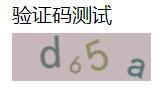
或
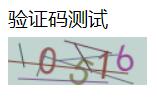
或

或

代码:
验证码组件:
src/common/sIdentify.vue
<template>
  <div class="s-canvas">
    <canvas id="s-canvas" :width="contentWidth" :height="contentHeight"></canvas>
  </div>
</template>
<script>
  export default {
    name: 'SIdentify',
    props: {
      identifyCode: {
        type: String,
        default: '1234'
      },
      fontSizeMin: {
        type: Number,
        default: 18
      },
      fontSizeMax: {
        type: Number,
        default: 40
      },
      backgroundColorMin: {
        type: Number,
        default: 180
      },
      backgroundColorMax: {
        type: Number,
        default: 240
      },
      colorMin: {
        type: Number,
        default: 50
      },
      colorMax: {
        type: Number,
        default: 160
      },
      lineColorMin: {
        type: Number,
        default: 40
      },
      lineColorMax: {
        type: Number,
        default: 180
      },
      dotColorMin: {
        type: Number,
        default: 0
      },
      dotColorMax: {
        type: Number,
        default: 255
      },
      contentWidth: {
        type: Number,
        default: 111
      },
      contentHeight: {
        type: Number,
        default: 38
      }
    },
    methods: {
      // 生成一个随机数
      randomNum(min, max) {
        return Math.floor(Math.random() * (max - min) + min)
      },
      // 生成一个随机的颜色
      randomColor(min, max) {
        let r = this.randomNum(min, max)
        let g = this.randomNum(min, max)
        let b = this.randomNum(min, max)
        return 'rgb(' + r + ',' + g + ',' + b + ')'
      },
      drawPic() {
        let canvas = document.getElementById('s-canvas')
        let ctx = canvas.getContext('2d')
        ctx.textBaseline = 'bottom'
        // 绘制背景
        ctx.fillStyle = this.randomColor(this.backgroundColorMin, this.backgroundColorMax)
        ctx.fillRect(0, 0, this.contentWidth, this.contentHeight)
        // 绘制文字
        for (let i = 0; i < this.identifyCode.length; i++) {
          this.drawText(ctx, this.identifyCode[i], i)
        }
        // this.drawLine(ctx) // 绘制干扰线
        // this.drawDot(ctx) // 绘制干扰点
      },
      // 绘制文本
      drawText(ctx, txt, i) {
        ctx.fillStyle = this.randomColor(this.colorMin, this.colorMax)
        ctx.font = this.randomNum(this.fontSizeMin, this.fontSizeMax) + 'px SimHei'
        let x = (i + 1) * (this.contentWidth / (this.identifyCode.length + 1))
        let y = this.randomNum(this.fontSizeMax, this.contentHeight - 5)
        var deg = this.randomNum(-30, 30) // 字符旋转角度(不超过45度比较好)
        // 修改坐标原点和旋转角度
        ctx.translate(x, y)
        ctx.rotate(deg * Math.PI / 180)
        ctx.fillText(txt, 0, 0)
        // 恢复坐标原点和旋转角度
        ctx.rotate(-deg * Math.PI / 180)
        ctx.translate(-x, -y)
      },
      drawLine(ctx) {
        // 绘制干扰线
        for (let i = 0; i < 8; i++) {
          ctx.strokeStyle = this.randomColor(this.lineColorMin, this.lineColorMax)
          ctx.beginPath()
          ctx.moveTo(this.randomNum(0, this.contentWidth), this.randomNum(0, this.contentHeight))
          ctx.lineTo(this.randomNum(0, this.contentWidth), this.randomNum(0, this.contentHeight))
          ctx.stroke()
        }
      },
      drawDot(ctx) {
        // 绘制干扰点
        for (let i = 0; i < 100; i++) {
          ctx.fillStyle = this.randomColor(0, 255)
          ctx.beginPath()
          ctx.arc(this.randomNum(0, this.contentWidth), this.randomNum(0, this.contentHeight), 1, 0, 2 * Math.PI)
          ctx.fill()
        }
      }
    },
    watch: {
      identifyCode() {
        this.drawPic()
      }
    },
    mounted() {
      this.drawPic()
    }
  }
</script>
父组件
<template>
  <div>
    <div>验证码测试</div>
    <div @click="refreshCode()" class="code" style="cursor:pointer;" title="点击切换验证码">
      <s-identify :identifyCode="identifyCode"></s-identify>
    </div>
  </div>
</template>

<script>
import { defineComponent } from 'vue';
import sIdentify from "@/common/sIdentify.vue";
// import axios from 'axios'
export default defineComponent({
  name: 'WatermarkTest',
  components: { sIdentify },
  data() {
    return {
      identifyCode: "",
      identifyCodes: ['0','1','2','3','4','5','6','7','8','9','a','b','c','d'], //根据实际需求加入自己想要的字符
    }
  },
  mounted() {
    this.refreshCode()
 },
 unmounted() {

 },
  methods: {
    // 生成随机数
    randomNum(min, max) {
      max = max + 1
      return Math.floor(Math.random() * (max - min) + min);
    },
    // 更新验证码
    refreshCode() {
      this.identifyCode = "";
      this.makeCode(this.identifyCodes, 4);
      console.log('当前验证码:',this.identifyCode);
    },
    // 随机生成验证码字符串
    makeCode(data, len) {
      console.log('data, len:', data, len)
      for (let i = 0; i < len; i++) {
        this.identifyCode += this.identifyCodes[this.randomNum(0, this.identifyCodes.length-1)]
      }
    },
  },
});
</script>
以上就是本文的全部内容,希望对大家的学习有所帮助,也希望大家多多支持脚本之家。
相关文章
 这篇文章主要介绍了Vue基于iview实现登录密码的显示与隐藏功能,本文通过截图实例代码说明给大家介绍的非常详细,对大家的学习或工作具有一定的参考借鉴价值,需要的朋友可以参考下2020-03-03
 这篇文章主要介绍了vue下拉列表的两种实现方式比较,具有很好的参考价值,希望对大家有所帮助。如有错误或未考虑完全的地方,望不吝赐教2021-06-06
 这篇文章主要介绍了vue 解决在微信内置浏览器中调用支付宝支付的情况,具有很好的参考价值,希望对大家有所帮助。一起跟随小编过来看看吧2020-11-11
 大家都知道vue-router有两种模式,hash模式和history模式,带#的则是hash模式。接下来给大家带来了Vue 去除路径中的#号的解决方法,感兴趣的朋友一起看看吧2018-04-04
 这篇文章主要为大家详细介绍了Vue项目之学生管理系统实例,文中示例代码介绍的非常详细,具有一定的参考价值,感兴趣的小伙伴们可以参考一下,希望能够给你带来帮助2022-03-03
 这篇文章主要介绍了vueRouter--matcher之动态增减路由方式,具有很好的参考价值,希望对大家有所帮助。如有错误或未考虑完全的地方,望不吝赐教2022-04-04
 这篇文章主要介绍了Vue项目部署的实现(阿里云+Nginx代理+PM2),小编觉得挺不错的,现在分享给大家,也给大家做个参考。一起跟随小编过来看看吧2019-03-03
 这篇文章主要介绍了vue组件和iframe页面的相互传参问题及解决方案,具有很好的参考价值,希望对大家有所帮助。如有错误或未考虑完全的地方,望不吝赐教2022-05-05
 这篇文章主要介绍了vue下拉刷新组件的开发及slot的使用详解,本文通过实例代码给大家介绍的非常详细,对大家的学习或工作具有一定的参考借鉴价值,需要的朋友可以参考下2020-12-12
Vue中判断语句与循环语句基础用法及v-if和v-for的注意事项详解
在Vue指令中,最经常被用于做逻辑操作的指令,下面这篇文章主要给大家介绍了关于Vue中判断语句与循环语句基础用法及v-if和v-for注意事项的相关资料,文中通过图文介绍的非常详细,需要的朋友可以参考下2022-08-08
最新评论