

vue圆环百分比进度条组件功能的实现
更新时间:2021年05月25日 14:39:16 作者:孩子他爹
在一些页面设置进度条效果给人一种很好的体验效果,今天小编教大家vue圆环百分比进度条组件功能的实现代码,代码超级简单啊,感兴趣的朋友快来看下吧
有需要的人可以参考一下,如果试用过,发现问题,欢迎留言告知,不胜感激。
功能介绍:
1、若页面无刷新,且第一次传值小于第二次传值或者圆环初始化时执行的是递增动画
2、若页面无刷新,且第一次传值大于第二次传值则为执行递减动画
3、中间展示的百分比数字有缓动动画(速度同圆环进度动画一直)
4、动画完成时会触发动画完成回调
5、外部传值为圆环进度百分比(整数),圆环动画速度(整数)
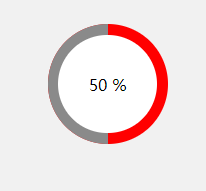
效果如图所示:
<template>
  <div class="percentloop">
    <div class="circle-left">
      <div ref="leftcontent"></div>
    </div>
    <div class="circle-right">
      <div ref="rightcontent"></div>
    </div>
    <div class="number">
      {{ percent }} %
    </div>
  </div>
</template>

<script>
export default {
  props: {
    percentNum: {
      type: [String, Number],
      default: 0
    },
    speed: { // 建议取值为0-3
      type: [String, Number],
      default: 1
    }
  },
  data () {
    return {
      percent: 0,
      initDeg: 0,
      timeId: null,
      animationing: false
    }
  },
  methods: {
    transformToDeg (percent) {
      let deg = 0
      if (percent >= 100) {
        deg = 360
      } else {
        deg = parseInt(360 * percent / 100)
      }
      return deg
    },
    transformToPercent (deg) {
      let percent = 0
      if (deg >= 360) {
        percent = 100
      } else {
        percent = parseInt(100 * deg / 360)
      }
      return percent
    },
    rotateLeft (deg) { // 大于180时,执行的动画
      this.$refs.leftcontent.style.transform = 'rotate(' + (deg - 180) + 'deg)'
    },
    rotateRight (deg) { // 小于180时,执行的动画
      this.$refs.rightcontent.style.transform = 'rotate(' + deg + 'deg)'
    },
    goRotate (deg) {
      this.animationing = true
      this.timeId = setInterval(() => {
        if (deg > this.initDeg) { // 递增动画
          this.initDeg += Number(this.speed)
          if (this.initDeg >= 180) {
            this.rotateLeft(this.initDeg)
            this.rotateRight(180) // 为避免前后两次传入的百分比转换为度数后的值不为步距的整数,可能出现的左右转动不到位的情况。
          } else {
            this.rotateRight(this.initDeg)
          }
        } else { // 递减动画
          this.initDeg -= Number(this.speed)
          if (this.initDeg >= 180) {
            this.rotateLeft(this.initDeg)
          } else {
            this.rotateLeft(180) // 为避免前后两次传入的百分比转换为度数后的值不为步距的整数,可能出现的左右转动不到位的情况。
            this.rotateRight(this.initDeg)
          }
        }
        this.percent = this.transformToPercent(this.initDeg) // 百分比数据滚动动画
        const remainer = Number(deg) - this.initDeg
        if (Math.abs(remainer) < this.speed) {
          this.initDeg += remainer
          if (this.initDeg > 180) {
            this.rotateLeft(deg)
          } else {
            this.rotateRight(deg)
          }
          this.animationFinished()
        }
      }, 10)
    },
    animationFinished () {
      this.percent = this.percentNum // 百分比数据滚动动画
      this.animationing = false
      clearInterval(this.timeId)
      this.$emit('animationFinished') // 动画完成的回调
    }
  },
  created () {
    this.goRotate(this.transformToDeg(this.percentNum))
  },
  watch: {
    'percentNum': function (val) {
      if (this.animationing) return
      this.goRotate(this.transformToDeg(val))
    }
  }
}
</script>

<style scoped lang="scss">
.percentloop {
  position: relative;
  width: 100%;
  height: 100%;
  border-radius: 50%;
  overflow: hidden;
  .circle-left, .circle-right {
    position: absolute;
    top: 0;
    left: 0;
    width: 50%;
    height: 100%;
    background-color: red;
    overflow: hidden;
    &>div {
      width: 100%;
      height: 100%;
      background-color: #8a8a8a;
      transform-origin: right center;
      /*transition: all .5s linear;*/
    }
  }
  .circle-right {
    left: 50%;
    &>div {
      transform-origin: left center;
    }
  }
  .number {
    position: absolute;
    top: 9%;
    bottom: 9%;
    left: 9%;
    right: 9%;
    background-color: #fff;
    border-radius: 50%;
    overflow: hidden;
    display: flex;
    align-items: center;
    justify-content: center;
    color: #000;
  }
}
</style>
以上就是vue圆环百分比进度条组件功能的实现的详细内容,更多关于vue进度条的资料请关注脚本之家其它相关文章!
相关文章
 这篇文章主要介绍了Vue slot插槽的使用,在生活中很多地方都有插槽,电脑usb的插槽,插板当中的电源插槽,插槽的目的是为了让我们原来的设备具备更多的扩展性比如电脑的USB我们可以插入U盘,手机,鼠标,键盘等等,下面文章就来介绍Vue slot插槽是如何使用的2021-10-10
 这篇文章主要介绍了vue之keepAlive使用案例详解,本篇文章通过简要的案例,讲解了该项技术的了解与使用,以下就是详细内容,需要的朋友可以参考下2021-09-09
 在网上搜了一下如何调用swiper实例,大部分都是通过 swiperRef = new Swiper(‘.swiper’, options) 这种方法初始化swiper,然后直接能用 swiperRef 实例,这篇文章主要介绍了swiper/vue 获取 swiper实例方法详解,需要的朋友可以参考下2023-12-12
 这篇文章主要介绍了vue语法自动转typescript,文中通过示例代码介绍的非常详细,对大家的学习或者工作具有一定的参考学习价值,需要的朋友们下面随着小编来一起学习学习吧2019-09-09
 本篇文章主要介绍了vue 文件目录结构详解,小编觉得挺不错的,现在分享给大家,也给大家做个参考。一起跟随小编过来看看吧2017-11-11
 这篇文章主要给大家介绍了关于vue3.0关闭eslint校验的3种方法,在实际开发过程中,eslint的作用不可估量,文中将关闭的方法介绍的非常详细,需要的朋友可以参考下2023-06-06
 这篇文章主要个给大家介绍了在vue3中使用defineModel进行父子组件中的双向绑定,文中通过代码示例给大家介绍的非常详细,对大家的学习或工作有一定的帮助,需要的朋友可以参考下2024-01-01
 Vue.js是一套构建用户界面的框架,只关注视图层,它不仅易于上手,还便于与第三方库或既有项目整合,下面这篇文章主要给大家介绍了关于使用idea创建vue项目的相关资料,需要的朋友可以参考下2022-08-08
vue的index.html中获取环境变量和业务判断图文详解
这篇文章主要给大家介绍了关于vue的index.html中获取环境变量和业务判断的相关资料,对vue来说index.html是一个总的入口文件,vue是单页面应用,挂在id为app的div下然后动态渲染路由模板,需要的朋友可以参考下2023-09-09 这篇文章主要为大家介绍了前端架构vue动态组件使用的基础教程,有需要的朋友可以借鉴参考下,希望能够有所帮助,祝大家多多进步早日升职加薪2022-02-02
最新评论