

idea编译器vue缩进报错问题场景分析
项目场景:
在运行Vue项目时,出现了缩进报错的问题,我是使用idea 的编译器,上网查了一下多数都是直接更改缩进的的数量,不过我觉得麻烦,就只是想要关掉验证。
问题描述:
idea编译器出现Vue缩进报错
✘ http://eslint.org/docs/rules/indent Expected indentation of 0 spaces but found 2
src\components\Home.vue:6:1
export default {
^✘ http://eslint.org/docs/rules/indent Expected indentation of 2 spaces but found 4
src\components\Home.vue:7:1
name: 'Home'
^✘ http://eslint.org/docs/rules/indent Expected indentation of 0 spaces but found 2
src\components\Home.vue:8:1
}
^✘ 3 problems (3 errors, 0 warnings)
解决方案:
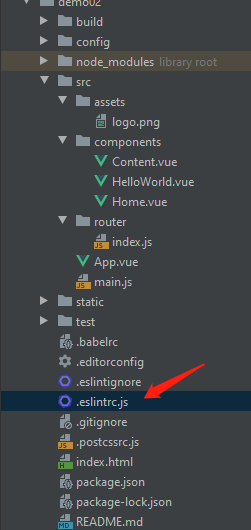
在.eslintrc.js 里加入这三行代码即可
'no-tabs':'off',
    'indent':'off',
    'space-before-function-paren':0
加入后样子
rules: {
    // allow async-await
    'generator-star-spacing': 'off',
    // allow debugger during development
    'no-debugger': process.env.NODE_ENV === 'production' ? 'error' : 'off',
    'no-tabs':'off',
    'indent':'off',
    'space-before-function-paren':0
  }
到此这篇关于idea编译器vue缩进报错问题场景分析的文章就介绍到这了,更多相关vue缩进报错内容请搜索脚本之家以前的文章或继续浏览下面的相关文章希望大家以后多多支持脚本之家!
相关文章
 这篇文章主要为大家详细介绍了基于Vue.js的表格分页组件使用方法,了解了Vue.js的特点,感兴趣的朋友可以参考一下2016-05-05
 这篇文章主要介绍了vue中动态控制btn的disabled属性方式,具有很好的参考价值,希望对大家有所帮助。如有错误或未考虑完全的地方,望不吝赐教2022-04-04
 Vue-cli@3.0 是一个全新的 Vue 项目脚手架。这篇文章主要介绍了Vue-cli@3.0 插件系统简析,需要的朋友可以参考下2018-09-09
 这篇文章主要为大家详细介绍了vue+el-upload实现多文件动态上传,文中示例代码介绍的非常详细,具有一定的参考价值,感兴趣的小伙伴们可以参考一下2021-10-10
vue项目启动出现cannot GET /服务错误的解决方法
这篇文章主要介绍了vue项目启动出现cannot GET /服务错误的解决方法,文中通过示例代码介绍的非常详细,对大家的学习或者工作具有一定的参考学习价值,需要的朋友们下面随着小编来一起学习学习吧2020-04-04 这篇文章主要为大家详细介绍了vue组件实现移动端九宫格转盘抽奖,文中示例代码介绍的非常详细,具有一定的参考价值,感兴趣的小伙伴们可以参考一下2020-10-10
 这篇文章主要给大家介绍了关于Vue监听Enter键的方法与区别的相关资料,在Vue中我们可以通过监听键盘事件来实现回车键切换焦点的功能,文中通过代码介绍的非常详细,需要的朋友可以参考下2023-10-10
 这篇文章主要介绍了Vue 数据绑定的原理,帮助大家更好的理解和使用vue框架,感兴趣的朋友可以了解下2020-11-11
vue 解决setTimeOut和setInterval函数无效报错的问题
这篇文章主要介绍了vue 解决setTimeOut和setInterval函数无效报错的问题,具有很好的参考价值,希望对大家有所帮助。一起跟随小编过来看看吧2020-07-07
基于 vue-skeleton-webpack-plugin 的骨架屏实战
这篇文章主要介绍了基于 vue-skeleton-webpack-plugin 的骨架屏实战,文中通过示例代码介绍的非常详细,对大家的学习或者工作具有一定的参考学习价值,需要的朋友们下面随着小编来一起学习学习吧2019-08-08
最新评论