

手把手教你用vue3开发一个打砖块小游戏
更新时间:2021年07月07日 10:38:59 作者:lizhenwen
这篇文章主要给大家介绍了关于如何利用vue3开发一个打砖块小游戏的相关资料,通过一个小游戏实例可以快速了解vue3开发小游戏的流程,需要的朋友可以参考下
前言
用vue3写了几个实例,感觉Vue3的composition Api设计得还是很不错,改变了一下习惯,但写多两个就好了。 这次写一个也是儿时很觉得很好玩的游戏-打砖块, 无聊的时候玩一下也觉得挺好玩,游戏性也挺高。这次我直接用vite+vue3打包尝试一下,vite也是开箱即用,特点是也是可以清除死代码,按需打包,所以打包速度也是非常快的。没用过的同学可以尝试用用。
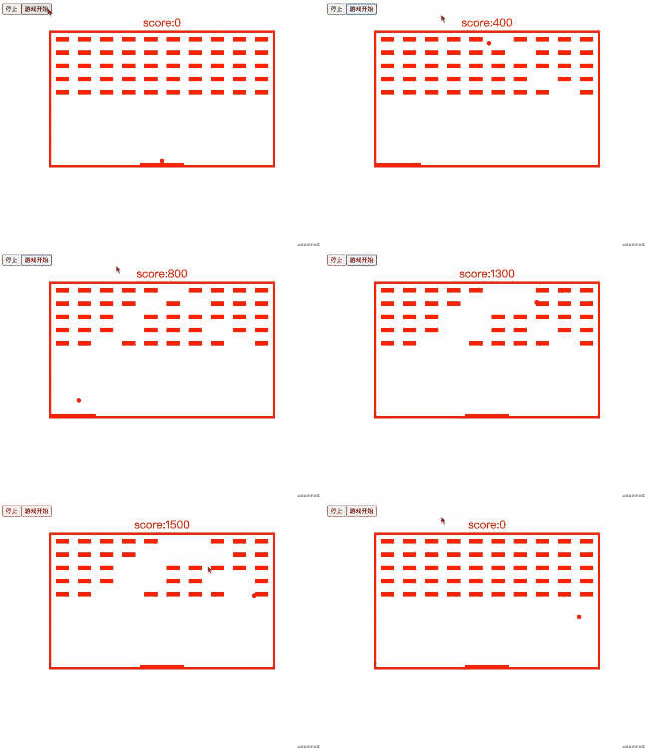
游戏效果
游戏需求
- 创建一个场景
- 创建一个球,创建一堆被打击方块
- 创建一个可以移动方块并可控制左右移动
- 当球碰撞左右上边界及移动方块回弹
- 挡球碰撞下边界游戏结束
上完整代码
<template>

    <button @click="stop">停止</button>
    <button @click="start">游戏开始</button>
    <div style="color: red; text-align: center;font-size: 25px">score:{{scroce}}</div>

    <div class="box" :style="{width :boxWidth +'px', height:boxHeight +'px'}">
        <div class="str">{{str}}</div>
        <div class="kuaiBox">
            <div class="kuai" v-for="(item,index) in arr" :key="index" :style="{opacity :item.active ? '0':'1'}"></div>
        </div>
        <div class="ball" :style="{left :x + 'px', top : y + 'px', width : ball +'px', height: ball+'px'}"></div>
        <div class="bottomMove"
             :style="{left :mx + 'px' , top : my + 'px',width :moveBottomW +'px',height : moveBottomH+'px'  }"></div>
    </div>
</template>

<script setup>
    import {onMounted, onUnmounted, reactive, toRefs} from 'vue'

    const boxWidth = 500, // 场景宽度
        boxHeight = 300, // 场景高度
        ball = 10,//小球的宽高
        moveBottomH = 5,//移动方块高度
        moveBottomW = 100//移动方块快读

    const strArr = '恭喜你,挑战成功!!'

    //用reactive 保存一些可观察信息
    const state = reactive({
        x: boxWidth / 2 - ball / 2,  // 小球x轴位置信息 计算默认位置在中间
        y: boxHeight - ball - moveBottomH, // 小球Y轴的位置信息 计算默认位置在中间
        mx: boxWidth / 2 - moveBottomW / 2, //移动方块的位置信息 计算默认位置在中间
        my: boxHeight - moveBottomH, // 移动方块y轴的的位置信息  计算默认位置在中间
        // 被打击方块的数组
        arr: Array.from({length: 50}, (_, index) => {
            return {
                index,
                active: false
            }
        }),
        str: '', // 返回挑战成功字眼
        scroce: 0 // 分数
    })
    // 用toRefs将观察对象的信息解构出来供模板使用
    const {x, y, mx, my, arr, str, scroce} = toRefs(state)
    let timer = null, // 小球定时器
        speed = 3,// 小球速度
        map = {x: 10, y: 10},
        timer2 = null, // 挑战成功字眼显示定时器
        index = 0//挑战成功字眼续个显示的索引值

    // 挑战成功字眼续个显示的方法
    const strFun = () => {
        if (strArr.length === index) clearInterval(timer2)
        state.str += strArr.substr(index, 1)
        index++
    }


    //移动小球的方法
    // 1.这里同过变量map 对象来记录坐标信息, 确定小球碰到 左右上 及移动方块是否回弹
    // 2.循环砖块检测小球碰撞到砖块消失
    const moveBall = () => {
        const {offsetTop, offsetHeight, offsetLeft, offsetWidth} = document.querySelector('.bottomMove')
        if (state.x <= 0) {
            map.x = speed
        } else if (state.x > boxWidth - ball) {
            map.x = -speed
        }
        if (state.y <= 0) {
            map.y = speed
        }
        if (state.y >= offsetTop - offsetHeight &&
            state.y <= offsetTop + offsetHeight &&
            state.x >= offsetLeft &&
            state.x < offsetLeft + offsetWidth) {
            map.y = -speed
        }
        if (state.y > boxHeight) {
            clearInterval(timer)
            alert('game over')
            window.location.reload()
        }
        Array.from(state.arr).forEach((item, index) => {
            const {
                offsetLeft,
                offsetTop,
                offsetWidth,
                offsetHeight
            } = document.querySelectorAll('.kuai')[index]
            if (state.x > offsetLeft
                && state.x < offsetLeft + offsetWidth
                && state.y > offsetTop
                && state.y < offsetTop + offsetHeight) {
                if (!state.arr[index].active) {
                    state.scroce += 100
                }
                state.arr[index].active = true
            }
        })
        if (Array.from(state.arr).every(item => item.active)) {
            clearInterval(timer)
            timer2 = setInterval(strFun, 1000)
        }
        state.x = state.x += map.x
        state.y = state.y += map.y
    }

    //移动方块左右移动方法 ,接住小球
    const bottomMove = ev => {
        if (ev.code === 'Space') clearInterval(timer)
        switch (ev.key) {
            case 'ArrowRight':
                state.mx += 100
                break
            case  'ArrowLeft':
                state.mx -= 100
                break
        }
        state.mx = state.mx < 0 ? 0 : state.mx
        state.mx = state.mx > boxWidth - moveBottomW ? boxWidth - moveBottomW : state.mx
    }
    // 暂停游戏
    const stop = () => {
        clearInterval(timer)
    }
    // 开始游戏
    const start = () => {
        timer = setInterval(moveBall, 20)
    }

    // 绑定移动方块事件
    onMounted(() => {
        document.addEventListener('keyup', bottomMove)
    })
    // 移动出移动方块事件
    onUnmounted(() => {
        clearInterval(timer)
    })
</script>

<style>

    .bottomMove {
        width: 100px;
        height: 10px;
        background: red;
        position: absolute;
        transition-duration: 100ms;
        transition-timing-function: ease-out;
    }

    .ball {
        width: 20px;
        height: 20px;
        background-color: red;
        border-radius: 50%;
        position: absolute;
    }

    .kuaiBox {
        display: flex;
        flex-wrap: wrap;
    }

    .kuai {
        width: 30px;
        height: 10px;
        background: red;
        margin: 10px;
        transition-duration: 100ms;
        transition-timing-function: ease-in;
    }

    .str {
        text-align: center;
        font-size: 50px;
        color: red;

    }

    .box {

        justify-content: center;
        width: 500px;
        height: 500px;
        margin: 0 auto;
        position: relative;
        border: 5px solid red;
        overflow: hidden;
    }

    .picker {
        width: 50px;
        height: 50px;
    }
</style>
最后
以后继续用vue3,多写写实例。
附上打砖块小游戏地址
shinewen189.github.io/nigo-ball-v…
到此这篇关于用vue3开发一个打砖块小游戏的文章就介绍到这了,更多相关vue3打砖块小游戏内容请搜索脚本之家以前的文章或继续浏览下面的相关文章希望大家以后多多支持脚本之家!
相关文章
 有时候,频繁调用的函数,我们需要把它挂载在全局的vue原型上,方便调用,这篇文章主要为大家详细介绍了Vue中挂载全局的具体操作,需要的可以参考下2024-03-03
 本篇文章主要介绍了使用vue.js实现联动效果的示例代码,小编觉得挺不错的,现在分享给大家,也给大家做个参考。一起跟随小编过来看看吧2017-01-01
 在现代电商系统开发中,后台管理界面经常需要根据商品规格和规格值动态生成SKU表格,本文通过element-ui框架,展示了如何在Vue.js的环境下,利用子组件和动态绑定的方式,实现SKU表格的增删改查功能2024-11-11
 今天小编就为大家分享一篇vue 获取及修改store.js里的公共变量实例,具有很好的参考价值,希望对大家有所帮助。一起跟随小编过来看看吧2019-11-11
 这篇文章主要介绍了vue 进阶之实现父子组件间的传值,本文通过实例代码给大家介绍的非常详细,具有一定的参考借鉴价值,需要的朋友可以参考下2019-04-04
 这篇文章主要为大家详细介绍了vue项目实现分页效果,文中示例代码介绍的非常详细,具有一定的参考价值,感兴趣的小伙伴们可以参考一下2021-03-03
 这篇文章主要为大家详细介绍了vue项目实现按钮可随意移动,文中示例代码介绍的非常详细,具有一定的参考价值,感兴趣的小伙伴们可以参考一下2022-03-03
vue cli 局部混入mixin和全局混入mixin的过程
这篇文章主要介绍了vue cli 局部混入mixin和全局混入mixin的过程,具有很好的参考价值,希望对大家有所帮助。如有错误或未考虑完全的地方,望不吝赐教2022-05-05 在Vue项目中,通过使用vue-print-nb插件,可以实现页面的打印功能,这篇文章主要介绍了vue项目纯前端实现的模板打印功能的相关资料,需要的朋友可以参考下2024-10-10
vue+socket.io+express+mongodb 实现简易多房间在线群聊示例
本篇文章主要介绍了vue+socket.io+express+mongodb 实现简易多房间在线群聊示例,具有一定的参考价值,感兴趣的小伙伴们可以参考一下。2017-10-10
最新评论