

vue实现底部弹窗多选
更新时间:2021年09月05日 10:58:26 作者:知命者夏洛特
这篇文章主要为大家详细介绍了vue实现底部弹窗多选,文中示例代码介绍的非常详细,具有一定的参考价值,感兴趣的小伙伴们可以参考一下
本文实例为大家分享了vue实现底部弹窗多选的具体代码,供大家参考,具体内容如下

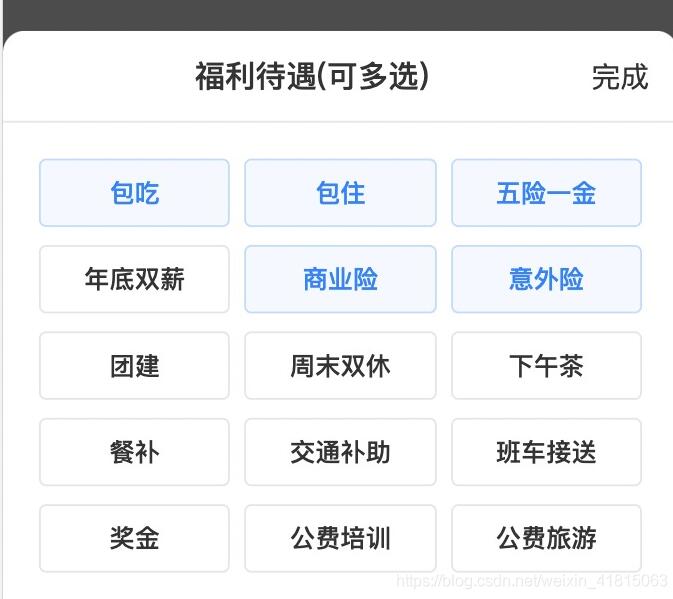

代码:
<template>
  <div class="release-post">
    <div class="resume_main">
      <div class="resume_content">
        <van-form>
          <div class="table_list post_welfare">
            <p class="name_title">岗位福利<span class="required">*</span></p>
            <van-field
              class="calendar"
              input-align="left"
              v-model="benefits"
              placeholder="请选择岗位福利"
              @focus="onFocus"
              :class="{ borderStyle: welfareChange }"
              @click.stop="clickWelfare"
              :disabled="true"
            />
          </div>
        </van-form>
        <!-- 岗位福利 -->
        <van-popup v-model="showWelfare" position="bottom">
          <div class="welfare_top">
            <p></p>
            <p class="welfare_title">福利待遇(可多选)</p>
            <p class="welfare_btn" @click.stop="onConfirmSpeed">完成</p>
          </div>
          <div class="welfare_content">
            <div
              v-for="(item, index) in welfareList"
              :key="index"
              :class="{ active: item.active }"
              id="welfare_item"
              @click.stop="clickWelfareItem(item, index)"
            >
              <p :class="item.active ? 'welfare_text' : 'not_welfare_text'">
                {{ item.text }}
              </p>
            </div>
          </div>
        </van-popup>
      </div>
    </div>
    <div>
      <div class="mask">
        <button
          class="btn"
          @click="submit"
          :class="{ btnBg: colorChange() }"
          v-preventReClick="1000"
        >
          完成
        </button>
      </div>
    </div>
  </div>
</template>

<script>
import Vue from 'vue';
import { Circle, DatetimePicker, Form, Field, Toast, Calendar, Picker, Overlay, ActionSheet, Popup } from 'vant';
import 'vant/lib/index.less';
Vue.use(Circle).use(DatetimePicker).use(Form).use(Field).use(Toast).use(Calendar).use(Picker).use(Overlay).use(ActionSheet).use(Popup);

export default {
  name: "PerfectPost",
  data () {
    return {
      welfareList: [
        {
          id: 1,
          text: "包吃"
        },
        {
          id: 2,
          text: "包住"
        },
        {
          id: 3,
          text: "五险一金"
        },
        {
          id: 4,
          text: "年底双薪"
        },
        {
          id: 5,
          text: "商业险"
        },
        {
          id: 6,
          text: "意外险"
        },
        {
          id: 7,
          text: "团建"
        },
        {
          id: 8,
          text: "周末双休"
        },
        {
          id: 9,
          text: "下午茶"
        },
        {
          id: 10,
          text: "餐补"
        },
        {
          id: 11,
          text: "交通补助"
        },
        {
          id: 12,
          text: "班车接送"
        },
        {
          id: 13,
          text: "奖金"
        },
        {
          id: 14,
          text: "公费培训"
        },
        {
          id: 15,
          text: "公费旅游"
        },
      ],
      showWelfare: false,//岗位福利
      onlineForm: {
        benefits: "",//岗位福利
      },
      checkedList: [],
      welfareChange: false,
    };
  },
  methods: {
    //弹出岗位福利
    clickWelfare () {
      this.showRedTips()
      this.showWelfare = true
    },
    //选择福利项
    clickWelfareItem (v) {
      if (v.active) {
        Vue.set(v, 'active', false)
      } else if (this.checkedList.length < 5) {
        Vue.set(v, 'active', true)
      }
      this.checkedList = this.welfareList.filter(function (item) {
        return item.active
      })
      if (this.checkedList.length >= 5) {
        Toast('最多只能选择5个哦')
      }
    },
    //完成福利选项
    onConfirmSpeed () {
      this.showWelfare = false
      this.welfareChange = false
      let itemList = this.checkedList.map((item) => {
        return item.text
      });
      let str = itemList.join('/')
      let str1 = itemList.join(';')
      this.benefits = str ? str : this.benefits
      this.onlineForm.benefits = str1 ? str1 : this.benefits
    },
    showRedTips () {
      this.welfareChange = false
    },
    onFocus () {
      this.showRedTips()
    },
    //下一步按钮色值
    colorChange () {
      if (this.onlineForm.benefits) {
        return true
      }
    },
    // 验证
    validateOnlineForm () {
      let valid = true;
      if (!this.onlineForm.benefits || !this.onlineForm.benefits.trim()) {
        valid = false;
        Toast('请选择岗位福利')
        this.welfareChange = true
      }
      return valid;
    },
    //提交
    submit () {
      if (this.validateOnlineForm()) {
        Toast('提交')
      }
    },
  },
};
</script>

<style scoped lang="less" >
* {
  margin: 0;
  padding: 0;
}
::v-deep .van-picker__title {
  font-size: 17px;
  font-family: PingFangSC, PingFangSC-Medium;
  font-weight: 500;
  text-align: center;
  color: #333333;
}
.release-post {
  width: 100%;
  padding-bottom: 64px;
  padding-top: constant(safe-area-inset-top);
  padding-top: env(safe-area-inset-top);
}
.post_welfare {
  ::v-deep .van-field__control:disabled {
    font-size: 15px;
    font-family: PingFangSC, PingFangSC-Regular;
    font-weight: 400;
    text-align: left;
    color: #333333;
    -webkit-text-fill-color: #333333;
  }
  ::v-deep input::-webkit-input-placeholder {
    font-size: 15px;
    font-family: PingFangSC, PingFangSC-Regular;
    font-weight: 400;
    text-align: left;
    color: #999999;
    -webkit-text-fill-color: #999999;
  }
}
::v-deep .van-field__control:disabled {
  font-size: 15px;
  font-family: PingFangSC, PingFangSC-Regular;
  font-weight: 400;
  text-align: left;
  color: #333333;
  -webkit-text-fill-color: #333333;
}

.welfare_content {
  padding-top: 10px;
  padding-bottom: 30px;
  display: flex;
  justify-content: space-around;
  align-items: center;
  flex-wrap: wrap;
  margin: 0 16px;
}
#welfare_item {
  width: 31%;
}
.welfare_top {
  display: flex;
  justify-content: space-between;
  align-items: center;
  padding: 13px 0;
  border-bottom: solid 0.5px #e5e5e5;
}
.welfare_title {
  font-size: 17px;
  font-family: PingFangSC, PingFangSC-Medium;
  font-weight: 500;
  text-align: center;
  color: #333333;
  margin-right: -16px;
}
.welfare_btn {
  font-size: 16px;
  font-family: PingFangSC, PingFangSC-Regular;
  font-weight: 400;
  text-align: right;
  color: #333333;
  margin-right: 16px;
}
.welfare_text {
  height: 36px;
  background: #f4f8ff;
  border: 1px solid #bbdcff;
  border-radius: 4px;
  margin-top: 10px;
  line-height: 36px;

  font-size: 14px;
  font-family: PingFangSC, PingFangSC-Medium;
  font-weight: 500;
  text-align: center;
  color: #1283ff;
}
.not_welfare_text {
  height: 36px;
  background: #ffffff;
  border: 1px solid #e5e5e5;
  border-radius: 4px;
  margin-top: 10px;
  line-height: 36px;

  font-size: 14px;
  font-family: PingFang, PingFang-SC;
  font-weight: 500;
  text-align: center;
  color: #333333;
}

.resume_content {
  margin-left: 30px;
  margin-right: 30px;
  ::v-deep {
    .van-popup--bottom {
      border-top-left-radius: 12px;
      border-top-right-radius: 12px;
    }
  }
}
.mask {
  width: 100%;
  background: #ffffff;
  box-shadow: 0px 0px 8px 0px rgba(204, 204, 204, 0.3);
  position: fixed;
  bottom: 0;
  left: 0;
  display: flex;
  justify-content: center;
  align-items: center;
  padding: 10px 0;
  padding-bottom: calc(env(safe-area-inset-bottom)+15px);
  padding-bottom: calc(env(safe-area-inset-bottom) + 15px);
}
.btn {
  font-size: 16px;
  font-family: PingFangSC, PingFangSC-Medium;
  font-weight: 500;
  text-align: left;
  color: #ffffff;
  margin: 0 auto;
  text-align: center;
  line-height: 1.6rem;
  width: 100%;
  margin: 0 16px;
  height: 48px;
  background: #d8d8d8;
}
.btnBg {
  font-size: 16px;
  font-family: PingFangSC, PingFangSC-Medium;
  font-weight: 500;
  text-align: left;
  color: #ffffff;
  margin: 0 auto;
  text-align: center;
  line-height: 1.6rem;
  width: 100%;
  margin: 0 16px;
  height: 48px;
  background: #d8d8d8;
  border: none;
  outline: none;
  background: linear-gradient(90deg, #50a3ff, #1283ff);
  border-radius: 4px;
}

.name_title {
  font-size: 16px;
  font-family: PingFangSC, PingFangSC-Medium;
  font-weight: 500;
  color: #333333;
}

.required {
  font-size: 13px;
  font-family: PingFangSC, PingFangSC-Regular;
  font-weight: 400;
  color: #ff1d28;
  position: absolute;
}
.calendar {
  width: 100%;
  height: 49px;
  background: #ffffff;
  border: 1px solid #e5e5e5;
  border-radius: 5px;
  margin-top: 10px;
  padding-left: 20px;
  background: url("./images/drop-down.png") no-repeat 96% center;
  background-size: 10px 7px;
  padding-right: 25px;
  ::v-deep .van-field__control {
    font-size: 15px;
    font-family: PingFangSC, PingFangSC-Regular;
    font-weight: 400;
    text-align: left;
    color: #333333;
    margin-top: 12px;
  }
}
::v-deep input::-webkit-input-placeholder {
  font-size: 15px;
  font-family: PingFangSC, PingFangSC-Regular;
  font-weight: 400;
  text-align: left;
  color: #afadad;
  -webkit-text-fill-color: #afadad;
}
.table_list {
  margin-top: 16px;
}
.borderStyle {
  border: solid 1px #ff1d28;
  border-radius: 3px;
}
input::-webkit-input-placeholder {
  font-size: 15px;
  font-family: PingFangSC, PingFangSC-Regular;
  font-weight: 400;
  text-align: left;
  color: #999999;
}
.van-field__control {
  color: #333333;
}
</style>
以上就是本文的全部内容,希望对大家的学习有所帮助,也希望大家多多支持脚本之家。
相关文章
 这篇文章主要介绍了Element输入框带历史查询记录的实现示例,小编觉得挺不错的,现在分享给大家,也给大家做个参考。一起跟随小编过来看看吧2019-01-01
 这篇文章主要为大家详细介绍了vue实现滑动超出指定距离回顶部功能,具有一定的参考价值,感兴趣的小伙伴们可以参考一下2019-07-07
 这篇文章主要为大家介绍了使用v-memo缓存模板子树提高应用性能详解,有需要的朋友可以借鉴参考下,希望能够有所帮助,祝大家多多进步,早日升职加薪2022-09-09
 下面小编就为大家分享一篇vue页面离开后执行函数的实例,具有很好的参考价值,希望对大家有所帮助。一起跟随小编过来看看吧2018-03-03
 这里分享一个常用的价格格式化的一个方法,在电商的价格处理中非常的实用,具体实现代码大家参考下本文2017-05-05
 这篇文章主要介绍了构建大型 Vue.js 项目的10条建议(小结),文中通过示例代码介绍的非常详细,对大家的学习或者工作具有一定的参考学习价值,需要的朋友们下面随着小编来一起学习学习吧2019-11-11
 下面小编就为大家分享一篇vue2.0 子组件改变props值,并向父组件传值的方法,具有很好的参考价值,希望对大家有所帮助。一起跟随小编过来看看吧2018-03-03
 这篇文章主要介绍了关于vue中输入框的使用场景总结,具有很好的参考价值,希望对大家有所帮助。如有错误或未考虑完全的地方,望不吝赐教2022-05-05
 这篇文章主要为大家详细介绍了vue实现移动端多格输入框,文中示例代码介绍的非常详细,具有一定的参考价值,感兴趣的小伙伴们可以参考一下2021-10-10
 swagger是一种标准的数据格式的定义,对于不同语言进行实现一些注解API式的东西,能快速生成这种描述restful格式的api信息的json串,本文给大家详细介绍vue编写的功能强大的swagger-ui页面,感兴趣的朋友跟随小编一起看看吧2022-02-02
最新评论