

element table多层嵌套显示的实践
更新时间:2021年09月29日 11:13:52 作者:lovlin_l
本文主要介绍了element table多层嵌套显示的实践,文中通过示例代码介绍的非常详细,具有一定的参考价值,感兴趣的小伙伴们可以参考一下
有个需求是一个列表,里面包含多个单子,每个单子可以是唯一,也可以是多个合并之后的,而且每个单子下面显示的是另外一个表格,来上图
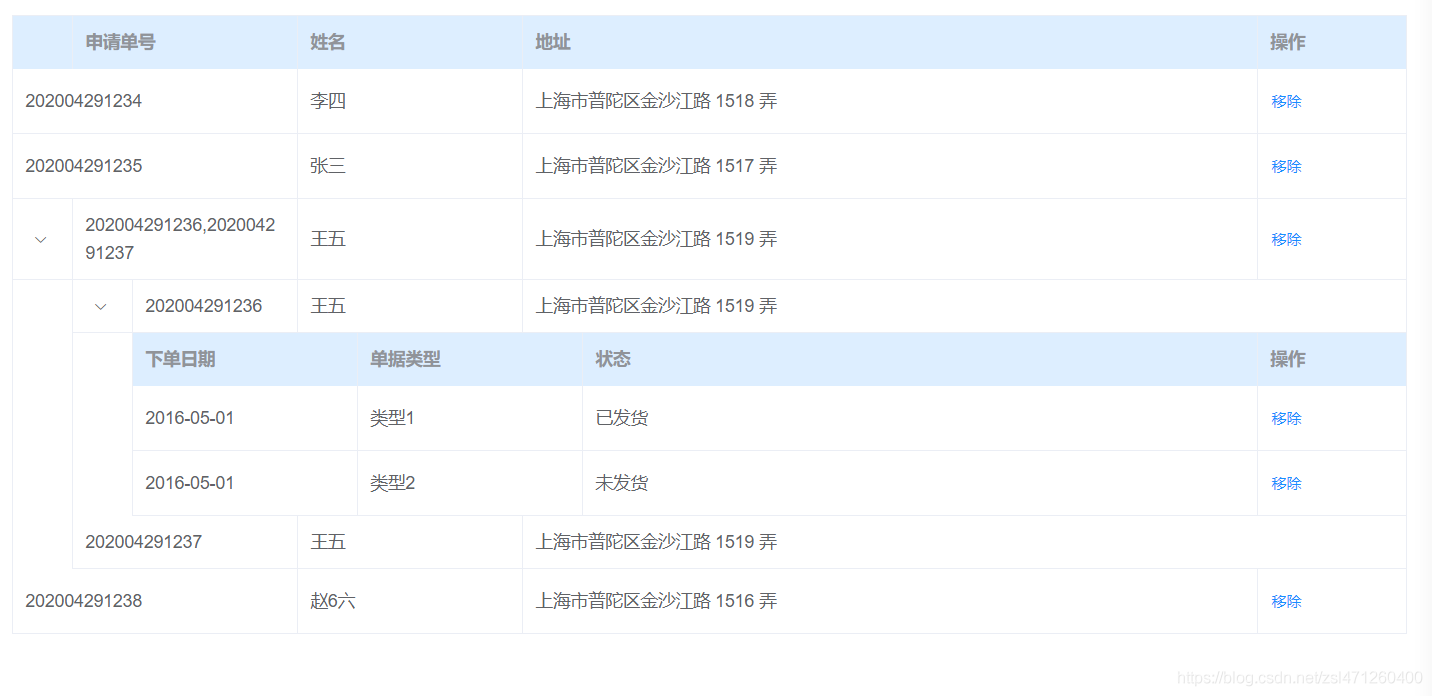
每行的操作还不一样,然后通过官网的一些例子总结了一下合并代码
<template>
  <div class="app-container">
    <div>
      <el-table
        :data="tableData"
        style="width: 100%;margin-bottom: 20px;"
        :span-method="arraySpanMethod"
        row-key="id"
        border
      >
        <el-table-column type="expand">
          <template slot-scope="props">
            <el-table
              class="table-in-table"
              :show-header="false"
              :data="props.row.datas"
              style="width: 100%;"
              row-key="id"
              :span-method="arraySpanMethod"
              border
            >
              <el-table-column type="expand">
                <template slot-scope="props">
                  <el-table
                    class="table-in-table"
                    :data="props.row.datas"
                    style="width: 100%;"
                    row-key="id"
                    border
                  >
                    <el-table-column prop="date" label="下单日期" width="180"></el-table-column>
                    <el-table-column prop="type" label="单据类型" width="180"></el-table-column>
                    <el-table-column prop="status" label="状态"></el-table-column>
                    <el-table-column label="操作" width="120">
                      <template slot-scope="props">
                        <el-button type="text" size="small">移除</el-button>
                      </template>
                    </el-table-column>
                  </el-table>
                </template>
              </el-table-column>
              <el-table-column prop="applyNo" label="申请单号" width="132.2"></el-table-column>
              <el-table-column prop="name" label="姓名" width="180"></el-table-column>
              <el-table-column prop="address" label="地址"></el-table-column>
            </el-table>
          </template>
        </el-table-column>
        <el-table-column prop="applyNo" label="申请单号" width="180"></el-table-column>
        <el-table-column prop="name" label="姓名" width="180"></el-table-column>
        <el-table-column prop="address" label="地址"></el-table-column>
        <el-table-column label="操作" width="120">
          <template slot-scope="props">
            <el-button type="text" size="small">移除</el-button>
          </template>
        </el-table-column>
      </el-table>
    </div>
  </div>
</template>

<script>
export default {
  name: "name1",
  components: {},
  data() {
    return {
      tableData: [
        {
          id: 1,
          applyNo: "202004291234",
          name: "李四",
          address: "上海市普陀区金沙江路 1518 弄"
        },
        {
          id: 2,
          applyNo: "202004291235",
          name: "张三",
          address: "上海市普陀区金沙江路 1517 弄"
        },
        {
          id: 3,
          applyNo: "202004291236,202004291237",
          name: "王五",
          address: "上海市普陀区金沙江路 1519 弄",
          datas: [
            {
              id: 31,
              applyNo: "202004291236",
              name: "王五",
              address: "上海市普陀区金沙江路 1519 弄",
              datas: [
                {
                  id: 31,
                  date: "2016-05-01",
                  type: "类型1",
                  status: "已发货"
                },
                {
                  id: 32,
                  date: "2016-05-01",
                  type: "类型2",
                  status: "未发货"
                }
              ]
            },
            {
              id: 32,
              applyNo: "202004291237",
              name: "王五",
              address: "上海市普陀区金沙江路 1519 弄"
            }
          ]
        },
        {
          id: 4,
          applyNo: "202004291238",
          name: "赵6六",
          address: "上海市普陀区金沙江路 1516 弄"
        }
      ]
    };
  },
  methods: {
    arraySpanMethod({ row, column, rowIndex, columnIndex }) {
      if (!row.datas) {
        if (columnIndex === 0) {
          return [0, 0];
        } else if (columnIndex === 1) {
          return [1, 2];
        }
      }
    }
  }
};
</script>
<style lang="scss" scoped>
.app-container {
  ::v-deep {
    .el-table th {
      background: #ddeeff;
    }
    .el-table__expanded-cell {
      border-bottom: 0px;
      border-right: 0px;
      padding: 0px 0px 0px 47px;
    }
  }
  .table-in-table {
    border-top: 0px;
  }
}
</style>
注:需要注意一点的是,这里面的孩子节点不能用children,因为官方默认是children,所以会出现别的下拉组件
设置td宽度的时候,需要注意的是里面跟外层的差47.8
到此这篇关于element table多层嵌套显示的实践的文章就介绍到这了,更多相关element table多层嵌套内容请搜索脚本之家以前的文章或继续浏览下面的相关文章希望大家以后多多支持脚本之家!
您可能感兴趣的文章:
相关文章
 Vue.js 是一个渐进式框架,用于构建用户界面,在开发过程中,我们经常需要根据不同的条件动态显示组件,在本文中,我将详细介绍如何实现Vue组件的动态绑定,提供示例代码,以帮助你更深入地理解这个概念,需要的朋友可以参考下2024-11-11
 这篇文章主要介绍了vue 实现走马灯效果,文中通过示例代码介绍的非常详细,对大家的学习或者工作具有一定的参考学习价值,需要的朋友们下面随着小编来一起学习学习吧2019-10-10
 这篇文章主要为大家详细介绍了vue实现移动端拖动排序,文中示例代码介绍的非常详细,具有一定的参考价值,感兴趣的小伙伴们可以参考一下2020-08-08
 在小程序的wxml文件中创建消息框,消息框一般包含要提示的消息内容以及确认和取消按钮,在小程序的wxss文件中定义消息框的样式,在小程序的js文件中,我们需要通过Animation对象实现消息框的弹出动画2023-12-12
 最近公司新启动了个项目,用的是vue框架在做,下面这篇文章主要给大家介绍了关于vue实现token登录验证的相关资料,文中通过实例代码介绍的非常详细,需要的朋友可以参考下2022-04-04
 这篇文章主要介绍了vue中表格设置某列样式、不显示表头问题,具有很好的参考价值,希望对大家有所帮助,如有错误或未考虑完全的地方,望不吝赐教2023-10-10
 useVModel()用来实现父子组件间数据的双向绑定,若不想使用默认回调,也可以自己使用emit实现回调,这篇文章主要给大家介绍了关于vue中useVModel()使用方法的相关资料,需要的朋友可以参考下2024-03-03
 这篇文章主要介绍了vue项目中使用scss的方法步骤,小编觉得挺不错的,现在分享给大家,也给大家做个参考。一起跟随小编过来看看吧2019-05-05
vue3 onMounted异步函数同步请求async/await实现
这篇文章主要为大家介绍了vue3 onMounted初始化数据异步函数/同步请求async/await实现详解,有需要的朋友可以借鉴参考下,希望能够有所帮助,祝大家多多进步,早日升职加薪2023-07-07 这篇文章主要为大家详细介绍了Vue分页组件的封装方法,文中示例代码介绍的非常详细,具有一定的参考价值,感兴趣的小伙伴们可以参考一下2022-07-07
最新评论