

SpringBoot 实现微信推送模板的示例代码
更新时间:2021年12月03日 10:38:56 作者:陈彦斌
这篇文章主要介绍了SpringBoot 实现微信推送模板,本文通过实例代码给大家介绍的非常详细,对大家的学习或工作具有一定的参考借鉴价值,需要的朋友可以参考下
导读
由于最近手头上需要做个Message Gateway,涉及到:邮件(点我直达)、短信、公众号等推送功能,网上学习下,整理下来以备以后使用。
添加依赖
在SpringBoot项目中添加依赖
 <!--微信模版消息推送三方sdk-->
        <dependency>
            <groupId>com.github.binarywang</groupId>
            <artifactId>weixin-java-mp</artifactId>
            <version>3.3.0</version>
        </dependency>
控制层代码
package com.ybchen.springbootwechart.controller;

import me.chanjar.weixin.mp.api.WxMpInMemoryConfigStorage;
import me.chanjar.weixin.mp.api.WxMpService;
import me.chanjar.weixin.mp.api.impl.WxMpServiceImpl;
import me.chanjar.weixin.mp.bean.template.WxMpTemplateData;
import me.chanjar.weixin.mp.bean.template.WxMpTemplateMessage;
import org.springframework.web.bind.annotation.GetMapping;
import org.springframework.web.bind.annotation.RestController;

/**
 * @ClassName:PushController
 * @Description:微信推送
 * @Author:chenyb
 * @Date:2020/11/27 10:33 上午
 * @Versiion:1.0
 */
@RestController
public class PushController {
    /*
     * 微信测试账号推送
     * */
    @GetMapping("/push")
    public String push() {
        //1,配置
        WxMpInMemoryConfigStorage wxStorage = new WxMpInMemoryConfigStorage();
        wxStorage.setAppId("AppId");
        wxStorage.setSecret("Secret");
        WxMpService wxMpService = new WxMpServiceImpl();
        wxMpService.setWxMpConfigStorage(wxStorage);

        //2,推送消息
        WxMpTemplateMessage templateMessage = WxMpTemplateMessage.builder()
                .toUser("ojPPk54RcFkCgGVP3m66v1RM2mvA")//要推送的用户openid
                .templateId("a7RPsASc7fw33zFo7zEfWKE0vrPnUo7VZ82fX3tTfMg")//模版id
                .url("https://www.cnblogs.com/chenyanbin/")//点击模版消息要访问的网址
                .build();
        //3,如果是正式版发送模版消息,这里需要配置你的信息
//                templateMessage.addData(new WxMpTemplateData("name", "value", "#FF00FF"));
//                templateMessage.addData(new WxMpTemplateData(name2, value2, color2));
        try {
            wxMpService.getTemplateMsgService().sendTemplateMsg(templateMessage);
            return "推送成功";
        } catch (Exception e) {
            System.out.println("推送失败:" + e.getMessage());
            e.printStackTrace();
            return "推送失败";
        }
    }
}
去微信公众平台注册一个开发测试账户
个人开发,我们可以去微信公众号平台注册个测试账户点我直达,微信扫码登录,会给我们一个免费的:appID、appsecret,微信扫码关注公众号,会显示关注测试公众号的用户列表。全局错误码:点我直达
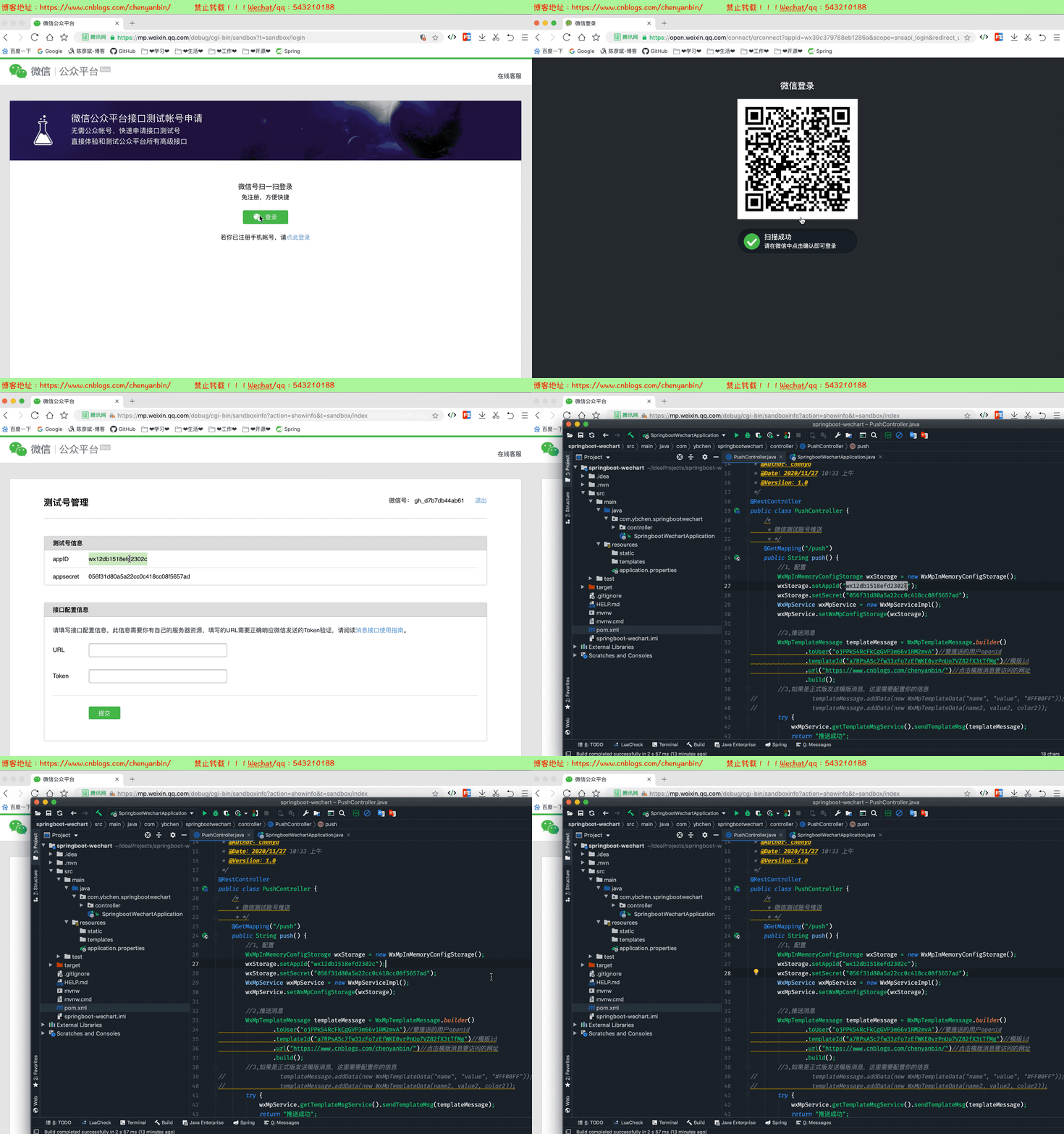
测试
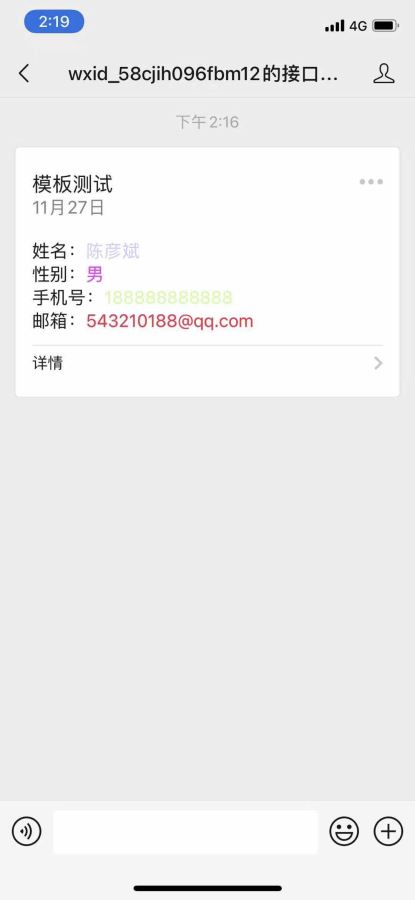
关注测试公众号,创建模板,并发送指定模板内容

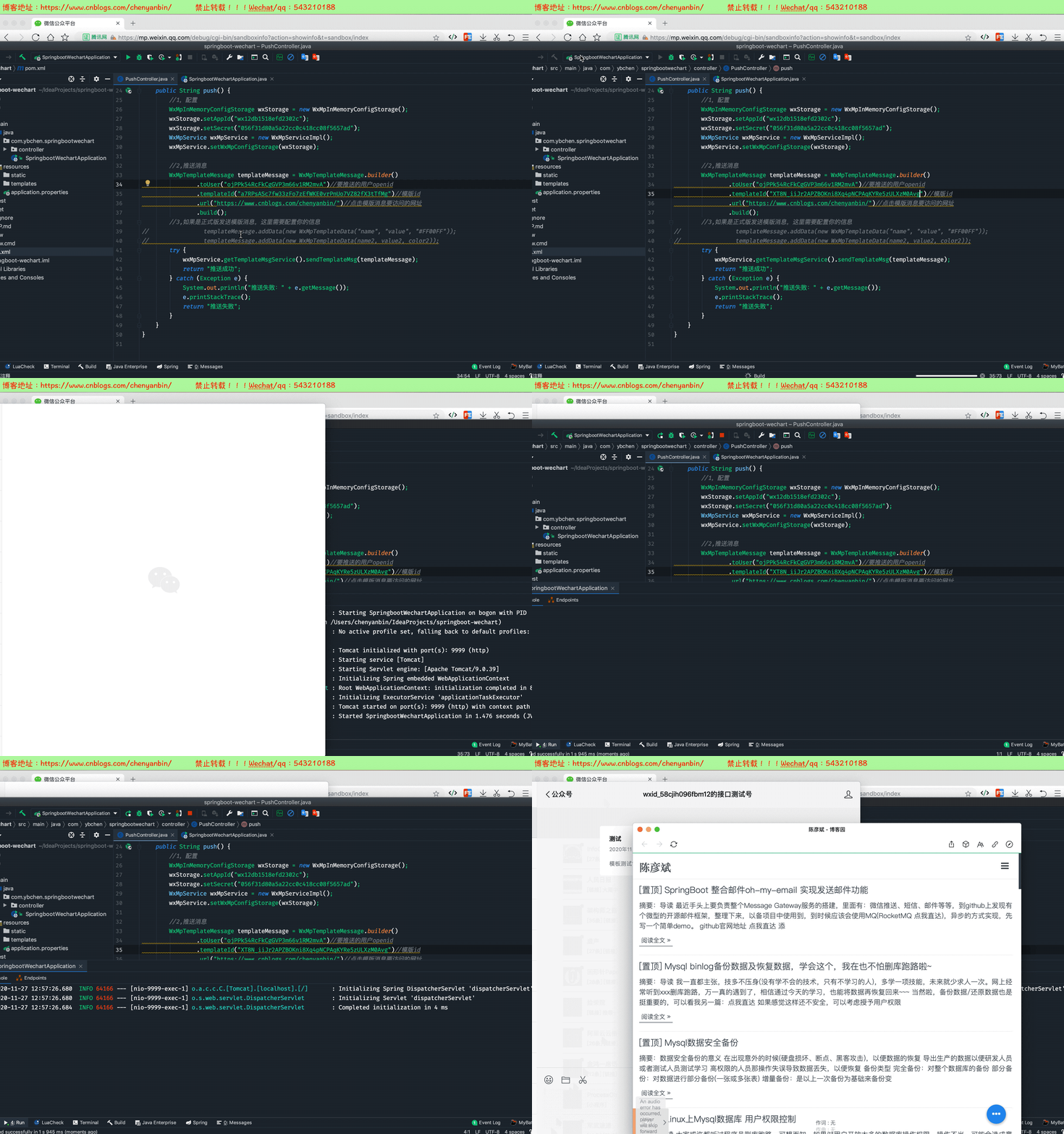
替换模板内容在微信公众平台创建模板
语法:{{变量名.DATA}}
姓名:{{user_name.DATA}}
性别:{{sex.DATA}}
手机号:{{phone.DATA}}
邮箱:{{email.DATA}}

控制层修改
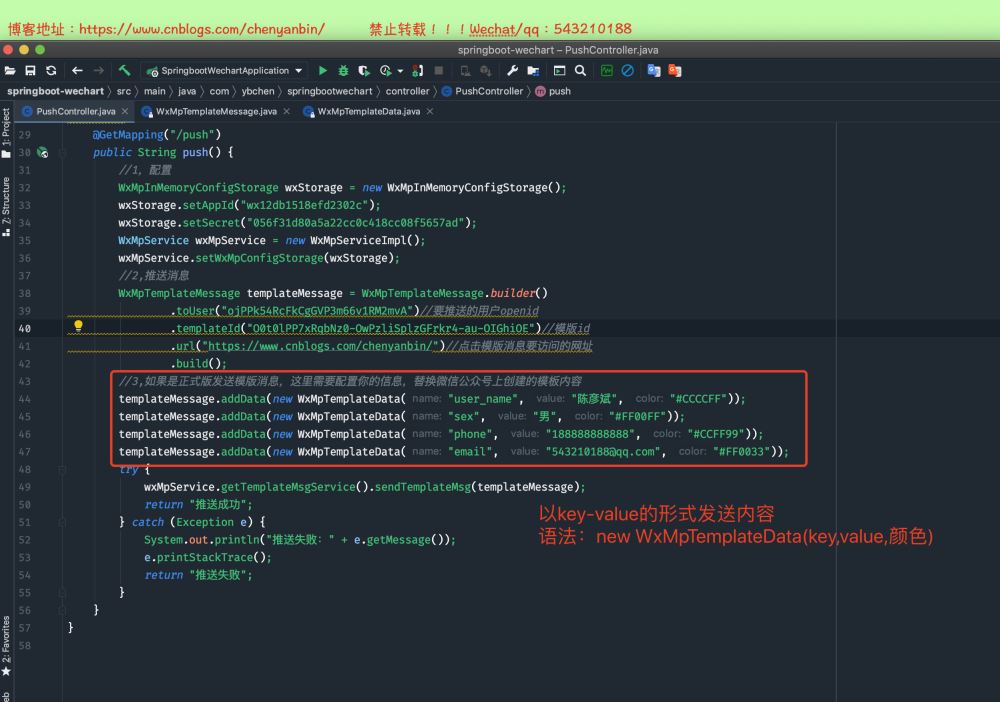

package com.ybchen.springbootwechart.controller;

import me.chanjar.weixin.mp.api.WxMpInMemoryConfigStorage;
import me.chanjar.weixin.mp.api.WxMpService;
import me.chanjar.weixin.mp.api.impl.WxMpServiceImpl;
import me.chanjar.weixin.mp.bean.template.WxMpTemplateData;
import me.chanjar.weixin.mp.bean.template.WxMpTemplateMessage;
import org.springframework.web.bind.annotation.GetMapping;
import org.springframework.web.bind.annotation.RestController;

import java.time.LocalDate;
import java.time.LocalDateTime;
import java.time.format.DateTimeFormatter;
import java.util.Map;
import java.util.Objects;

/**
 * @ClassName:PushController
 * @Description:微信推送
 * @Author:chenyb
 * @Date:2020/11/27 10:33 上午
 * @Versiion:1.0
 */
@RestController
public class PushController {
    /*
     * 微信测试账号推送
     * */
    @GetMapping("/push")
    public String push() {
        //1,配置
        WxMpInMemoryConfigStorage wxStorage = new WxMpInMemoryConfigStorage();
        wxStorage.setAppId("wx12db1518efd2302c");
        wxStorage.setSecret("056f31d80a5a22cc0c418cc08f5657ad");
        WxMpService wxMpService = new WxMpServiceImpl();
        wxMpService.setWxMpConfigStorage(wxStorage);
        //2,推送消息
        WxMpTemplateMessage templateMessage = WxMpTemplateMessage.builder()
                .toUser("ojPPk54RcFkCgGVP3m66v1RM2mvA")//要推送的用户openid
                .templateId("O0t0lPP7xRqbNz0-OwPzliSplzGFrkr4-au-OIGhiOE")//模版id
                .url("https://www.cnblogs.com/chenyanbin/")//点击模版消息要访问的网址
                .build();
        //3,如果是正式版发送模版消息,这里需要配置你的信息,替换微信公众号上创建的模板内容
        templateMessage.addData(new WxMpTemplateData("user_name", "陈彦斌", "#CCCCFF"));
        templateMessage.addData(new WxMpTemplateData("sex", "男", "#FF00FF"));
        templateMessage.addData(new WxMpTemplateData("phone", "188888888888", "#CCFF99"));
        templateMessage.addData(new WxMpTemplateData("email", "543210188@qq.com", "#FF0033"));
        try {
            wxMpService.getTemplateMsgService().sendTemplateMsg(templateMessage);
            return "推送成功";
        } catch (Exception e) {
            System.out.println("推送失败:" + e.getMessage());
            e.printStackTrace();
            return "推送失败";
        }
    }
}
到此这篇关于SpringBoot 实现微信推送模板的文章就介绍到这了,更多相关SpringBoot 微信推送内容请搜索脚本之家以前的文章或继续浏览下面的相关文章希望大家以后多多支持脚本之家!
相关文章
 java中对字符串每个字符统计的方法,需要的朋友可以参考一下2013-03-03
 这篇文章主要介绍了Spring中@Cacheable注解的使用详解,Spring框架提供了@Cacheable注解来轻松地将方法结果缓存起来,以便在后续调用中快速访问,本文将详细介绍@Cacheable注解的使用方法,并从源码级别解析其实现原理,需要的朋友可以参考下2023-11-11
 这篇文章主要介绍了SpringBoot项目从搭建到发布一条龙,本文给大家介绍的非常详细,对大家的学习或工作具有一定的参考借鉴价值,需要的朋友可以参考下2021-02-02
 这篇文章主要介绍了java线程优先级原理详解,文中通过示例代码介绍的非常详细,对大家的学习或者工作具有一定的参考学习价值,需要的朋友可以参考下2019-10-10
 这篇文章主要介绍了Spring Boot 文件上传与下载的示例代码,文中通过示例代码介绍的非常详细,对大家的学习或者工作具有一定的参考学习价值,需要的朋友们下面随着小编来一起学习学习吧2019-03-03
 这篇文章给大家介绍了springboot开启mybatis二级缓存的详细步骤,文中通过代码示例给大家讲解的非常详细,对大家的学习或工作有一定的帮助,需要的朋友可以参考下2024-02-02
 今天小编就为大家分享一篇关于Java语言实现非递归实现树的前中后序遍历总结,小编觉得内容挺不错的,现在分享给大家,具有很好的参考价值,需要的朋友一起跟随小编来看看吧2019-01-01
 在当今的软件开发世界中,监控是至关重要的一部分,本文主要介绍了如何在Spring Boot应用程序中使用Prometheus进行监控,以帮助大家更好地理解和管理您的应用程序,有需要的可以参考下2023-10-10
Java实用技巧:如何使用String去除开头的第一个字符?
这篇文章主要介绍了Java实用技巧:如何使用String去除开头的第一个字符,需要的朋友可以参考下2023-11-11 文章主要介绍了文件上传接收接口的使用方法,包括获取文件信息、创建文件夹、保存文件到本地的两种方法,以及如何使用Postman进行接口调用2025-01-01
最新评论