

Android实现流光和光影移动效果代码
更新时间:2021年12月22日 10:45:11 作者:红尘、困住我年少
大家好,本篇文章主要讲的是Android实现流光和光影移动效果代码,感兴趣的同学赶快来看一看吧,对你有帮助的话记得收藏一下,方便下次浏览
概述:
开发过程中,看到有些界面用到一道光线在屏幕中掠过的效果,觉得挺炫的。所以查找相关资料自己实现了一遍。
先上个预览图:

实现思路:
简单来说就是在一个view中绘制好一道光影,并不断改变光影在view中的位置。
1.首先我们先了解一下光影怎么绘制
在了解如何绘制之前,我们先看一下LinearGradient的构造方法
 /**
     * Create a shader that draws a linear gradient along a line.
     *
     * @param x0           The x-coordinate for the start of the gradient line
     * @param y0           The y-coordinate for the start of the gradient line
     * @param x1           The x-coordinate for the end of the gradient line
     * @param y1           The y-coordinate for the end of the gradient line
     * @param colors       The sRGB colors to be distributed along the gradient line
     * @param positions    May be null. The relative positions [0..1] of
     *                     each corresponding color in the colors array. If this is null,
     *                     the the colors are distributed evenly along the gradient line.
     * @param tile         The Shader tiling mode
     *
     *
     * 翻译过来:
     * x0,y0为渐变起点,x1,y1为渐变的终点
     *
     * colors数组为两点间的渐变颜色值,positions数组取值范围是0~1
     * 传入的colors[]长度和positions[]长度必须相等,一一对应关系,否则报错
     * position传入null则代表colors均衡分布
     *
     * tile有三种模式
     * Shader.TileMode.CLAMP:    边缘拉伸模式,它会拉伸边缘的一个像素来填充其他区域
     * Shader.TileMode.MIRROR:    镜像模式,通过镜像变化来填充其他区域
     * Shader.TileMode.REPEAT:重复模式,通过复制来填充其他区域
     */
LinearGradient(float x0, float y0, float x1, float y1, @NonNull @ColorInt int[] colors,
            @Nullable float[] positions, @NonNull TileMode tile)
colors[]和positions[]的说明结合下图,这样理解起来应该就比较明朗了

回到正题,如何绘制光影。我们看到的那道光可以参照下图:
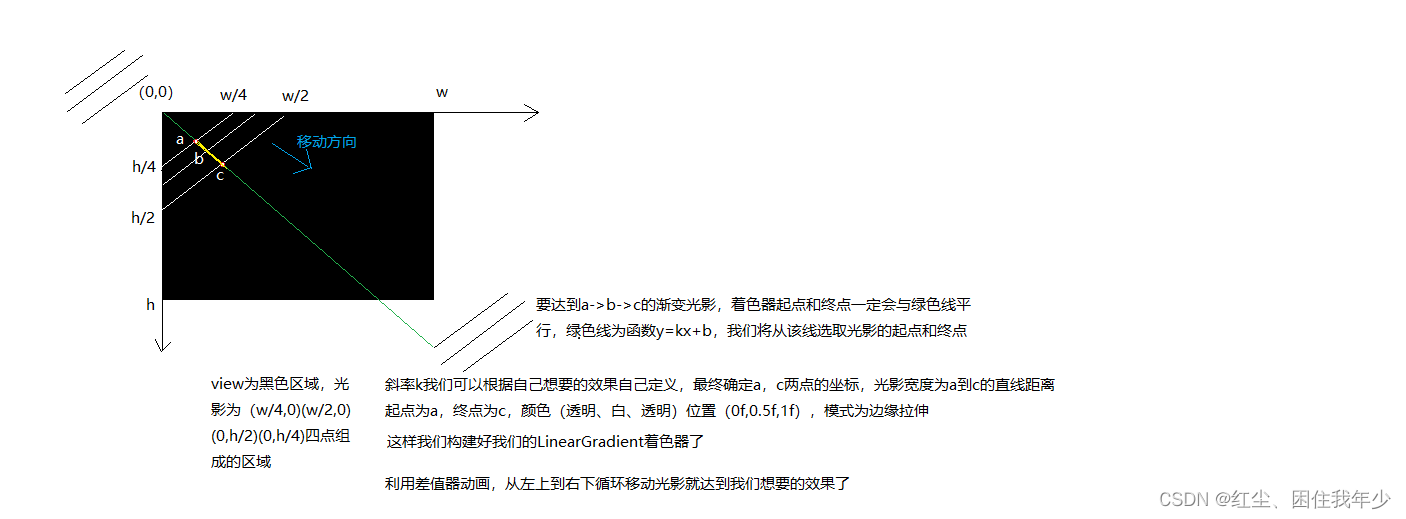
根据分析得到我们的着色器是线性着色器(其他着色器请查询相关api):
LinearGradient(a的x坐标, a的y坐标, c的x坐标, c的y坐标, new int[]{Color.parseColor("#00FFFFFF"), Color.parseColor("#FFFFFFFF"), Color.parseColor("#00FFFFFF")}, new float[]{0f, 0.5f, 1f}, Shader.TileMode.CLAMP)
2.给画笔上色。设置着色器mPaint.setShader(mLinearGradient)
3.给定一个数值范围利用数值生成器ValueAnimator产生数值,监听数值变化。每次回调都将该数值传入光影的起点和终点并进行绘制
代码如下:
/**
 * author: caoyb
 * created on: 2021/12/20 15:13
 * description:
 */
public class ConfigLoadingView extends View {

    private Paint mPaint;
    private Path mPath;
    private LinearGradient mLinearGradient;
    private ValueAnimator mValueAnimator;

    public ConfigLoadingView(Context context) {
        this(context, null);
    }

    public ConfigLoadingView(Context context, @Nullable AttributeSet attrs) {
        this(context, attrs, 0);
    }

    public ConfigLoadingView(Context context, @Nullable AttributeSet attrs, int defStyleAttr) {
        super(context, attrs, defStyleAttr);
        init();
    }

    private void init() {
        mPaint = new Paint();
        mPath = new Path();
    }

    private void initPointAndAnimator(int w, int h) {
        Point point1 = new Point(0, 0);
        Point point2 = new Point(w, 0);
        Point point3 = new Point(w, h);
        Point point4 = new Point(0, h);

        mPath.moveTo(point1.x, point1.y);
        mPath.lineTo(point2.x, point2.y);
        mPath.lineTo(point3.x, point3.y);
        mPath.lineTo(point4.x, point4.y);
        mPath.close();

		// 斜率k
        float k = 1f * h / w;
        // 偏移
        float offset = 1f * w / 2;
		// 0f - offset * 2 为数值左边界(屏幕外左侧), w + offset * 2为数值右边界(屏幕外右侧)
		// 目的是使光影走完一遍,加一些时间缓冲,不至于每次光影移动的间隔都那么急促
        mValueAnimator = ValueAnimator.ofFloat(0f - offset * 2, w + offset * 2);
        mValueAnimator.setRepeatCount(-1);
        mValueAnimator.setInterpolator(new LinearInterpolator());
        mValueAnimator.setDuration(1500);
        mValueAnimator.addUpdateListener(new ValueAnimator.AnimatorUpdateListener() {
            @Override
            public void onAnimationUpdate(ValueAnimator animation) {
                float value = (float) animation.getAnimatedValue();
                mLinearGradient = new LinearGradient(value, k * value, value + offset, k * (value + offset),
                        new int[]{Color.parseColor("#00FFFFFF"), Color.parseColor("#1AFFFFFF"), Color.parseColor("#00FFFFFF")}, null, Shader.TileMode.CLAMP);
                mPaint.setShader(mLinearGradient);
                invalidate();
            }
        });
        mValueAnimator.start();
    }

    @Override
    protected void onMeasure(int widthMeasureSpec, int heightMeasureSpec) {
        super.onMeasure(widthMeasureSpec, heightMeasureSpec);
        int widthSize = MeasureSpec.getSize(widthMeasureSpec);
        int heightSize = MeasureSpec.getSize(heightMeasureSpec);
        initPointAndAnimator(widthSize, heightSize);
    }

    @Override
    protected void onDraw(Canvas canvas) {
        super.onDraw(canvas);
        canvas.drawPath(mPath, mPaint);
    }

    @Override
    protected void onDetachedFromWindow() {
        super.onDetachedFromWindow();
        mValueAnimator.cancel();
    }
}
注意点:
LinearGradient里参数之一:
color[]参数只能是16进制的RGB数值,不能传R.color.xxx。R.color.xxx虽然是int型,但拿到的是资源ID,并不是16进制RGB
到此这篇关于Android实现流光和光影移动效果代码的文章就介绍到这了,更多相关Android 流光和光影移动效果内容请搜索脚本之家以前的文章或继续浏览下面的相关文章希望大家以后多多支持脚本之家!
相关文章
 本文主要介绍了Android每天定时提醒功能、定时功能、闹钟的相关知识。具有很好的参考价值,下面跟着小编一起来看下吧2017-04-04
 这篇文章主要为大家详细介绍了Android可自定义垂直循环滚动布局,具有一定的参考价值,感兴趣的小伙伴们可以参考一下2018-03-03
 这篇文章主要为大家详细介绍了Android帧式布局实现自动切换颜色,文中示例代码介绍的非常详细,具有一定的参考价值,感兴趣的小伙伴们可以参考一下2022-04-04
 这篇文章主要介绍了Android的App启动时白屏的问题相关资料,在App启动的第一次的时候白屏会一段时间,这里提供了解决办法,需要的朋友可以参考下2017-08-08
 在开发app的过程中,我们经常需要知道app处于前后台的状态,本文主要介绍了flutter监听app进入前后台状态的实现,文中通过示例代码介绍的非常详细,对大家的学习或者工作具有一定的参考学习价值,需要的朋友们下面随着小编来一起学习学习吧2022-04-04
 这篇文章主要为大家详细介绍了Android实现viewpager实现循环轮播效果,具有一定的参考价值,感兴趣的小伙伴们可以参考一下2018-03-03
 这篇文章主要介绍了android仿爱奇艺加载动画实例,小编觉得挺不错的,现在就分享给大家,也给大家做个参考。2016-10-10
Android使用IntentService进行apk更新示例代码
这篇文章主要介绍了Android使用IntentService进行apk更新示例代码,小编觉得挺不错的,现在分享给大家,也给大家做个参考。一起跟随小编过来看看吧2018-01-01 这篇文章主要介绍了 Android Dialog详解及实例代码的相关资料,需要的朋友可以参考下2017-04-04
Flutter WillPopScope拦截返回事件原理示例详解
这篇文章主要为大家介绍了Flutter WillPopScope拦截返回事件原理示例详解,有需要的朋友可以借鉴参考下,希望能够有所帮助,祝大家多多进步,早日升职加薪2022-09-09
最新评论