

C++的运算符你真的了解吗
更新时间:2022年02月15日 16:34:08 作者:没有省略号
这篇文章主要为大家详细介绍了C++的运算符,文中示例代码介绍的非常详细,具有一定的参考价值,感兴趣的小伙伴们可以参考一下,希望能够给你带来帮助
前言
运算符的作用:用于执行代码的运算
主要有:
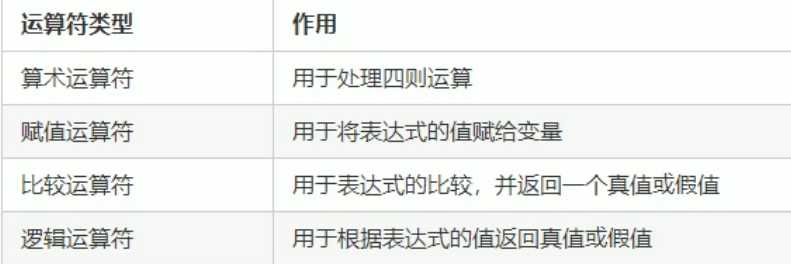
1 算术运算符
用于处理四则运算
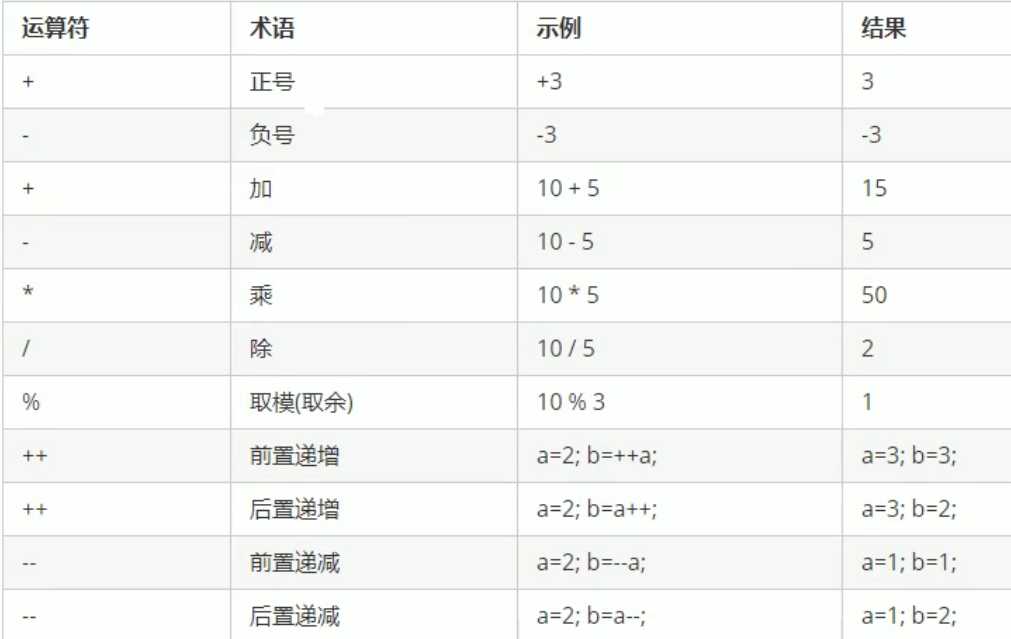
对于前置递增:将递增运算前置,使变量先加一,再进行表达式运算。
对于后置递增:将递增运算后置,使变量先进行表达式运算,再加一。
#include<iostream>
using namespace std;
int main()
{
	//1.前置递增:先加一,再进行表达式运算
	int a = 10;
	int b = ++a * 10;
	cout << "a = " << a << endl;
	cout << "b = " << b << endl;
	//2.后置递增:先进行表达式运算,再加一
	int c = 10;
	int d = c++ * 10;
	cout << "c = " << c << endl;
	cout << "d = " << d << endl;
	system("pause");
	return 0;
}
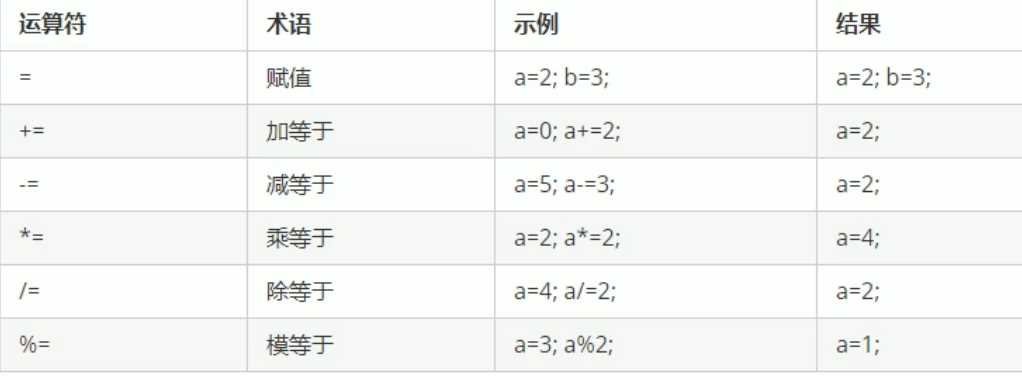
2 赋值运算符
#include<iostream>
using namespace std;
int main1()
{
	//赋值运算符
	int a = 10;
	int b = 2;
	cout << "a = " << a << endl;
	//+=
	a = 10;
	a += b;
	cout << "a = " << a << endl;
	//-=
	a = 10;
	a -= b;
	cout << "a = " << a << endl;
	//*=
	a = 10;
	a *= b;
	cout << "a = " << a << endl;
	// /=
	a = 10;
	a /= b;
	cout << "a = " << a << endl;
	// %=
	a = 10;
	a %= b;
	cout << "a = " << a << endl;
	system("pause");
	return 0;
}
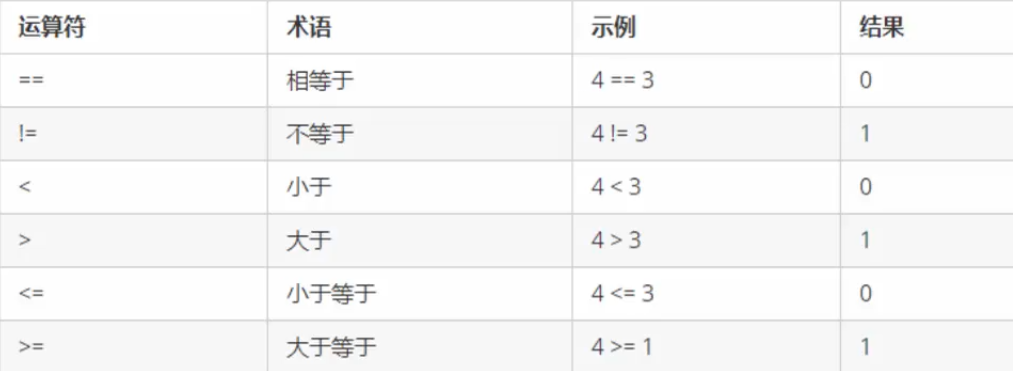
3 比较运算符
#include<iostream>
using namespace std;
int main()
{
	cout << (4 == 3) << endl;
	cout << (4 != 3) << endl;
	cout << (4 < 3) << endl;
	cout << (4 > 3) << endl;
	cout << (4 >= 3) << endl;
	cout << (4 <= 3) << endl;
	system("pause");
	return 0;
}
4 逻辑运算符

#include<iostream>using namespace std;int main(){int a = 5;// 逻辑运算符 非cout << !a << endl;cout << !!a << endl;// 逻辑运算符 与int b = 0;int c = 3;cout << (a && b) << endl;cout << (a && c) << endl;//逻辑运算符  或cout << (!a || b) << endl;cout << (a || c) << endl;system("pause");return 0;}#include<iostream>
using namespace std;
int main()
{
	int a = 5;
	// 逻辑运算符 非
	cout << !a << endl;
	cout << !!a << endl;
	// 逻辑运算符 与
	int b = 0;
	int c = 3;
	cout << (a && b) << endl;
	cout << (a && c) << endl;
	//逻辑运算符  或
	cout << (!a || b) << endl;
	cout << (a || c) << endl;
	system("pause");
	return 0;
}
总结
本篇文章就到这里了,希望能够给你带来帮助,也希望您能够多多关注脚本之家的更多内容!
相关文章
 本文主要介绍了C语言标准库<math.h>和<setjmp.h>的实现,文中通过示例代码介绍的非常详细,对大家的学习或者工作具有一定的参考学习价值,需要的朋友们下面随着小编来一起学习学习吧2023-11-11
 Prim算法能够在带权的图中搜索出最小生成树,这也是各大ACM和面试及考研题目中的热点,下面我们就来详细看一下Prim(普里姆)算法求最小生成树的思想及C语言实例讲解2016-06-06
 这篇文章主要介绍了C语言单链队列的表示与实现,对于研究数据结构与算法的朋友来说很有参考借鉴价值,需要的朋友可以参考下2014-07-07
 这篇文章主要为大家介绍了C语言联合体Union特点及运用的全面讲解教程有需要深度朋友可以借鉴参考下,希望能够有所帮助,祝大家多多进步早日升职加薪2021-10-10
 这篇文章主要介绍了C++可扩展性与多线程,文中通过示例代码介绍的非常详细,对大家的学习或者工作具有一定的参考学习价值,需要的朋友们下面随着小编来一起学习吧2022-10-10
 众所周知,在调试、跟踪和执行应用程序的过程中,程序的日志能为这些工作提供大量有价值的运行信息。因此,程序的日志对应用程序的运行、维护至关重要2013-05-05
 数据结构的课程设计一般都不是很好理解,今天小编为大家总结了一下c和c++版本的常见栈和队列的的停车场管理程序,需要的小伙伴可以参考一下2022-06-06
VS2019配置OpenCV时找不到Microsoft.Cpp.x64.user的解决方法
这篇文章主要介绍了VS2019配置OpenCV时找不到Microsoft.Cpp.x64.user的解决方法,需要的朋友可以参考下2020-02-02 哈希表是一种根据关键码去寻找值的数据映射结构,该结构通过把关键码映射的位置去寻找存放值的地方,说起来可能感觉有点复杂,我想我举个例子你就会明白了,最典型的的例子就是字典2022-02-02
c++ 形状类Shape(派生出圆类Circle和矩形类Rectangle)
通过C++方式,建立一个形状类Shape作为基类,派生出圆类Circle和矩形类Rectangle 求出面积并获取相关信息2020-11-11
最新评论