

Springboot基于Redisson实现Redis分布式可重入锁源码解析
一、前言
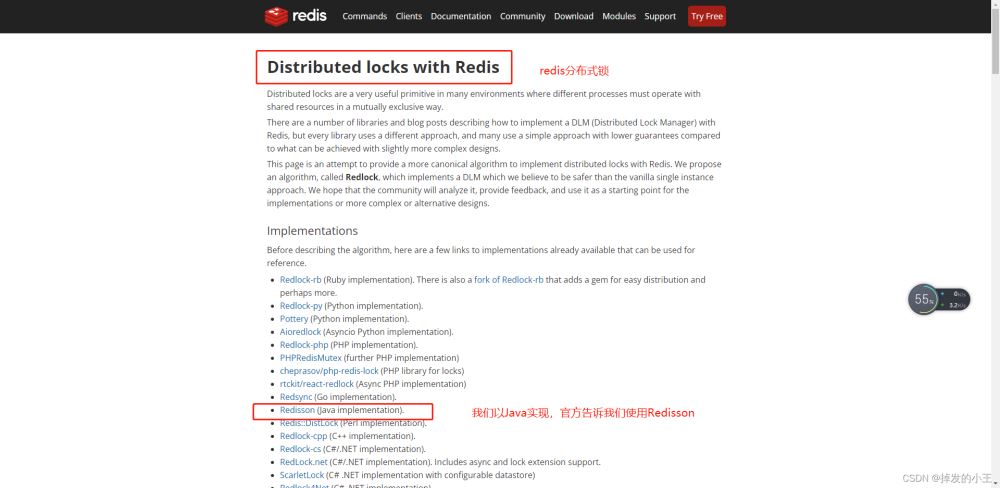
我们在实现使用Redis实现分布式锁,最开始一般使用SET resource-name anystring NX EX max-lock-time进行加锁,使用Lua脚本保证原子性进行实现释放锁。这样手动实现比较麻烦,对此Redis官网也明确说Java版使用Redisson来实现。小编也是看了官网慢慢的摸索清楚,特写此记录一下。从官网到整合Springboot到源码解读,以单节点为例,小编的理解都在注释里,希望可以帮助到大家!!
二、为什么使用Redisson
1. 我们打开官网
2. 我们可以看到官方让我们去使用其他
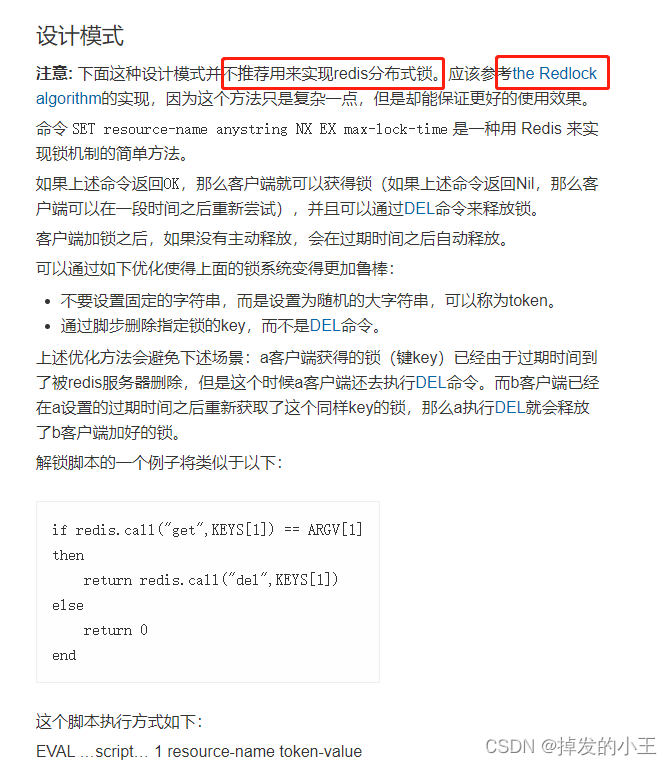
3. 打开官方推荐
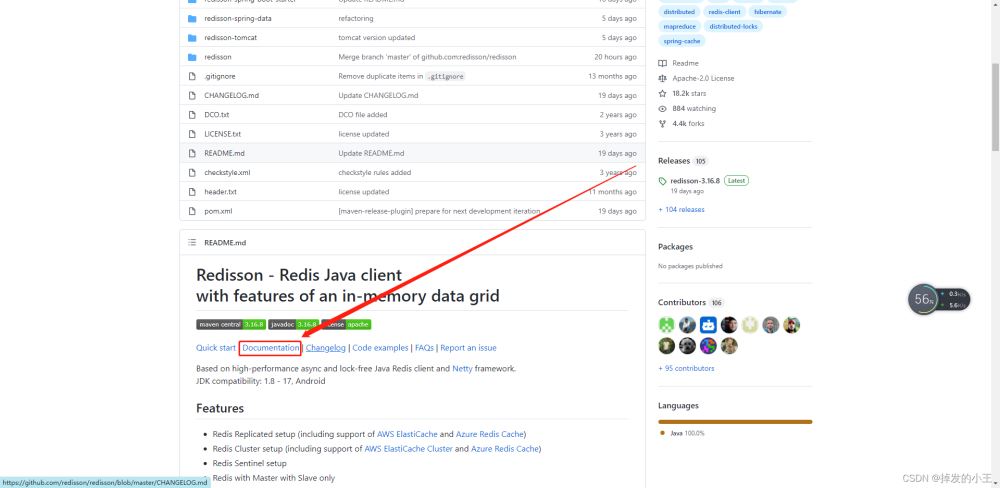
4. 找到文档
5. Redisson结构

三、Springboot整合Redisson
1. 导入依赖
<dependency>
    <groupId>org.springframework.boot</groupId>
    <artifactId>spring-boot-starter-data-redis</artifactId>
</dependency>
<dependency>
    <groupId>redis.clients</groupId>
    <artifactId>jedis</artifactId>
</dependency>
<!--redis分布式锁-->
<dependency>
    <groupId>org.redisson</groupId>
    <artifactId>redisson</artifactId>
    <version>3.12.0</version>
</dependency>
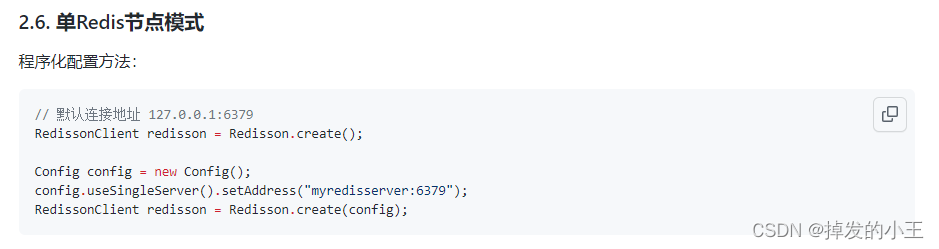
2. 以官网为例查看如何配置
3. 编写配置类
import org.redisson.Redisson;
import org.redisson.api.RedissonClient;
import org.redisson.config.Config;
import org.springframework.context.annotation.Bean;
import org.springframework.context.annotation.Configuration;

/**
 * @author wangzhenjun
 * @date 2022/2/9 9:57
 */
@Configuration
public class MyRedissonConfig {

    /**
     * 所有对redisson的使用都是通过RedissonClient来操作的
     * @return
     */
    @Bean(destroyMethod="shutdown")
    public RedissonClient redisson(){
        // 1. 创建配置
        Config config = new Config();
        // 一定要加redis://
        config.useSingleServer().setAddress("redis://192.168.17.130:6379");
        // 2. 根据config创建出redissonClient实例
        RedissonClient redissonClient = Redisson.create(config);
        return redissonClient;
    }
}
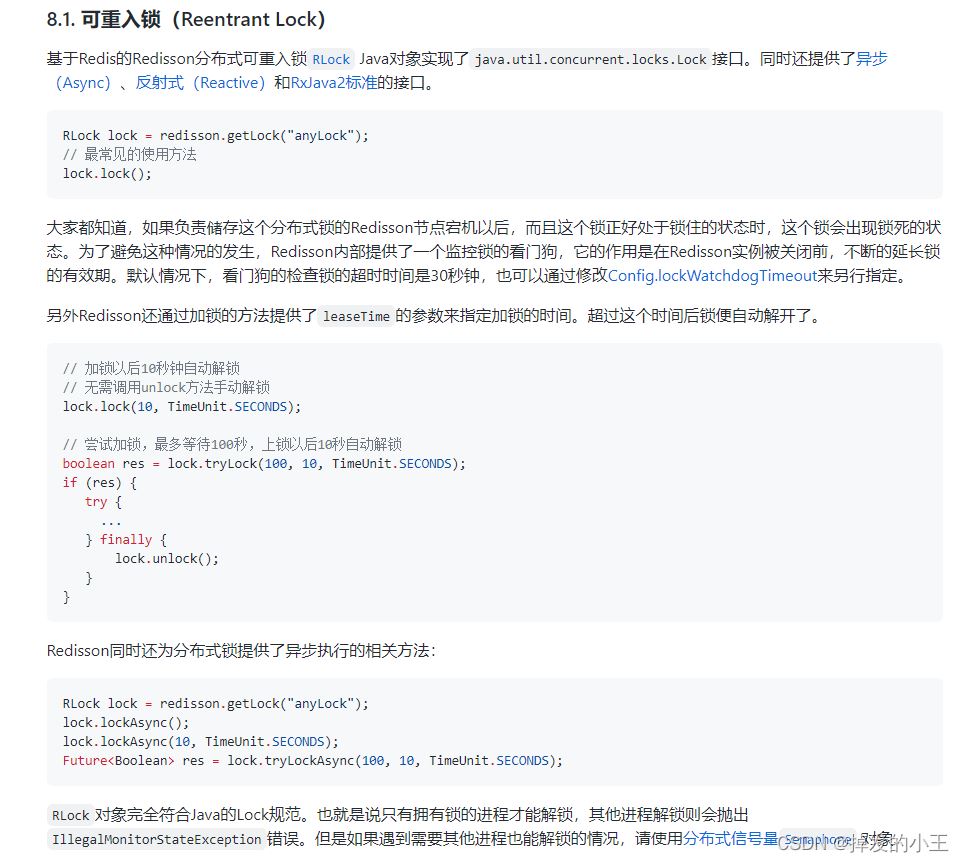
4. 官网测试加锁例子
5. 根据官网简单Controller接口编写
@ResponseBody
@GetMapping("/hello")
public String hello(){
    // 1.获取一把锁,只要锁名字一样,就是同一把锁
    RLock lock = redisson.getLock("my-lock");
    // 2. 加锁
    lock.lock();// 阻塞试等待  默认加的都是30s
    // 带参数情况
    // lock.lock(10, TimeUnit.SECONDS);// 10s自动解锁,自动解锁时间一定要大于业务的执行时间。
    try {
        System.out.println("加锁成功" + Thread.currentThread().getId());
        Thread.sleep(30000);
    } catch (InterruptedException e) {
        e.printStackTrace();
    } finally {
        // 3. 解锁
        System.out.println("解锁成功:" + Thread.currentThread().getId());
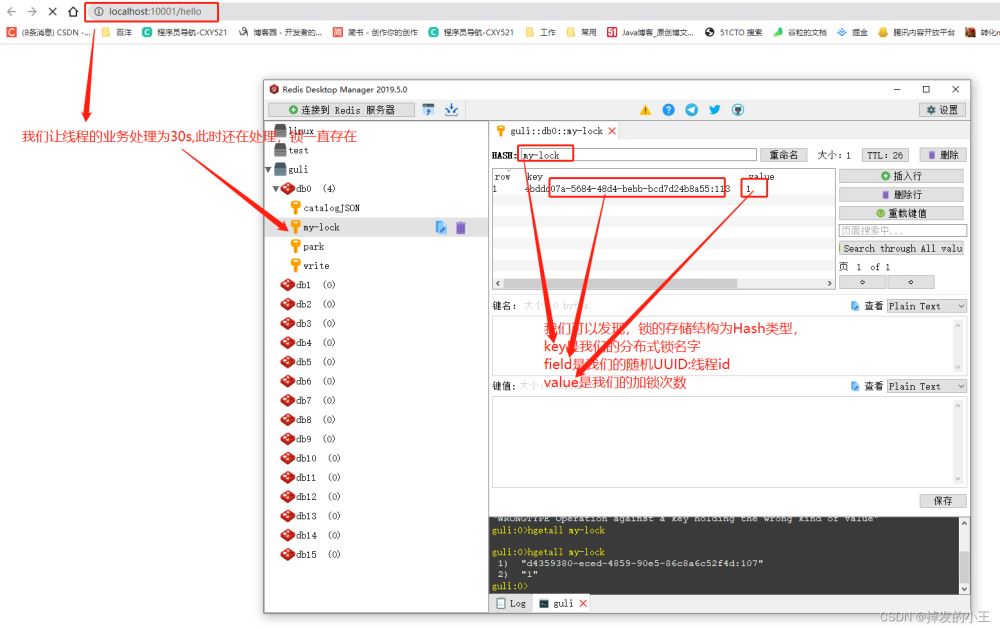
        lock.unlock();
    }
    return "hello";
}
6. 测试
四、lock.lock()源码分析
1. 打开RedissonLock实现类

2. 找到实现方法
@Override
public void lock() {
    try {
    	// 我们发现不穿过期时间源码默认过期时间为-1
        lock(-1, null, false);
    } catch (InterruptedException e) {
        throw new IllegalStateException();
    }
}
3. 按住Ctrl进去lock方法
private void lock(long leaseTime, TimeUnit unit, boolean interruptibly) throws InterruptedException {
	// 获取线程的id,占有锁的时候field的值为UUID:线程号id
    long threadId = Thread.currentThread().getId();
    // 尝试获得锁
    Long ttl = tryAcquire(leaseTime, unit, threadId);
    // lock acquired 获得锁,返回
    if (ttl == null) {
        return;
    }
	// 这里说明获取锁失败,就通过线程id订阅这个锁
    RFuture<RedissonLockEntry> future = subscribe(threadId);
    if (interruptibly) {
        commandExecutor.syncSubscriptionInterrupted(future);
    } else {
        commandExecutor.syncSubscription(future);
    }

    try {
    	// 这里进行自旋,不断尝试获取锁
        while (true) {
        	// 继续尝试获取锁
            ttl = tryAcquire(leaseTime, unit, threadId);
            // lock acquired 获取成功
            if (ttl == null) {
            	// 直接返回,挑出自旋
                break;
            }

            // waiting for message 继续等待获得锁
            if (ttl >= 0) {
                try {
                    future.getNow().getLatch().tryAcquire(ttl, TimeUnit.MILLISECONDS);
                } catch (InterruptedException e) {
                    if (interruptibly) {
                        throw e;
                    }
                    future.getNow().getLatch().tryAcquire(ttl, TimeUnit.MILLISECONDS);
                }
            } else {
                if (interruptibly) {
                    future.getNow().getLatch().acquire();
                } else {
                    future.getNow().getLatch().acquireUninterruptibly();
                }
            }
        }
    } finally {
     	// 取消订阅
        unsubscribe(future, threadId);
    }
//        get(lockAsync(leaseTime, unit));
}
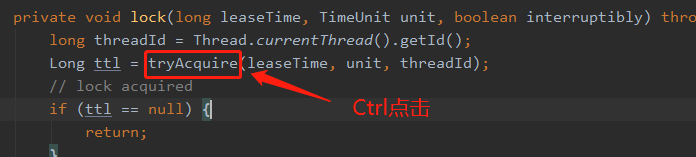
4. 进去尝试获取锁方法
private Long tryAcquire(long leaseTime, TimeUnit unit, long threadId) {
	// 直接进入异步方法
    return get(tryAcquireAsync(leaseTime, unit, threadId));
}

private <T> RFuture<Long> tryAcquireAsync(long leaseTime, TimeUnit unit, long threadId) {
    // 这里进行判断如果没有设置参数leaseTime = -1
    if (leaseTime != -1) {
        return tryLockInnerAsync(leaseTime, unit, threadId, RedisCommands.EVAL_LONG);
    }
    // 此方法进行获得锁,过期时间为看门狗的默认时间
    // private long lockWatchdogTimeout = 30 * 1000;看门狗默认过期时间为30s
    // 加锁和过期时间要保证原子性,这个方法后面肯定调用执行了Lua脚本,我们下面在看
    RFuture<Long> ttlRemainingFuture = tryLockInnerAsync(commandExecutor.getConnectionManager().getCfg().getLockWatchdogTimeout(), TimeUnit.MILLISECONDS, threadId, RedisCommands.EVAL_LONG);
    // 开启一个定时任务进行不断刷新过期时间
    ttlRemainingFuture.onComplete((ttlRemaining, e) -> {
        if (e != null) {
            return;
        }
        // lock acquired 获得锁
        if (ttlRemaining == null) {
        	// 刷新过期时间方法,我们下一步详细说一下
            scheduleExpirationRenewal(threadId);
    });
    return ttlRemainingFuture;
5. 查看tryLockInnerAsync()方法
<T> RFuture<T> tryLockInnerAsync(long leaseTime, TimeUnit unit, long threadId, RedisStrictCommand<T> command) {
    internalLockLeaseTime = unit.toMillis(leaseTime);

    return commandExecutor.evalWriteAsync(getName(), LongCodec.INSTANCE, command,
    		  // 首先判断锁是否存在
              "if (redis.call('exists', KEYS[1]) == 0) then " +
              		// 存在则获取锁
                  "redis.call('hset', KEYS[1], ARGV[2], 1); " +
                  // 然后设置过期时间
                  "redis.call('pexpire', KEYS[1], ARGV[1]); " +
                  "return nil; " +
              "end; " +
              // hexists查看哈希表的指定字段是否存在,存在锁并且是当前线程持有锁
              "if (redis.call('hexists', KEYS[1], ARGV[2]) == 1) then " +
              		// hincrby自增一
                  "redis.call('hincrby', KEYS[1], ARGV[2], 1); " +
                  	// 锁的值大于1,说明是可重入锁,重置过期时间
                  "redis.call('pexpire', KEYS[1], ARGV[1]); " +
                  "return nil; " +
              "end; " +
              // 锁已存在,且不是本线程,则返回过期时间ttl
              "return redis.call('pttl', KEYS[1]);",
                Collections.<Object>singletonList(getName()), internalLockLeaseTime, getLockName(threadId));
}
6. 进入4留下的定时任务scheduleExpirationRenewal()方法
一步步往下找源码:scheduleExpirationRenewal --->renewExpiration
根据下面源码,定时任务刷新时间为:internalLockLeaseTime / 3,是看门狗的1/3,即为10s刷新一次
private void renewExpiration() {
    ExpirationEntry ee = EXPIRATION_RENEWAL_MAP.get(getEntryName());
    if (ee == null) {
        return;
    }

    Timeout task = commandExecutor.getConnectionManager().newTimeout(new TimerTask() {
        @Override
        public void run(Timeout timeout) throws Exception {
            ExpirationEntry ent = EXPIRATION_RENEWAL_MAP.get(getEntryName());
            if (ent == null) {
                return;
            }
            Long threadId = ent.getFirstThreadId();
            if (threadId == null) {
                return;
            }

            RFuture<Boolean> future = renewExpirationAsync(threadId);
            future.onComplete((res, e) -> {
                if (e != null) {
                    log.error("Can't update lock " + getName() + " expiration", e);
                    return;
                }

                if (res) {
                    // reschedule itself
                    renewExpiration();
                }
            });
        }
    }, internalLockLeaseTime / 3, TimeUnit.MILLISECONDS);

    ee.setTimeout(task);
}
五、lock.lock(10, TimeUnit.SECONDS)源码分析
1. 打开实现类
@Override
public void lock(long leaseTime, TimeUnit unit) {
    try {
    	// 这里的过期时间为我们输入的10
        lock(leaseTime, unit, false);
    } catch (InterruptedException e) {
        throw new IllegalStateException();
    }
}
2. 方法lock()实现展示,同三.3源码
3. 直接来到尝试获得锁tryAcquireAsync()方法
private <T> RFuture<Long> tryAcquireAsync(long leaseTime, TimeUnit unit, long threadId) {
    // 这里进行判断如果没有设置参数leaseTime = -1,此时我们为10
    if (leaseTime != -1) {
    	// 来到此方法
        return tryLockInnerAsync(leaseTime, unit, threadId, RedisCommands.EVAL_LONG);
    }
    // 此处省略后面内容,前面以详细说明。。。。
}
4. 打开tryLockInnerAsync()方法
我们不难发现和没有传过期时间的方法一样,只不过leaseTime的值变了。
<T> RFuture<T> tryLockInnerAsync(long leaseTime, TimeUnit unit, long threadId, RedisStrictCommand<T> command) {
    internalLockLeaseTime = unit.toMillis(leaseTime);

    return commandExecutor.evalWriteAsync(getName(), LongCodec.INSTANCE, command,
    		  // 首先判断锁是否存在
              "if (redis.call('exists', KEYS[1]) == 0) then " +
              		// 存在则获取锁
                  "redis.call('hset', KEYS[1], ARGV[2], 1); " +
                  // 然后设置过期时间
                  "redis.call('pexpire', KEYS[1], ARGV[1]); " +
                  "return nil; " +
              "end; " +
              // hexists查看哈希表的指定字段是否存在,存在锁并且是当前线程持有锁
              "if (redis.call('hexists', KEYS[1], ARGV[2]) == 1) then " +
              		// hincrby自增一
                  "redis.call('hincrby', KEYS[1], ARGV[2], 1); " +
                  	// 锁的值大于1,说明是可重入锁,重置过期时间
                  "redis.call('pexpire', KEYS[1], ARGV[1]); " +
                  "return nil; " +
              "end; " +
              // 锁已存在,且不是本线程,则返回过期时间ttl
              "return redis.call('pttl', KEYS[1]);",
                Collections.<Object>singletonList(getName()), internalLockLeaseTime, getLockName(threadId));
}
六、lock.unlock()源码分析
1. 打开方法实现
@Override
public void unlock() {
    try {
    	// 点击进入释放锁方法
        get(unlockAsync(Thread.currentThread().getId()));
    } catch (RedisException e) {
        if (e.getCause() instanceof IllegalMonitorStateException) {
            throw (IllegalMonitorStateException) e.getCause();
        } else {
            throw e;
        }
    }

//        Future<Void> future = unlockAsync();
//        future.awaitUninterruptibly();
//        if (future.isSuccess()) {
//            return;
//        }
//        if (future.cause() instanceof IllegalMonitorStateException) {
//            throw (IllegalMonitorStateException)future.cause();
//        }
//        throw commandExecutor.convertException(future);
}
2. 打开unlockAsync()方法
@Override
public RFuture<Void> unlockAsync(long threadId) {
    RPromise<Void> result = new RedissonPromise<Void>();
    // 解锁方法,后面展开说
    RFuture<Boolean> future = unlockInnerAsync(threadId);
	// 完成
    future.onComplete((opStatus, e) -> {
        if (e != null) {
        	// 取消到期续订
            cancelExpirationRenewal(threadId);
            // 将这个未来标记为失败并通知所有人
            result.tryFailure(e);
            return;
        }
		// 状态为空,说明解锁的线程和当前锁不是同一个线程
        if (opStatus == null) {
            IllegalMonitorStateException cause = new IllegalMonitorStateException("attempt to unlock lock, not locked by current thread by node id: "
                    + id + " thread-id: " + threadId);
            result.tryFailure(cause);
            return;
        }

        cancelExpirationRenewal(threadId);
        result.trySuccess(null);
    });

    return result;
}
3. 打开unlockInnerAsync()方法
protected RFuture<Boolean> unlockInnerAsync(long threadId) {
    return commandExecutor.evalWriteAsync(getName(), LongCodec.INSTANCE, RedisCommands.EVAL_BOOLEAN,
    		// 判断释放锁的线程和已存在锁的线程是不是同一个线程,不是返回空
            "if (redis.call('hexists', KEYS[1], ARGV[3]) == 0) then " +
                "return nil;" +
            "end; " +
            // 释放锁后,加锁次数减一
            "local counter = redis.call('hincrby', KEYS[1], ARGV[3], -1); " +
            // 判断剩余数量是否大于0
            "if (counter > 0) then " +
            	// 大于0 ,则刷新过期时间
                "redis.call('pexpire', KEYS[1], ARGV[2]); " +
                "return 0; " +
            "else " +
            	// 释放锁,删除key并发布锁释放的消息
                "redis.call('del', KEYS[1]); " +
                "redis.call('publish', KEYS[2], ARGV[1]); " +
                "return 1; "+
            "end; " +
            "return nil;",
            Arrays.<Object>asList(getName(), getChannelName()), LockPubSub.UNLOCK_MESSAGE, internalLockLeaseTime, getLockName(threadId));

}
七、总结
这样大家就跟着小编走完了一遍底层源码,是不是感觉自己又行了,哈哈哈。小编走下来一遍觉得收货还是蛮大的,以前不敢点进去源码,进去就懵逼了,所以人要大胆的向前迈出第一步。
到此这篇关于Springboot基于Redisson实现Redis分布式可重入锁【案例到源码分析】的文章就介绍到这了,更多相关SpringbootRedis分布式可重入锁内容请搜索脚本之家以前的文章或继续浏览下面的相关文章希望大家以后多多支持脚本之家!
相关文章
 这篇文章主要介绍了Hadoop环境配置之hive环境配置,本文给大家介绍的非常详细,对大家的学习或工作具有一定的参考借鉴价值,需要的朋友可以参考下2021-12-12
 这篇文章主要为大家详细介绍了java实现微信App支付服务端,具有一定的参考价值,感兴趣的小伙伴们可以参考一下2018-10-10
Spring Shell 命令行实现交互式Shell应用开发
本文主要介绍了Spring Shell 命令行实现交互式Shell应用开发,能够帮助开发者快速构建功能丰富的命令行应用程序,具有一定的参考价值,感兴趣的可以了解一下2025-04-04
详解Java8的forEach(...)如何提供index值
这篇文章主要介绍了详解Java8的forEach(...)如何提供index值,文中通过示例代码介绍的非常详细,对大家的学习或者工作具有一定的参考学习价值,需要的朋友们下面随着小编来一起学习学习吧2021-03-03 这篇文章主要为大家详细介绍了Intellij Idea部署OpenCV 4.0.0环境,具有一定的参考价值,感兴趣的小伙伴们可以参考一下2019-07-07
 这篇文章主要为大家详细介绍了Java中对象的比较、集合框架中PriorityQueue的比较方式以及PriorityQueue的模拟实现,感兴趣的可以了解一下2022-07-07
 XSS攻击又称跨站脚本攻击,通常指利用网页开发时留下的漏洞,通过巧妙的方法注入恶意指令代码到网页,使用户加载并执行攻击者恶意制造的网页程序,下面这篇文章主要给大家介绍了关于Spring Boot项目抵御XSS攻击的相关资料,需要的朋友可以参考下2022-11-11
SpringBoot注解@EnableScheduling定时任务详细解析
这篇文章主要介绍了SpringBoot注解@EnableScheduling定时任务详细解析,@EnableScheduling 开启对定时任务的支持,启动类里面使用@EnableScheduling 注解开启功能,自动扫描,需要的朋友可以参考下2024-01-01
JavaScript 与 Java 区别介绍 学java怎么样
JavaScript 是一种嵌入式脚本文件,直接插入网页,有浏览器一边解释一边执行。而java 语言不一样,他必须在JAVA虚拟机上运行。而且事先需要进行编译。接下来脚本之家小编给大家揭晓js与java区别,感兴趣的朋友一起看看吧2016-09-09
基于RecyclerChart的KLine绘制Volume实现详解
这篇文章主要为大家介绍了基于RecyclerChart的KLine绘制Volume实现详解,有需要的朋友可以借鉴参考下,希望能够有所帮助,祝大家多多进步,早日升职加薪2023-03-03
最新评论