

Android超详细讲解组件ScrollView的使用
更新时间:2022年03月31日 16:40:02 作者:小皮猪
本节带来的是Android基本UI控件中的第十个:ScrollView(滚动条),或者我们应该叫他 竖直滚动条,对应的另外一个水平方向上的滚动条:HorizontalScrollView,先让我们来了解ScrollView
概述
ScrollView也是一个容器,它是FrameLayout的子类,它的主要作用就是将超出物理屏幕的内容显示出来,(就是滚动条效果)ScrollView提供垂直滚动,进而可将超出物理屏幕的内容显示出来。
在一般情况下,可以将一个采用垂直方式布局组件的LinearLayout作为ScrollLayout容器的子组件,同时,在LinearLayout容器中可以显示超出屏幕物理高度的内容。
练习
这么说有点抽象,然后我们现在实现完成一个调试板颜色的显示,效果如下:(可以往下滚动)
代码:
<?xml version="1.0" encoding="utf-8"?>
<ScrollView xmlns:android="http://schemas.android.com/apk/res/android"
    android:layout_width="match_parent"
    android:layout_height="match_parent">


    <LinearLayout
        android:layout_width="match_parent"
        android:layout_height="wrap_content"
        android:orientation="vertical">

        <LinearLayout
            android:layout_width="match_parent"
            android:layout_height="wrap_content"
            android:orientation="horizontal">
            <View
                android:layout_width="0dp"
                android:layout_height="60dp"
                android:layout_weight="2"
                android:background="#07C2FB" />
            <TextView
                android:layout_width="0dp"
                android:layout_height="60dp"
                android:layout_weight="1"
                android:gravity="center"
                android:text="#07C2FB" />
        </LinearLayout>

        <LinearLayout
            android:layout_width="match_parent"
            android:layout_height="wrap_content"
            android:orientation="horizontal">
            <View
                android:layout_width="0dp"
                android:layout_height="60dp"
                android:layout_weight="2"
                android:background="#C60426FD" />
            <TextView
                android:layout_width="0dp"
                android:layout_height="60dp"
                android:layout_weight="1"
                android:gravity="center"
                android:text="#C60426FD" />
        </LinearLayout>

        <LinearLayout
            android:layout_width="match_parent"
            android:layout_height="wrap_content"
            android:orientation="horizontal">
            <View
                android:layout_width="0dp"
                android:layout_height="60dp"
                android:layout_weight="2"
                android:background="#032898" />
            <TextView
                android:layout_width="0dp"
                android:layout_height="60dp"
                android:layout_weight="1"
                android:gravity="center"
                android:text="#032898" />
        </LinearLayout>
        <LinearLayout
            android:layout_width="match_parent"
            android:layout_height="wrap_content"
            android:orientation="horizontal">
            <View
                android:layout_width="0dp"
                android:layout_height="60dp"
                android:layout_weight="2"
                android:background="#021173" />
            <TextView
                android:layout_width="0dp"
                android:layout_height="60dp"
                android:layout_weight="1"
                android:gravity="center"
                android:text="#021173" />
        </LinearLayout>

        <LinearLayout
            android:layout_width="match_parent"
            android:layout_height="wrap_content"
            android:orientation="horizontal">
            <View
                android:layout_width="0dp"
                android:layout_height="60dp"
                android:layout_weight="2"
                android:background="#504DAE" />
            <TextView
                android:layout_width="0dp"
                android:layout_height="60dp"
                android:layout_weight="1"
                android:gravity="center"
                android:text="#504DAE" />
        </LinearLayout>
        <LinearLayout
            android:layout_width="match_parent"
            android:layout_height="wrap_content"
            android:orientation="horizontal">
            <View
                android:layout_width="0dp"
                android:layout_height="60dp"
                android:layout_weight="2"
                android:background="#3C60A6" />
            <TextView
                android:layout_width="0dp"
                android:layout_height="60dp"
                android:layout_weight="1"
                android:gravity="center"
                android:text="#3C60A6" />
        </LinearLayout>
        <LinearLayout
            android:layout_width="match_parent"
            android:layout_height="wrap_content"
            android:orientation="horizontal">
            <View
                android:layout_width="0dp"
                android:layout_height="60dp"
                android:layout_weight="2"
                android:background="#282EA8" />
            <TextView
                android:layout_width="0dp"
                android:layout_height="60dp"
                android:layout_weight="1"
                android:gravity="center"
                android:text="#282EA8" />
        </LinearLayout>
        <LinearLayout
            android:layout_width="match_parent"
            android:layout_height="wrap_content"
            android:orientation="horizontal">
            <View
                android:layout_width="0dp"
                android:layout_height="60dp"
                android:layout_weight="2"
                android:background="#273523" />
            <TextView
                android:layout_width="0dp"
                android:layout_height="60dp"
                android:layout_weight="1"
                android:gravity="center"
                android:text="##5E7559" />
        </LinearLayout>
        <LinearLayout
            android:layout_width="match_parent"
            android:layout_height="wrap_content"
            android:orientation="horizontal">
            <View
                android:layout_width="0dp"
                android:layout_height="60dp"
                android:layout_weight="2"
                android:background="#0E1E73" />
            <TextView
                android:layout_width="0dp"
                android:layout_height="60dp"
                android:layout_weight="1"
                android:gravity="center"
                android:text="#0E1E73" />
        </LinearLayout>
        <LinearLayout
            android:layout_width="match_parent"
            android:layout_height="wrap_content"
            android:orientation="horizontal">
            <View
                android:layout_width="0dp"
                android:layout_height="60dp"
                android:layout_weight="2"
                android:background="#305BC8" />
            <TextView
                android:layout_width="0dp"
                android:layout_height="60dp"
                android:layout_weight="1"
                android:gravity="center"
                android:text="#305BC8" />
        </LinearLayout>
        <LinearLayout
            android:layout_width="match_parent"
            android:layout_height="wrap_content"
            android:orientation="horizontal">
            <View
                android:layout_width="0dp"
                android:layout_height="60dp"
                android:layout_weight="2"
                android:background="#282EA8" />
            <TextView
                android:layout_width="0dp"
                android:layout_height="60dp"
                android:layout_weight="1"
                android:gravity="center"
                android:text="#282EA8" />
        </LinearLayout>
        <LinearLayout
            android:layout_width="match_parent"
            android:layout_height="wrap_content"
            android:orientation="horizontal">
            <View
                android:layout_width="0dp"
                android:layout_height="60dp"
                android:layout_weight="2"
                android:background="#0B685E" />
            <TextView
                android:layout_width="0dp"
                android:layout_height="60dp"
                android:layout_weight="1"
                android:gravity="center"
                android:text="#0B685E" />
        </LinearLayout>
        <LinearLayout
            android:layout_width="match_parent"
            android:layout_height="wrap_content"
            android:orientation="horizontal">
            <View
                android:layout_width="0dp"
                android:layout_height="60dp"
                android:layout_weight="2"
                android:background="#263B7E" />
            <TextView
                android:layout_width="0dp"
                android:layout_height="60dp"
                android:layout_weight="1"
                android:gravity="center"
                android:text="#263B7E" />
        </LinearLayout>
        <LinearLayout
            android:layout_width="match_parent"
            android:layout_height="wrap_content"
            android:orientation="horizontal">
            <View
                android:layout_width="0dp"
                android:layout_height="60dp"
                android:layout_weight="2"
                android:background="#0A7AC5" />
            <TextView
                android:layout_width="0dp"
                android:layout_height="60dp"
                android:layout_weight="1"
                android:gravity="center"
                android:text="#0A7AC5" />
        </LinearLayout>

    </LinearLayout>

</ScrollView>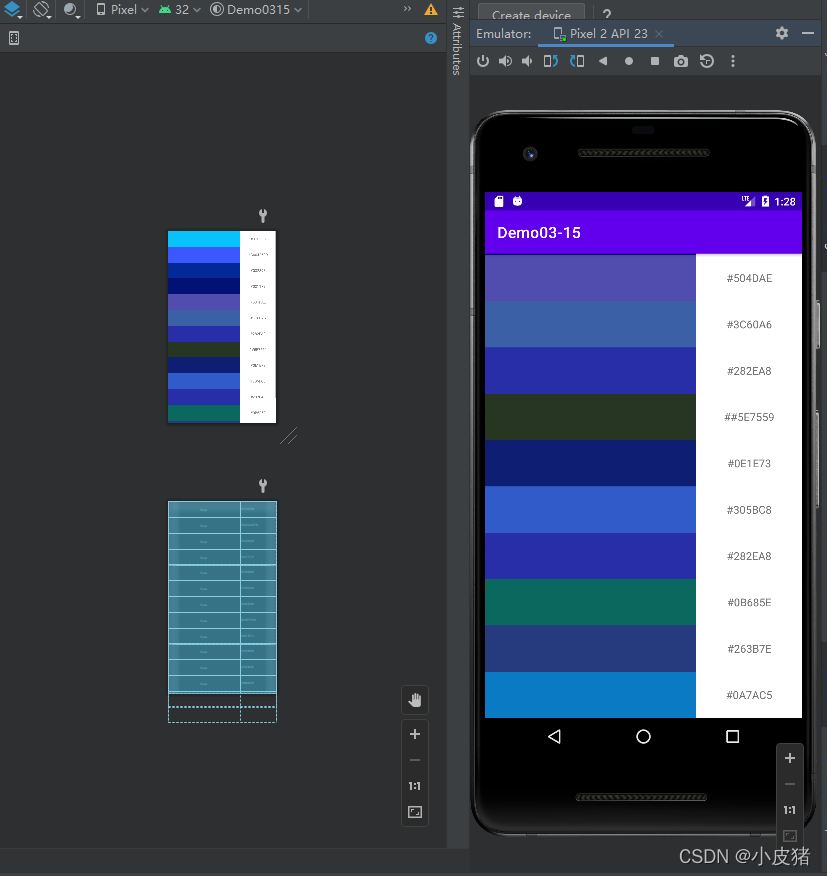
当然了ScrollView只提供了垂直滚动条,若要使用水平滚动功能,则Android提供了HorizontalScrollView容器,HorizontalScrollView容器可以提供水平滚动,它的使用方法与ScrollView类似
HorizontalScrollView:
<?xml version="1.0" encoding="utf-8"?>
<HorizontalScrollView xmlns:android="http://schemas.android.com/apk/res/android"
    android:layout_width="match_parent"
    android:layout_height="match_parent">


    <LinearLayout
        android:layout_width="wrap_content"
        android:layout_height="match_parent"
        android:orientation="horizontal">

        <LinearLayout
            android:layout_width="match_parent"
            android:layout_height="match_parent"
            android:orientation="vertical">
            <View
                android:layout_width="200px"
                android:layout_height="60dp"
                android:layout_weight="2"
                android:background="#2479CE" />

            <TextView
                android:layout_width="200px"
                android:layout_height="60dp"
                android:layout_weight="1"
                android:gravity="center"
                android:text="#2479CE" />
        </LinearLayout>

        <LinearLayout
            android:layout_width="match_parent"
            android:layout_height="match_parent"
            android:orientation="vertical">
            <View
                android:layout_width="200px"
                android:layout_height="60dp"
                android:layout_weight="2"
                android:background="#C97A06" />

            <TextView
                android:layout_width="200px"
                android:layout_height="60dp"
                android:layout_weight="1"
                android:gravity="center"
                android:text="#C97A06" />
        </LinearLayout>

        <LinearLayout
            android:layout_width="match_parent"
            android:layout_height="match_parent"
            android:orientation="vertical">
            <View
                android:layout_width="200px"
                android:layout_height="60dp"
                android:layout_weight="2"
                android:background="#68060E" />

            <TextView
                android:layout_width="200px"
                android:layout_height="60dp"
                android:layout_weight="1"
                android:gravity="center"
                android:text="#68060E" />
        </LinearLayout>
        <LinearLayout
            android:layout_width="match_parent"
            android:layout_height="match_parent"
            android:orientation="vertical">
            <View
                android:layout_width="200px"
                android:layout_height="60dp"
                android:layout_weight="2"
                android:background="#271904" />

            <TextView
                android:layout_width="200px"
                android:layout_height="60dp"
                android:layout_weight="1"
                android:gravity="center"
                android:text="#271904" />
        </LinearLayout>


        <LinearLayout
            android:layout_width="match_parent"
            android:layout_height="match_parent"
            android:orientation="vertical">
            <View
                android:layout_width="200px"
                android:layout_height="60dp"
                android:layout_weight="2"
                android:background="#673AB7" />

            <TextView
                android:layout_width="200px"
                android:layout_height="60dp"
                android:layout_weight="1"
                android:gravity="center"
                android:text="#673AB7" />
        </LinearLayout>

        <LinearLayout
            android:layout_width="match_parent"
            android:layout_height="match_parent"
            android:orientation="vertical">
            <View
                android:layout_width="200px"
                android:layout_height="60dp"
                android:layout_weight="2"
                android:background="#1B5834" />

            <TextView
                android:layout_width="200px"
                android:layout_height="60dp"
                android:layout_weight="1"
                android:gravity="center"
                android:text="#1B5834" />
        </LinearLayout>

        <LinearLayout
            android:layout_width="match_parent"
            android:layout_height="match_parent"
            android:orientation="vertical">
            <View
                android:layout_width="200px"
                android:layout_height="60dp"
                android:layout_weight="2"
                android:background="#680379" />

            <TextView
                android:layout_width="200px"
                android:layout_height="60dp"
                android:layout_weight="1"
                android:gravity="center"
                android:text="#680379" />
        </LinearLayout>

        <LinearLayout
            android:layout_width="match_parent"
            android:layout_height="match_parent"
            android:orientation="vertical">
            <View
                android:layout_width="200px"
                android:layout_height="60dp"
                android:layout_weight="2"
                android:background="#043485" />

            <TextView
                android:layout_width="200px"
                android:layout_height="60dp"
                android:layout_weight="1"
                android:gravity="center"
                android:text="#043485" />
        </LinearLayout>

        <LinearLayout
            android:layout_width="match_parent"
            android:layout_height="match_parent"
            android:orientation="vertical">
            <View
                android:layout_width="200px"
                android:layout_height="60dp"
                android:layout_weight="2"
                android:background="#798506" />

            <TextView
                android:layout_width="200px"
                android:layout_height="60dp"
                android:layout_weight="1"
                android:gravity="center"
                android:text="#798506" />
        </LinearLayout>

        <LinearLayout
            android:layout_width="match_parent"
            android:layout_height="match_parent"
            android:orientation="vertical">
            <View
                android:layout_width="200px"
                android:layout_height="60dp"
                android:layout_weight="2"
                android:background="#B12E04" />

            <TextView
                android:layout_width="200px"
                android:layout_height="60dp"
                android:layout_weight="1"
                android:gravity="center"
                android:text="#B12E04" />
        </LinearLayout>

        <LinearLayout
            android:layout_width="match_parent"
            android:layout_height="match_parent"
            android:orientation="vertical">
            <View
                android:layout_width="200px"
                android:layout_height="60dp"
                android:layout_weight="2"
                android:background="#A09006" />

            <TextView
                android:layout_width="200px"
                android:layout_height="60dp"
                android:layout_weight="1"
                android:gravity="center"
                android:text="#A09006" />
        </LinearLayout>

        <LinearLayout
            android:layout_width="match_parent"
            android:layout_height="match_parent"
            android:orientation="vertical">
            <View
                android:layout_width="200px"
                android:layout_height="60dp"
                android:layout_weight="2"
                android:background="#920C02" />

            <TextView
                android:layout_width="200px"
                android:layout_height="60dp"
                android:layout_weight="1"
                android:gravity="center"
                android:text="#920C02" />
        </LinearLayout>


    </LinearLayout>

</HorizontalScrollView>
实现效果:

到此这篇关于Android超详细讲解组件ScrollView的使用的文章就介绍到这了,更多相关Android ScrollView内容请搜索脚本之家以前的文章或继续浏览下面的相关文章希望大家以后多多支持脚本之家!
相关文章

react native android6+拍照闪退或重启的解决方案
android 6+权限使用的时候需要动态申请,那么在使用rn的时候要怎么处理拍照权限问题呢?本文提供的是一揽子rn操作相册、拍照的解决方案,需要的朋友可以参考下2017-11-11
Android LayoutTransiton实现简单的录制按钮
这篇文章主要介绍了Android LayoutTransiton实现简单的录制按钮,主要实现开始,暂停,停止和显示录制时间长度,具有一定的参考价值,感兴趣的小伙伴们可以参考一下2018-06-06
Android安装apk文件并适配Android 7.0详解
这篇文章主要介绍了Android安装apk文件并适配Android 7.0详解的相关资料,需要的朋友可以参考下2017-05-05 这篇文章主要介绍了Android开发中的重力传感器用法,简单分析了Android重力传感器的基本功能、使用方法,并结合实例形式分析了Android基于重力传感器实现横竖屏切换的相关操作技巧,需要的朋友可以参考下2017-11-11
Android Studio 合并module到统一文件夹的方法
这篇文章主要介绍了Android Studio 合并module到统一文件夹的方法,补充介绍了android studio关于同名资源文件的合并技巧,需要的朋友可以参考下2018-04-04 今天小编就为大家分享一篇Android适配底部虚拟按键的方法详解,具有很好的参考价值,希望对大家有所帮助。一起跟随小编过来看看吧2018-07-07
 在本篇文章里小编给大家整理了关于Android 测量文字宽度的实例方法,需要的朋友们可以参考学习下。2020-02-02
在Android中使用Anntation来代替ENUM的方法
本篇文章主要介绍了在Android中使用Anntation来代替ENUM的方法,小编觉得挺不错的,现在分享给大家,也给大家做个参考。一起跟随小编过来看看吧2018-02-02 这篇文章主要介绍了Android判断设备网络连接状态及判断连接方式的方法,涉及Android针对网络连接的相关判定技巧,具有一定参考借鉴价值,需要的朋友可以参考下2015-10-10
 这篇文章主要介绍了Android 简单跳转页面工具的实例详解,本文给大家介绍的非常详细,对大家的学习或工作具有一定的参考借鉴价值,需要的朋友可以参考下2021-03-03
最新评论