

Qt结合OpenCV部署yolov5的实现
更新时间:2022年04月07日 15:43:20 作者:SongpingWang
本文主要介绍了Qt结合OpenCV部署yolov5的实现,文中通过示例代码介绍的非常详细,对大家的学习或者工作具有一定的参考学习价值,需要的朋友们下面随着小编来一起学习学习吧
分别使用了openvino,opencv_cuda进行加速。
关于演示视频及代码讲解请查看:
https://www.bilibili.com/video/BV13S4y1c7ea/
https://www.bilibili.com/video/BV1Dq4y1x7r6/
https://www.bilibili.com/video/BV1kT4y1S7hz/
一、新建项目 UI设计
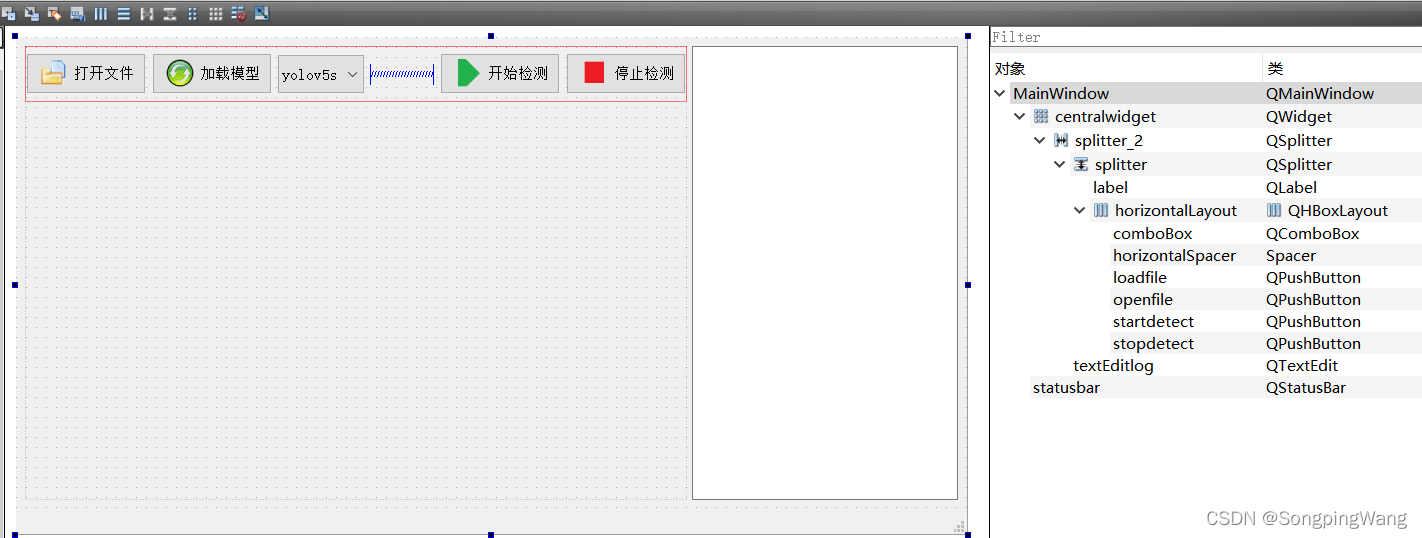
二、代码部分 mainwindow 类
mainwindow.h
#ifndef MAINWINDOW_H
#define MAINWINDOW_H
#include <QFileDialog>
#include <QFile>
#include <opencv2/opencv.hpp>
#include <opencv2/dnn.hpp>
#include <QMainWindow>
#include <QTimer>
#include <QImage>
#include <QPixmap>
#include <QDateTime>
#include <QMutex>
#include <QMutexLocker>
#include <QMimeDatabase>
#include <iostream>
#include <yolov5.h>
#include <chrono>

#pragma comment(lib,"C:\\Program Files (x86)\\Intel\\openvino_2021\\opencv\\lib\\opencv_core453.lib")
#pragma comment(lib,"C:\\Program Files (x86)\\Intel\\openvino_2021\\opencv\\lib\\opencv_imgcodecs453.lib")
#pragma comment(lib,"C:\\Program Files (x86)\\Intel\\openvino_2021\\opencv\\lib\\opencv_imgproc453.lib")
#pragma comment(lib,"C:\\Program Files (x86)\\Intel\\openvino_2021\\opencv\\lib\\opencv_videoio453.lib")
#pragma comment(lib,"C:\\Program Files (x86)\\Intel\\openvino_2021\\opencv\\lib\\opencv_objdetect453.lib")
#pragma comment(lib,"C:\\Program Files (x86)\\Intel\\openvino_2021\\opencv\\lib\\opencv_dnn453.lib")

#pragma comment(lib,"C:\\Program Files (x86)\\Intel\\openvino_2021\\deployment_tools\\inference_engine\\lib\\intel64\\Release\\inference_engine.lib")
#pragma comment(lib,"C:\\Program Files (x86)\\Intel\\openvino_2021\\deployment_tools\\inference_engine\\lib\\intel64\\Release\\inference_engine_c_api.lib")
#pragma comment(lib,"C:\\Program Files (x86)\\Intel\\openvino_2021\\deployment_tools\\inference_engine\\lib\\intel64\\Release\\inference_engine_transformations.lib")

//LIBS+= -L "C:\Program Files (x86)\Intel\openvino_2021\opencv\lib\*.lib"
//LIBS+= -L "C:\Program Files (x86)\Intel\openvino_2021\deployment_tools\inference_engine\lib\intel64\Release\*.lib"

//#ifdef QT_NO_DEBUG
//#pragma comment(lib,"C:\Program Files (x86)\Intel\openvino_2021\opencv\lib\opencv_core452.lib")
//#pragma comment(lib,"E:/opencv_build/install/x64/vc16/lib/opencv_imgcodecs452.lib")
//#pragma comment(lib,"E:/opencv_build/install/x64/vc16/lib/opencv_imgproc452.lib")
//#pragma comment(lib,"E:/opencv_build/install/x64/vc16/lib/opencv_imgcodecs452.lib")

//#pragma comment(lib,"E:/opencv_build/install/x64/vc16/lib/opencv_video452.lib")
//#pragma comment(lib,"E:/opencv_build/install/x64/vc16/lib/opencv_videoio452.lib")
//#pragma comment(lib,"E:/opencv_build/install/x64/vc16/lib/opencv_objdetect452.lib")
//#pragma comment(lib,"E:/opencv_build/install/x64/vc16/lib/opencv_shape452.lib")
//#pragma comment(lib,"E:/opencv_build/install/x64/vc16/lib/opencv_dnn452.lib")
//#pragma comment(lib,"E:/opencv_build/install/x64/vc16/lib/opencv_dnn_objdetect452.lib")
//#else
//#pragma comment(lib,"E:/opencv_build/install/x64/vc16/lib/opencv_core452d.lib")
//#pragma comment(lib,"E:/opencv_build/install/x64/vc16/lib/opencv_imgcodecs452d.lib")
//#pragma comment(lib,"E:/opencv_build/install/x64/vc16/lib/opencv_imgproc452d.lib")
//#pragma comment(lib,"E:/opencv_build/install/x64/vc16/lib/opencv_imgcodecs452d.lib")

//#pragma comment(lib,"E:/opencv_build/install/x64/vc16/lib/opencv_video452d.lib")
//#pragma comment(lib,"E:/opencv_build/install/x64/vc16/lib/opencv_videoio452d.lib")
//#pragma comment(lib,"E:/opencv_build/install/x64/vc16/lib/opencv_objdetect452d.lib")
//#pragma comment(lib,"E:/opencv_build/install/x64/vc16/lib/opencv_shape452d.lib")
//#pragma comment(lib,"E:/opencv_build/install/x64/vc16/lib/opencv_dnn452d.lib")
//#pragma comment(lib,"E:/opencv_build/install/x64/vc16/lib/opencv_dnn_objdetect452d.lib")
//#endif


//#ifdef QT_NO_DEBUG
//#pragma comment(lib,"E:/opencv452_cuda/install/x64/vc16/lib/opencv_core452.lib")
//#pragma comment(lib,"E:/opencv452_cuda/install/x64/vc16/lib/opencv_imgcodecs452.lib")
//#pragma comment(lib,"E:/opencv452_cuda/install/x64/vc16/lib/opencv_imgproc452.lib")
//#pragma comment(lib,"E:/opencv452_cuda/install/x64/vc16/lib/opencv_imgcodecs452.lib")

//#pragma comment(lib,"E:/opencv452_cuda/install/x64/vc16/lib/opencv_video452.lib")
//#pragma comment(lib,"E:/opencv452_cuda/install/x64/vc16/lib/opencv_videoio452.lib")
//#pragma comment(lib,"E:/opencv452_cuda/install/x64/vc16/lib/opencv_objdetect452.lib")
//#pragma comment(lib,"E:/opencv452_cuda/install/x64/vc16/lib/opencv_shape452.lib")
//#pragma comment(lib,"E:/opencv452_cuda/install/x64/vc16/lib/opencv_dnn452.lib")
//#pragma comment(lib,"E:/opencv452_cuda/install/x64/vc16/lib/opencv_dnn_objdetect452.lib")
//#endif


QPixmap Mat2Image(cv::Mat src);

QT_BEGIN_NAMESPACE
namespace Ui { class MainWindow; }
QT_END_NAMESPACE

class MainWindow : public QMainWindow
{
    Q_OBJECT

public:
    MainWindow(QWidget *parent = nullptr);
    void Init();
    ~MainWindow();

private slots:
    void readFrame(); //自定义信号处理函数


    void on_openfile_clicked();

    void on_loadfile_clicked();

    void on_startdetect_clicked();

    void on_stopdetect_clicked();

    void on_comboBox_activated(const QString &arg1);

private:
    Ui::MainWindow *ui;
    QTimer *timer;
    cv::VideoCapture *capture;

    YOLOV5 *yolov5;
    NetConfig conf;
    NetConfig *yolo_nets;
    std::vector<cv::Rect> bboxes;
    int IsDetect_ok = 0;
};
#endif // MAINWINDOW_H
mainwindow.cpp
#include "mainwindow.h"
#include "ui_mainwindow.h"


MainWindow::MainWindow(QWidget *parent)
    : QMainWindow(parent)
    , ui(new Ui::MainWindow)
{
    ui->setupUi(this);
    setWindowTitle(QStringLiteral("YoloV5目标检测软件"));

    timer = new QTimer(this);
    timer->setInterval(33);
    connect(timer,SIGNAL(timeout()),this,SLOT(readFrame()));
    ui->startdetect->setEnabled(false);
    ui->stopdetect->setEnabled(false);
    Init();
}

MainWindow::~MainWindow()
{

    capture->release();
    delete capture;
    delete [] yolo_nets;
    delete yolov5;
    delete ui;
}

void MainWindow::Init()
{
    capture = new cv::VideoCapture();
    yolo_nets = new NetConfig[4]{
                                {0.5, 0.5, 0.5, "yolov5s"},
                                {0.6, 0.6, 0.6, "yolov5m"},
                                {0.65, 0.65, 0.65, "yolov5l"},
                                {0.75, 0.75, 0.75, "yolov5x"}
                            };
    conf = yolo_nets[0];
    yolov5 = new YOLOV5();
    yolov5->Initialization(conf);
            ui->textEditlog->append(QStringLiteral("默认模型类别:yolov5s args: %1 %2 %3")
                                    .arg(conf.nmsThreshold)
                                    .arg(conf.objThreshold)
                                    .arg(conf.confThreshold));
}

void MainWindow::readFrame()
{
    cv::Mat frame;
    capture->read(frame);
    if (frame.empty()) return;

    auto start = std::chrono::steady_clock::now();
    yolov5->detect(frame);
    auto end = std::chrono::steady_clock::now();
    std::chrono::duration<double, std::milli> elapsed = end - start;
    ui->textEditlog->append(QString("cost_time: %1 ms").arg(elapsed.count()));

//    double t0 = static_cast<double>(cv::getTickCount());
//    yolov5->detect(frame);
//    double t1 = static_cast<double>(cv::getTickCount());
//    ui->textEditlog->append(QStringLiteral("cost_time: %1 ").arg((t1 - t0) / cv::getTickFrequency()));

    cv::cvtColor(frame, frame, cv::COLOR_BGR2RGB);
    QImage rawImage = QImage((uchar*)(frame.data),frame.cols,frame.rows,frame.step,QImage::Format_RGB888);
    ui->label->setPixmap(QPixmap::fromImage(rawImage));
}

void MainWindow::on_openfile_clicked()
{
    QString filename = QFileDialog::getOpenFileName(this,QStringLiteral("打开文件"),".","*.mp4 *.avi;;*.png *.jpg *.jpeg *.bmp");
    if(!QFile::exists(filename)){
        return;
    }
    ui->statusbar->showMessage(filename);

    QMimeDatabase db;
    QMimeType mime = db.mimeTypeForFile(filename);
    if (mime.name().startsWith("image/")) {
        cv::Mat src = cv::imread(filename.toLatin1().data());
        if(src.empty()){
            ui->statusbar->showMessage("图像不存在!");
            return;
        }
        cv::Mat temp;
        if(src.channels()==4)
            cv::cvtColor(src,temp,cv::COLOR_BGRA2RGB);
        else if (src.channels()==3)
            cv::cvtColor(src,temp,cv::COLOR_BGR2RGB);
        else
            cv::cvtColor(src,temp,cv::COLOR_GRAY2RGB);

        auto start = std::chrono::steady_clock::now();
        yolov5->detect(temp);
        auto end = std::chrono::steady_clock::now();
        std::chrono::duration<double, std::milli> elapsed = end - start;
        ui->textEditlog->append(QString("cost_time: %1 ms").arg(elapsed.count()));
        QImage img = QImage((uchar*)(temp.data),temp.cols,temp.rows,temp.step,QImage::Format_RGB888);
        ui->label->setPixmap(QPixmap::fromImage(img));
        ui->label->resize(ui->label->pixmap()->size());
        filename.clear();
    }else if (mime.name().startsWith("video/")) {
        capture->open(filename.toLatin1().data());
        if (!capture->isOpened()){
            ui->textEditlog->append("fail to open MP4!");
            return;
        }
        IsDetect_ok +=1;
        if (IsDetect_ok ==2)
            ui->startdetect->setEnabled(true);
        ui->textEditlog->append(QString::fromUtf8("Open video: %1 succesfully!").arg(filename));

        //获取整个帧数QStringLiteral
        long totalFrame = capture->get(cv::CAP_PROP_FRAME_COUNT);
        ui->textEditlog->append(QStringLiteral("整个视频共 %1 帧").arg(totalFrame));
        ui->label->resize(QSize(capture->get(cv::CAP_PROP_FRAME_WIDTH), capture->get(cv::CAP_PROP_FRAME_HEIGHT)));

        //设置开始帧()
        long frameToStart = 0;
        capture->set(cv::CAP_PROP_POS_FRAMES, frameToStart);
        ui->textEditlog->append(QStringLiteral("从第 %1 帧开始读").arg(frameToStart));

        //获取帧率
        double rate = capture->get(cv::CAP_PROP_FPS);
        ui->textEditlog->append(QStringLiteral("帧率为: %1 ").arg(rate));
    }
}

void MainWindow::on_loadfile_clicked()
{
    QString onnxFile = QFileDialog::getOpenFileName(this,QStringLiteral("选择模型"),".","*.onnx");
    if(!QFile::exists(onnxFile)){
        return;
    }
    ui->statusbar->showMessage(onnxFile);
    if (!yolov5->loadModel(onnxFile.toLatin1().data())){
        ui->textEditlog->append(QStringLiteral("加载模型失败!"));
        return;
    }
    IsDetect_ok +=1;
    ui->textEditlog->append(QString::fromUtf8("Open onnxFile: %1 succesfully!").arg(onnxFile));
    if (IsDetect_ok ==2)
        ui->startdetect->setEnabled(true);
}

void MainWindow::on_startdetect_clicked()
{
    timer->start();
    ui->startdetect->setEnabled(false);
    ui->stopdetect->setEnabled(true);
    ui->openfile->setEnabled(false);
    ui->loadfile->setEnabled(false);
    ui->comboBox->setEnabled(false);
    ui->textEditlog->append(QStringLiteral("================\n"
                                           "    开始检测\n"
                                           "================\n"));
}

void MainWindow::on_stopdetect_clicked()
{
    ui->startdetect->setEnabled(true);
    ui->stopdetect->setEnabled(false);
    ui->openfile->setEnabled(true);
    ui->loadfile->setEnabled(true);
    ui->comboBox->setEnabled(true);
    timer->stop();
    ui->textEditlog->append(QStringLiteral("================\n"
                                           "    停止检测\n"
                                           "================\n"));
}

void MainWindow::on_comboBox_activated(const QString &arg1)
{
    if (arg1.contains("s")){
        conf = yolo_nets[0];
    }else if (arg1.contains("m")) {
        conf = yolo_nets[1];
    }else if (arg1.contains("l")) {
        conf = yolo_nets[2];
    }else if (arg1.contains("x")) {
        conf = yolo_nets[3];}
    yolov5->Initialization(conf);
    ui->textEditlog->append(QStringLiteral("使用模型类别:%1 args: %2 %3 %4")
                            .arg(arg1)
                            .arg(conf.nmsThreshold)
                            .arg(conf.objThreshold)
                            .arg(conf.confThreshold));
}
yolov5类
yolov5.h
#ifndef YOLOV5_H
#define YOLOV5_H
#include <opencv2/opencv.hpp>
#include <opencv2/dnn.hpp>
#include <fstream>
#include <sstream>
#include <iostream>
#include <exception>
#include <QMessageBox>


struct NetConfig
{
    float confThreshold; // class Confidence threshold
    float nmsThreshold;  // Non-maximum suppression threshold
    float objThreshold;  //Object Confidence threshold
    std::string netname;
};

class YOLOV5
{
public:
    YOLOV5(){}
    void Initialization(NetConfig conf);
    bool loadModel(const char* onnxfile);
    void detect(cv::Mat& frame);
private:
    const float anchors[3][6] = {{10.0, 13.0, 16.0, 30.0, 33.0, 23.0}, {30.0, 61.0, 62.0, 45.0, 59.0, 119.0},{116.0, 90.0, 156.0, 198.0, 373.0, 326.0}};
    const float stride[3] = { 8.0, 16.0, 32.0 };
    std::string classes[80] = {"person", "bicycle", "car", "motorbike", "aeroplane", "bus",
                              "train", "truck", "boat", "traffic light", "fire hydrant",
                              "stop sign", "parking meter", "bench", "bird", "cat", "dog",
                              "horse", "sheep", "cow", "elephant", "bear", "zebra", "giraffe",
                              "backpack", "umbrella", "handbag", "tie", "suitcase", "frisbee",
                              "skis", "snowboard", "sports ball", "kite", "baseball bat",
                              "baseball glove", "skateboard", "surfboard", "tennis racket",
                              "bottle", "wine glass", "cup", "fork", "knife", "spoon", "bowl",
                              "banana", "apple", "sandwich", "orange", "broccoli", "carrot",
                              "hot dog", "pizza", "donut", "cake", "chair", "sofa", "pottedplant",
                              "bed", "diningtable", "toilet", "tvmonitor", "laptop", "mouse",
                              "remote", "keyboard", "cell phone", "microwave", "oven", "toaster",
                              "sink", "refrigerator", "book", "clock", "vase", "scissors",
                              "teddy bear", "hair drier", "toothbrush"};
    const int inpWidth = 640;
    const int inpHeight = 640;
    float confThreshold;
    float nmsThreshold;
    float objThreshold;

    cv::Mat blob;
    std::vector<cv::Mat> outs;
    std::vector<int> classIds;
    std::vector<float> confidences;
    std::vector<cv::Rect> boxes;
    cv::dnn::Net net;
    void drawPred(int classId, float conf, int left, int top, int right, int bottom, cv::Mat& frame);
    void sigmoid(cv::Mat* out, int length);
};

static inline float sigmoid_x(float x)
{
    return static_cast<float>(1.f / (1.f + exp(-x)));
}
#endif // YOLOV5_H
yolov5.cpp
#include "yolov5.h"
using namespace std;
using namespace cv;


void YOLOV5::Initialization(NetConfig conf)
{
    this->confThreshold = conf.confThreshold;
    this->nmsThreshold = conf.nmsThreshold;
    this->objThreshold = conf.objThreshold;
    classIds.reserve(20);
    confidences.reserve(20);
    boxes.reserve(20);
    outs.reserve(3);
}

bool YOLOV5::loadModel(const char *onnxfile)
{
    try {
        this->net = cv::dnn::readNetFromONNX(onnxfile);
        return true;
    } catch (exception& e) {
        QMessageBox::critical(NULL,"Error",QStringLiteral("模型加载出错,请检查重试!\n %1").arg(e.what()),QMessageBox::Yes,QMessageBox::Yes);
        return false;
    }
    this->net.setPreferableBackend(cv::dnn::DNN_BACKEND_INFERENCE_ENGINE);
    this->net.setPreferableTarget(cv::dnn::DNN_TARGET_CPU);

//    this->net.setPreferableBackend(cv::dnn::DNN_BACKEND_CUDA);
//    this->net.setPreferableTarget(cv::dnn::DNN_TARGET_CUDA);
//    try {
//        this->net.setPreferableBackend(cv::dnn::DNN_BACKEND_CUDA);
//        this->net.setPreferableTarget(cv::dnn::DNN_TARGET_CUDA);
//    } catch (exception& e2) {
//        this->net.setPreferableBackend(cv::dnn::DNN_BACKEND_DEFAULT);
//        this->net.setPreferableTarget(cv::dnn::DNN_TARGET_CPU);
//        QMessageBox::warning(NULL,"warning",QStringLiteral("正在使用CPU推理!\n %1").arg(e2.what()),QMessageBox::Yes,QMessageBox::Yes);
//        return false;
//    }
}

void YOLOV5::detect(cv::Mat &frame)
{
    cv::dnn::blobFromImage(frame, blob, 1 / 255.0, Size(this->inpWidth, this->inpHeight), Scalar(0, 0, 0), true, false);
    this->net.setInput(blob);
    this->net.forward(outs, this->net.getUnconnectedOutLayersNames());

    /generate proposals
    classIds.clear();
    confidences.clear();
    boxes.clear();
    float ratioh = (float)frame.rows / this->inpHeight, ratiow = (float)frame.cols / this->inpWidth;
    int n = 0, q = 0, i = 0, j = 0, nout = 8 + 5, c = 0;
    for (n = 0; n < 3; n++)   ///尺度
    {
        int num_grid_x = (int)(this->inpWidth / this->stride[n]);
        int num_grid_y = (int)(this->inpHeight / this->stride[n]);
        int area = num_grid_x * num_grid_y;
        this->sigmoid(&outs[n], 3 * nout * area);
        for (q = 0; q < 3; q++)    ///anchor数
        {
            const float anchor_w = this->anchors[n][q * 2];
            const float anchor_h = this->anchors[n][q * 2 + 1];
            float* pdata = (float*)outs[n].data + q * nout * area;
            for (i = 0; i < num_grid_y; i++)
            {
                for (j = 0; j < num_grid_x; j++)
                {
                    float box_score = pdata[4 * area + i * num_grid_x + j];
                    if (box_score > this->objThreshold)
                    {
                        float max_class_socre = 0, class_socre = 0;
                        int max_class_id = 0;
                        for (c = 0; c < 80; c++)  get max socre
                        {
                            class_socre = pdata[(c + 5) * area + i * num_grid_x + j];
                            if (class_socre > max_class_socre)
                            {
                                max_class_socre = class_socre;
                                max_class_id = c;
                            }
                        }

                        if (max_class_socre > this->confThreshold)
                        {
                            float cx = (pdata[i * num_grid_x + j] * 2.f - 0.5f + j) * this->stride[n];  ///cx
                            float cy = (pdata[area + i * num_grid_x + j] * 2.f - 0.5f + i) * this->stride[n];   ///cy
                            float w = powf(pdata[2 * area + i * num_grid_x + j] * 2.f, 2.f) * anchor_w;   ///w
                            float h = powf(pdata[3 * area + i * num_grid_x + j] * 2.f, 2.f) * anchor_h;  ///h

                            int left = (cx - 0.5*w)*ratiow;
                            int top = (cy - 0.5*h)*ratioh;   ///坐标还原到原图上

                            classIds.push_back(max_class_id);
                            confidences.push_back(max_class_socre);
                            boxes.push_back(Rect(left, top, (int)(w*ratiow), (int)(h*ratioh)));
                        }
                    }
                }
            }
        }
    }

    // Perform non maximum suppression to eliminate redundant overlapping boxes with
    // lower confidences
    vector<int> indices;
    cv::dnn::NMSBoxes(boxes, confidences, this->confThreshold, this->nmsThreshold, indices);
    for (size_t i = 0; i < indices.size(); ++i)
    {
        int idx = indices[i];
        Rect box = boxes[idx];
        this->drawPred(classIds[idx], confidences[idx], box.x, box.y,
            box.x + box.width, box.y + box.height, frame);
    }
}

void YOLOV5::drawPred(int classId, float conf, int left, int top, int right, int bottom, Mat &frame)
{
    rectangle(frame, Point(left, top), Point(right, bottom), Scalar(0, 0, 255), 3);
    string label = format("%.2f", conf);
    label = this->classes[classId] + ":" + label;

    int baseLine;
    Size labelSize = getTextSize(label, FONT_HERSHEY_SIMPLEX, 0.5, 1, &baseLine);
    top = max(top, labelSize.height);
    putText(frame, label, Point(left, top), FONT_HERSHEY_SIMPLEX, 0.75, Scalar(0, 255, 0), 1);
}

void YOLOV5::sigmoid(Mat *out, int length)
{
    float* pdata = (float*)(out->data);
    int i = 0;
    for (i = 0; i < length; i++)
    {
        pdata[i] = 1.0 / (1 + expf(-pdata[i]));
    }
}
三、效果演示
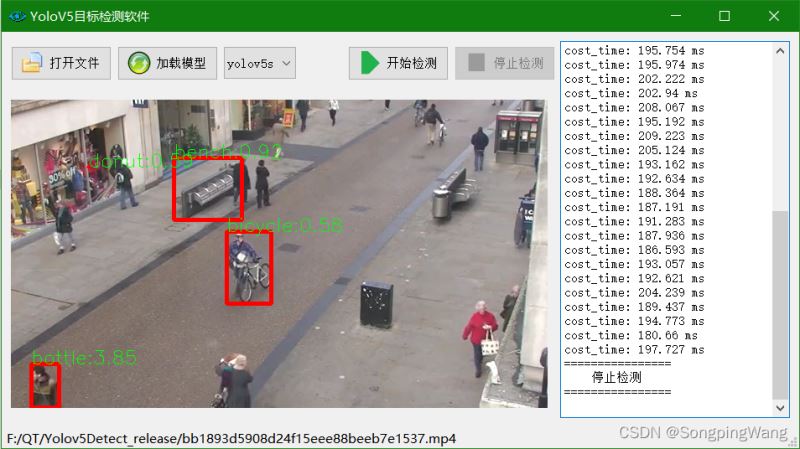
到此这篇关于Qt结合OpenCV部署yolov5的实现的文章就介绍到这了,更多相关Qt OpenCV部署yolov5内容请搜索脚本之家以前的文章或继续浏览下面的相关文章希望大家以后多多支持脚本之家!
相关文章
 这篇文章主要为大家详细介绍了C++实现贺卡程序,C++应用程序编写的雪花贺卡,具有一定的参考价值,感兴趣的小伙伴们可以参考一下2019-04-04
 这篇文章主要为大家详细介绍了C语言使用结构体实现简单通讯录,具有一定的参考价值,感兴趣的小伙伴们可以参考一下2018-02-02
 这篇文章主要介绍了C++核心编程之占位参数和默认参数,c++中函数的形参列表中的形参是可以有默认值的,函数的形参列表里可以有占位参数,用来占位,调用函数时必须填补位置。下面更多相关内容的详细介绍,需要的小伙伴可以参考一下2022-03-03
 今天小编就为大家分享一篇关于C语言中函数指针与软件设计经验总结,小编觉得内容挺不错的,现在分享给大家,具有很好的参考价值,需要的朋友一起跟随小编来看看吧2018-12-12
 这篇文章主要为大家详细介绍了如何利用c++实现解析zip文件,并对流式文件pptx内容的修改,文中的示例代码讲解详细,有需要的小伙伴可以参考一下2023-12-12
 这篇文章主要为大家详细介绍了基于C语言实现扫雷游戏,文中示例代码介绍的非常详细,具有一定的参考价值,感兴趣的小伙伴们可以参考一下2020-11-11
 本篇文章主要介绍了八大排序算法,详细的介绍了八个算法思想,实现代码,稳定性,时间复杂度等,具有一定的参考价值,有需要的可以了解一下。2016-11-11
 趁空闲时间,小编决定把C++的排序算法分析并总结下,以便温故知新。也方便需要的朋友可以参考学习。2016-07-07
 C语言给定了一些基本的数据类型,下面这篇文章主要给大家介绍了关于重学c/c++之数据存储(整数、浮点数)的相关资料,文中通过实例代码介绍的非常详细,需要的朋友可以参考下2022-11-11
 这篇文章介绍了C语言计算Robots机器人行走路线,对大家的学习或者工作具有一定的参考学习价值,需要的朋友们下面随着小编来一起学习学习吧2021-12-12
最新评论