

Vue实现裁切图片功能
更新时间:2022年04月22日 17:22:54 作者:nicepainkiller
这篇文章主要为大家详细介绍了Vue实现裁切图片功能,文中示例代码介绍的非常详细,具有一定的参考价值,感兴趣的小伙伴们可以参考一下
本文实例为大家分享了Vue实现裁切图片的具体代码,供大家参考,具体内容如下
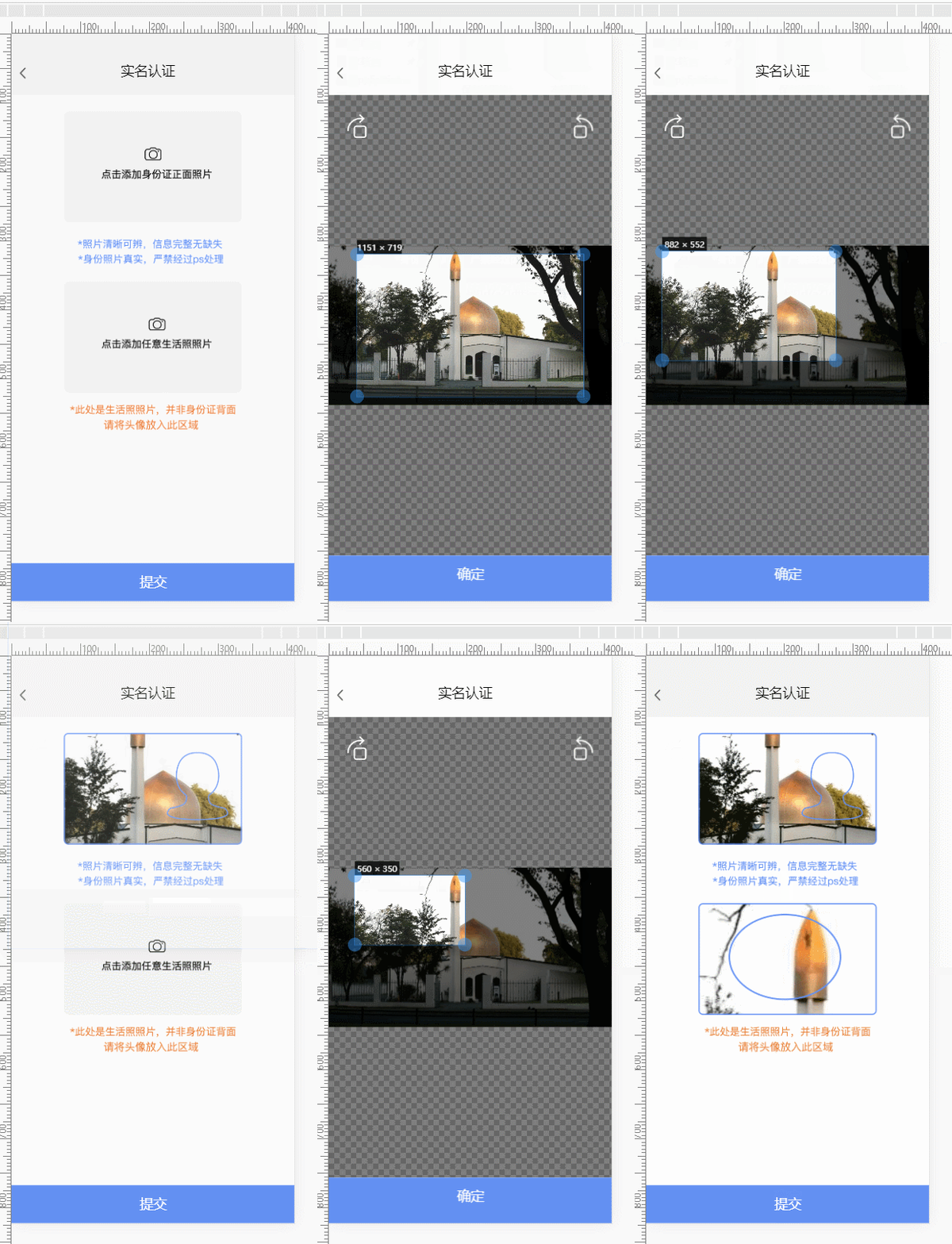
项目需求做一个身份证的裁切功能
原生开发的话,这种功能挺容易实现的
Web的没有做过相关功能,百度了一下 vue-cropper 在 VUE是使用还是蛮方便的
1)、安装 vue-cropper
npm install vue-cropper
2)、编写 .VUE 文件 cropper.vue 应为项目本身使用 mui
<template>
    <div>
        <div class="mui-fullscreen">

            <div class="top" style="height:1.63rem;background:white;" v-on:click="onBack()">
                <img src="../assets/img/payMent/fanhui@2x.png" style="width:0.17rem;margin-left: 0.21rem; margin-top: 0.89rem">
                <p style="position: absolute; margin-left: 2.9rem;top: 0.8rem; font-family:PingFang-SC-Medium; color: black;  font-size: 0.36rem;">实名认证</p>
            </div>

            <div style="position: absolute; width: 100%;top:1.63rem;bottom:1.2rem ;background:#F2F2F2 ;">
                <!-- <img id="image" :src="image" style="width: 100%; width: 100%;"> -->
                <img src="../assets/img/lobby/youxuanzhuan.png" style="width: 0.5rem; position: absolute; top: 0.5rem; left: 0.5rem; z-index: 2;"
                 v-on:click="rotateLeft()" />
                <img src="../assets/img/lobby/zuoxuanzhuan.png" style="width: 0.5rem; position: absolute; top: 0.5rem; right: 0.5rem; z-index: 2;"
                 v-on:click="rotateRight()" />


                <div class="cropperContent">

                    <vue-cropper ref="cropper" :img="option.img" :outputSize="option.size" :outputType="option.outputType" :info="true"
                     :full="option.full" :canMove="option.canMove" :canMoveBox="option.canMoveBox" :original="option.original"
                     :autoCrop="option.autoCrop" :fixed="option.fixed" :fixedNumber="option.fixedNumber" :centerBox="option.centerBox"
                     :infoTrue="option.infoTrue" :fixedBox="option.fixedBox" @realTime="realTime"></vue-cropper>


                </div>

                <!--                 <div style="height: 2rem;width: 2rem; background: greenyellow; position: absolute; top: 5rem;">
                    <img :src="preview" style="height: 2rem;width: 2rem;" />
                </div> -->

            </div>


            <div class="buttom" style="background: #618FF5; height:1.2rem;width:100%; bottom: 0rem; position:absolute;#F2F2F2"
             v-on:click="onSelect()">
                <p style="position: absolute; margin-left: 3.4rem;top: 0.3rem; font-family:PingFang-SC-Medium; color: white;  font-size: 0.36rem;">确定</p>
            </div>

            <!--             <img :src="preview" style="height: 1rem;" /> -->

        </div>
    </div>
</template>

<script>
    import {
        VueCropper
    } from 'vue-cropper'
    export default {
        data() {
            return {
                target: 0,
                cropperHelp: null,
                preview: null,
                //裁剪组件的基础配置option
                option: {
                    img: '', // 裁剪图片的地址
                    info: true, // 裁剪框的大小信息
                    outputSize: 1, // 裁剪生成图片的质量
                    outputType: 'jpeg', // 裁剪生成图片的格式
                    canScale: false, // 图片是否允许滚轮缩放
                    autoCrop: true, // 是否默认生成截图框
                    autoCropWidth: 800, // 默认生成截图框宽度
                    autoCropHeight: 500, // 默认生成截图框高度
                    fixedBox: false, // 固定截图框大小 不允许改变
                    fixed: true, // 是否开启截图框宽高固定比例
                    fixedNumber: [16, 10], // 截图框的宽高比例
                    full: false, // 是否输出原图比例的截图
                    canMoveBox: true, // 截图框能否拖动
                    original: false, // 上传图片按照原始比例渲染
                    centerBox: true, // 截图框是否被限制在图片里面
                    infoTrue: true // true 为展示真实输出图片宽高 false 展示看到的截图框宽高
                },
            }
        },
        components: {
            VueCropper
        },
        methods: {
            //放大/缩小
            changeScale(num) {
                console.log('changeScale')
                num = num || 1;
                this.$refs.cropper.changeScale(num);
            },
            //坐旋转
            rotateLeft() {
                console.log('rotateLeft')
                this.$refs.cropper.rotateLeft();
            },
            //右旋转
            rotateRight() {
                console.log('rotateRight')
                this.$refs.cropper.rotateRight();
            },
            // 实时预览函数
            realTime(data) {
                //this.previews = data
            },
            imgLoad(msg) {
                console.log(msg)
            },
            cropImage() {

            },


            onSelect() {

                this.$refs.cropper.getCropBlob((data) => {
                    //console.log("data===>",data)
                    var img = window.URL.createObjectURL(data);
                    this.$emit("onCutingResoult", {
                        img: img,
                        target: this.target
                    })
                })
            },

            onReset(param) {
                this.target = param.target
                this.option.img = param.url
                this.preview = param.url
            },
            onBack() {
                this.$emit("onCutingBack")
            }
        }

    }
</script>

<style scoped>
    .mui-fullscreen {
        background: white;
    }

    .cropperContent {
        width: 100%;
        height: 100%;
    }

    /*     .mui-fullscreen {
        background: #F2F2F2;
        top: 0rem;
        bottom: 0rem;
    } */
</style>
基本上,放里面就能使用。
以上就是本文的全部内容,希望对大家的学习有所帮助,也希望大家多多支持脚本之家。
相关文章
 这篇文章主要为大家详细介绍了vue实现在线学生录入系统,文中示例代码介绍的非常详细,具有一定的参考价值,感兴趣的小伙伴们可以参考一下2020-05-05
 本篇文章主要介绍了Vue中保存用户登录状态实例代码,具有一定的参考价值,感兴趣的小伙伴们可以参考一下。、2017-06-06
 本文主要介绍了vue可视化大屏实现无线滚动列表飞入效果,文中通过示例代码介绍的非常详细,对大家的学习或者工作具有一定的参考学习价值,需要的朋友们下面随着小编来一起学习学习吧2022-04-04
 这篇文章主要为大家介绍了Vue中使用防抖与节流的方法,具有一定的参考价值,感兴趣的小伙伴们可以参考一下,希望能够给你带来帮助2022-01-01
 这篇文章主要介绍了vue自定义指令之面板拖拽的实现,文中通过示例代码介绍的非常详细,对大家的学习或者工作具有一定的参考学习价值,需要的朋友们下面随着小编来一起学习学习吧2019-04-04
 这篇文章主要为大家详细介绍了vue实现图片上传到后台,文中示例代码介绍的非常详细,具有一定的参考价值,感兴趣的小伙伴们可以参考一下2020-06-06
 这篇文章主要介绍了vue打包后的线上部署Apache、nginx全过程,具有很好的参考价值,希望对大家有所帮助。如有错误或未考虑完全的地方,望不吝赐教2023-02-02
 这篇文章主要介绍了浅谈Vue 性能优化之深挖数组,文中通过示例代码介绍的非常详细,对大家的学习或者工作具有一定的参考学习价值,需要的朋友们下面随着小编来一起学习学习吧2018-12-12
 h()函数是Vue.js中的一个工具函数,用于创建虚拟DOM节点,具有更高的灵活性和控制力,本文介绍Vue h函数到底是个啥,感兴趣的朋友一起看看吧2025-02-02
vue-router2.0 组件之间传参及获取动态参数的方法
下面小编就为大家带来一篇vue-router2.0 组件之间传参及获取动态参数的方法。小编觉得挺不错的,现在就分享给大家,也给大家做个参考。一起跟随小编过来看看吧2017-11-11
最新评论