

利用apache ftpserver搭建ftp服务器的方法步骤
更新时间:2022年05月20日 08:35:26 作者:逆水寒龙
本文主要介绍了利用apache ftpserver搭建ftp服务器的方法步骤,文中通过示例代码介绍的非常详细,具有一定的参考价值,感兴趣的小伙伴们可以参考一下
操作环境:
- win2012r2 x64 datacenter
- Apache FtpServer 1.2.0
- Java SE Development Kit 8u333
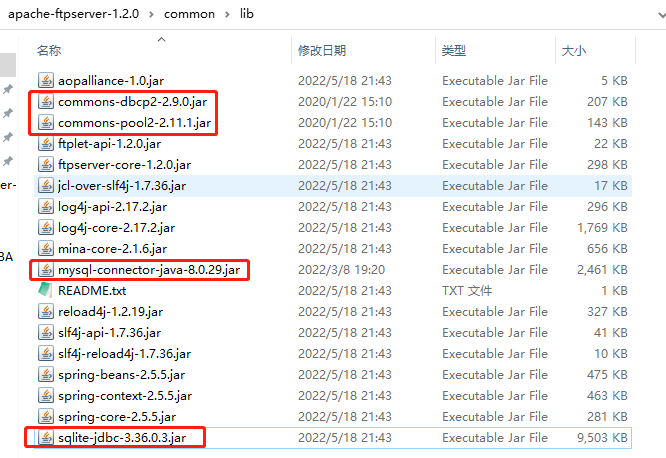
- commons-dbcp2-2.9.0.jar
- commons-pool2-2.11.1.jar
- mysql server 8.0.29
- mysql-connector-java-8.0.29.jar
- sqlite
- sqlite-jdbc-3.36.0.3.jar
如下图:
一、usermanager采用文件形式管理xml示例如下
<?xml version="1.0" encoding="UTF-8"?>
  <!--
    Licensed to the Apache Software Foundation (ASF) under one or more
    contributor license agreements. See the NOTICE file distributed with
    this work for additional information regarding copyright ownership.
    The ASF licenses this file to you under the Apache License, Version
    2.0 (the "License"); you may not use this file except in compliance
    with the License. You may obtain a copy of the License at
    http://www.apache.org/licenses/LICENSE-2.0 Unless required by
    applicable law or agreed to in writing, software distributed under the
    License is distributed on an "AS IS" BASIS, WITHOUT WARRANTIES OR
    CONDITIONS OF ANY KIND, either express or implied. See the License for
    the specific language governing permissions and limitations under the
    License.
  -->
<server xmlns="http://mina.apache.org/ftpserver/spring/v1"
  xmlns:xsi="http://www.w3.org/2001/XMLSchema-instance"
  xsi:schemaLocation="
     http://mina.apache.org/ftpserver/spring/v1 https://mina.apache.org/ftpserver-project/ftpserver-1.0.xsd
     "
  id="myServer">
  <listeners>
    <nio-listener name="default" port="21">
        <ssl>
                <keystore file="./res/ftpserver.jks" password="password" />
            </ssl>
    </nio-listener>
  </listeners>
  <file-user-manager file="./res/conf/users.properties" />
</server>
二、usermanager采用mysql数据库管理用户时,ftpd-mysql.xml示例如下
目前数据库管理用户时采用的明文存储,salted和md5的方式没有测试成功,如有测试成功的朋友请指导一下。
<?xml version="1.0" encoding="UTF-8"?>
<!-- Licensed to the Apache Software Foundation (ASF) under one or more contributor
    license agreements. See the NOTICE file distributed with this work for additional
    information regarding copyright ownership. The ASF licenses this file to
    you under the Apache License, Version 2.0 (the "License"); you may not use
    this file except in compliance with the License. You may obtain a copy of
    the License at http://www.apache.org/licenses/LICENSE-2.0 Unless required
    by applicable law or agreed to in writing, software distributed under the
    License is distributed on an "AS IS" BASIS, WITHOUT WARRANTIES OR CONDITIONS
    OF ANY KIND, either express or implied. See the License for the specific
    language governing permissions and limitations under the License. -->
<server xmlns="http://mina.apache.org/ftpserver/spring/v1"
    xmlns:xsi="http://www.w3.org/2001/XMLSchema-instance" xmlns:beans="http://www.springframework.org/schema/beans"
    xsi:schemaLocation="
           http://www.springframework.org/schema/beans
           http://www.springframework.org/schema/beans/spring-beans-2.5.xsd
           http://mina.apache.org/ftpserver/spring/v1
           http://mina.apache.org/ftpserver/ftpserver-1.0.xsd
           "
    id="myServer">
    <listeners>
        <nio-listener name="default" port="21">
            <ssl>
                <keystore file="./res/ftpserver.jks" password="password" />
            </ssl>
        </nio-listener>
    </listeners>
    <db-user-manager encrypt-passwords="clear">
        <data-source>
            <beans:bean class="org.apache.commons.dbcp2.BasicDataSource">
                <beans:property name="driverClassName" value="com.mysql.jdbc.Driver" />
                <beans:property name="url" value="jdbc:mysql://localhost/ftpserver" />
                <beans:property name="username" value="root" />
                <beans:property name="password" value="123456" />
            </beans:bean>
        </data-source>
        <insert-user>INSERT INTO FTP_USER (userid, userpassword,
            homedirectory, enableflag, writepermission, idletime, uploadrate,
            downloadrate) VALUES ('{userid}', '{userpassword}',
            '{homedirectory}',
            {enableflag}, {writepermission}, {idletime},
            {uploadrate},
            {downloadrate})
        </insert-user>
        <update-user>UPDATE FTP_USER SET
            userpassword='{userpassword}',homedirectory='{homedirectory}',enableflag={enableflag},writepermission={writepermission},idletime={idletime},uploadrate={uploadrate},downloadrate={downloadrate}
            WHERE userid='{userid}'
        </update-user>
        <delete-user>DELETE FROM FTP_USER WHERE userid = '{userid}'
        </delete-user>
        <select-user>SELECT userid, userpassword, homedirectory,
            enableflag, writepermission, idletime, uploadrate, downloadrate,
            maxloginnumber, maxloginperip FROM
            FTP_USER WHERE userid = '{userid}'
        </select-user>
        <select-all-users>
            SELECT userid FROM FTP_USER ORDER BY userid
        </select-all-users>
        <is-admin>SELECT userid FROM FTP_USER WHERE userid='{userid}'
            AND
            userid='admin'
        </is-admin>
        <authenticate>SELECT userpassword from FTP_USER WHERE
            userid='{userid}'
        </authenticate>
    </db-user-manager>
</server>注意:org.apache.commons.dbcp2.BasicDataSource,看最新的commons.dbcp命名空间和1.x版本有区别
三、usermanager采用Sqlite数据库管理用户时,ftpd-sqlite.xml示例如下
<?xml version="1.0" encoding="UTF-8"?>
<!-- Licensed to the Apache Software Foundation (ASF) under one or more contributor
    license agreements. See the NOTICE file distributed with this work for additional
    information regarding copyright ownership. The ASF licenses this file to
    you under the Apache License, Version 2.0 (the "License"); you may not use
    this file except in compliance with the License. You may obtain a copy of
    the License at http://www.apache.org/licenses/LICENSE-2.0 Unless required
    by applicable law or agreed to in writing, software distributed under the
    License is distributed on an "AS IS" BASIS, WITHOUT WARRANTIES OR CONDITIONS
    OF ANY KIND, either express or implied. See the License for the specific
    language governing permissions and limitations under the License. -->
<server xmlns="http://mina.apache.org/ftpserver/spring/v1"
    xmlns:xsi="http://www.w3.org/2001/XMLSchema-instance" xmlns:beans="http://www.springframework.org/schema/beans"
    xsi:schemaLocation="
           http://www.springframework.org/schema/beans
           http://www.springframework.org/schema/beans/spring-beans-2.5.xsd
           http://mina.apache.org/ftpserver/spring/v1
           http://mina.apache.org/ftpserver/ftpserver-1.0.xsd
           "
    id="myServer">
    <listeners>
        <nio-listener name="default" port="21">
            <ssl>
                <keystore file="./res/ftpserver.jks" password="password" />
            </ssl>
        </nio-listener>
    </listeners>
    <db-user-manager encrypt-passwords="clear">
        <data-source>
            <beans:bean class="org.apache.commons.dbcp2.BasicDataSource">
                <beans:property name="driverClassName" value="org.sqlite.JDBC" />
                <beans:property name="url" value="jdbc:sqlite:ftp.db" />
            </beans:bean>
        </data-source>
        <insert-user>INSERT INTO FTP_USER (userid, userpassword,
            homedirectory, enableflag, writepermission, idletime, uploadrate,
            downloadrate) VALUES ('{userid}', '{userpassword}',
            '{homedirectory}',
            {enableflag}, {writepermission}, {idletime},
            {uploadrate},
            {downloadrate})
        </insert-user>
        <update-user>UPDATE FTP_USER SET
            userpassword='{userpassword}',homedirectory='{homedirectory}',enableflag={enableflag},writepermission={writepermission},idletime={idletime},uploadrate={uploadrate},downloadrate={downloadrate}
            WHERE userid='{userid}'
        </update-user>
        <delete-user>DELETE FROM FTP_USER WHERE userid = '{userid}'
        </delete-user>
        <select-user>SELECT userid, userpassword, homedirectory,
            enableflag, writepermission, idletime, uploadrate, downloadrate,
            maxloginnumber, maxloginperip FROM
            FTP_USER WHERE userid = '{userid}'
        </select-user>
        <select-all-users>
            SELECT userid FROM FTP_USER ORDER BY userid
        </select-all-users>
        <is-admin>SELECT userid FROM FTP_USER WHERE userid='{userid}'
            AND
            userid='admin'
        </is-admin>
        <authenticate>SELECT userpassword from FTP_USER WHERE
            userid='{userid}'
        </authenticate>
    </db-user-manager>
</server>注意:commons的jar包还保留着,多了个操作sqlitejdbc的jar包,下载地址:GitHub - xerial/sqlite-jdbc: SQLite JDBC Driver
四、解决ftpd.exe在64位windows系统启动失败的问题
需下载tomcat包,目前测试的这个版本可行tomcat-7 v7.0.109 (apache.org)

放入apache ftpserver bin目录里替换原有的ftpd.exe
这样安装为服务的时候就可以正常启动了
五、python操作sqlite的ftp.db管理(增加删除)用户
自己搞了个python脚本,采用了sqlalchemy来操作数据库
from sqlalchemy import create_engine
from sqlalchemy import MetaData,Table,Column,Boolean,Integer,String
import os

engine=create_engine('sqlite:///ftp.db')
conn=engine.connect()

metadata=MetaData()

ftpusers=Table('FTP_USER',metadata,
    Column('userid',String(64),primary_key=True),
    Column('userpassword',String(64),nullable=False),
    Column('homedirectory',String(128),nullable=False),
    Column('enableflag',Boolean(),default=True),
    Column('writepermission',Boolean(),default=True),
    Column('idletime',Integer(),default=0),
    Column('uploadrate',Integer(),default=0),
    Column('downloadrate',Integer(),default=0),
    Column('maxloginnumber',Integer(),default=0),
    Column('maxloginperip',Integer(),default=0)
)

metadata.create_all(engine)

def addgeneraluser():

	deluser = ftpusers.delete().where(ftpusers.c.userid=="nic")
	rs = conn.execute(deluser)

	dirname="./files/alluser"
	if not os.path.exists(dirname):
		os.mkdir(dirname)

	ins=ftpusers.insert().values(
		userid="nic",
		userpassword="123321",
		homedirectory=dirname,
		writepermission=0,
		maxloginnumber=1
	)

	result=conn.execute(ins)

def addadmin():
	deladmin = ftpusers.delete().where(ftpusers.c.userid=="admin")
	rs = conn.execute(deladmin)

	ins=ftpusers.insert().values(
		userid="admin",
		userpassword="123456",
		homedirectory="./files",
		writepermission=1
	)

	result=conn.execute(ins)

def getusers():
	sel=ftpusers.select()
	rs=conn.execute(sel)
	print(rs.fetchall())

addgeneraluser()
getusers()
可以方便的增加用户了,generaluser只读权限只能同时登录一个,admin权限可读写,不限制。
到此这篇关于利用apache ftpserver搭建ftp服务器的方法步骤的文章就介绍到这了,更多相关apache ftpserver搭建ftp内容请搜索脚本之家以前的文章或继续浏览下面的相关文章希望大家以后多多支持脚本之家!
相关文章
 apache服务器全局配置详解,介绍很多关于服务器相关的一些知识,用apache架设服务器的朋友可以收藏下2013-03-03
 这篇文章主要介绍了在CentOS 7.2上安装SuPHP的详细方法,本教程介绍从源代码安装CentOS 7.2上的SuPHP,因为没有可用于CentOS 7.2的SuPHP软件包,需要的朋友可以参考下2020-02-02
 今天小编就为大家分享一篇关于makefile是什么及其工作原理的文章,小编觉得内容挺不错的,现在分享给大家,具有很好的参考价值,需要的朋友一起跟随小编来看看吧2018-09-09
 在本篇文章里小编给各位分享的是关于linux中的相对路径的表示方法,需要的朋友们可以学习下。2020-03-03
 这篇文章主要为大家详细介绍了什么是Linux软链接和Linux硬链接,在默认情况下,ln命令产生硬链接,感兴趣的小伙伴们可以参考一下2016-05-05
 一个应用程序调用动态库, 而这个动态库其中的函数调用某静态库时,如何生成应用程序呢?看下面的代码就明白了2013-12-12
 在本篇文章里小编给大家分享了关于linux如何删除环境变量的详细方法和步骤,需要的朋友们学习下。2019-04-04
linux中mount/umount命令的基本用法及开机自动挂载方法
本篇文章主要介绍了linux中mount/umount命令的基本用法及开机自动挂载,具有一定的参考价值,感兴趣的小伙伴们可以参考一下。2016-11-11 自学Linux对于新手来说是一件非常辛苦的事件,那么有没有快速成为Linux高手的方法呢,掌握一些Linux常用特殊命令是必不可少的。下面是自学Linux命令的4种方法,2018-10-10
 众所周知,如果没有 cd 命令,我们无法 Linux 中切换目录。接下来通过本文给大家介绍了在 Linux 中不使用 CD 命令进入目录/文件夹的方法,需要的朋友可以参考下2019-04-04
最新评论