

Vue3中使用vuex4的实现示例
更新时间:2022年06月22日 09:30:55 作者:龙雨LongYu12
本文主要介绍了Vue3中使用vuex4的实现示例,文中通过示例代码介绍的非常详细,对大家的学习或者工作具有一定的参考学习价值,需要的朋友们下面随着小编来一起学习学习吧
1、引入依赖:
npm i vuex
2、新建文件夹 store ,在里面新建文件 index.js

3、index.js文件内容:
import { createStore } from 'vuex'

export default createStore({
  state: {

  },
  mutations: {

  },
  actions: {

  },
  modules: {
  }
})
4、在 main.js 中引入
import store from './store'

5、使用
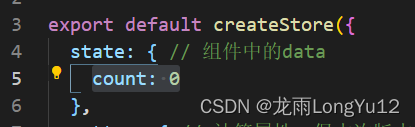
在 store/index.js 的 state 中添加 count: 0
在任一组件文件中:加入下面代码:
import { useStore } from "vuex";
export default {
  name: "App",
  setup() {
    // Vue3 有个 composition api 的入口
    const store = useStore();// 获取容器

  },
};
获取到容器 store 后 ,获取 Vuex 中的 count 的值,通过 store.state.count 来获取。


直接在 template 中使用,目前可以使用旧版本写法

如果想要字段 count 改变后,页面显示数据也改变,需要引入 vue 的计算属性 computed
<template>
  <img alt="Vue logo" src="./assets/logo.png" />
  <h1>Vuex</h1>
  <h1>{{ count }}</h1>
</template>


<script>
import { computed } from "vue";
import { useStore } from "vuex";
export default {
  name: "App",
  setup() {
    // Vue3 有个 composition api 的入口
    const store = useStore(); // 获取容器
    // 获取 Vuex 中的 count 的值
    console.log("store.state.count", store.state.count);
    return {
      count: computed(() => store.state.count),
    };
  },
};
</script>
6、修改 count 的值
这个和在 vue2 中的写法一样
在 store/index.js 中添加下面代码:
 mutations: {
    add(state, payload) {
      state.count += payload
    }
  },
在 要修改 count 的值的组件中通过 commit 来修改
store.commit('add', 3)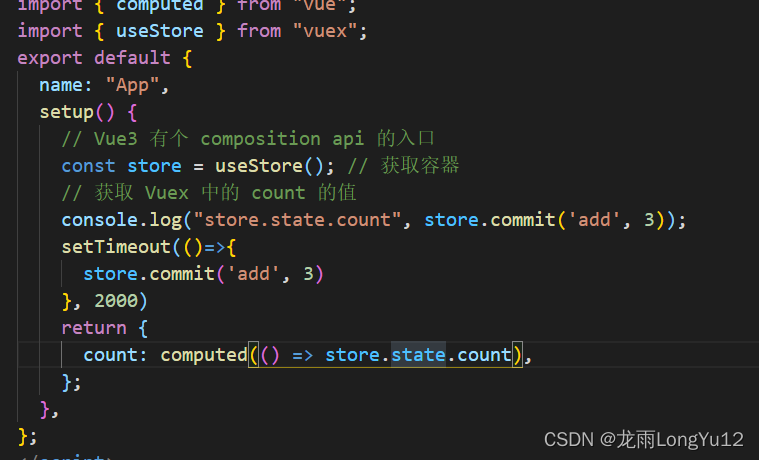
到此这篇关于Vue3中使用vuex4的实现示例的文章就介绍到这了,更多相关Vue3使用vuex4内容请搜索脚本之家以前的文章或继续浏览下面的相关文章希望大家以后多多支持脚本之家!
相关文章
 这篇文章介绍了vue实现消息无缝滚动效果的方法,文中通过示例代码介绍的非常详细。对大家的学习或工作具有一定的参考借鉴价值,需要的朋友可以参考下2022-06-06
 这篇文章主要为大家详细介绍了vue2.0实现音乐和视频播放进度条组件的思路及具体实现方法,具有一定的参考价值,感兴趣的小伙伴们可以参考一下2018-06-06
 这篇文章主要介绍了在antd Table中插入可编辑的单元格实例,具有很好的参考价值,希望对大家有所帮助。一起跟随小编过来看看吧2020-10-10
 这篇文章主要介绍了Vue实现商品详情页的评价列表功能,本文通过实例代码给大家介绍的非常详细,具有一定的参考借鉴价值,需要的朋友可以参考下2019-09-09
 这篇文章主要介绍了vue解决跨域问题,本文通过实例图文相结合给大家介绍的非常详细,对大家的学习或工作具有一定的参考借鉴价值,需要的朋友可以参考下2020-11-11
Vue项目中对index.html中BASE_URL的配置方式
这篇文章主要介绍了Vue项目中对index.html中BASE_URL的配置方式,具有很好的参考价值,希望对大家有所帮助。如有错误或未考虑完全的地方,望不吝赐教2022-06-06
vue中使用echarts刷新可以正常渲染但路由跳转不显示的问题解决
在 Vue 中使用 ECharts 组件时,遇到路由跳转后图表不显示的问题可能是因为组件销毁和重新创建的原因,所以本文给大家介绍了vue中使用echarts刷新可以正常渲染但路由跳转不显示问题的解决方法,需要的朋友可以参考下2024-02-02 这篇文章主要介绍了Vue CLI3搭建的项目中路径相关问题的解决,小编觉得挺不错的,现在分享给大家,也给大家做个参考。一起跟随小编过来看看吧2018-09-09
 在开发中经常有从列表跳到详情页,然后返回详情页的时候需要缓存列表页的状态(比如滚动位置信息),这个时候就需要保存状态,要缓存状态2021-10-10
 这篇文章主要介绍了Vue中的table表单切换实现效果,具有很好的参考价值,希望对大家有所帮助。如有错误或未考虑完全的地方,望不吝赐教2022-08-08
最新评论