

SpringBoot通过@MatrixVariable进行传参详解
更新时间:2022年06月27日 09:56:36 作者:鸣鼓ming
这篇文章主要介绍了SpringBoot使用@MatrixVariable传参,文章围绕@MatrixVariable展开详细的内容介绍,具有一定的参考价值,需要的小伙伴可以参考一下
1.相关概念
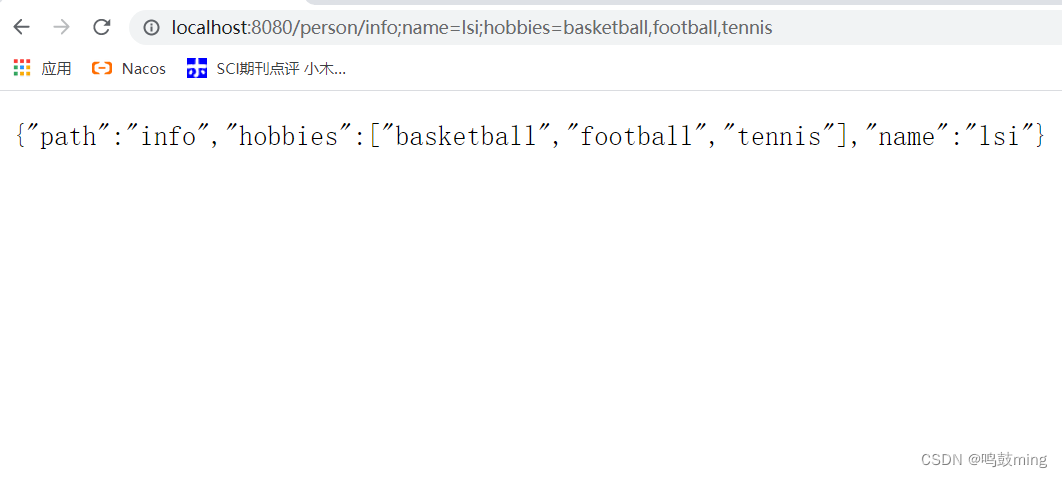
语法: 请求路径:/person/info;name=lisi;hobbies=basketball,football,tennis不同变量用分号相隔, 一个变量有多个值则使用逗号隔开
SpringBoot默认是禁用了矩阵变量的功能
手动开启原理: 对于路径的处理, UrlPathHelper的removeSemicolonContent设置为false,让其支持矩阵变量的。
矩阵变量必须有url路径变量才能被解析, 也就是/person/{path}里的path(这里我把它的值写成info, 即/person/info)
2.开启矩阵变量
第一种方法,实现接口WebMvcConfigurer,覆盖方法configurePathMatch。
WebConfig
package com.limi.springboottest2.config;
import org.springframework.context.annotation.Configuration;
import org.springframework.web.servlet.config.annotation.PathMatchConfigurer;
import org.springframework.web.servlet.config.annotation.WebMvcConfigurer;
import org.springframework.web.util.UrlPathHelper;
@Configuration
public class WebConfig implements WebMvcConfigurer {
    public void configurePathMatch(PathMatchConfigurer configurer) {
        UrlPathHelper urlPathHelper = new UrlPathHelper();
        // 设置不移除分号 ;后面的内容。矩阵变量功能就可以生效
        urlPathHelper.setRemoveSemicolonContent(false);
        configurer.setUrlPathHelper(urlPathHelper);
    }
}
第二种,自定义WebMvcConfigurer类型组件并添加到容器中。
WebConfig
package com.limi.springboottest2.config;
import org.springframework.context.annotation.Bean;
import org.springframework.context.annotation.Configuration;
import org.springframework.web.servlet.config.annotation.PathMatchConfigurer;
import org.springframework.web.servlet.config.annotation.WebMvcConfigurer;
import org.springframework.web.util.UrlPathHelper;
@Configuration
public class WebConfig implements WebMvcConfigurer {
    @Bean
    public WebMvcConfigurer webMvcConfigurer(){
        return new WebMvcConfigurer() {
            @Override
            public void configurePathMatch(PathMatchConfigurer configurer) {
                UrlPathHelper urlPathHelper = new UrlPathHelper();
                // 设置不移除分号 ;后面的内容。矩阵变量功能就可以生效
                urlPathHelper.setRemoveSemicolonContent(false);
                configurer.setUrlPathHelper(urlPathHelper);
            }
        };
    }
}
3.代码测试
index.html
<!DOCTYPE html>
<html lang="en">
<head>
    <meta charset="UTF-8">
    <title>Title</title>
</head>
<body>
    <h1>欢迎你好呀!</h1>
    <a href="/person/info;name=lsi;hobbies=basketball,football,tennis" rel="external nofollow" >1测试@MatrixVariable</a>
    <br>
    <a href="/person/1;age=50/2;age=30" rel="external nofollow" >2测试@MatrixVariable</a>
</body>
</html>
HelloController
package com.limi.springboottest2.controller;
import org.springframework.stereotype.Controller;
import org.springframework.web.bind.annotation.GetMapping;
import org.springframework.web.bind.annotation.MatrixVariable;
import org.springframework.web.bind.annotation.PathVariable;
import org.springframework.web.bind.annotation.ResponseBody;
import java.util.HashMap;
import java.util.List;
import java.util.Map;
@Controller
public class HelloController {
    //    /person/info;name=lsi;hobbies=basketball,football,tennis
    @ResponseBody
    @GetMapping("/person/{path}")
    public Map<String,Object> get(@PathVariable("path") String path,
                                  @MatrixVariable("name") String name,
                                  @MatrixVariable("hobbies") List<String> hobbies){
        Map<String,Object> map = new HashMap<>();
        map.put("path",path);
        map.put("name",name);
        map.put("hobbies",hobbies);
        return map;
    }
    // 测试传入两组相同的类型的变量, 例如老板和员工的年龄
    // /person/1;age=50/2;age=30
    @ResponseBody
    @GetMapping("/person/{bossId}/{empId}")
    public Map boss(@MatrixVariable(value = "age",pathVar = "bossId") Integer bossAge,
                    @MatrixVariable(value = "age",pathVar = "empId") Integer empAge){
        Map<String,Object> map = new HashMap<>();
        map.put("bossAge",bossAge);
        map.put("empAge",empAge);
        return map;
    }
}
测试1
测试2

到此这篇关于SpringBoot通过@MatrixVariable进行传参详解的文章就介绍到这了,更多相关SpringBoot @MatrixVariable内容请搜索脚本之家以前的文章或继续浏览下面的相关文章希望大家以后多多支持脚本之家!
相关文章
 这篇文章主要介绍了SpringBoot快速搭建实现三步骤解析,文中通过示例代码介绍的非常详细,对大家的学习或者工作具有一定的参考学习价值,需要的朋友可以参考下2020-05-05
 这篇文章主要介绍了Java多线程synchronized同步方法详解,文中通过示例代码介绍的非常详细,对大家的学习或者工作具有一定的参考学习价值,需要的朋友可以参考下2020-03-03
Springboot读取templates文件html代码实例
这篇文章主要介绍了Springboot读取templates文件html代码实例,文中通过示例代码介绍的非常详细,对大家的学习或者工作具有一定的参考学习价值,需要的朋友可以参考下2020-04-04
Springboot整合freemarker和相应的语法详解
FreeMarker是一款Spring官方推荐使用的模板引擎。接下来通过本文给大家介绍Springboot整合freemarker和相应的语法,感兴趣的朋友一起看看吧2021-09-09 这篇文章主要介绍了Java过滤器filter,通过过滤器,可以对来自客户端的请求进行拦截,进行预处理或者对最终响应给客户端的数据进行处理后再输出2017-07-07
IntelliJ IDEA教程之clean或者install Maven项目的操作方法
这篇文章主要介绍了IntelliJ IDEA教程之clean或者install Maven项目的操作方法,本文分步骤给大家介绍两种方式讲解如何调试出窗口,需要的朋友可以参考下2023-04-04 这篇文章主要介绍了十个常见的Java异常出现原因,文中通过示例代码介绍的非常详细,对大家的学习或者工作具有一定的参考学习价值,需要的朋友们下面随着小编来一起学习学习吧2019-03-03
 这篇文章主要为大家详细介绍了java实现Runnable接口适合资源的共享,具有一定的参考价值,感兴趣的小伙伴们可以参考一下2018-07-07
 这篇文章主要介绍了Java手机号码工具类示例详解,通过手机号码来判断运营商获取归属地,本文通过实例代码给大家介绍的非常详细,对大家的学习或工作具有一定的参考借鉴价值,需要的朋友可以参考下2022-02-02
 这篇文章主要介绍了java String不可变的好处,文中通过示例代码介绍的非常详细,对大家的学习或者工作具有一定的参考学习价值,需要的朋友们下面随着小编来一起学习学习吧2019-03-03
最新评论