

vue el-select与el-tree实现支持可搜索树型
更新时间:2022年08月18日 10:39:09 作者:范特西是只猫
本文主要介绍了vue el-select与el-tree实现支持可搜索树型,文中通过示例代码介绍的非常详细,对大家的学习或者工作具有一定的参考学习价值,需要的朋友们下面随着小编来一起学习学习吧
1. 树型下拉菜单
实现效果
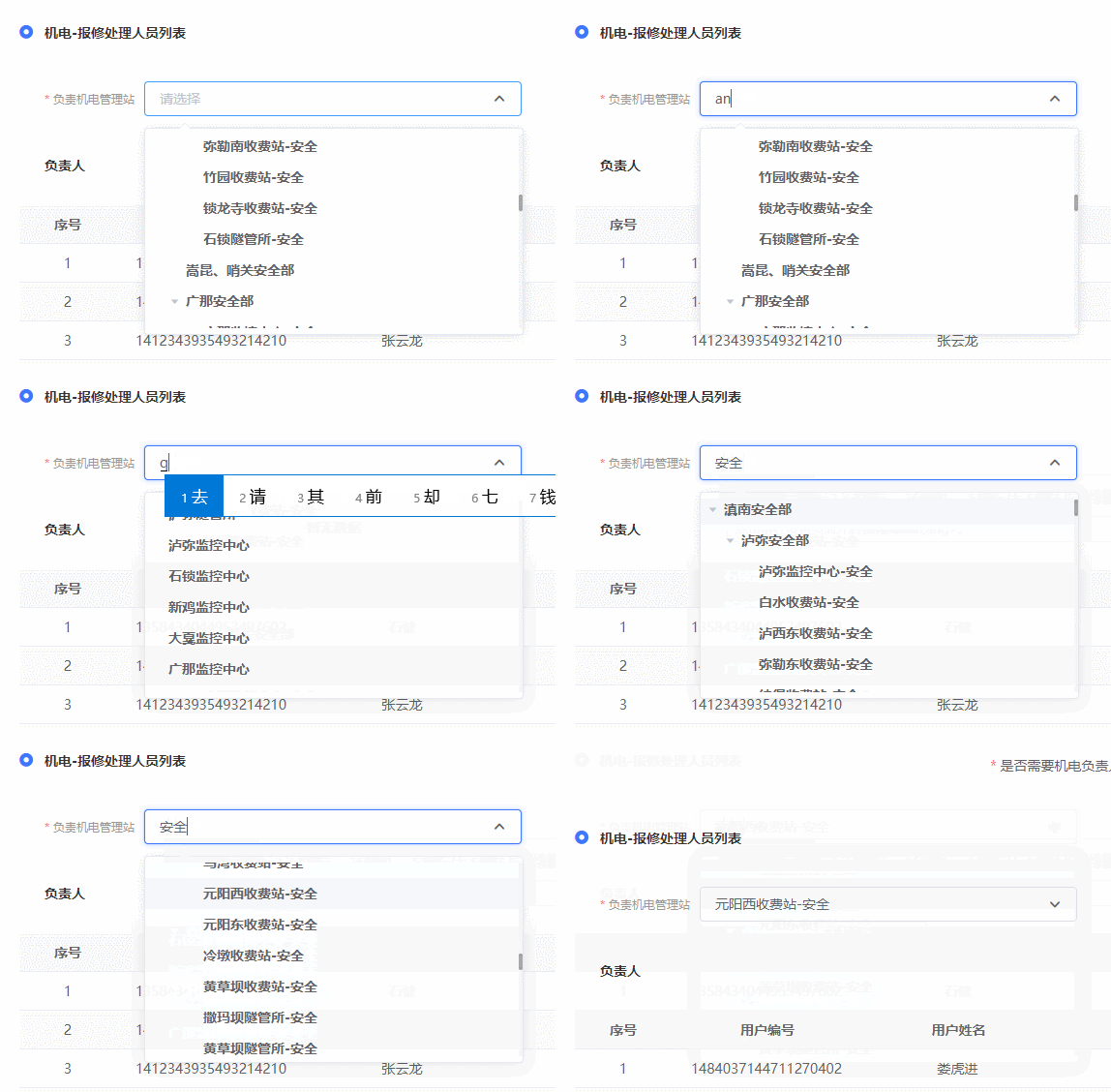
2. vue页面代码
引入selectTree组件
import { selectTree } from '@/components'
export default {
  components: {
    selectTree
  },
  data() {
  	defaultData:{
  		managementStationId:'1478570186653609986',
  		managementStationName:'泸弥监控中心-安全'
  	}
  }
}
页面使用
- returnDropList
树型菜单的值 - managementStationId
key值 - defaultData
设置默认值 - treeProps
配置菜单 - @handleNodeClick
选择事件
<template>
	<div>
		<selectTree
		  style="width: 390px"
		  :treeList="returnDropList"
		  nodeKey="managementStationId"
		  :defaultData="defaultData"
		  :treeProps="{
		    children: 'children',
		    label: 'managementStationName'
		  }"
		  @handleNodeClick="selectDrop"
		></selectTree>
	</div>
</template>
3.树型数据结构

3. selectTree 组件代码
<template>
  <el-select
    class="user-select-tree"
    v-model="textStr"
    :placeholder="placeholder"
    ref="select"
    :filterable="true"
    :remote="true"
    :remote-method="remoteMethod"
    :clearable="clearable"
    @clear="clearSelect"
    @visible-change="visibleChange"
    :popper-append-to-body="false"
    style="width: 100%"
  >
    <el-option
      v-model="value"
      style="
        height: 100%;
        max-height: 200px;
        overflow-y: auto;
        padding: 0;
        background-color: #ffffff;
      "
    >
      <el-tree
        :data="treeList"
        :props="treeProps"
        :filter-node-method="filterNode"
        :current-node-key="currentKey"
        highlight-current
        default-expand-all
        :node-key="nodeKey"
        ref="selectTree"
        :check-strictly="true"
        @node-click="handleTreeClick"
      >
        <span
          slot-scope="{ data }"
          :title="data[treeProps.label]"
          class="ellipsis"
        >
          {{ data[treeProps.label] }}
        </span>
      </el-tree>
    </el-option>
  </el-select>
</template>

<script>
export default {
  name: 'index',
  props: {
    treeList: {
      type: Array
    }, //树形原始数据
    treeProps: Object, //树形配置
    nodeKey: String, //树形唯一键值
    defaultSelect: {
      //默认选择
      type: Boolean,
      default: true
    },
    defaultData: {
      type: Object,
      default: null
    },
    clearable: { type: Boolean, default: false },
    placeholder: { type: String, default: '请选择' }
  },
  data() {
    return {
      textStr: '',
      value: '',
      filterText: '',
      currentKey: '',
      highlightNode: -1
    }
  },
  watch: {
    filterText(val) {
      this.$refs.selectTree.filter(val)
    },
    defaultData(val) {
      if (this.highlightNode === -1) {
       this.setEdit(val)
      }
    },
    treeList(val) {
      if (val.length > 0) {
        this.$nextTick(() => {
          if (this.defaultSelect) {
            this.value = val[0][this.treeProps.children][0][this.nodeKey]
            this.textStr =
              val[0][this.treeProps.children][0][this.treeProps.label]
            this.highlightNode = this.value
            this.currentKey = this.value
            this.$refs.selectTree.setCurrentKey(this.highlightNode)
            this.$emit('handleNodeClick', this.value)
          }
        })
      }
    }
  },

  methods: {
    setEdit(obj) {
      if (obj.name !== '' && obj.value !== '') {
        this.value = obj.value
        this.textStr = obj.name
        this.$nextTick(() => {
          this.highlightNode = this.value
          this.currentKey = this.value
          this.$refs.selectTree.setCurrentKey(this.highlightNode)
        })
      }
    },
    visibleChange() {
      this.filterText = ''
    },
    filterNode(value, data) {
      if (!value) return true
      return data[this.treeProps.label].indexOf(value) !== -1
    },
    remoteMethod(query) {
      setTimeout(() => {
        this.filterText = query
      }, 100)
    },
    // 设备类型点击赋值
    handleTreeClick(data, checked) {
      this.filterText = ''
      if (checked) {
        // //判断是否是父子
        if (
          data[this.treeProps.children] !== undefined &&
          data[this.treeProps.children].length !== 0
        ) {
          this.$refs.selectTree.setCurrentKey(this.highlightNode)
        } else {
          this.value = data[this.nodeKey]
          this.textStr = data[this.treeProps.label]
          this.$forceUpdate()
          this.currentKey = this.value
          this.highlightNode = data[this.nodeKey]
          this.$emit('handleNodeClick', this.value)
          this.$refs.selectTree.setCheckedKeys([this.highlightNode])
          this.$refs.select.blur()
        }
      }
    },
    clearFun() {
      this.value = ''
      this.textStr = ''
      this.currentKey = undefined
      this.highlightNode = undefined
      this.$refs.selectTree.setCurrentKey(this.highlightNode)
    },
    clearSelect() {
      this.value = ''
      this.textStr = ''
      this.$refs.selectTree.setCurrentKey()
      this.$emit('handleNodeClick', '')
    }
  }
}
</script>

<style scoped lang="scss">
.user-select-tree {
  ::v-deep {
    .el-icon-::before {
      content: '\ea1b';
      font-family: 'icomoon' !important;
      display: inline-block;
      -webkit-transform: scale(0.83);
      font-size: 10px;
      //width: 100%;
      //height: 100%;
      color: #666666;
      pointer-events: none;
    }
    .el-input.is-focus {
      .el-icon- {
        transform: rotate(0deg);
      }
    }
    .el-input__inner {
      height: 36px;
      line-height: 36px;
    }
    .el-input__icon {
      line-height: 36px;
    }
    .el-tree-node__content {
      height: 32px;
    }
  }
}
</style>
到此这篇关于vue el-select与el-tree实现支持可搜索树型的文章就介绍到这了,更多相关vue 可搜索树型内容请搜索脚本之家以前的文章或继续浏览下面的相关文章希望大家以后多多支持脚本之家!
相关文章

Vue 使用 Mint UI 实现左滑删除效果CellSwipe
这篇文章主要介绍了Vue 使用 Mint UI 实现左滑删除效果CellSwipe,非常不错,具有参考借鉴价值,需要的朋友可以参考下2018-04-04 这篇文章主要介绍了详解Vue.js和layui日期控件冲突问题解决办法,文中通过示例代码介绍的非常详细,对大家的学习或者工作具有一定的参考学习价值,需要的朋友们下面随着小编来一起学习学习吧2019-07-07
 这篇文章主要介绍了vue 鼠标移入移出(hover)切换显示图片问题,具有很好的参考价值,希望对大家有所帮助。如有错误或未考虑完全的地方,望不吝赐教2022-10-10
 这篇文章主要为大家介绍了VueJS设计与实现之浅响应与深响应详解,有需要的朋友可以借鉴参考下,希望能够有所帮助,祝大家多多进步,早日升职加薪2022-08-08
 默认情况下,写在.vue组件中的样式会全局生效,因此很容易造成多个组件之间的样式冲突问题。导致组件之间样式冲突的根本原因,我们接下来探究一下2022-11-11
 node.js代码修改后,需要重新启动 Express 应用,所做的修改才能生效。若之后的每次代码修改都要重复这样的操作,势必会影响开发效率,本文将详细介绍Nodemon,它会监测项目中的所有文件,一旦发现文件有改动,Nodemon 会自动重启应用2020-02-02
 这篇文章主要为大家详细介绍了Vue数字输入框组件的使用方法,文中示例代码介绍的非常详细,具有一定的参考价值,感兴趣的小伙伴们可以参考一下2019-10-10
 这篇文章主要介绍了解决vue scoped scss 无效的问题,具有很好的参考价值,希望对大家有所帮助。一起跟随小编过来看看吧2020-09-09
 这篇文章主要为大家介绍了Vben Admin 多标签页状态管理源码学习,有需要的朋友可以借鉴参考下,希望能够有所帮助,祝大家多多进步,早日升职加薪2022-09-09
 vue2和vue3的组件封装还是有区别,下面这篇文章主要给大家介绍了关于Vue3如何封装组件的相关资料,文中通过实例代码介绍的非常详细,对大家学习或者使用vue3具有一定的参考学习价值,需要的朋友可以参考下2023-02-02
最新评论