

SpringBoot 如何从容器中获取对象
如何从容器中获取对象
有时候在项目中,我们会自己创建一些类,类中需要使用到容器中的一些类。方法是新建类并实现ApplicationContextAware 接口,在类中建立静态对象 ApplicationContext 对象,这个对象就如同xml配置中的 applicationContext.xml,容器中类都可以获取到。
例如@Service、 @Component、@Repository、@Controller 、@Bean 标注的类都能获取到。
/**
 * 功能描述:Spring Bean 管理类
 *
 */
@Component
public class SpringContextUtils implements ApplicationContextAware {
    /**
     * 上下文对象实例
     */
    private static ApplicationContext applicationContext;
    @Override
    public void setApplicationContext(ApplicationContext applicationContext) throws BeansException {
        this.applicationContext = applicationContext;
    }
    /**
     * 获取applicationContext
     *
     * @return
     */
    public static ApplicationContext getApplicationContext() {
        return applicationContext;
    }
    /**
     * 通过name获取 Bean.
     *
     * @param name
     * @return
     */
    public static Object getBean(String name) {
        return getApplicationContext().getBean(name);
    }
    /**
     * 通过class获取Bean.
     *
     * @param clazz
     * @param <T>
     * @return
     */
    public static <T> T getBean(Class<T> clazz) {
        try{
            return getApplicationContext().getBean(clazz);
        }catch (Exception e){
            return null;
        }
    }
    /**
     * 通过name,以及Clazz返回指定的Bean
     *
     * @param name
     * @param clazz
     * @param <T>
     * @return
     */
    public static <T> T getBean(String name, Class<T> clazz) {
        return getApplicationContext().getBean(name, clazz);
    }
}
SpringBoot中的容器
容器功能
1、组件添加
(1)主要注解
@Configuration
告诉SpringBoot这是一个配置类 == 配置文件
注意:spring5.2以后@Configuration多了一个属性proxyBeanMethods,默认为true
@Configuration(proxyBeanMethods = true)
proxyBeanMethods:代理bean的方法Full(proxyBeanMethods = true)、【保证每个@Bean方法被调用多少次返回的组件都是单实例的】 外部无论对配置类中的这个组件注册方法调用多少次获取的都是之前注册容器中的单实例对象Lite(proxyBeanMethods = false)【每个@Bean方法被调用多少次返回的组件都是新创建的】- 组件依赖必须使用Full模式默认。其他默认是否Lite模式
● Full模式与Lite模式
○ 最佳实战
■ 配置 类组件之间无依赖关系用Lite模式加速容器启动过程,减少判断
■ 配置类组件之间有依赖关系,方法会被调用得到之前单实例组件,用Full模式
@Bean
- 给容器中添加组件。以方法名作为组件的id。返回类型就是组件类型。返回的值,就是组件在容器中的实例
- 配置类里面使用@Bean标注在方法上给容器注册组件,默认是单实例的
- 配置类本身也是组件
(2) 基本使用
bean包:
Pet类:
/**
 * 宠物
 */
public class Pet {
    private String name;
    public String getName() {
        return name;
    }
    public void setName(String name) {
        this.name = name;
    }
    public Pet(String name) {
        this.name = name;
    }
    public Pet() {
    }
    @Override
    public String toString() {
        return "Pet{" +
                "name='" + name + '\'' +
                '}';
    }
}
User类:
/*
用户
 */
public class User {
    private String name;
    private Integer age;
    public User() {
    }
    public User(String name, Integer age) {
        this.name = name;
        this.age = age;
    }
    public String getName() {
        return name;
    }
    public void setName(String name) {
        this.name = name;
    }
    public Integer getAge() {
        return age;
    }
    public void setAge(Integer age) {
        this.age = age;
    }
    @Override
    public String toString() {
        return "User{" +
                "name='" + name + '\'' +
                ", age=" + age +
                '}';
    }
}
config包:
MyConfig类
@Configuration(proxyBeanMethods = false)//告诉Spring这是一个配置类
public class MyConfig {
    @Bean//给容器中添加组件。以方法名作为组件的id。返回类型就是组件类型。返回的值,就是组件在容器中的实例
    public User user01(){
        return  new User("zhangsan",18);
    }
    @Bean("tom")
    public Pet tomcatPet(){
        return new Pet("tomcat");
    }
}
controller包:
MainApplication类
@SpringBootConfiguration
@EnableAutoConfiguration
@ComponentScan("com")
public class MainApplication {
    public static void main(String[] args) {
        //1、返回我们IOC容器
        ConfigurableApplicationContext run = SpringApplication.run(MainApplication.class, args);
        //2、查看容器里面的组件
        String[] names = run.getBeanDefinitionNames();
        for (String name : names) {
            System.out.println(name);
        }
        //3、从容器中获取组件
        MyConfig bean = run.getBean(MyConfig.class);
        System.out.println(bean);
        //如果@Configuration(proxyBeanMethods = true)代理对象调用方法。SpringBoot总会检查这个组件是否在容器中有。
        //保持组件单实例
        User user = bean.user01();
        User user1 = bean.user01();
        System.out.println("组件为:"+(user == user1));
    }
}
结果

(3)补充 @Import
给容器导入一个组件
必须写在容器中的组件上
 * @Import({User.class, DBHelper.class})
 *      给容器中自动创建出这两个类型的组件、默认组件的名字就是全类名
 *
 *
 *
 */
@Import({User.class, DBHelper.class})
@Configuration(proxyBeanMethods = false) //告诉SpringBoot这是一个配置类 == 配置文件
public class MyConfig {
}
@Configuration测试代码如下
@SpringBootConfiguration
@EnableAutoConfiguration
@ComponentScan("com")
public class MainApplication {
    public static void main(String[] args) {
        //1、返回我们IOC容器
        ConfigurableApplicationContext run = SpringApplication.run(MainApplication.class, args);
        //2、查看容器里面的组件
        String[] names = run.getBeanDefinitionNames();
        for (String name : names) {
            System.out.println(name);
        }
        //3、从容器中获取组件
        MyConfig bean = run.getBean(MyConfig.class);
        System.out.println(bean);
        //如果@Configuration(proxyBeanMethods = true)代理对象调用方法。SpringBoot总会检查这个组件是否在容器中有。
        //保持组件单实例
        User user = bean.user01();
        User user1 = bean.user01();
        System.out.println("组件为:"+(user == user1));
        //5、获取组件
        String[] beanNamesForType = run.getBeanNamesForType(User.class);
        System.out.println("======");
        for (String s : beanNamesForType) {
            System.out.println(s);
        }
        DBHelper bean1 = run.getBean(DBHelper.class);
        System.out.println(bean1);
    }
}

@Conditional
条件装配:满足Conditional指定的条件,则进行组件注入
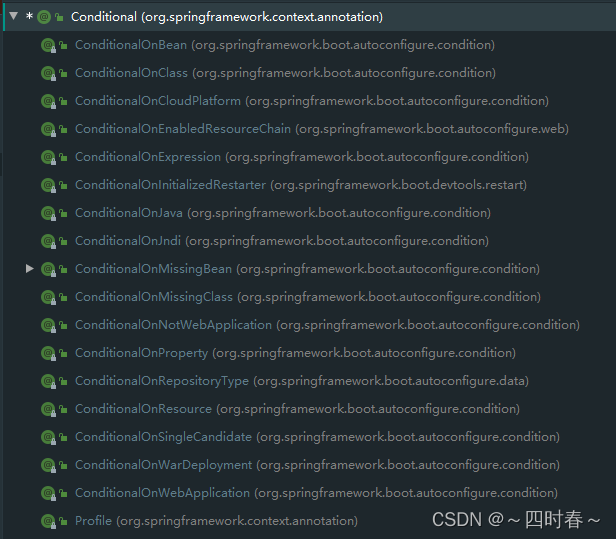
ConditionalOnBean:当容器中存在指定的bean组件时才干某些事情ConditionalOnMissingBean:当容器中不存在指定的bean组件时才干某些事情ConditionalOnClass:当容器中有某个类时才干某些事情ConditionalOnResource:当项目的类路径存在某个资源时,才干什么事
=====================测试条件装配==========================
@Configuration(proxyBeanMethods = false) //告诉SpringBoot这是一个配置类 == 配置文件
//@ConditionalOnBean(name = "tom")
@ConditionalOnMissingBean(name = "tom")
public class MyConfig {
    @Bean //给容器中添加组件。以方法名作为组件的id。返回类型就是组件类型。返回的值,就是组件在容器中的实例
    public User user01(){
        User zhangsan = new User("zhangsan", 18);
        //user组件依赖了Pet组件
        zhangsan.setPet(tomcatPet());
        return zhangsan;
    }
    @Bean("tom22")
    public Pet tomcatPet(){
        return new Pet("tomcat");
    }
}
测试:
public static void main(String[] args) {
        //1、返回我们IOC容器
        ConfigurableApplicationContext run = SpringApplication.run(MainApplication.class, args);
        //2、查看容器里面的组件
        String[] names = run.getBeanDefinitionNames();
        for (String name : names) {
            System.out.println(name);
        }
        boolean tom = run.containsBean("tom");
        System.out.println("容器中Tom组件:"+tom);
        boolean user01 = run.containsBean("user01");
        System.out.println("容器中user01组件:"+user01);
        boolean tom22 = run.containsBean("tom22");
        System.out.println("容器中tom22组件:"+tom22);
    }

2、原生配置文件引入(xml文件引入)
@ImportResource
导入资源
@ImportResource("classpath:beans.xml")//导入spring的配置文件
@Import({User.class, DBHelper.class})
@Configuration(proxyBeanMethods = false)//告诉Spring这是一个配置类
@ConditionalOnMissingBean(name = "tom")
public class MyConfig {
======================beans.xml=========================
<?xml version="1.0" encoding="UTF-8"?>
<beans xmlns="http://www.springframework.org/schema/beans"
       xmlns:xsi="http://www.w3.org/2001/XMLSchema-instance"
       xmlns:context="http://www.springframework.org/schema/context"
       xsi:schemaLocation="http://www.springframework.org/schema/beans http://www.springframework.org/schema/beans/spring-beans.xsd http://www.springframework.org/schema/context https://www.springframework.org/schema/context/spring-context.xsd">
    <bean id="haha" class="com.atguigu.boot.bean.User">
        <property name="name" value="zhangsan"></property>
        <property name="age" value="18"></property>
    </bean>
    <bean id="hehe" class="com.atguigu.boot.bean.Pet">
        <property name="name" value="tomcat"></property>
    </bean>
</beans>
测试
======================测试=================
        boolean haha = run.containsBean("haha");
        boolean hehe = run.containsBean("hehe");
        System.out.println("haha:"+haha);//true
        System.out.println("hehe:"+hehe);//true

3、配置绑定
如何使用Java读取到properties文件中的内容,并且把它封装到JavaBean中,以供随时使用;
(1) @Component + @ConfigurationProperties
properties文件

/**
 * 只有在容器中的组件,才会拥有SpringBoot提供的强大功能
 */
@Component
@ConfigurationProperties(prefix = "mycar")
public class Car {
    private String brand;
    private Integer price;
    public String getBrand() {
        return brand;
    }
    public void setBrand(String brand) {
        this.brand = brand;
    }
    public Integer getPrice() {
        return price;
    }
    public void setPrice(Integer price) {
        this.price = price;
    }
    @Override
    public String toString() {
        return "Car{" +
                "brand='" + brand + '\'' +
                ", price=" + price +
                '}';
    }
}
(2) @EnableConfigurationProperties + @ConfigurationProperties
@Configuration(proxyBeanMethods = false) //告诉SpringBoot这是一个配置类 == 配置文件
@ConditionalOnMissingBean(name = "tom")
@ImportResource("classpath:beans.xml")
//@EnableConfigurationProperties(Car.class)
//1、开启Car配置绑定功能
//2、把这个Car这个组件自动注册到容器中
public class  MyConfig {
以上为个人经验,希望能给大家一个参考,也希望大家多多支持脚本之家。
相关文章

Java中区别.toString() ,(String),valueOf()方法
这篇文章主要介绍了Java中区别.toString() ,(String),valueOf()方法,需要的朋友可以参考下2017-01-01
SpringBoot中使用Session共享实现分布式部署的示例代码
这篇文章主要介绍了SpringBoot中使用Session共享实现分布式部署的示例代码,文中通过示例代码介绍的非常详细,对大家的学习或者工作具有一定的参考学习价值,需要的朋友们下面随着小编来一起学习学习吧2020-07-07 这篇文章主要为大家详细介绍了Java NIO实现聊天系统,文中示例代码介绍的非常详细,具有一定的参考价值,感兴趣的小伙伴们可以参考一下2021-11-11
 Apache Tika 是一个功能强大的内容分析工具,它能够从多种文件格式中提取文本、元数据以及其他结构化信息,下面我们来看看如何使用Apache Tika检测敏感信息从而实现数据泄露防护吧2025-01-01
 本文详细介绍了使用Vue和SpringBoot实现token认证的方法,包括前后端交互流程、后端依赖导入、token工具类、拦截器、跨域处理、前端路由守卫、请求拦截器等内容,具有一定的参考价值,感兴趣的可以了解一下2024-10-10
 Spring 中鲜为人知但非常有用的注解之一是 @Filter,它支持自定义过滤器,下面我们就来深入研究一下如何使用 Spring 的 @Filter 注解来创建自定义过滤器吧2023-11-11
 这篇文章主要介绍了Spring@Value属性注入使用方法解析,文中通过示例代码介绍的非常详细,对大家的学习或者工作具有一定的参考学习价值,需要的朋友可以参考下2020-01-01
 这篇文章主要介绍了Java实现对视频进行截图的方法,结合实例形式分析了Java使用ffmpeg针对视频进行截图的相关操作技巧,并附带ffmpeg.exe文件供读者下载使用,需要的朋友可以参考下2018-01-01
 本文介绍了SpringBoot项目多环境打包与配置文件排除实践,包括多环境配置的实现方法、打包时排除配置文件的方法以及动态加载外部配置文件的最佳实践,感兴趣的朋友跟随小编一起看看吧2024-11-11
解决springboot利用ConfigurationProperties注解配置数据源无法读取配置信息问题
今天在学习springboot利用ConfigurationProperties注解配置数据源的使用遇到一个问题无法读取配置信息,发现全部为null,纠结是哪里出了问题呢,今天一番思考,问题根源找到,下面把我的解决方案分享到脚本之家平台,感兴趣的朋友一起看看吧2021-05-05
最新评论