

SpringBoot自定义MessageConverter与内容协商管理器contentNegotiationManager详解
1、自定义消息转换器MessageConverter
在WebMvcAutoConfiguration类中有一个方法configureMessageConverters(),它会配置默认的MessageConverter
public void configureMessageConverters(List<HttpMessageConverter<?>> converters) {
	this.messageConvertersProvider.ifAvailable((customConverters) -> {
		converters.addAll(customConverters.getConverters());
	});
}
假设我们现在有一个新的需求
想要后端返回我们自己定义的格式的数据,就叫x-decade,格式为使用分号拼接Person对象属性值
那么就要新建一个MessageConverter了
package com.decade.converters;
import com.decade.pojo.Person;
import org.springframework.http.HttpInputMessage;
import org.springframework.http.HttpOutputMessage;
import org.springframework.http.MediaType;
import org.springframework.http.converter.HttpMessageConverter;
import org.springframework.http.converter.HttpMessageNotReadableException;
import org.springframework.http.converter.HttpMessageNotWritableException;
import java.io.IOException;
import java.io.OutputStream;
import java.util.List;
public class DecadeConverter implements HttpMessageConverter<Person> {
	// 只考虑写出,所以这里默认写false
    @Override
    public boolean canRead(Class<?> clazz, MediaType mediaType) {
        return false;
    }
    @Override
    public boolean canWrite(Class<?> clazz, MediaType mediaType) {
        return clazz.isAssignableFrom(Person.class);
    }
    /**
     * 统计当前converter能支持哪些类型
     * @return 返回支持的媒体类型
     */
    @Override
    public List<MediaType> getSupportedMediaTypes() {
        return MediaType.parseMediaTypes("application/x-decade");
    }
	// 只考虑写出,所以这里默认写null
    @Override
    public Person read(Class<? extends Person> clazz, HttpInputMessage inputMessage) throws IOException, HttpMessageNotReadableException {
        return null;
    }
    @Override
    public void write(Person person, MediaType contentType, HttpOutputMessage outputMessage) throws IOException, HttpMessageNotWritableException {
        // 自定义想要写出的数据格式
        String result = person.getName() + ";" + person.getAge() + ";" + person.getBirth();
        // 写出
        final OutputStream body = outputMessage.getBody();
        body.write(result.getBytes());
    }
}
我们发现,WebMvcConfigurer接口类下面有2个关于配置MessageConverter的方法
// 会覆盖默认的MessageConverter
default void configureMessageConverters(List<HttpMessageConverter<?>> converters) {
}
// 不会覆盖,只会在默认的MessageConverter后面追加我们自定义的
default void extendMessageConverters(List<HttpMessageConverter<?>> converters) {
}
所以,我们选择在自定义配置类中重写extendMessageConverters()方法
package com.decade.config;
import com.decade.converters.DecadeConverter;
import org.springframework.context.annotation.Bean;
import org.springframework.context.annotation.Configuration;
import org.springframework.http.converter.HttpMessageConverter;
import org.springframework.web.servlet.config.annotation.WebMvcConfigurer;
import java.util.List;
@Configuration(proxyBeanMethods = false)
public class MyMvcConfig implements WebMvcConfigurer {
    @Bean
    public WebMvcConfigurer createConvert() {
        return new WebMvcConfigurer() {
            @Override
            public void extendMessageConverters(List<HttpMessageConverter<?>> converters) {
                converters.add(new DecadeConverter());
            }
        };
    }
}
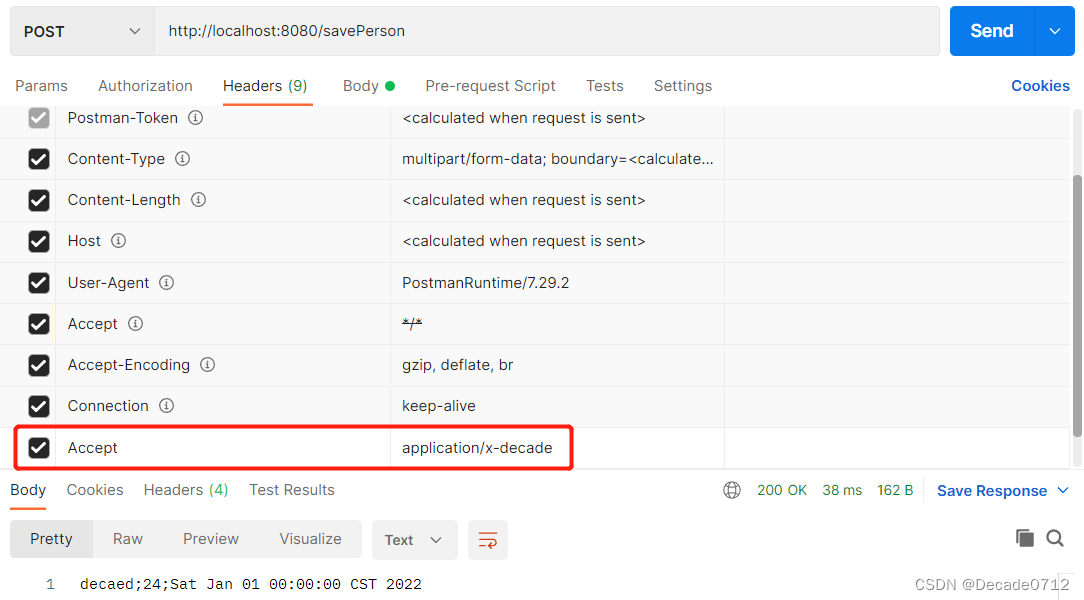
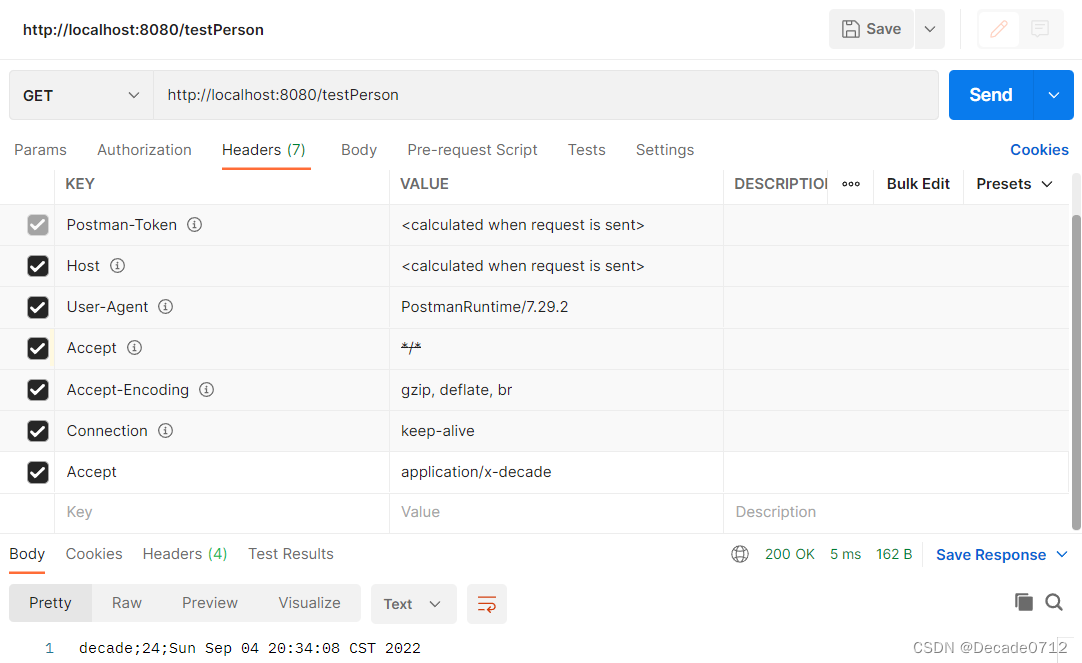
我们在请求头中设置Accept为我们自定义的格式application/x-decade
验证结果如下
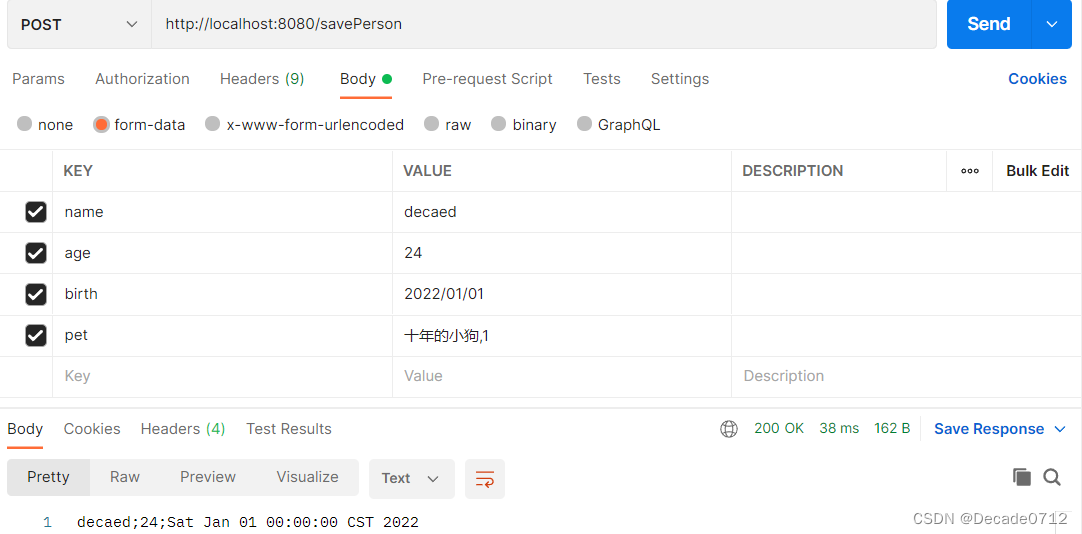
2、自定义内容协商管理器contentNegotiationManager
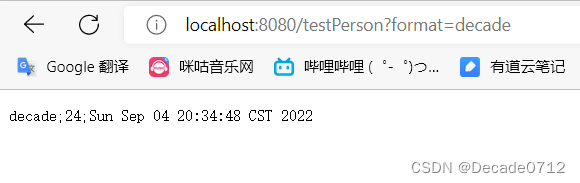
问题:我们新建的x-decade格式是否只能通过postman调用才会生效呢?如果我们要使用浏览器参数方式,怎么才能生效呢?
因为我们之前的【Spring Boot】响应处理
它默认只能处理xml和json格式,所以为了解决这个问题,我们就要自定义内容协商管理器了
首先我们还是要在自定义配置类中重写相关方法
package com.decade.config;
import org.springframework.context.annotation.Bean;
import org.springframework.context.annotation.Configuration;
import org.springframework.http.MediaType;
import org.springframework.web.accept.HeaderContentNegotiationStrategy;
import org.springframework.web.accept.ParameterContentNegotiationStrategy;
import org.springframework.web.servlet.config.annotation.ContentNegotiationConfigurer;
import org.springframework.web.servlet.config.annotation.WebMvcConfigurer;
import java.util.Arrays;
import java.util.HashMap;
import java.util.Map;
@Configuration(proxyBeanMethods = false)
public class MyMvcConfig implements WebMvcConfigurer {
    @Bean
    public WebMvcConfigurer createConvert() {
        return new WebMvcConfigurer() {
            @Override
            public void configureContentNegotiation(ContentNegotiationConfigurer configurer) {
                // 设置支持的浏览器参数类型
                Map<String, MediaType> mediaTypes = new HashMap<>();
                mediaTypes.put("json", MediaType.APPLICATION_JSON);
                mediaTypes.put("xml", MediaType.APPLICATION_XML);
                mediaTypes.put("decade", MediaType.parseMediaType("application/x-decade"));
                final ParameterContentNegotiationStrategy strategy = new ParameterContentNegotiationStrategy(mediaTypes);
                // 为了继续支持请求头参数类型,还需要往里面塞请求头内容协商管理器
                final HeaderContentNegotiationStrategy headerContentNegotiationStrategy = new HeaderContentNegotiationStrategy();
                configurer.strategies(Arrays.asList(strategy, headerContentNegotiationStrategy));
            }
        };
    }
}
可以看到,系统中的内容协商管理器下面还是原来的2种:获取请求头中的Accept和获取请求参数中的format
但是获取请求参数format,除了能识别原来的json和xml,还能识别我们自定义的application/x-decade,它使用decade与之对应
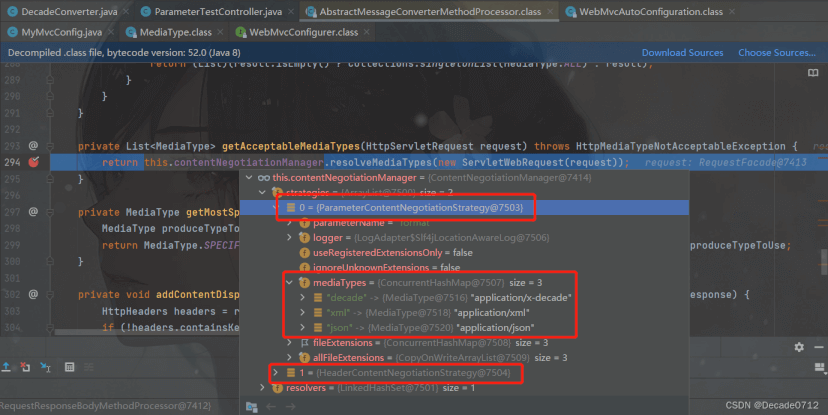
可以看到,我们自定义的媒体类型成功加入服务器能解析出来的类型
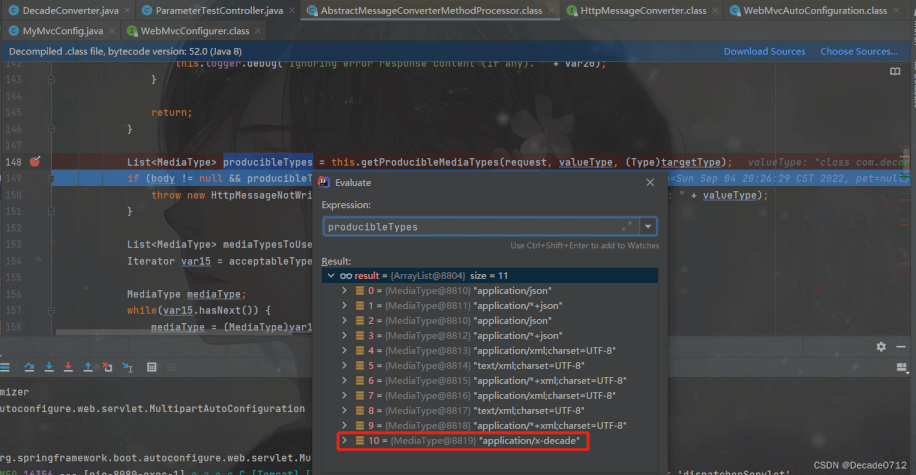
我们写一个接口进行验证
@GetMapping(value = "/testPerson")
@ResponseBody
public Person testPerson() {
	Person person = new Person();
	person.setName("decade");
	person.setAge(24);
	person.setBirth(new Date());
	return person;
}
由验证结果可以知道,我们从postman和浏览器都可以获得我们指定格式的数据
到此这篇关于SpringBoot自定义MessageConverter与内容协商管理器contentNegotiationManager详解的文章就介绍到这了,更多相关SpringBoot MessageConverter内容请搜索脚本之家以前的文章或继续浏览下面的相关文章希望大家以后多多支持脚本之家!
相关文章
 这篇文章主要介绍了JSR303校验注解和自定义校验注解的使用,文中通过示例代码介绍的非常详细,对大家的学习或者工作具有一定的参考学习价值,需要的朋友们下面随着小编来一起学习学习吧2020-09-09
解决Springboot项目报错:java:错误:不支持发行版本 17
这篇文章主要给大家介绍了关于解决Springboot项目报错:java:错误:不支持发行版本17的相关资料,这个错误意味着你的Spring Boot项目正在使用Java 17这个版本,但是你的项目中未配置正确的Java版本,需要的朋友可以参考下2023-08-08 这篇文章主要介绍了Java反射的应用之动态代理深入理解,本文给大家介绍的非常详细,对大家的学习或工作具有一定的参考借鉴价值,需要的朋友可以参考下2021-09-09
 AC自动机是一个多模式匹配算法,在模式匹配领域被广泛应用。本文将详细为大家介绍AC自动机的原理与实现方法,感兴趣的可以了解一下2022-05-05
 本文主要介绍了springboot实现小程序支付的项目实践, 可以通过调用微信支付 API 实现支付功能,具有一定的参考价值,感兴趣的可以了解一下2023-09-09
 这篇文章主要介绍了详解spring cloudhystrix缓存功能的使用,小编觉得挺不错的,现在分享给大家,也给大家做个参考。一起跟随小编过来看看吧2018-08-08
 这篇文章主要介绍了Java 包装类型及易错陷阱详解,具有很好的参考价值,希望对大家有所帮助。如有错误或未考虑完全的地方,望不吝赐教2021-08-08
 这篇文章主要介绍了如何使用Reactor完成类似Flink的操作,帮助大家更好的理解和学习使用Java,感兴趣的朋友可以了解下2021-03-03
 流程控制语句顾名思义就是控制程序走向的语句,其中包括条件语句,分支语句和循环语句,这篇文章主要给大家介绍了关于Java中控制流程语句的相关资料,文中通过示例代码介绍的非常详细,需要的朋友可以参考下2021-10-10
 这篇文章主要给大家介绍了关于Java for循环的妙用之鸡兔同笼问题的相关资料,文中通过示例代码介绍的非常详细,对大家的学习或者工作具有一定的参考学习价值,需要的朋友们下面随着小编来一起学习学习吧2021-04-04
最新评论