

C++实现简易反弹小球游戏的示例代码
前言
我们利用printf 函数实现一个在屏幕上弹跳的小球,如图所示。弹跳的小球游戏比较简单、容易入门,也是反弹球消砖块、接金币、台球等很多游戏的基础。
完成游戏前需要掌握的语法知识:标识符、变量、常量、运算符与表达式,以及 printf、scanf、if-else、while、for 语句的用法。
正文部分我们会逐步进行讲解,前一部分是后一部分的基础,大家不要跳过阅读。
一、显示静止的小球
首先利用 printf 函数在屏幕坐标(x,y)处显示一个静止的小球字符'o',注意屏幕坐标系的原点在左上角,如图
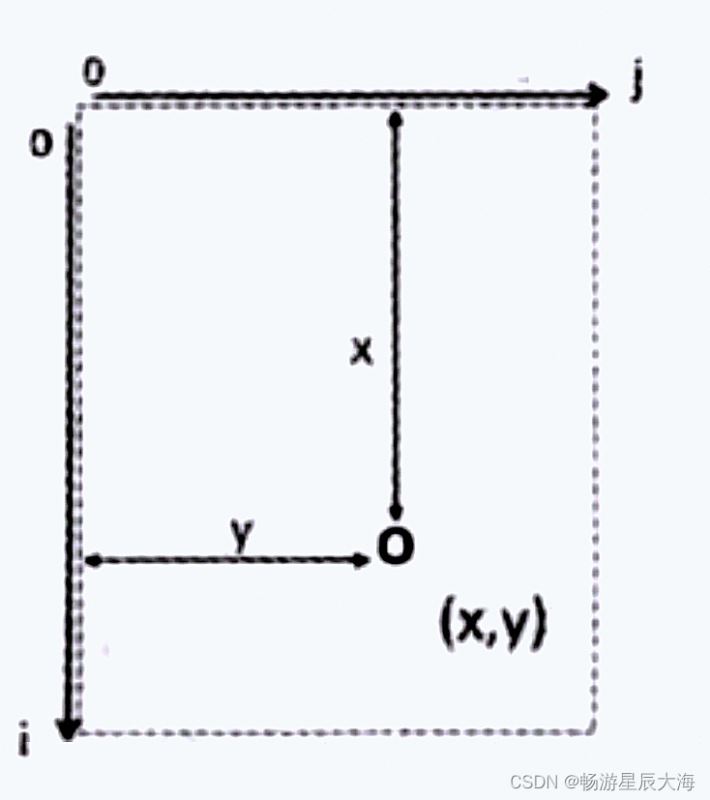
#include<stdio.h>
int main()
{
    int i,j;
    int x=5;
    int y=10;

    //输出小球上面的空行
    for(i=0;i<x;i++)
       printf("\n");
    //输出小球左边的空格
    for(j=0;j<y;j++)
       printf(" ");
    printf("o");//输出小球
    printf("\n");
    return 0;
 }
二、小球下落
改变小球的坐标变量,即让小球的i坐标增加,从而让小球下落。在每次显示之前使用了清屏函数system("cls"),注意需要包含新的头文件#include<stdlib.h>。
#include<stdio.h>
 #include<stdlib.h>
 int main()
 {
     int i,j;
    int x=1;
    int y=10;
    for(x=1;x<10;i++)
    {
        system("cls");//清屏函数
        //输出小球上面的空行
        for(i=0;i<x;i++)
           printf("\n");
        //输出小球左边的空格
        for(j=0;j<y;j++)
           printf(" ");
        printf("o");//输出小球
        printf("\n");
        return 0;
    }
     return 0;
 }
三、上下弹跳的小球
在上一步代码的基础上增加记录速度的变量 velocity,小球的新位置x=旧位置x+速度velocity。当判断小球到达上、下边界时改变方向,即改变velocity 的正负号。
#include<stdio.h>
 #include<stdlib.h>
 int main()
 {
     int i,j;
    int x=5;
    int y=10;

    int height=20;
    int velocity=1;
    while(1)
    {
        x=x+velocity;
        system("cls");// 清屏函数

        //输出小球上面的空行
        for(i=0;i<x;i++)
           printf("\n");
        //输出小球左边的空格
        for(j=0;j<y;j++)
           printf(" ");//输出小球
        printf("o");
        printf("\n");

        if(x==height)
           velocity=-velocity;
        if(x==0)
           velocity=-velocity;
    }
    return 0;
 }
四、斜着弹跳的小球
下面让程序更有趣,使小球斜着弹跳,主要思路是增加x、y两个方向的速度控制变量velocity_x、velocity_y,初值为1;velocity_x碰到上、下边界后改变正负号,velocity_y碰到左、右边界后改变正负号。
 #include<stdio.h>
 #include<stdlib.h>
 int main()
 {
     int i,j;
    int x=0;
    int y=5;

    int velocity_x=1;
    int velocity_y=1;
    int left=0;
    int right=20;
    int top=0;
    int bottom=10;

    while(1)
    {
        x=x+velocity_x;
        y=y+velocity_y;

        system("cls");
        //
        for(i=0;i<x;i++)
           printf("\n");
        //
        for(j=0;j<y;j++)
           printf(" ");
        printf("o");
        printf("\n");

        if(x==top||x==bottom)
           velocity_x=-velocity_x;
        if(y==left||y==right)
           velocity_y=-velocity_y;
    }
    return 0;
 }
五、控制小球弹跳的速度
以上反弹球的速度可能过快,为了降低反弹球的速度,以使用Sleep 函数(#include<windows.h>)。比如 sleep(10)表示程序执行到此处暂停 10ms,从而控制小球弹跳的速度。
六、完整代码
 #include<stdio.h>
 #include<stdlib.h>
 #include<windows.h>
 int main()
 {
     int i,j;
    int x=0;
    int y=5;

    int velocity_x=1;
    int velocity_y=1;
    int left=0;
    int right=20;
    int top=0;
    int bottom=10;

    while(1)
    {
        x=x+velocity_x;
        y=y+velocity_y;

        system("cls");
        //
        for(i=0;i<x;i++)
           printf("\n");
        //
        for(j=0;j<y;j++)
           printf(" ");
        printf("o");
        printf("\n");
        Sleep(10);

        if(x==top||x==bottom)
           velocity_x=-velocity_x;
        if(y==left||y==right)
           velocity_y=-velocity_y;
    }
    return 0;
 }
以上就是C++实现简易反弹小球游戏的示例代码的详细内容,更多关于C++反弹小球游戏的资料请关注脚本之家其它相关文章!
相关文章
 下面小编就为大家带来一篇浅谈C语言的字符串分割。小编觉得挺不错的,现在就分享给大家,也给大家做个参考。一起跟随小编过来看看吧2016-05-05
 这篇文章主要介绍了C语言数据结构之判断循环链表空与满的相关资料,希望通过本文能帮助到大家,让大家掌握这部分内容,需要的朋友可以参考下2017-10-10
 这篇文章主要介绍了c++如何实现归并两个有序链表,具有很好的参考价值,希望对大家有所帮助。如有错误或未考虑完全的地方,望不吝赐教2022-07-07
QT委托代理机制之Model View Delegate使用方法详解
这篇文章主要介绍了QT委托代理机制之Model View Delegate的使用方法,对大家的学习或者工作具有一定的参考学习价值,需要的朋友们下面随着小编来一起学习学习吧2022-08-08 本文对类的构造函数和析构函数进行总结,主要包括了构造函数的初始化、重载、使用参数和默认参数,拷贝构造函数和析构函数,希望能帮助读者在程序开发中更好的理解类,属于C/C++基础2022-05-05
 strcmp函数语法为“int strcmp(char *str1,char *str2)”,其作用是比较字符串str1和str2是否相同,如果相同则返回0,如果不同,前者大于后者则返回1,否则返回-12022-05-05
 这篇文章主要介绍的是C++/编译原理求解First集合,本文将围绕该话题详细展开全文,需要的小伙伴可以参考一下2021-10-10
 有一个项目需要写csv文件以呈现数据。Github上有一个关于csv的轻量级读写库minicsv,于是下载之。但是编译example时出现了以下问题2016-11-11
C语言的isatty函数和ttyname函数以及sendmsg函数用法
这篇文章主要介绍了C语言的isatty函数和ttyname函数以及sendmsg函数用法,是C语言入门学习中的基础知识,需要的朋友可以参考下2015-09-09 reactor设计模式是event-driven architecture的一种实现方式,处理多个客户端并发的向服务端请求服务的场景,每种服务在服务端可能由多个方法组成,这篇文章主要介绍了Reactor原理与实现,需要的朋友可以参考下2022-07-07
最新评论