

WPF自定义控件的实现
更新时间:2023年03月03日 09:11:54 作者:weixin_59803084
本文主要介绍了WPF自定义控件的实现,文中通过示例代码介绍的非常详细,对大家的学习或者工作具有一定的参考学习价值,需要的朋友们下面随着小编来一起学习学习吧
方式一:基于现有控件进行扩展,如基于button进行扩展,UI可直接用xmal进行编辑设计,逻辑用xaml.cs进行编辑
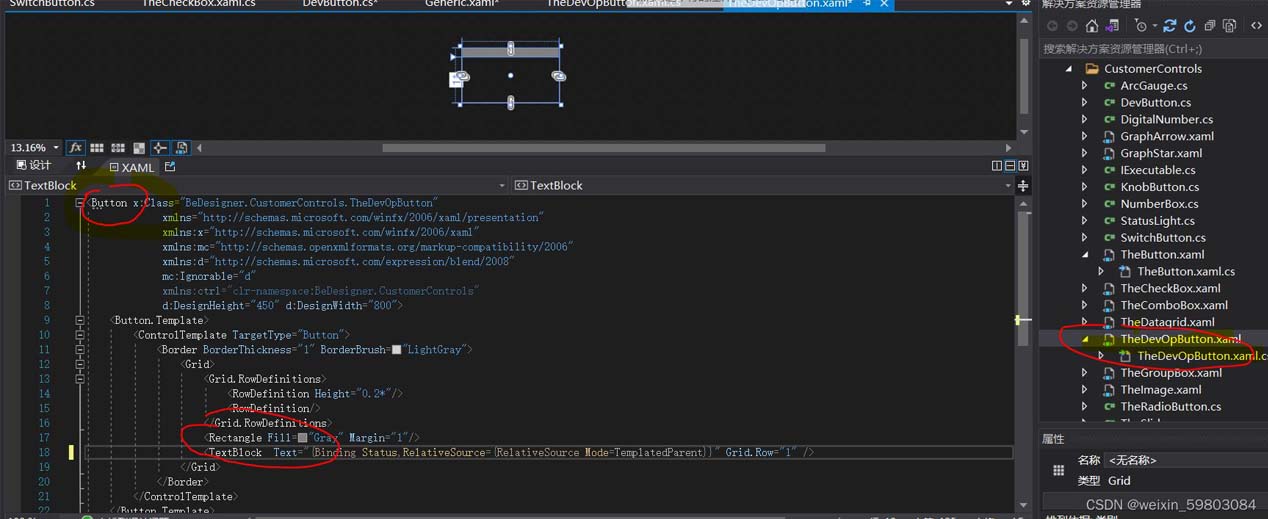
方法二:直接创建wpf自定义控件

本文用方法二开展自定义控件!!!
1.自定义控件的内容在代码cs文件中,自定义控件继承自Control,ui界面可在Genric.xaml中定义。
2.在Generic.xaml中定义控件界面
  <Style  TargetType="{x:Type ctrl:DevButton}">
        <Setter Property="Template">
            <Setter.Value>
                <ControlTemplate TargetType="{x:Type ctrl:DevButton}">
                    <Border Background="{TemplateBinding Background}"
                            BorderBrush="{TemplateBinding BorderBrush}"
                            BorderThickness="{TemplateBinding BorderThickness}">
                            <Grid>
                                <Grid.ColumnDefinitions>
                                    <ColumnDefinition Width="0.1*" MaxWidth="5"/>
                                    <ColumnDefinition/>
                                </Grid.ColumnDefinitions>
                                //自定义控件中的组成 ,需要定义x:name,后台代码需要用到,button中的DevName是后台cs中定义的依赖属性
                                <Rectangle Margin="1" x:Name="statusLed"/>
                                <Button Grid.Column="1" x:Name="devBtn" Content="{TemplateBinding DevName}"/>
                            </Grid>

                    </Border>
                </ControlTemplate>
            </Setter.Value>
        </Setter>
    </Style>
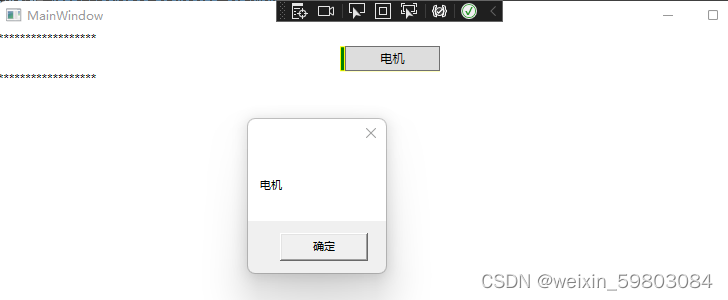
上述界面中定义了两个控件,组成本自定义控件的外观显示。一个rectangle,用颜色对状态进行显示,一个button,是本自定义控件的主要内容,需要显示设备名称,Click事件/Command需要触发任务。
3.后台处理
3.1 定义自定义属性DevName
        public string DevName
        {
            get { return (string)GetValue(DevNameProperty); }
            set { SetValue(DevNameProperty, value); }
        }
        public static readonly DependencyProperty DevNameProperty =
        DependencyProperty.Register("DevName", typeof(string), typeof(DevButton), new FrameworkPropertyMetadata("", new PropertyChangedCallback(OnDevNameChanged)));
        private static void OnDevNameChanged(DependencyObject sender, DependencyPropertyChangedEventArgs e)
        {
            DevButton ctrl =sender as DevButton;
            ctrl.DevName = e.NewValue.ToString();
        }
3.2 定义与前端界面UI元素对应的信息
        private Rectangle statusLed;
        private Button devBtn;
        public override void OnApplyTemplate()
        {
            //备用方法 Template.FindName(DownButtonKey, this) as Button;
            statusLed = GetTemplateChild("statusLed") as Rectangle;
            devBtn = GetTemplateChild("devBtn") as Button;
            devBtn.Click += DevBtn_Click;
            base.OnApplyTemplate();
        }
依据控件名称查找模板中的控件,并注册button的click事件
3.3 定义事件
       private void DevBtn_Click(object sender, RoutedEventArgs e)
        {
            MessageBox.Show(DevName);
        }
自定义控件主要就是上述几步。总体代码如下:
using System;
using System.Collections.Generic;
using System.Globalization;
using System.Linq;
using System.Text;
using System.Threading.Tasks;
using System.Windows;
using System.Windows.Controls;
using System.Windows.Data;
using System.Windows.Documents;
using System.Windows.Input;
using System.Windows.Media;
using System.Windows.Media.Imaging;
using System.Windows.Navigation;
using System.Windows.Shapes;

namespace WpfApp2
{
    /// <summary>
    /// Author:yut 2022-12-21
    /// Function:自定义控件,用于设备的启停控制,同时显示设备的运行状态
    /// <summary>
    public class DevButton : Control
    {

        public DevButton()
        {
            SetCurrentValue(WidthProperty, 100d);
            SetCurrentValue(HeightProperty, 25d);
            SetCurrentValue(BackgroundProperty, Brushes.Yellow);
        }
        static DevButton()
        {
            DefaultStyleKeyProperty.OverrideMetadata(typeof(DevButton), new FrameworkPropertyMetadata(typeof(DevButton)));
        }
        private Rectangle statusLed;
        private Button devBtn;
        public override void OnApplyTemplate()
        {
            statusLed = GetTemplateChild("statusLed") as Rectangle;
            devBtn = GetTemplateChild("devBtn") as Button;
            devBtn.Click += DevBtn_Click;
            base.OnApplyTemplate();
        }

        #region 自定义属性
        public int DevId
        {
            get { return (int)GetValue(DevIdProperty); }
            set { SetValue(DevIdProperty, value); }
        }
        public static readonly DependencyProperty DevIdProperty =
          DependencyProperty.Register("DevId", typeof(int), typeof(DevButton), new FrameworkPropertyMetadata(-1,new PropertyChangedCallback(OnDevIdChanged)));
        private static void OnDevIdChanged(DependencyObject sender, DependencyPropertyChangedEventArgs e)
        {
            DevButton ctrl = (DevButton)sender;
            ctrl.DevId = (int)e.NewValue;
        }

        public string DevName
        {
            get { return (string)GetValue(DevNameProperty); }
            set { SetValue(DevNameProperty, value); }
        }
        public static readonly DependencyProperty DevNameProperty =
        DependencyProperty.Register("DevName", typeof(string), typeof(DevButton), new FrameworkPropertyMetadata("", new PropertyChangedCallback(OnDevNameChanged)));
        private static void OnDevNameChanged(DependencyObject sender, DependencyPropertyChangedEventArgs e)
        {
            DevButton ctrl =sender as DevButton;
            ctrl.DevName = e.NewValue.ToString();
        }

        public int DevStatus
        {
            get { return (int)GetValue(DevStatusProperty); }
            set
            {
                SetValue(DevStatusProperty, value);
            }
        }
        public static readonly DependencyProperty DevStatusProperty =
          DependencyProperty.Register("DevStatus", typeof(int), typeof(DevButton), new FrameworkPropertyMetadata(-1,new PropertyChangedCallback(OnDevStatusChanged)));
        private static void OnDevStatusChanged(DependencyObject sender, DependencyPropertyChangedEventArgs e)
        {
            DevButton ctrl = (DevButton)sender;
            ctrl.DevStatus = (int)e.NewValue;
            ctrl.StatusBrush=(ctrl.DevStatus>0)?Brushes.Green:Brushes.LightGray;
        }

        public Brush StatusBrush
        {
            get { return (Brush)GetValue(StatusBrushProperty); }
            set
            {
                SetValue(StatusBrushProperty, value);
            }
        }
        public static readonly DependencyProperty StatusBrushProperty =
        DependencyProperty.Register("StatusBrush", typeof(Brush), typeof(DevButton), new FrameworkPropertyMetadata(Brushes.LightGray));

        #endregion


        private void DevBtn_Click(object sender, RoutedEventArgs e)
        {
            MessageBox.Show(DevName);

        }

    }
}
<ResourceDictionary
xmlns="http://schemas.microsoft.com/winfx/2006/xaml/presentation"
xmlns:x="http://schemas.microsoft.com/winfx/2006/xaml"
xmlns:ctrl="clr-namespace:WpfApp2">
<Style TargetType="{x:Type ctrl:DevButton}">
<Setter Property="Template">
<Setter.Value>
<ControlTemplate TargetType="{x:Type ctrl:DevButton}">
<Border Background="{TemplateBinding Background}"
BorderBrush="{TemplateBinding BorderBrush}"
BorderThickness="{TemplateBinding BorderThickness}">
<Grid>
<Grid.ColumnDefinitions>
<ColumnDefinition Width="0.1*" MaxWidth="5"/>
<ColumnDefinition/>
</Grid.ColumnDefinitions>
<!--Fill="{TemplateBinding DevStatus, Converter={StaticResource IntToBrushes}}"-->
<Rectangle Margin="1" x:Name="statusLed" Fill="{TemplateBinding StatusBrush}"/>
<Button Grid.Column="1" x:Name="devBtn" Content="{TemplateBinding DevName}"/>
</Grid>
</Border>
</ControlTemplate>
</Setter.Value>
</Setter>
</Style>
</ResourceDictionary><Window x:Class="WpfApp2.MainWindow"
xmlns="http://schemas.microsoft.com/winfx/2006/xaml/presentation"
xmlns:x="http://schemas.microsoft.com/winfx/2006/xaml"
xmlns:d="http://schemas.microsoft.com/expression/blend/2008"
xmlns:mc="http://schemas.openxmlformats.org/markup-compatibility/2006"
xmlns:local="clr-namespace:WpfApp2"
mc:Ignorable="d"
Title="MainWindow" Height="450" Width="800">
<Grid>
<StackPanel>
<TextBlock Text="******************"/>
<local:DevButton DevName="电机" DevStatus="2"/>
<TextBlock Text="******************"/>
</StackPanel>
</Grid>
</Window>运行效果如下:
到此这篇关于WPF自定义控件的实现的文章就介绍到这了,更多相关WPF自定义控件内容请搜索脚本之家以前的文章或继续浏览下面的相关文章希望大家以后多多支持脚本之家!
相关文章
 这篇文章主要为大家详细介绍了C# Winform实现圆角无锯齿按钮,文中示例代码介绍的非常详细,具有一定的参考价值,感兴趣的小伙伴们可以参考一下2022-07-07
 本文介绍了中文转unicode字符的方法,还有UNICODE字符转为中文的方法,大家参考使用吧2014-01-01
 这篇文章主要介绍了C#中Memcached缓存用法,以实例形式详细讲述了在C#中针对Memcached缓存的各种操作,非常具有实用价值,需要的朋友可以参考下2014-10-10
 这篇文章介绍了C#获取应用程序路径或Web页面目录路径的方法,文中通过示例代码介绍的非常详细。对大家的学习或工作具有一定的参考借鉴价值,需要的朋友可以参考下2022-05-05
 今天小编就为大家分享一篇关于C#数据导入到EXCEL的方法,小编觉得内容挺不错的,现在分享给大家,具有很好的参考价值,需要的朋友一起跟随小编来看看吧2019-01-01
 这篇文章主要为大家介绍了C#中async/await之线程上下文工作原理解析,有需要的朋友可以借鉴参考下,希望能够有所帮助,祝大家多多进步,早日升职加薪<BR>2023-05-05
C# wpf Bitmap转换成WriteableBitmap的方法
本文主要介绍了C# wpf Bitmap转换成WriteableBitmap的方法,文中通过示例代码介绍的非常详细,对大家的学习或者工作具有一定的参考学习价值,需要的朋友们下面随着小编来一起学习学习吧2022-08-08 这篇文章介绍了C#使用XSLT实现xsl、xml与html相互转换的方法,文中通过示例代码介绍的非常详细。对大家的学习或工作具有一定的参考借鉴价值,需要的朋友可以参考下2022-06-06
 这篇文章主要介绍了c# 垃圾回收(GC)优化的相关资料,帮助大家更好的理解和学习c#,感兴趣的朋友可以了解下2021-02-02
 这篇文章主要为大家详细介绍了WPF如何通过自定义控件实现ItemsControl鱼眼效果,文中的示例代码讲解详细,需要的可以参考一下2024-01-01
最新评论