

Jquery中的CheckBox、RadioButton、DropDownList的取值赋值实现代码
更新时间:2011年10月12日 21:07:59 作者:
随着Jquery的作用越来越大,使用的朋友也越来越多。在Web中,由于CheckBox、 Radiobutton 、 DropDownList等控件使用的频率比较高,就关系到这些控件在Jquery中的操作问题
由于Jquery的版本更新很快,代码的写法也改变了许多,以下Jquery代码适query1.4版本以上
Radio

1.获取选中值,三种方法都可以:
$('input:radio:checked').val();
$("input[type='radio']:checked").val();
$("input[name='rd']:checked").val();
2.设置第一个Radio为选中值:
$('input:radio:first').attr('checked', 'checked');
或者
$('input:radio:first').attr('checked', 'true');
注: attr("checked",'checked')= attr("checked", 'true')= attr("checked", true)
3.设置最后一个Radio为选中值:
$('input:radio:last').attr('checked', 'checked');
或者
$('input:radio:last').attr('checked', 'true');
4.根据索引值设置任意一个radio为选中值:
$('input:radio').eq(索引值).attr('checked', 'true');索引值=0,1,2....
或者
$('input:radio').slice(1,2).attr('checked', 'true');
5.根据Value值设置Radio为选中值
$("input:radio[value='rd2']").attr('checked','true');
或者
$("input[value='rd2']").attr('checked','true');
6.删除Value值为rd2的Radio
$("input:radio[value='rd2']").remove();
7.删除第几个Radio
$("input:radio").eq(索引值).remove();索引值=0,1,2....
如删除第3个Radio:$("input:radio").eq(2).remove();
8.遍历Radio
$('input:radio').each(function(index,domEle){
//写入代码
});
DropDownList
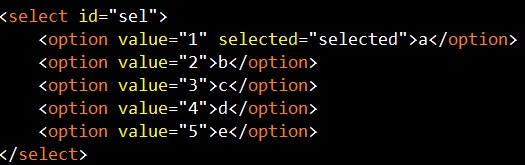
1. 获取选中项:
获取选中项的Value值:
$('select#sel option:selected').val();
或者
$('select#sel').find('option:selected').val();
获取选中项的Text值:
$('select#seloption:selected').text();
或者
$('select#sel').find('option:selected').text();
2. 获取当前选中项的索引值:
$('select#sel').get(0).selectedIndex;
3. 获取当前option的最大索引值:
$('select#sel option:last').attr("index")
4. 获取DropdownList的长度:
$('select#sel')[0].options.length;
或者
$('select#sel').get(0).options.length;
5. 设置第一个option为选中值:
$('select#sel option:first').attr('selected','true')
或者
$('select#sel')[0].selectedIndex = 0;
6. 设置最后一个option为选中值:
$('select#sel option:last).attr('selected','true')
7. 根据索引值设置任意一个option为选中值:
$('select#sel')[0].selectedIndex =索引值;索引值=0,1,2....
8. 设置Value=4 的option为选中值:
$('select#sel').attr('value','4');
或者
$("select#sel option[value='4']").attr('selected', 'true');
9. 删除Value=3的option:
$("select#sel option[value='3']").remove();
10.删除第几个option:
$(" select#sel option ").eq(索引值).remove();索引值=0,1,2....
如删除第3个Radio:
$(" select#sel option ").eq(2).remove();
11.删除第一个option:
$(" select#sel option ").eq(0).remove();
或者
$("select#sel option:first").remove();
12. 删除最后一个option:
$("select#sel option:last").remove();
13. 删除dropdownlist:
$("select#sel").remove();
14.在select后面添加一个option:
$("select#sel").append("<option value='6'>f</option>");
15. 在select前面添加一个option:
$("select#sel").prepend("<option value='0'>0</option>");
16. 遍历option:
$(' select#sel option ').each(function (index, domEle) {
//写入代码
});
CheckBox
1. 获取单个checkbox选中项(三种写法):
$("input:checkbox:checked").val()
或者
$("input:[type='checkbox']:checked").val();
或者
$("input:[name='ck']:checked").val();
2. 获取多个checkbox选中项:
$('input:checkbox').each(function() {
if ($(this).attr('checked') ==true) {
alert($(this).val());
}
});
3. 设置第一个checkbox 为选中值:
$('input:checkbox:first').attr("checked",'checked');
或者
$('input:checkbox').eq(0).attr("checked",'true');
4. 设置最后一个checkbox为选中值:
$('input:radio:last').attr('checked', 'checked');
或者
$('input:radio:last').attr('checked', 'true');
5. 根据索引值设置任意一个checkbox为选中值:
$('input:checkbox).eq(索引值).attr('checked', 'true');索引值=0,1,2....
或者
$('input:radio').slice(1,2).attr('checked', 'true');
6. 选中多个checkbox:
同时选中第1个和第2个的checkbox:
$('input:radio').slice(0,2).attr('checked','true');
7. 根据Value值设置checkbox为选中值:
$("input:checkbox[value='1']").attr('checked','true');
8. 删除Value=1的checkbox:
$("input:checkbox[value='1']").remove();
9. 删除第几个checkbox:
$("input:checkbox").eq(索引值).remove();索引值=0,1,2....
如删除第3个checkbox:
$("input:checkbox").eq(2).remove();
10.遍历checkbox:
$('input:checkbox').each(function (index, domEle) {
//写入代码
});
11.全部选中
$('input:checkbox').each(function() {
$(this).attr('checked', true);
});
12.全部取消选择:
$('input:checkbox').each(function () {
$(this).attr('checked',false);
});
Radio
1.获取选中值,三种方法都可以:
$('input:radio:checked').val();
$("input[type='radio']:checked").val();
$("input[name='rd']:checked").val();
2.设置第一个Radio为选中值:
$('input:radio:first').attr('checked', 'checked');
或者
$('input:radio:first').attr('checked', 'true');
注: attr("checked",'checked')= attr("checked", 'true')= attr("checked", true)
3.设置最后一个Radio为选中值:
$('input:radio:last').attr('checked', 'checked');
或者
$('input:radio:last').attr('checked', 'true');
4.根据索引值设置任意一个radio为选中值:
$('input:radio').eq(索引值).attr('checked', 'true');索引值=0,1,2....
或者
$('input:radio').slice(1,2).attr('checked', 'true');
5.根据Value值设置Radio为选中值
$("input:radio[value='rd2']").attr('checked','true');
或者
$("input[value='rd2']").attr('checked','true');
6.删除Value值为rd2的Radio
$("input:radio[value='rd2']").remove();
7.删除第几个Radio
$("input:radio").eq(索引值).remove();索引值=0,1,2....
如删除第3个Radio:$("input:radio").eq(2).remove();
8.遍历Radio
$('input:radio').each(function(index,domEle){
//写入代码
});
DropDownList
1. 获取选中项:
获取选中项的Value值:
$('select#sel option:selected').val();
或者
$('select#sel').find('option:selected').val();
获取选中项的Text值:
$('select#seloption:selected').text();
或者
$('select#sel').find('option:selected').text();
2. 获取当前选中项的索引值:
$('select#sel').get(0).selectedIndex;
3. 获取当前option的最大索引值:
$('select#sel option:last').attr("index")
4. 获取DropdownList的长度:
$('select#sel')[0].options.length;
或者
$('select#sel').get(0).options.length;
5. 设置第一个option为选中值:
$('select#sel option:first').attr('selected','true')
或者
$('select#sel')[0].selectedIndex = 0;
6. 设置最后一个option为选中值:
$('select#sel option:last).attr('selected','true')
7. 根据索引值设置任意一个option为选中值:
$('select#sel')[0].selectedIndex =索引值;索引值=0,1,2....
8. 设置Value=4 的option为选中值:
$('select#sel').attr('value','4');
或者
$("select#sel option[value='4']").attr('selected', 'true');
9. 删除Value=3的option:
$("select#sel option[value='3']").remove();
10.删除第几个option:
$(" select#sel option ").eq(索引值).remove();索引值=0,1,2....
如删除第3个Radio:
$(" select#sel option ").eq(2).remove();
11.删除第一个option:
$(" select#sel option ").eq(0).remove();
或者
$("select#sel option:first").remove();
12. 删除最后一个option:
$("select#sel option:last").remove();
13. 删除dropdownlist:
$("select#sel").remove();
14.在select后面添加一个option:
$("select#sel").append("<option value='6'>f</option>");
15. 在select前面添加一个option:
$("select#sel").prepend("<option value='0'>0</option>");
16. 遍历option:
$(' select#sel option ').each(function (index, domEle) {
//写入代码
});
CheckBox

$("input:checkbox:checked").val()
或者
$("input:[type='checkbox']:checked").val();
或者
$("input:[name='ck']:checked").val();
2. 获取多个checkbox选中项:
$('input:checkbox').each(function() {
if ($(this).attr('checked') ==true) {
alert($(this).val());
}
});
3. 设置第一个checkbox 为选中值:
$('input:checkbox:first').attr("checked",'checked');
或者
$('input:checkbox').eq(0).attr("checked",'true');
4. 设置最后一个checkbox为选中值:
$('input:radio:last').attr('checked', 'checked');
或者
$('input:radio:last').attr('checked', 'true');
5. 根据索引值设置任意一个checkbox为选中值:
$('input:checkbox).eq(索引值).attr('checked', 'true');索引值=0,1,2....
或者
$('input:radio').slice(1,2).attr('checked', 'true');
6. 选中多个checkbox:
同时选中第1个和第2个的checkbox:
$('input:radio').slice(0,2).attr('checked','true');
7. 根据Value值设置checkbox为选中值:
$("input:checkbox[value='1']").attr('checked','true');
8. 删除Value=1的checkbox:
$("input:checkbox[value='1']").remove();
9. 删除第几个checkbox:
$("input:checkbox").eq(索引值).remove();索引值=0,1,2....
如删除第3个checkbox:
$("input:checkbox").eq(2).remove();
10.遍历checkbox:
$('input:checkbox').each(function (index, domEle) {
//写入代码
});
11.全部选中
$('input:checkbox').each(function() {
$(this).attr('checked', true);
});
12.全部取消选择:
$('input:checkbox').each(function () {
$(this).attr('checked',false);
});
您可能感兴趣的文章:
- jQuery中的RadioButton,input,CheckBox取值赋值实现代码
- asp.net使用jQuery获取RadioButtonList成员选中内容和值示例
- 基于jquery自定义的漂亮单选按钮RadioButton
- jquery判断RadioButtonList和RadioButton中是否有选中项示例
- jQuery中RadioButtonList的功能及用法实例介绍
- JQuery中对服务器控件 DropdownList, RadioButtonList, CheckboxList的操作总结
- jquery获取ASP.NET服务器端控件dropdownlist和radiobuttonlist生成客户端HTML标签后的value和text值
- jQuery实现 RadioButton做必选校验功能
相关文章
 jquery下jstree简单应用,学习jstree的朋友可以参考下。2011-04-04
 用jquery的大概有一年了,只知道$(selector),其内部选择器是如何实现并不完全不清晰,汗颜啊于是看了jquery的源码,jquery用的选择器的引擎是sizzle,感兴趣的朋友可以了解下,或许本文对你有所帮助2013-02-02
 下面小编就为大家带来一篇jQuery获取当前点击的对象元素(实现代码)。小编觉得挺不错的,现在分享给大家,也给大家做个参考,一起跟随小编过来看看吧2016-05-05
 本文主要介绍了Jquery如何操作select,并对此做了详细的注释,具有很好的参考价值,需要的朋友可以看看2016-12-12
 在jQuery里面对于一些HTML的元素操作都是很简化的,这也是很多人选择使用jQuery的原因。2009-11-11
 一般元素下的多个指定子元素显示隐藏效果,使用css中的选择器:nth-child()、:nth-of-type(),但如果想使用JavaScript动态控制,就需要用到jquery的filter()方法2023-08-08
 jQuery总体架构的理解,学习jquery的朋友可以参考下。2011-03-03
jQuery+Ajax+PHP+Mysql实现分页显示数据实例讲解
这是一个典型的Ajax应用,在页面上,您只需要点击“下一页”,数据区将自动加载对应页码的数据,重新刷新数据区。类似的效果在很多网站上应用,尤其在一些需要展示大量图片数据的网页如淘宝商品列表页,Ajax分页效果让您的网站数据加载显得非常流畅。2015-09-09 这篇文章主要介绍了60个很实用的jQuery代码开发技巧收集,使用jquery的朋友可以参考下核心代码的使用,需要的朋友可以参考下2014-12-12
 本文为大家收集了10个非常酷的 jQuery 工具提示(Tooltip)插件,希望大家能喜欢2011-10-10
最新评论