

Win7 ASP连接数据库“未找到提供程序.该程序可能未正确安装”问题
更新时间:2012年01月08日 18:42:18 作者:
今天调试了基于Access数据库的ASP应用,没想到IIS7报错,提示ADODB.Connection 错误 '800a0e7a' 未找到提供程序。该程序可能未正确安装
ASP连接数据库的连接字符串是Provider=Microsoft.Jet.OLEDB.4.0; Data Source=路径,采用的是OleDB方式连接,问题可能就出在OleDB方式连接这一环节上。
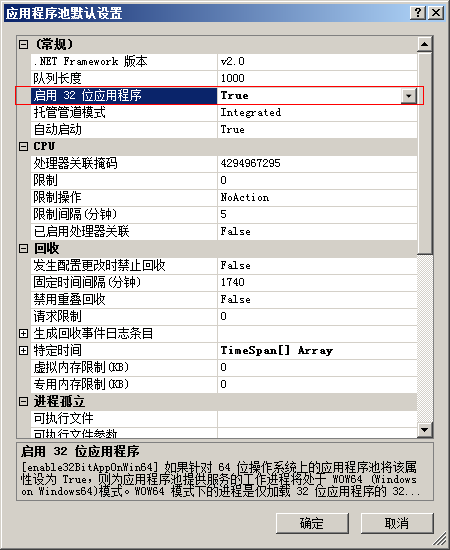
后来搜索网络得到了解决的办法 。原来是自己装的64位Windows 7系统的原因,默认64位环境下,IIS应用程序池未启用32位应用程序,我们只需要启用一下就可以了。打开IIS 7,定位到“应用程序池”,然后选择使用OleDB方式连接数据库的程序池,然后将启用32位应用程序设置为True就可以了。
Using MyODBC with ASP.NET in IIS7 on Vista x64
That's a heck of a title, but it's a problem I hit recently. I have a bunch of ASP.NET sites that use MySQL as their datastore, but I hadn't tried the on IIS7 yet. It took a while to get them to work at all (I had to set permissions on web.config and the other website files so that they could be read by both the Users group and the IIS_IUSRS group), but then I was left with an error about my MySQL connection. “ERROR [IM002] [Microsoft][ODBC Driver Manager] Data source name not found and no default driver specified” – another very general error that basically means “Something is wrong with your ODBC driver, somewhere.”
After some searching, I learned two things. The first is that if you're running 64-bit you can't use the standard ODBC Data Source Administrator in Administrative Tools with MySQL. You've got to go to C:\Windows\SysWOW64\odbcad32.exe and set up your DSN, if that's your thing. The other thing is that the MyODBC driver is 32-bit only. So to use it at all, you need to make sure you're calling it from 32-bit apps only. That means you've got to tweak the Application Pool you're using to run all its ASP.NET applications as 32-bit. To do this, go to Administrative Tools > Internet Information Services (IIS) Manager (or just hit the Windows key and type “IIS”). Then go to “Application Pools” and select whichever application pool your ASP.NET app uses (or create a new one just for your MySQL apps. Click “Advanced Settings…” and set “Enable 32-Bit Applications”. Now the AppPool will use the 32-bit .NET CLR to run your app, and it'll be able to see your MyODBC driver (whether you use a DSN or not).
后来搜索网络得到了解决的办法 。原来是自己装的64位Windows 7系统的原因,默认64位环境下,IIS应用程序池未启用32位应用程序,我们只需要启用一下就可以了。打开IIS 7,定位到“应用程序池”,然后选择使用OleDB方式连接数据库的程序池,然后将启用32位应用程序设置为True就可以了。
Using MyODBC with ASP.NET in IIS7 on Vista x64
That's a heck of a title, but it's a problem I hit recently. I have a bunch of ASP.NET sites that use MySQL as their datastore, but I hadn't tried the on IIS7 yet. It took a while to get them to work at all (I had to set permissions on web.config and the other website files so that they could be read by both the Users group and the IIS_IUSRS group), but then I was left with an error about my MySQL connection. “ERROR [IM002] [Microsoft][ODBC Driver Manager] Data source name not found and no default driver specified” – another very general error that basically means “Something is wrong with your ODBC driver, somewhere.”
After some searching, I learned two things. The first is that if you're running 64-bit you can't use the standard ODBC Data Source Administrator in Administrative Tools with MySQL. You've got to go to C:\Windows\SysWOW64\odbcad32.exe and set up your DSN, if that's your thing. The other thing is that the MyODBC driver is 32-bit only. So to use it at all, you need to make sure you're calling it from 32-bit apps only. That means you've got to tweak the Application Pool you're using to run all its ASP.NET applications as 32-bit. To do this, go to Administrative Tools > Internet Information Services (IIS) Manager (or just hit the Windows key and type “IIS”). Then go to “Application Pools” and select whichever application pool your ASP.NET app uses (or create a new one just for your MySQL apps. Click “Advanced Settings…” and set “Enable 32-Bit Applications”. Now the AppPool will use the 32-bit .NET CLR to run your app, and it'll be able to see your MyODBC driver (whether you use a DSN or not).

相关文章
 在现行的很多网络操纵中,偶然一台做事器每每不能满意客户端的哀求,此时只能通过增进做事器来办理题目2012-11-11
 今日碰到一个问题,就是在很久以前碰到的跨域问题,这里为大家分享一下,需要的朋友可以参考下2021-04-04
WebsitePanel Standalone Server安装配置方法
这篇文章主要为大家介绍下WebsitePanel安装后的配置方法,结合了上一篇文章,需要的朋友可以参考下2013-12-12 rsync使用所谓的"rsync算法",提供一个非常快速的档案传输方法, 使local和远端二部主机之间的档案达到同步,它主要是传送二个档案的异动部份,而非每次都整份传送, 因此速度相当地快.2008-09-09
 既然是我们的防范是从入侵者角度来进行考虑,那么我们就首先需要知道入侵者的入侵方式。目前较为流行web入侵方式都是通过寻找程序的漏洞先得到网站的webshell然后再根据服务器的配置来找到相应的可以利用的方法进行提权,进而拿下服务器权限的。2009-10-10
 这篇文章主要介绍了HTTPS 通信原理及详细介绍的相关资料,HTTPS能够加密信息,以免敏感信息被第三方获取。所以很多银行网站或电子邮箱等等安全级别较高的服务都会采用HTTPS协议,需要的朋友可以参考下2016-12-12
NET Runtime Optimization Service 1101 错误的解决方法
这篇文章主要介绍了NET Runtime Optimization Service 1101 错误的解决方法,需要的朋友可以参考下2015-09-09
安装服务器常见组件之ISAPI_Rewrite组件图文安装教程
本教程共分八篇:系统安装与设置篇、软件安装与设置篇、文件及文件夹权限篇、系统服务篇、安全策略篇、系统组件篇、注册表篇、软件安全篇。本篇讨论的是第二篇软件安装与设置篇的第五部分:安装常见组件之ISAPI_Rewrite组件安装图解。2010-05-05
Win2008 R2 64Bit下IIS环境安装memcache和memcached服务端的方法
这篇文章主要介绍了Win2008 R2 64Bit下IIS环境安装memcache和memcached服务端的方法,需要的朋友可以参考下2016-06-06 近在互联网上提这个问题的网友较多,典型问题:这几天服务器总是运行缓慢,远程登录后发现一个w3wp.exe的进程占用了100% cpu.2010-06-06
最新评论