

Android控件系列之RadioButton与RadioGroup使用方法
更新时间:2012年11月09日 10:04:58 作者:
本文介绍了Android中如何使用RadioGroup和RadioButton,对比了RadioButton和CheckBox的区别,并实现了自定义的RadioGroup中被选中RadioButton的变更监听事件
学习目的:
1、掌握在Android中如何建立RadioGroup和RadioButton
2、掌握RadioGroup的常用属性
3、理解RadioButton和CheckBox的区别
4、掌握RadioGroup选中状态变换的事件(监听器)
RadioButton和CheckBox的区别:
1、单个RadioButton在选中后,通过点击无法变为未选中
单个CheckBox在选中后,通过点击可以变为未选中
2、一组RadioButton,只能同时选中一个
一组CheckBox,能同时选中多个
3、RadioButton在大部分UI框架中默认都以圆形表示
CheckBox在大部分UI框架中默认都以矩形表示
RadioButton和RadioGroup的关系:
1、RadioButton表示单个圆形单选框,而RadioGroup是可以容纳多个RadioButton的容器
2、每个RadioGroup中的RadioButton同时只能有一个被选中
3、不同的RadioGroup中的RadioButton互不相干,即如果组A中有一个选中了,组B中依然可以有一个被选中
4、大部分场合下,一个RadioGroup中至少有2个RadioButton
5、大部分场合下,一个RadioGroup中的RadioButton默认会有一个被选中,并建议您将它放在RadioGroup中的起始位置
XML布局:
<?xml version="1.0" encoding="utf-8"?>
<LinearLayout xmlns:android="http://schemas.android.com/apk/res/android"
android:orientation="vertical"
android:layout_width="fill_parent"
android:layout_height="fill_parent"
>
<TextView
android:layout_width="fill_parent"
android:layout_height="wrap_content"
android:text="请选择您的性别:"
android:textSize="9pt"
/>
<RadioGroup android:id="@+id/radioGroup" android:contentDescription="性别" android:layout_width="wrap_content" android:layout_height="wrap_content">
<RadioButton android:layout_width="wrap_content" android:layout_height="wrap_content" android:id="@+id/radioMale" android:text="男" android:checked="true"></RadioButton>
<RadioButton android:layout_width="wrap_content" android:layout_height="wrap_content" android:id="@+id/radioFemale" android:text="女"></RadioButton>
</RadioGroup>
<TextView
android:id="@+id/tvSex"
android:layout_width="fill_parent"
android:layout_height="wrap_content"
android:text="您的性别是:男"
android:textSize="9pt"
/>
</LinearLayout>
选中项变更的事件监听:
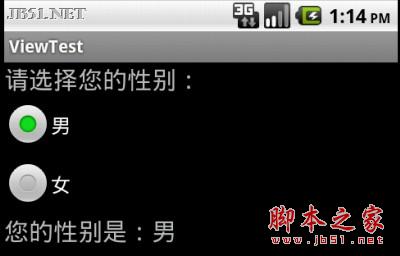
当RadioGroup中的选中项变更后,您可能需要做一些相应,比如上述例子中,性别选择“女”后下面的本文也相应改变,又或者选择不同的性别后,出现符合该性别的头像列表进行更新,女生不会喜欢使用大胡子作为自己的头像。
如果您对监听器不熟悉,可以阅读Android控件系列之Button以及Android监听器。
后台代码如下:
TextView tv = null;//根据不同选项所要变更的文本控件
@Override
public void onCreate(Bundle savedInstanceState) {
super.onCreate(savedInstanceState);
setContentView(R.layout.main);
//根据ID找到该文本控件
tv = (TextView)this.findViewById(R.id.tvSex);
//根据ID找到RadioGroup实例
RadioGroup group = (RadioGroup)this.findViewById(R.id.radioGroup);
//绑定一个匿名监听器
group.setOnCheckedChangeListener(new OnCheckedChangeListener() {
@Override
public void onCheckedChanged(RadioGroup arg0, int arg1) {
// TODO Auto-generated method stub
//获取变更后的选中项的ID
int radioButtonId = arg0.getCheckedRadioButtonId();
//根据ID获取RadioButton的实例
RadioButton rb = (RadioButton)MyActiviy.this.findViewById(radioButtonId);
//更新文本内容,以符合选中项
tv.setText("您的性别是:" + rb.getText());
}
});
}
1、掌握在Android中如何建立RadioGroup和RadioButton
2、掌握RadioGroup的常用属性
3、理解RadioButton和CheckBox的区别
4、掌握RadioGroup选中状态变换的事件(监听器)
RadioButton和CheckBox的区别:
1、单个RadioButton在选中后,通过点击无法变为未选中
单个CheckBox在选中后,通过点击可以变为未选中
2、一组RadioButton,只能同时选中一个
一组CheckBox,能同时选中多个
3、RadioButton在大部分UI框架中默认都以圆形表示
CheckBox在大部分UI框架中默认都以矩形表示
RadioButton和RadioGroup的关系:
1、RadioButton表示单个圆形单选框,而RadioGroup是可以容纳多个RadioButton的容器
2、每个RadioGroup中的RadioButton同时只能有一个被选中
3、不同的RadioGroup中的RadioButton互不相干,即如果组A中有一个选中了,组B中依然可以有一个被选中
4、大部分场合下,一个RadioGroup中至少有2个RadioButton
5、大部分场合下,一个RadioGroup中的RadioButton默认会有一个被选中,并建议您将它放在RadioGroup中的起始位置
XML布局:
复制代码 代码如下:
<?xml version="1.0" encoding="utf-8"?>
<LinearLayout xmlns:android="http://schemas.android.com/apk/res/android"
android:orientation="vertical"
android:layout_width="fill_parent"
android:layout_height="fill_parent"
>
<TextView
android:layout_width="fill_parent"
android:layout_height="wrap_content"
android:text="请选择您的性别:"
android:textSize="9pt"
/>
<RadioGroup android:id="@+id/radioGroup" android:contentDescription="性别" android:layout_width="wrap_content" android:layout_height="wrap_content">
<RadioButton android:layout_width="wrap_content" android:layout_height="wrap_content" android:id="@+id/radioMale" android:text="男" android:checked="true"></RadioButton>
<RadioButton android:layout_width="wrap_content" android:layout_height="wrap_content" android:id="@+id/radioFemale" android:text="女"></RadioButton>
</RadioGroup>
<TextView
android:id="@+id/tvSex"
android:layout_width="fill_parent"
android:layout_height="wrap_content"
android:text="您的性别是:男"
android:textSize="9pt"
/>
</LinearLayout>
选中项变更的事件监听:
当RadioGroup中的选中项变更后,您可能需要做一些相应,比如上述例子中,性别选择“女”后下面的本文也相应改变,又或者选择不同的性别后,出现符合该性别的头像列表进行更新,女生不会喜欢使用大胡子作为自己的头像。
如果您对监听器不熟悉,可以阅读Android控件系列之Button以及Android监听器。
后台代码如下:
复制代码 代码如下:
TextView tv = null;//根据不同选项所要变更的文本控件
@Override
public void onCreate(Bundle savedInstanceState) {
super.onCreate(savedInstanceState);
setContentView(R.layout.main);
//根据ID找到该文本控件
tv = (TextView)this.findViewById(R.id.tvSex);
//根据ID找到RadioGroup实例
RadioGroup group = (RadioGroup)this.findViewById(R.id.radioGroup);
//绑定一个匿名监听器
group.setOnCheckedChangeListener(new OnCheckedChangeListener() {
@Override
public void onCheckedChanged(RadioGroup arg0, int arg1) {
// TODO Auto-generated method stub
//获取变更后的选中项的ID
int radioButtonId = arg0.getCheckedRadioButtonId();
//根据ID获取RadioButton的实例
RadioButton rb = (RadioButton)MyActiviy.this.findViewById(radioButtonId);
//更新文本内容,以符合选中项
tv.setText("您的性别是:" + rb.getText());
}
});
}
效果如下:

总结:
本文介绍了Android中如何使用RadioGroup和RadioButton,对比了RadioButton和CheckBox的区别,并实现了自定义的RadioGroup中被选中RadioButton的变更监听事件。
您可能感兴趣的文章:
- Android单选按钮RadioButton的使用详解
- Android控件RadioButton实现多选一功能
- Android开发设置RadioButton点击效果的方法
- Android编程实现自定义PopupMenu样式示例【显示图标与设置RadioButton图标】
- Android RadioButton 图片位置与大小实例详解
- Android RadioGroup和RadioButton控件简单用法示例
- Android中设置RadioButton在文字右边的方法实例
- android RadioButton和CheckBox组件的使用方法
- Android RadioButton单选框的使用方法
- Android定制RadioButton样式三种实现方法
- Android控件RadioButton的使用方法
相关文章

Android中的HTextView库实现TextView动画效果
HTextView是一个用来给TextView里的文字做各种转换动画的开源库,不仅提供了多种动画选择,而且还有重复字符的位移动画,虽然并没有多么复杂,但是它使用的这些典型的设计模式以及各种动画的实现确实可以从中让我们学到不少知识2023-12-12 这篇文章主要介绍了Android组合控件实现功能强大的自定义控件的相关资料,需要的朋友可以参考下2016-05-05
 这篇文章主要介绍了Flutter模仿实现微信底部导航栏流程,文中通过示例代码介绍的非常详细,对大家的学习或者工作具有一定的参考学习价值,需要的朋友们下面随着小编来一起学习吧2023-05-05
 这篇文章主要介绍了Android复选框对话框用法,结合实例形式简单分析了Android复选对话框的创建与使用技巧,需要的朋友可以参考下2016-01-01
 这篇文章主要介绍了flutter仿微信底部图标渐变功能,本文通过实例代码给大家介绍的非常详细,对大家的学习或工作具有一定的参考借鉴价值,需要的朋友可以参考下2020-04-04
 这篇文章主要为大家详细介绍了Android实现EditText图文混合插入上传功能,具有一定的参考价值,感兴趣的小伙伴们可以参考一下2017-08-08
 这篇文章主要为大家详细介绍了Android如何利用POI实现将图片插入到Excel,文中的示例代码讲解详细,感兴趣的小伙伴可以跟随小编一起学习一下2023-11-11
 随着安卓智能手机不停的更新换代,安卓手机系统越来越完美,屏幕尺寸也越来越大啦,下面这篇文章主要给大家介绍了关于Android App设计规范的相关资料,需要的朋友可以参考下2022-10-10
 这篇文章主要介绍了Android实现文本排版,对多行文本进行排版布局,每一行的内容又分为两部分,左边为标题,右边为描述,左边内容长度不确定,右边的内容需要对齐,需要的朋友可以参考下2016-04-04
 本篇文章主要介绍了android相册选择图片的编码实现代码,小编觉得挺不错的,现在分享给大家,也给大家做个参考。一起跟随小编过来看看吧2017-08-08
最新评论