

android控件封装 自己封装的dialog控件
更新时间:2012年11月20日 16:44:46 作者:
自定义dialog肯定是用的很多了 但是感觉每次做都是很乱单纯完成任务而已,现在封装了一下以后用到直接copy,需要的朋友可以参考下
自定义dialog肯定是用的很多了但是感觉每次做都是很乱 单纯完成任务而已,现在封装了一下 以后用到直接copy
先上图:
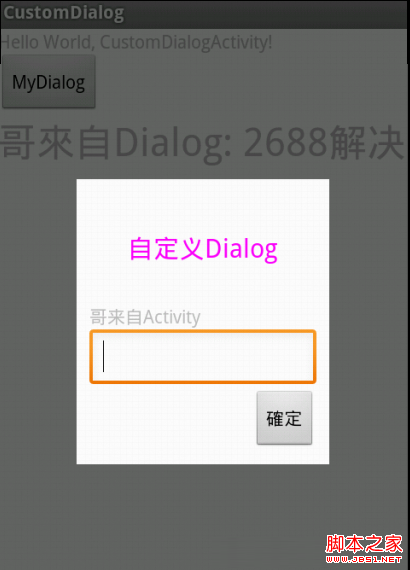
主activity
package com.su.testcustomdialog;
import com.su.testcustomdialog.MyDialog.Dialogcallback;
import android.app.Activity;
import android.os.Bundle;
import android.view.View;
import android.widget.Button;
import android.widget.TextView;
public class CustomDialogActivity extends Activity {
private TextView textView;
/** Called when the activity is first created. */
@Override
public void onCreate(Bundle savedInstanceState) {
super.onCreate(savedInstanceState);
setContentView(R.layout.main);
textView = (TextView) findViewById(R.id.textView11);
Button button = (Button) findViewById(R.id.button1);
button.setOnClickListener(new View.OnClickListener() {
@Override
public void onClick(View v) {
MyDialog myDialog = new MyDialog(CustomDialogActivity.this);
myDialog.setContent("哥来自Activity");
myDialog.setDialogCallback(dialogcallback);
myDialog.show();
}
});
}
/**
* 设置mydialog需要处理的事情
*/
Dialogcallback dialogcallback = new Dialogcallback() {
@Override
public void dialogdo(String string) {
textView.setText("哥來自Dialog: " + string);
}
};
}
然后是MyDialog的核心了
package com.su.testcustomdialog;
import android.app.Dialog;
import android.content.Context;
import android.view.View;
import android.widget.Button;
import android.widget.EditText;
import android.widget.TextView;
/**
* 自定义dialog
* @author sfshine
*
*/
public class MyDialog {
Context context;
Dialogcallback dialogcallback;
Dialog dialog;
Button sure;
TextView textView;
EditText editText;
/**
* init the dialog
* @return
*/
public MyDialog(Context con) {
this.context = con;
dialog = new Dialog(context, R.style.dialog);
dialog.setContentView(R.layout.dialog);
textView = (TextView) dialog.findViewById(R.id.textview);
sure = (Button) dialog.findViewById(R.id.button1);
editText = (EditText) dialog.findViewById(R.id.editText1);
sure.setOnClickListener(new View.OnClickListener() {
@Override
public void onClick(View v) {
dialogcallback.dialogdo(editText.getText().toString());
dismiss();
}
});
}
/**
* 设定一个interfack接口,使mydialog可以處理activity定義的事情
* @author sfshine
*
*/
public interface Dialogcallback {
public void dialogdo(String string);
}
public void setDialogCallback(Dialogcallback dialogcallback) {
this.dialogcallback = dialogcallback;
}
/**
* @category Set The Content of the TextView
* */
public void setContent(String content) {
textView.setText(content);
}
/**
* Get the Text of the EditText
* */
public String getText() {
return editText.getText().toString();
}
public void show() {
dialog.show();
}
public void hide() {
dialog.hide();
}
public void dismiss() {
dialog.dismiss();
}
}
dialog的布局
<?xml version="1.0" encoding="utf-8"?>
<LinearLayout xmlns:android="http://schemas.android.com/apk/res/android"
android:layout_width="match_parent"
android:layout_height="wrap_content"
android:layout_margin="30.0dp"
android:orientation="vertical"
android:padding="10dip" >
<!-- 这里如果使用android:layout_width="5000dip"设置一个极大的值 系统就会 -->
<TextView
android:layout_width="wrap_content"
android:layout_height="wrap_content"
android:layout_margin="30.0dp"
android:gravity="center"
android:text="自定义Dialog"
android:textColor="#F0F"
android:textSize="20dip" />
<TextView
android:id="@+id/textview"
android:layout_width="wrap_content"
android:layout_height="wrap_content" />
<EditText
android:id="@+id/editText1"
android:layout_width="match_parent"
android:layout_height="wrap_content"
android:ems="10" >
</EditText>
<Button
android:id="@+id/button1"
android:layout_width="wrap_content"
android:layout_height="wrap_content"
android:layout_gravity="right"
android:text="確定" />
</LinearLayout>
style 的文件
<?xml version="1.0" encoding="utf-8"?>
<resources>
<style name="dialog" parent="@android:style/Theme.Dialog">
<item name="android:windowFrame">@null</item>
<item name="android:windowIsFloating">true</item>
<item name="android:windowIsTranslucent">false</item>
<item name="android:windowNoTitle">true</item>
<item name="android:background">#FFF</item>
<item name="android:windowBackground">@android:color/transparent</item>
<item name="android:backgroundDimEnabled">true</item>
</style>
</resources>
先上图:
主activity
复制代码 代码如下:
package com.su.testcustomdialog;
import com.su.testcustomdialog.MyDialog.Dialogcallback;
import android.app.Activity;
import android.os.Bundle;
import android.view.View;
import android.widget.Button;
import android.widget.TextView;
public class CustomDialogActivity extends Activity {
private TextView textView;
/** Called when the activity is first created. */
@Override
public void onCreate(Bundle savedInstanceState) {
super.onCreate(savedInstanceState);
setContentView(R.layout.main);
textView = (TextView) findViewById(R.id.textView11);
Button button = (Button) findViewById(R.id.button1);
button.setOnClickListener(new View.OnClickListener() {
@Override
public void onClick(View v) {
MyDialog myDialog = new MyDialog(CustomDialogActivity.this);
myDialog.setContent("哥来自Activity");
myDialog.setDialogCallback(dialogcallback);
myDialog.show();
}
});
}
/**
* 设置mydialog需要处理的事情
*/
Dialogcallback dialogcallback = new Dialogcallback() {
@Override
public void dialogdo(String string) {
textView.setText("哥來自Dialog: " + string);
}
};
}
然后是MyDialog的核心了
复制代码 代码如下:
package com.su.testcustomdialog;
import android.app.Dialog;
import android.content.Context;
import android.view.View;
import android.widget.Button;
import android.widget.EditText;
import android.widget.TextView;
/**
* 自定义dialog
* @author sfshine
*
*/
public class MyDialog {
Context context;
Dialogcallback dialogcallback;
Dialog dialog;
Button sure;
TextView textView;
EditText editText;
/**
* init the dialog
* @return
*/
public MyDialog(Context con) {
this.context = con;
dialog = new Dialog(context, R.style.dialog);
dialog.setContentView(R.layout.dialog);
textView = (TextView) dialog.findViewById(R.id.textview);
sure = (Button) dialog.findViewById(R.id.button1);
editText = (EditText) dialog.findViewById(R.id.editText1);
sure.setOnClickListener(new View.OnClickListener() {
@Override
public void onClick(View v) {
dialogcallback.dialogdo(editText.getText().toString());
dismiss();
}
});
}
/**
* 设定一个interfack接口,使mydialog可以處理activity定義的事情
* @author sfshine
*
*/
public interface Dialogcallback {
public void dialogdo(String string);
}
public void setDialogCallback(Dialogcallback dialogcallback) {
this.dialogcallback = dialogcallback;
}
/**
* @category Set The Content of the TextView
* */
public void setContent(String content) {
textView.setText(content);
}
/**
* Get the Text of the EditText
* */
public String getText() {
return editText.getText().toString();
}
public void show() {
dialog.show();
}
public void hide() {
dialog.hide();
}
public void dismiss() {
dialog.dismiss();
}
}
dialog的布局
复制代码 代码如下:
<?xml version="1.0" encoding="utf-8"?>
<LinearLayout xmlns:android="http://schemas.android.com/apk/res/android"
android:layout_width="match_parent"
android:layout_height="wrap_content"
android:layout_margin="30.0dp"
android:orientation="vertical"
android:padding="10dip" >
<!-- 这里如果使用android:layout_width="5000dip"设置一个极大的值 系统就会 -->
<TextView
android:layout_width="wrap_content"
android:layout_height="wrap_content"
android:layout_margin="30.0dp"
android:gravity="center"
android:text="自定义Dialog"
android:textColor="#F0F"
android:textSize="20dip" />
<TextView
android:id="@+id/textview"
android:layout_width="wrap_content"
android:layout_height="wrap_content" />
<EditText
android:id="@+id/editText1"
android:layout_width="match_parent"
android:layout_height="wrap_content"
android:ems="10" >
</EditText>
<Button
android:id="@+id/button1"
android:layout_width="wrap_content"
android:layout_height="wrap_content"
android:layout_gravity="right"
android:text="確定" />
</LinearLayout>
style 的文件
复制代码 代码如下:
<?xml version="1.0" encoding="utf-8"?>
<resources>
<style name="dialog" parent="@android:style/Theme.Dialog">
<item name="android:windowFrame">@null</item>
<item name="android:windowIsFloating">true</item>
<item name="android:windowIsTranslucent">false</item>
<item name="android:windowNoTitle">true</item>
<item name="android:background">#FFF</item>
<item name="android:windowBackground">@android:color/transparent</item>
<item name="android:backgroundDimEnabled">true</item>
</style>
</resources>
您可能感兴趣的文章:
- Android中DialogFragment自定义背景与宽高的方法
- Android开发之基于DialogFragment创建对话框的方法示例
- 详解Android应用中DialogFragment的基本用法
- Android中使用DialogFragment编写对话框的实例教程
- android中ProgressDialog与ProgressBar的使用详解
- Android中自定义对话框(Dialog)的实例代码
- Android中Dialog去黑边的方法
- 实例详解Android自定义ProgressDialog进度条对话框的实现
- android dialog自定义实例详解
- Android开发之DialogFragment用法实例总结
相关文章
 这篇文章主要介绍了Android中监听Home键的4种方法总结,本文讲解了onSaveInstanceState方法、onUserLeaveHint方法、ACTION_CLOSE_SYSTEM_DIALOGS、framework PhoneWindowManager.java等4种方法,需要的朋友可以参考下2015-04-04
 这篇文章主要为大家详细介绍了Android RecyclerView基本使用的相关资料,具有一定的参考价值,感兴趣的小伙伴们可以参考一下2017-02-02
 本篇文章主要介绍了浅谈Android轻量级的数据缓存框架RxCache,具有一定的参考价值,感兴趣的小伙伴们可以参考一下2017-08-08
 这篇文章主要为大家详细介绍了Android实现搜索本地音乐的方法,具有一定的参考价值,感兴趣的小伙伴们可以参考一下2018-01-01
 这篇文章主要介绍了Android使用token维持登陆状态的方法,包括token的概念及作用介绍,本文给大家介绍的非常详细,需要的朋友参考下吧2017-01-01
 在日常开发中,经常会遇到获取屏幕高度、状态栏高度等需求,所以下面这篇文章就给大家总结介绍了关于Android如何获取屏幕、状态栏及标题栏高度的相关资料,文中通过示例代码介绍的非常详细,需要的朋友们可以参考下。2017-10-10
 本文主要介绍Android Dialog,这里详细介绍Android Dialog的基本使用方法,并提供了示例代码和实现效果图,有需要的小伙伴可以参考下2016-08-08
 这篇文章主要介绍了Android中Notification用法,较为详细的分析了Notification的功能、使用步骤与相关注意事项,需要的朋友可以参考下2016-07-07
 这篇文章主要介绍了Android 获取手机信息实例详解的相关资料,这里附有实例代码及实现效果图,需要的朋友可以参考下2017-01-01
Android应用开发中使用GridView网格布局的代码示例
GridView布局比较基础,可以取代已经逐渐淡出人们视线的TableLayout,这里我们就来看一下Android应用开发中使用GridView网格布局的代码示例:2016-06-06
最新评论