

Android layout_weight使用方法及实例
直接上代码和图片。
情况一:
[html]
<?xml version="1.0" encoding="utf-8"?>
<LinearLayout xmlns:android="http://schemas.android.com/apk/res/android"
android:layout_width="match_parent"
android:layout_height="match_parent"
android:orientation="horizontal" >
<fragment
android:id="@+id/titles"
android:layout_width="0dip"
android:layout_height="match_parent"
android:layout_weight="1"
class="com.a2bgeek.fragmentdemo.TitlesFragment" />
<FrameLayout
android:id="@+id/details"
android:layout_width="0dip"
android:layout_height="match_parent"
android:layout_weight="2" >
</FrameLayout>
</LinearLayout>
<?xml version="1.0" encoding="utf-8"?>
<LinearLayout xmlns:android="http://schemas.android.com/apk/res/android"
android:layout_width="match_parent"
android:layout_height="match_parent"
android:orientation="horizontal" >
<fragment
android:id="@+id/titles"
android:layout_width="0dip"
android:layout_height="match_parent"
android:layout_weight="1"
class="com.a2bgeek.fragmentdemo.TitlesFragment" />
<FrameLayout
android:id="@+id/details"
android:layout_width="0dip"
android:layout_height="match_parent"
android:layout_weight="2" >
</FrameLayout>
</LinearLayout>
<?xml version="1.0" encoding="utf-8"?>
<LinearLayout xmlns:android="http://schemas.android.com/apk/res/android"
android:layout_width="match_parent"
android:layout_height="match_parent"
android:orientation="horizontal" >
<fragment
android:id="@+id/titles"
android:layout_width="0dip"
android:layout_height="match_parent"
android:layout_weight="1"
class="com.a2bgeek.fragmentdemo.TitlesFragment" />
<FrameLayout
android:id="@+id/details"
android:layout_width="0dip"
android:layout_height="match_parent"
android:layout_weight="2" >
</FrameLayout>
</LinearLayout>
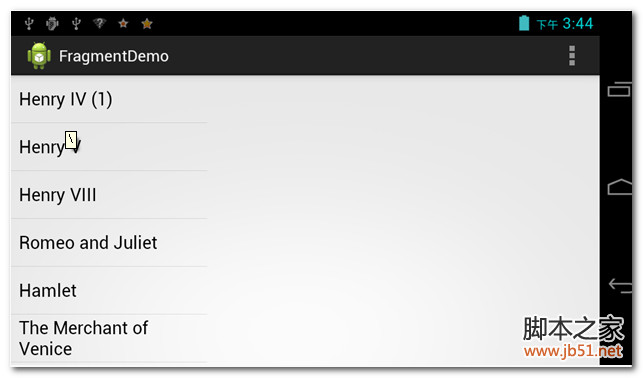
情况2:
[html]
<?xml version="1.0" encoding="utf-8"?>
<LinearLayout xmlns:android="http://schemas.android.com/apk/res/android"
android:layout_width="match_parent"
android:layout_height="match_parent"
android:orientation="horizontal" >
<fragment
android:id="@+id/titles"
android:layout_width="match_parent"
android:layout_height="match_parent"
android:layout_weight="1"
class="com.a2bgeek.fragmentdemo.TitlesFragment" />
<FrameLayout
android:id="@+id/details"
android:layout_width="match_parent"
android:layout_height="match_parent"
android:layout_weight="2" >
</FrameLayout>
</LinearLayout>
<?xml version="1.0" encoding="utf-8"?>
<LinearLayout xmlns:android="http://schemas.android.com/apk/res/android"
android:layout_width="match_parent"
android:layout_height="match_parent"
android:orientation="horizontal" >
<fragment
android:id="@+id/titles"
android:layout_width="match_parent"
android:layout_height="match_parent"
android:layout_weight="1"
class="com.a2bgeek.fragmentdemo.TitlesFragment" />
<FrameLayout
android:id="@+id/details"
android:layout_width="match_parent"
android:layout_height="match_parent"
android:layout_weight="2" >
</FrameLayout>
</LinearLayout>

情况三:
Fragment这个东西在wrap_content的情况下会占据全部,和控件不太一样。
相关文章
 这篇文章介绍了android中的adb命令,文中通过示例代码介绍的非常详细。对大家的学习或工作具有一定的参考借鉴价值,需要的朋友可以参考下2022-04-04
Android中TabLayout结合ViewPager实现页面切换
这篇文章主要为大家详细介绍了Android中TabLayout结合ViewPager实现页面切换效果,具有一定的参考价值,感兴趣的小伙伴们可以参考一下2016-12-12 这篇文章主要介绍了anroid的spinner下拉列表的使用示例,需要的朋友可以参考下2014-04-04
 本篇文章是对Android中复写按钮方法进行了详细的分析介绍,需要的朋友参考下2013-05-05
 这篇文章主要为大家介绍了Android客户端与服务端数据加密传输方案详解,有需要的朋友可以借鉴参考下,希望能够有所帮助,祝大家多多进步,早日升职加薪2023-01-01
 这篇文章主要介绍了Flutter 实现下拉刷新上拉加载的示例代码,文中通过示例代码介绍的非常详细,对大家的学习或者工作具有一定的参考学习价值,需要的朋友们下面随着小编来一起学习学习吧2019-12-12
android组件SwipeRefreshLayout下拉小球式刷新效果
这篇文章主要为大家详细介绍了android组件SwipeRefreshLayout下拉小球式刷新效果,具有一定的参考价值,感兴趣的小伙伴们可以参考一下2017-02-02 这篇文章主要介绍了Android源码中的一些目录结构,方法需要的朋友2013-06-06
 这篇文章主要为大家详细介绍了Android利用HelloChart绘制曲线,文中示例代码介绍的非常详细,具有一定的参考价值,感兴趣的小伙伴们可以参考一下2022-02-02
 这篇文章主要为大家详细介绍了Android自定义组件跟随自己手指主动画圆,具有一定的参考价值,感兴趣的小伙伴们可以参考一下2017-07-07
最新评论