

Android消息通知栏的实现方法介绍
更新时间:2013年06月19日 11:34:25 作者:
本篇文章是对Android消息通知栏的实现方法进行了详细的分析介绍,需要的朋友参考下
背景知识:可以用Activity和Service来开始消息通知,两者的区别在于一个是在前台触发,一个是后台服务触发。
要使用消息通知,必须要用到两个类:NotificationManager和Notification,其他NotificationManager的初始化是用getSystemService方法,并且通过notify方法来向android系统发送消息栏通知和显示。
效果 :
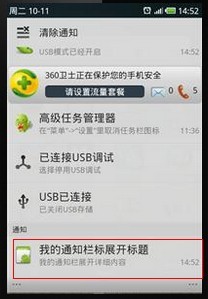
代码:
//消息通知栏
//定义NotificationManager
String ns = Context.NOTIFICATION_SERVICE;
NotificationManager mNotificationManager = (NotificationManager) getSystemService(ns);
//定义通知栏展现的内容信息
int icon = R.drawable.icon;
CharSequence tickerText = "我的通知栏标题";
long when = System.currentTimeMillis();
Notification notification = new Notification(icon, tickerText, when);
//定义下拉通知栏时要展现的内容信息
Context context = getApplicationContext();
CharSequence contentTitle = "我的通知栏标展开标题";
CharSequence contentText = "我的通知栏展开详细内容";
Intent notificationIntent = new Intent(this, BootStartDemo.class);
PendingIntent contentIntent = PendingIntent.getActivity(this, 0,
notificationIntent, 0);
notification.setLatestEventInfo(context, contentTitle, contentText,
contentIntent);
//用mNotificationManager的notify方法通知用户生成标题栏消息通知
mNotificationManager.notify(1, notification);
要使用消息通知,必须要用到两个类:NotificationManager和Notification,其他NotificationManager的初始化是用getSystemService方法,并且通过notify方法来向android系统发送消息栏通知和显示。
效果 :
代码:
复制代码 代码如下:
//消息通知栏
//定义NotificationManager
String ns = Context.NOTIFICATION_SERVICE;
NotificationManager mNotificationManager = (NotificationManager) getSystemService(ns);
//定义通知栏展现的内容信息
int icon = R.drawable.icon;
CharSequence tickerText = "我的通知栏标题";
long when = System.currentTimeMillis();
Notification notification = new Notification(icon, tickerText, when);
//定义下拉通知栏时要展现的内容信息
Context context = getApplicationContext();
CharSequence contentTitle = "我的通知栏标展开标题";
CharSequence contentText = "我的通知栏展开详细内容";
Intent notificationIntent = new Intent(this, BootStartDemo.class);
PendingIntent contentIntent = PendingIntent.getActivity(this, 0,
notificationIntent, 0);
notification.setLatestEventInfo(context, contentTitle, contentText,
contentIntent);
//用mNotificationManager的notify方法通知用户生成标题栏消息通知
mNotificationManager.notify(1, notification);
您可能感兴趣的文章:
- Android中通过Notification&NotificationManager实现消息通知
- Android编程实现google消息通知功能示例
- Android之开发消息通知栏
- Android自定义Notification添加点击事件
- Android中AlarmManager+Notification实现定时通知提醒功能
- Android 中Notification弹出通知实现代码
- Android编程使用Service实现Notification定时发送功能示例
- Android 通知使用权(NotificationListenerService)的使用
- android使用NotificationListenerService监听通知栏消息
- Android消息通知Notification常用方法(发送消息和接收消息)
相关文章
 这篇文章主要介绍了Android实现View滑动的6种方法,文中示例代码介绍的非常详细,具有一定的参考价值,感兴趣的小伙伴们可以参考一下2021-03-03
 在 OkHttp 的源码中,我们经常能看到 Okio 的身影,所以这篇文章文章我们将对Okio进行一个详细的讲解,文中有详细的代码示例供大家参考,需要的朋友可以参考下2023-07-07
 这篇文章主要介绍了android 常见的四种对话框实例讲解,非常不错,具有参考借鉴价值,对android 对话框相关知识感兴趣的朋友一起看看吧2016-09-09
Android中新引进的Google Authenticator验证系统工作原理浅析
这篇文章主要介绍了Android中新引进的Google Authenticator验证系统工作原理浅析,需要的朋友可以参考下2014-10-10
Android 6.0上sdcard和U盘路径获取和区分方法
今天小编就为大家分享一篇Android 6.0上sdcard和U盘路径获取和区分方法,具有很好的参考价值,希望对大家有所帮助。一起跟随小编过来看看吧2018-08-08
Android拦截并获取WebView内部POST请求参数的实现方法
这篇文章主要介绍了Android拦截并获取WebView内部POST请求参数 的实现方法,本文通过两种方案给大家介绍的非常详细,具有一定的参考借鉴价值,需要的朋友可以参考下2019-04-04
Android使用phonegap从相册里面获取照片(代码分享)
本文主要介绍了使用phonegap从相册里面获取照片的实现方法代码。具有很好的参考价值,下面跟着小编一起来看下吧2017-03-03 JSON(JavaScript Object Notation)和XML,并称为客户端和服务端交互解决方案的倚天剑和屠龙刀,这篇文章主要介绍了Android系列---JSON数据解析的实例,有兴趣的可以了解一下。2016-11-11
 这篇文章主要为大家详细介绍了Android实现渐变启动页和带有指示器的引导页,文中示例代码介绍的非常详细,具有一定的参考价值,感兴趣的小伙伴们可以参考一下2019-09-09
 这篇文章主要为大家详细介绍了Android自定义scrollview实现回弹效果,文中示例代码介绍的非常详细,具有一定的参考价值,感兴趣的小伙伴们可以参考一下2022-04-04
最新评论