

九宫图比较常用的多控件布局(GridView)使用介绍
更新时间:2013年06月19日 15:21:44 作者:
GridView跟ListView都是比较常用的多控件布局,而GridView更是实现九宫图的首选,下面与大家分享下GridView用法,感兴趣的朋友可以参考下哈
GridView跟ListView都是比较常用的多控件布局,而GridView更是实现九宫图的首选!本文就是介绍如何使用GridView实现九宫图。GridView的用法很多,网上介绍最多的方法就是自己实现一个ImageAdapter继承BaseAdapter,再供GridView使用,类似这种的方法本文不再重复,本文介绍的GridView用法跟前文ListView的极其类似。也算是我偷懒一下,嘻嘻嘻嘻。。。。
先来贴出本文代码运行的结果:
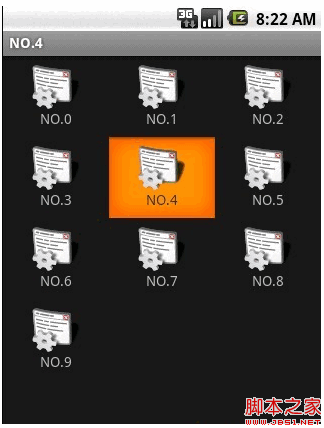
本文需要添加/修改3个文件:main.xml、night_item.xml、JAVA源代码。
main.xml源代码如下,本身是个GirdView,用于装载Item:
<?xml version="1.0" encoding="utf-8"?>
<GridView xmlns:android="http://schemas.android.com/apk/res/android"
android:id="@+id/gridview"
android:layout_width="fill_parent"
android:layout_height="fill_parent"
android:numColumns="auto_fit"
android:verticalSpacing="10dp"
android:horizontalSpacing="10dp"
android:columnWidth="90dp"
android:stretchMode="columnWidth"
android:gravity="center"
/>
<?xml version="1.0" encoding="utf-8"?>
<GridView xmlns:android="http://schemas.android.com/apk/res/android"
android:id="@+id/gridview"
android:layout_width="fill_parent"
android:layout_height="fill_parent"
android:numColumns="auto_fit"
android:verticalSpacing="10dp"
android:horizontalSpacing="10dp"
android:columnWidth="90dp"
android:stretchMode="columnWidth"
android:gravity="center"
/>
介绍一下里面的某些属性:
android:numColumns="auto_fit" ,GridView的列数设置为自动
android:columnWidth="90dp",每列的宽度,也就是Item的宽度
android:stretchMode="columnWidth",缩放与列宽大小同步
android:verticalSpacing="10dp",两行之间的边距,如:行一(NO.0~NO.2)与行二(NO.3~NO.5)间距为10dp
android:horizontalSpacing="10dp",两列之间的边距。
接下来介绍 night_item.xml,这个XML跟前面ListView的ImageItem.xml很类似:
<?xml version="1.0" encoding="utf-8"?>
<RelativeLayout
xmlns:android="http://schemas.android.com/apk/res/android"
android:layout_height="wrap_content"
android:paddingBottom="4dip" android:layout_width="fill_parent">
<ImageView
android:layout_height="wrap_content"
android:id="@+id/ItemImage"
android:layout_width="wrap_content"
android:layout_centerHorizontal="true">
</ImageView>
<TextView
android:layout_width="wrap_content"
android:layout_below="@+id/ItemImage"
android:layout_height="wrap_content"
android:text="TextView01"
android:layout_centerHorizontal="true"
android:id="@+id/ItemText">
</TextView>
</RelativeLayout>
<?xml version="1.0" encoding="utf-8"?>
<RelativeLayout
xmlns:android="http://schemas.android.com/apk/res/android"
android:layout_height="wrap_content"
android:paddingBottom="4dip" android:layout_width="fill_parent">
<ImageView
android:layout_height="wrap_content"
android:id="@+id/ItemImage"
android:layout_width="wrap_content"
android:layout_centerHorizontal="true">
</ImageView>
<TextView
android:layout_width="wrap_content"
android:layout_below="@+id/ItemImage"
android:layout_height="wrap_content"
android:text="TextView01"
android:layout_centerHorizontal="true"
android:id="@+id/ItemText">
</TextView>
</RelativeLayout>
最后就是JAVA的源代码了,也跟前面的ListView的JAVA源代码很类似,不过多了“选中”的事件处理:
view plaincopy to clipboardprint?
public void onCreate(Bundle savedInstanceState) {
super.onCreate(savedInstanceState);
setContentView(R.layout.main);
GridView gridview = (GridView) findViewById(R.id.gridview);
//生成动态数组,并且转入数据
ArrayList<HashMap<String, Object>> lstImageItem = new ArrayList<HashMap<String, Object>>();
for(int i=0;i<10;i++)
先来贴出本文代码运行的结果:
本文需要添加/修改3个文件:main.xml、night_item.xml、JAVA源代码。
main.xml源代码如下,本身是个GirdView,用于装载Item:
复制代码 代码如下:
<?xml version="1.0" encoding="utf-8"?>
<GridView xmlns:android="http://schemas.android.com/apk/res/android"
android:id="@+id/gridview"
android:layout_width="fill_parent"
android:layout_height="fill_parent"
android:numColumns="auto_fit"
android:verticalSpacing="10dp"
android:horizontalSpacing="10dp"
android:columnWidth="90dp"
android:stretchMode="columnWidth"
android:gravity="center"
/>
<?xml version="1.0" encoding="utf-8"?>
<GridView xmlns:android="http://schemas.android.com/apk/res/android"
android:id="@+id/gridview"
android:layout_width="fill_parent"
android:layout_height="fill_parent"
android:numColumns="auto_fit"
android:verticalSpacing="10dp"
android:horizontalSpacing="10dp"
android:columnWidth="90dp"
android:stretchMode="columnWidth"
android:gravity="center"
/>
介绍一下里面的某些属性:
android:numColumns="auto_fit" ,GridView的列数设置为自动
android:columnWidth="90dp",每列的宽度,也就是Item的宽度
android:stretchMode="columnWidth",缩放与列宽大小同步
android:verticalSpacing="10dp",两行之间的边距,如:行一(NO.0~NO.2)与行二(NO.3~NO.5)间距为10dp
android:horizontalSpacing="10dp",两列之间的边距。
接下来介绍 night_item.xml,这个XML跟前面ListView的ImageItem.xml很类似:
复制代码 代码如下:
<?xml version="1.0" encoding="utf-8"?>
<RelativeLayout
xmlns:android="http://schemas.android.com/apk/res/android"
android:layout_height="wrap_content"
android:paddingBottom="4dip" android:layout_width="fill_parent">
<ImageView
android:layout_height="wrap_content"
android:id="@+id/ItemImage"
android:layout_width="wrap_content"
android:layout_centerHorizontal="true">
</ImageView>
<TextView
android:layout_width="wrap_content"
android:layout_below="@+id/ItemImage"
android:layout_height="wrap_content"
android:text="TextView01"
android:layout_centerHorizontal="true"
android:id="@+id/ItemText">
</TextView>
</RelativeLayout>
<?xml version="1.0" encoding="utf-8"?>
<RelativeLayout
xmlns:android="http://schemas.android.com/apk/res/android"
android:layout_height="wrap_content"
android:paddingBottom="4dip" android:layout_width="fill_parent">
<ImageView
android:layout_height="wrap_content"
android:id="@+id/ItemImage"
android:layout_width="wrap_content"
android:layout_centerHorizontal="true">
</ImageView>
<TextView
android:layout_width="wrap_content"
android:layout_below="@+id/ItemImage"
android:layout_height="wrap_content"
android:text="TextView01"
android:layout_centerHorizontal="true"
android:id="@+id/ItemText">
</TextView>
</RelativeLayout>
最后就是JAVA的源代码了,也跟前面的ListView的JAVA源代码很类似,不过多了“选中”的事件处理:
复制代码 代码如下:
view plaincopy to clipboardprint?
public void onCreate(Bundle savedInstanceState) {
super.onCreate(savedInstanceState);
setContentView(R.layout.main);
GridView gridview = (GridView) findViewById(R.id.gridview);
//生成动态数组,并且转入数据
ArrayList<HashMap<String, Object>> lstImageItem = new ArrayList<HashMap<String, Object>>();
for(int i=0;i<10;i++)
相关文章
 本文主要介绍 PHP autoload 机制,这里整理了详细的知识资料供大家学习参考,希望能帮助有需要的小伙伴2016-08-08
 这篇文章主要介绍了Android使用socket创建简单TCP连接的方法,结合实例形式详细分析了Android使用socket创建TCP连接的具体步骤与实现技巧,需要的朋友可以参考下2016-04-04
 这篇文章主要介绍了Android开发实现SubMenu选项菜单和子菜单,结合实例形式分析了Android开发中SubMenu选项菜单和子菜单的功能、配置、布局等相关操作技巧,需要的朋友可以参考下2019-03-03
 这篇文章主要介绍了Android内存使用情况的应用实例的相关资料,需要的朋友可以参考下2017-04-04
 这篇文章主要介绍了Android平台下轻量级http网络传输库的相关资料,需要的朋友可以参考下2016-01-01
 AsyncTask就相当于Android给我们提供了一个多线程编程的一个框架,其介于Thread和Handler之间,我们如果要定义一个AsyncTask,就需要定义一个类来继承AsyncTask这个抽象类,并实现其唯一的一doInBackgroud 抽象方法,这篇文章主要介绍了AsyncTask详解,需要的朋友可以参考下2024-01-01
 这篇文章主要介绍了浅谈Android官方MVP架构解读,小编觉得挺不错的,现在分享给大家,也给大家做个参考。一起跟随小编过来看看吧2016-12-12
Android开发中RecyclerView组件使用的一些进阶技讲解
RecyclerView是Android 5.0以来新加入的一个组件,基本上全面优于ListView,这里我们将来关注Android开发中RecyclerView组件使用的一些进阶技讲解:2016-06-06 本篇文章主要介绍了Android仿IOS自定义AlertDialog对话框,主要介绍了圆角AlertDialog对话框,具有一定的参考价值,有兴趣的可以了解一下。2017-03-03
 这篇文章主要介绍了Android studio 实现手机扫描二维码功能,需要的朋友可以参考下2019-10-10
最新评论