

Android HTTP发送请求和接收响应的实例代码
更新时间:2013年06月19日 17:09:54 作者:
Android HTTP请求和接收响应实例完整的Manifest文件如下,感兴趣的朋友可以参考下哈,希望对大家有所帮助
添加权限
首先要在manifest中加上访问网络的权限:
<manifest ... >
<uses-permission android:name="android.permission.INTERNET" />
...
</manifest>
完整的Manifest文件如下:
<?xml version="1.0" encoding="utf-8"?>
<manifest xmlns:android="http://schemas.android.com/apk/res/android"
package="com.example.httpdemo1"
android:versionCode="1"
android:versionName="1.0" >
<uses-sdk
android:minSdkVersion="8"
android:targetSdkVersion="17" />
<uses-permission android:name="android.permission.INTERNET" />
<application
android:allowBackup="true"
android:icon="@drawable/ic_launcher"
android:label="@string/app_name"
android:theme="@style/AppTheme" >
<activity
android:name="com.example.httpdemo1.HttpDemo1Activity"
android:label="@string/app_name" >
<intent-filter>
<action android:name="android.intent.action.MAIN" />
<category android:name="android.intent.category.LAUNCHER" />
</intent-filter>
</activity>
</application>
</manifest>
布局代码如下:
<RelativeLayout xmlns:android="http://schemas.android.com/apk/res/android"
xmlns:tools="http://schemas.android.com/tools"
android:layout_width="match_parent"
android:layout_height="match_parent"
android:paddingBottom="@dimen/activity_vertical_margin"
android:paddingLeft="@dimen/activity_horizontal_margin"
android:paddingRight="@dimen/activity_horizontal_margin"
android:paddingTop="@dimen/activity_vertical_margin"
tools:context=".HttpDemo1Activity" >
<TextView
android:id="@+id/myWebTitle"
android:layout_width="wrap_content"
android:layout_height="wrap_content"
android:text="" />
<Button
android:id="@+id/requestBtn"
android:layout_width="fill_parent"
android:layout_height="wrap_content"
android:layout_alignParentBottom="true"
android:text="Send Request" />
<WebView
android:id="@+id/webview"
android:layout_width="fill_parent"
android:layout_height="match_parent"
android:layout_above="@id/requestBtn"
android:layout_below="@id/myWebTitle" />
</RelativeLayout>
activity_http_demo1.xml
主要的代码:
package com.example.httpdemo1;
import java.io.BufferedReader;
import java.io.IOException;
import java.io.InputStream;
import java.io.InputStreamReader;
import org.apache.http.HttpEntity;
import org.apache.http.HttpResponse;
import org.apache.http.client.HttpClient;
import org.apache.http.client.methods.HttpGet;
import org.apache.http.impl.client.DefaultHttpClient;
import android.os.Bundle;
import android.app.Activity;
import android.view.View;
import android.view.View.OnClickListener;
import android.webkit.WebView;
import android.widget.Button;
public class HttpDemo1Activity extends Activity
{
private Button mSendReqBtn = null;// 发送请求的按钮
private WebView mWebView = null;// 用于显示结果,用载入html字符串的方式显示响应结果,而不是使用WebView自己的方式加载URL
// 响应
private HttpResponse mHttpResponse = null;
// 实体
private HttpEntity mHttpEntity = null;
@Override
protected void onCreate(Bundle savedInstanceState)
{
super.onCreate(savedInstanceState);
setContentView(R.layout.activity_http_demo1);
mSendReqBtn = (Button) findViewById(R.id.requestBtn);
mSendReqBtn.setOnClickListener(mSendClickListener);
mWebView = (WebView) findViewById(R.id.webview);
}
private OnClickListener mSendClickListener = new OnClickListener()
{
@Override
public void onClick(View v)
{
// 生成一个请求对象
HttpGet httpGet = new HttpGet("http://www.baidu.com/");
// 生成一个Http客户端对象
HttpClient httpClient = new DefaultHttpClient();
// 下面使用Http客户端发送请求,并获取响应内容
InputStream inputStream = null;
try
{
// 发送请求并获得响应对象
mHttpResponse = httpClient.execute(httpGet);
// 获得响应的消息实体
mHttpEntity = mHttpResponse.getEntity();
// 获取一个输入流
inputStream = mHttpEntity.getContent();
BufferedReader bufferedReader = new BufferedReader(
new InputStreamReader(inputStream));
String result = "";
String line = "";
while (null != (line = bufferedReader.readLine()))
{
result += line;
}
// 将结果打印出来,可以在LogCat查看
System.out.println(result);
// 将内容载入WebView显示
mWebView.getSettings().setDefaultTextEncodingName("UTF-8");
// 直接使用mWebView.loadData(result, "text/html", "utf-8");会显示找不到网页
// 换成下面的方式可以正常显示(但是比较宽,拖动可见百度logo)
mWebView.loadDataWithBaseURL(null, result, "text/html",
"utf-8", null);
// 直接载入URL也可以显示页面(但是此例子主要是为了验证响应返回的字符串是否正确,所以不用下面这行代码)
// mWebView.loadUrl("http://www.baidu.com/");
}
catch (Exception e)
{
e.printStackTrace();
}
finally
{
try
{
inputStream.close();
}
catch (IOException e)
{
e.printStackTrace();
}
}
}
};
}
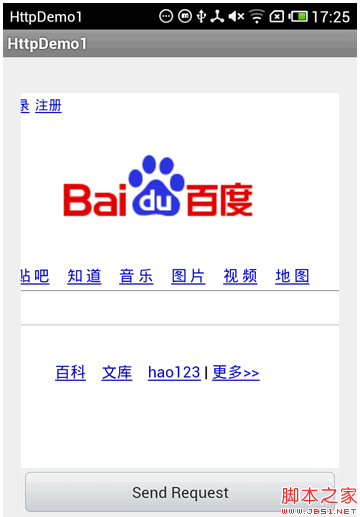
程序运行结果如下:
参考资料
Android开发视频教程HTTP操作。——http://www.marsdroid.org
Android Reference: package org.apache.http:
http://developer.android.com/reference/org/apache/http/package-summary.html
首先要在manifest中加上访问网络的权限:
复制代码 代码如下:
<manifest ... >
<uses-permission android:name="android.permission.INTERNET" />
...
</manifest>
完整的Manifest文件如下:
复制代码 代码如下:
<?xml version="1.0" encoding="utf-8"?>
<manifest xmlns:android="http://schemas.android.com/apk/res/android"
package="com.example.httpdemo1"
android:versionCode="1"
android:versionName="1.0" >
<uses-sdk
android:minSdkVersion="8"
android:targetSdkVersion="17" />
<uses-permission android:name="android.permission.INTERNET" />
<application
android:allowBackup="true"
android:icon="@drawable/ic_launcher"
android:label="@string/app_name"
android:theme="@style/AppTheme" >
<activity
android:name="com.example.httpdemo1.HttpDemo1Activity"
android:label="@string/app_name" >
<intent-filter>
<action android:name="android.intent.action.MAIN" />
<category android:name="android.intent.category.LAUNCHER" />
</intent-filter>
</activity>
</application>
</manifest>
布局代码如下:
复制代码 代码如下:
<RelativeLayout xmlns:android="http://schemas.android.com/apk/res/android"
xmlns:tools="http://schemas.android.com/tools"
android:layout_width="match_parent"
android:layout_height="match_parent"
android:paddingBottom="@dimen/activity_vertical_margin"
android:paddingLeft="@dimen/activity_horizontal_margin"
android:paddingRight="@dimen/activity_horizontal_margin"
android:paddingTop="@dimen/activity_vertical_margin"
tools:context=".HttpDemo1Activity" >
<TextView
android:id="@+id/myWebTitle"
android:layout_width="wrap_content"
android:layout_height="wrap_content"
android:text="" />
<Button
android:id="@+id/requestBtn"
android:layout_width="fill_parent"
android:layout_height="wrap_content"
android:layout_alignParentBottom="true"
android:text="Send Request" />
<WebView
android:id="@+id/webview"
android:layout_width="fill_parent"
android:layout_height="match_parent"
android:layout_above="@id/requestBtn"
android:layout_below="@id/myWebTitle" />
</RelativeLayout>
activity_http_demo1.xml
主要的代码:
复制代码 代码如下:
package com.example.httpdemo1;
import java.io.BufferedReader;
import java.io.IOException;
import java.io.InputStream;
import java.io.InputStreamReader;
import org.apache.http.HttpEntity;
import org.apache.http.HttpResponse;
import org.apache.http.client.HttpClient;
import org.apache.http.client.methods.HttpGet;
import org.apache.http.impl.client.DefaultHttpClient;
import android.os.Bundle;
import android.app.Activity;
import android.view.View;
import android.view.View.OnClickListener;
import android.webkit.WebView;
import android.widget.Button;
public class HttpDemo1Activity extends Activity
{
private Button mSendReqBtn = null;// 发送请求的按钮
private WebView mWebView = null;// 用于显示结果,用载入html字符串的方式显示响应结果,而不是使用WebView自己的方式加载URL
// 响应
private HttpResponse mHttpResponse = null;
// 实体
private HttpEntity mHttpEntity = null;
@Override
protected void onCreate(Bundle savedInstanceState)
{
super.onCreate(savedInstanceState);
setContentView(R.layout.activity_http_demo1);
mSendReqBtn = (Button) findViewById(R.id.requestBtn);
mSendReqBtn.setOnClickListener(mSendClickListener);
mWebView = (WebView) findViewById(R.id.webview);
}
private OnClickListener mSendClickListener = new OnClickListener()
{
@Override
public void onClick(View v)
{
// 生成一个请求对象
HttpGet httpGet = new HttpGet("http://www.baidu.com/");
// 生成一个Http客户端对象
HttpClient httpClient = new DefaultHttpClient();
// 下面使用Http客户端发送请求,并获取响应内容
InputStream inputStream = null;
try
{
// 发送请求并获得响应对象
mHttpResponse = httpClient.execute(httpGet);
// 获得响应的消息实体
mHttpEntity = mHttpResponse.getEntity();
// 获取一个输入流
inputStream = mHttpEntity.getContent();
BufferedReader bufferedReader = new BufferedReader(
new InputStreamReader(inputStream));
String result = "";
String line = "";
while (null != (line = bufferedReader.readLine()))
{
result += line;
}
// 将结果打印出来,可以在LogCat查看
System.out.println(result);
// 将内容载入WebView显示
mWebView.getSettings().setDefaultTextEncodingName("UTF-8");
// 直接使用mWebView.loadData(result, "text/html", "utf-8");会显示找不到网页
// 换成下面的方式可以正常显示(但是比较宽,拖动可见百度logo)
mWebView.loadDataWithBaseURL(null, result, "text/html",
"utf-8", null);
// 直接载入URL也可以显示页面(但是此例子主要是为了验证响应返回的字符串是否正确,所以不用下面这行代码)
// mWebView.loadUrl("http://www.baidu.com/");
}
catch (Exception e)
{
e.printStackTrace();
}
finally
{
try
{
inputStream.close();
}
catch (IOException e)
{
e.printStackTrace();
}
}
}
};
}
程序运行结果如下:
参考资料
Android开发视频教程HTTP操作。——http://www.marsdroid.org
Android Reference: package org.apache.http:
http://developer.android.com/reference/org/apache/http/package-summary.html
相关文章
 这篇文章主要介绍了Android AMS启动App进程原理,系统fork函数是如何创建进程,文中有详细的代码示例,对大家的学习或工作有一定的帮助,需要的朋友可以参考下2023-05-05
 这篇文章主要为大家介绍了Android IntentFilter的匹配规则示例详解,有需要的朋友可以借鉴参考下,希望能够有所帮助,祝大家多多进步,早日升职加薪2022-12-12
Kotlin语言中CompileSdkVersion与targetSdkVersion的区别浅析
这篇文章主要介绍了Kotlin语言中CompileSdkVersion和targetSdkVersion有什么区别,文中通过示例代码介绍的非常详细,对大家的学习或者工作具有一定的参考学习价值,需要的朋友们下面随着小编来一起学习吧2023-02-02 这篇文章主要给大家介绍了关于利用Flutter实现可以缩放拖拽的图片的相关资料,文中通过示例代码介绍的非常详细,对大家学习或者使用Flutter具有一定的参考学习价值,需要的朋友们下面来一起学习学习吧2019-06-06
 由于项目中需要使用到富文本显示和编辑,索性整理下,这篇文章主要给大家介绍了关于Android富文本实现的几种方式,文中通过实例代码介绍的非常详细,需要的朋友可以参考下2022-05-05
 网上随便搜索一下Dragger2,一大堆文章铺天盖地而来,但很多讲的不清楚,下面这篇文章主要给大家介绍了关于Dagger2新手入门与使用基础教程的相关资料,文中通过示例代码介绍的非常详细,需要的朋友可以参考下。2018-04-04
 大家好,本篇文章主要讲的是Android TextView实现跑马灯效果代码,感兴趣的同学赶快来看一看吧,对你有帮助的话记得收藏一下2022-01-01
android通过蓝牙接收文件打开时无法自动选择合适的应用程序
android 通过蓝牙接收文件,从历史传输记录打开,无法自动选择合适的应用程序,比如video player打开.3gp、.mp4文件等等2013-06-06 本篇文章主要介绍了Retrofit2.0 实现图文(参数+图片)上传方法总结,具有一定的参考价值,有兴趣的可以了解一下2017-08-08
 这篇文章主要为大家详细介绍了Flutter进阶之实现动画效果的第五篇,具有一定的参考价值,感兴趣的小伙伴们可以参考一下2018-08-08
最新评论