

C#下解析HTML的两种方法介绍
在搜索引擎的开发中,我们需要对Html进行解析。本文介绍C#解析HTML的两种方法。
AD:
在搜索引擎的开发中,我们需要对网页的Html内容进行检索,难免的就需要对Html进行解析。拆分每一个节点并且获取节点间的内容。此文介绍两种C#解析Html的方法。
C#解析Html的第一种方法:
用System.Net.WebClient下载Web Page存到本地文件或者String中,用正则表达式来分析。这个方法可以用在Web Crawler等需要分析很多Web Page的应用中。
估计这也是大家最直接,最容易想到的一个方法。
转自网上的一个实例:所有的href都抽取出来:
using System;
using System.Net;
using System.Text;
using System.Text.RegularExpressions;
namespace HttpGet
{
class Class1
{
[STAThread]
static void Main(string[] args)
{
System.Net.WebClient client = new WebClient();
byte[] page = client.DownloadData("http://www.google.com");
string content = System.Text.Encoding.UTF8.GetString(page);
string regex = "href=[\\\"\\\'](http:\\/\\/|\\.\\/|\\/)?\\w+(\\.\\w+)*(\\/\\w+(\\.\\w+)?)*(\\/|\\?\\w*=\\w*(&\\w*=\\w*)*)?[\\\"\\\']";
Regex re = new Regex(regex);
MatchCollection matches = re.Matches(content);
System.Collections.IEnumerator enu = matches.GetEnumerator();
while (enu.MoveNext() && enu.Current != null)
{
Match match = (Match)(enu.Current);
Console.Write(match.Value + "\r\n");
}
}
}
}
C#解析Html的第二种方法:
利用Winista.Htmlparser.Net 解析Html。这是.NET平台下解析Html的开源代码,网上有源码下载,百度一下就能搜到,这里就不提供了。并且有英文的帮助文档。找不到的留下邮箱。
个人认为这是.net平台下解析html不错的解决方案,基本上能够满足我们对html的解析工作。
自己做了个实例:
using System;
using System.Collections.Generic;
using System.ComponentModel;
using System.Data;
using System.Drawing;
using System.Linq;
using System.Text;
using System.Windows.Forms;
using Winista.Text.HtmlParser;
using Winista.Text.HtmlParser.Lex;
using Winista.Text.HtmlParser.Util;
using Winista.Text.HtmlParser.Tags;
using Winista.Text.HtmlParser.Filters;
namespace HTMLParser
{
public partial class Form1 : Form
{
public Form1()
{
InitializeComponent();
AddUrl();
}
private void btnParser_Click(object sender, EventArgs e)
{
#region 获得网页的html
try
{
txtHtmlWhole.Text = "";
string url = CBUrl.SelectedItem.ToString().Trim();
System.Net.WebClient aWebClient = new System.Net.WebClient();
aWebClient.Encoding = System.Text.Encoding.Default;
string html = aWebClient.DownloadString(url);
txtHtmlWhole.Text = html;
}
catch (Exception ex)
{
MessageBox.Show(ex.Message);
}
#endregion
#region 分析网页html节点
Lexer lexer = new Lexer(this.txtHtmlWhole.Text);
Parser parser = new Parser(lexer);
NodeList htmlNodes = parser.Parse(null);
this.treeView1.Nodes.Clear();
this.treeView1.Nodes.Add("root");
TreeNode treeRoot = this.treeView1.Nodes[0];
for (int i = 0; i < htmlNodes.Count; i++)
{
this.RecursionHtmlNode(treeRoot, htmlNodes[i], false);
}
#endregion
}
private void RecursionHtmlNode(TreeNode treeNode, INode htmlNode, bool siblingRequired)
{
if (htmlNode == null || treeNode == null) return;
TreeNode current = treeNode;
TreeNode content ;
//current node
if (htmlNode is ITag)
{
ITag tag = (htmlNode as ITag);
if (!tag.IsEndTag())
{
string nodeString = tag.TagName;
if (tag.Attributes != null && tag.Attributes.Count > 0)
{
if (tag.Attributes["ID"] != null)
{
nodeString = nodeString + " { id=\"" + tag.Attributes["ID"].ToString() + "\" }";
}
if (tag.Attributes["HREF"] != null)
{
nodeString = nodeString + " { href=\"" + tag.Attributes["HREF"].ToString() + "\" }";
}
}
current = new TreeNode(nodeString);
treeNode.Nodes.Add(current);
}
}
//获取节点间的内容
if (htmlNode.Children != null && htmlNode.Children.Count > 0)
{
this.RecursionHtmlNode(current, htmlNode.FirstChild, true);
content = new TreeNode(htmlNode.FirstChild.GetText());
treeNode.Nodes.Add(content);
}
//the sibling nodes
if (siblingRequired)
{
INode sibling = htmlNode.NextSibling;
while (sibling != null)
{
this.RecursionHtmlNode(treeNode, sibling, false);
sibling = sibling.NextSibling;
}
}
}
private void AddUrl()
{
CBUrl.Items.Add("http://www.hao123.com");
CBUrl.Items.Add("http://www.sina.com");
CBUrl.Items.Add("http://www.heuet.edu.cn");
}
}
}
运行效果:
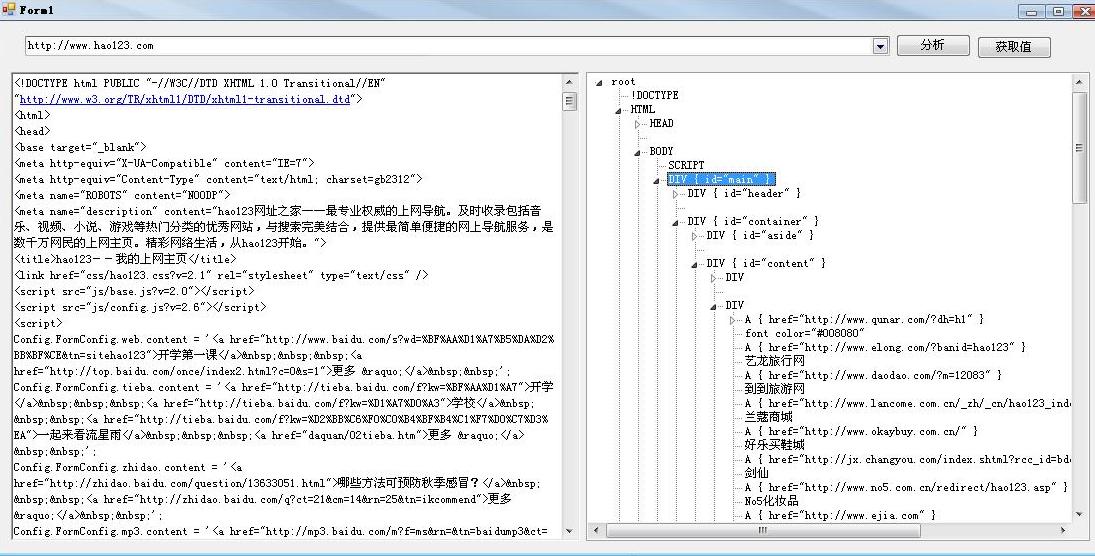
实现取来很容易,结合Winista.Htmlparser源码很快就可以实现想要的效果。
小结:
简单介绍了两种C#解析Html的的方法,大家有什么其他好的方法还望指教。
相关文章
 这篇文章主要介绍了C#使用SqlBulkCopy批量复制数据到数据表的方法,较为详细的讲述了SqlBulkCopy批量复制数据到数据表的原理与实现技巧,需要的朋友可以参考下2014-10-10
 这篇文章主要介绍了C#中TextBox实现输入提示功能的方法,涉及C#中TextBox的相关操作技巧,需要的朋友可以参考下2015-06-06
 这篇文章主要为大家详细介绍了C#实现简单俄罗斯方块,文中示例代码介绍的非常详细,具有一定的参考价值,感兴趣的小伙伴们可以参考一下2020-03-03
 本篇文章是对c#中滚动字幕动画窗体的实现方法进行了详细的分析介绍,需要的朋友参考下2013-06-06
 这篇文章主要介绍了C#中数组段用法,实例分析了C#数组段的定义、功能及使用方法,需要的朋友可以参考下2015-05-05
基于Silverlight DataGrid中无代码设置开始与结束日期DatePicker的实现方法
本篇文章是对Silverlight DataGrid中无代码设置开始与结束日期DatePicker的实现方法进行了详细的分析介绍,需要的朋友参考下2013-05-05 这篇文章主要介绍了C#简单输出日历的方法,涉及C#针对日期与时间的简单操作技巧,具有一定参考借鉴价值,需要的朋友可以参考下2015-10-10
 Windows Management Instrumentation(WMI)是用于管理基于 Windows 操作系统的数据和操作的基础结构,本文将使用WMI实现监听进程的启动和关闭,感兴趣的可以了解下2024-01-01
 这篇文章主要为大家详细介绍了如何利用C#实现电脑系统挂机锁,文中的示例代码讲解详细,对我们学习C#有一定的帮助,感兴趣的小伙伴可以跟随小编一起了解一下2022-12-12
 本文详细讲解了C#与C++枚举的区别对比和使用案例,文中通过示例代码介绍的非常详细。对大家的学习或工作具有一定的参考借鉴价值,需要的朋友可以参考下2022-04-04
最新评论